Go Back   FileForums > Game Backup > PC Games > PC Games - CD/DVD Conversions > Conversion Tutorials
Register FAQ Community Calendar Today's Posts Search

Reply
 
Thread Tools Search this Thread Display Modes
  #1  
Old 20-05-2020, 16:55
Cesar82's Avatar
Cesar82 Cesar82 is offline
Registered User
 
Join Date: May 2011
Location: Brazil
Posts: 1,074
Thanks: 1,814
Thanked 2,304 Times in 787 Posts
Cesar82 is on a distinguished road
I think a reading version of the registry does not work properly if you don't have a video card.
I created a version with both options in inno setup, if the result of the WMI verification is less than 0 (Negative value) it checks the registry.
Attached Files
File Type: 7z SysInfo_Test.7z (1.5 KB, 21 views)
Reply With Quote
The Following 3 Users Say Thank You to Cesar82 For This Useful Post:
BLACKFIRE69 (22-05-2020), Gehrman (22-05-2020), Razor12911 (23-05-2020)
Sponsored Links
  #2  
Old 29-05-2020, 04:19
DiCaPrIo DiCaPrIo is offline
Registered User
 
Join Date: Apr 2017
Location: Don't Know
Posts: 48
Thanks: 90
Thanked 49 Times in 30 Posts
DiCaPrIo is on a distinguished road
Quote:
Originally Posted by BLACKFIRE69 View Post
guys,
test this plz
VRam: 17592186044415 MB
Reply With Quote
  #3  
Old 29-05-2020, 04:55
Cesar82's Avatar
Cesar82 Cesar82 is offline
Registered User
 
Join Date: May 2011
Location: Brazil
Posts: 1,074
Thanks: 1,814
Thanked 2,304 Times in 787 Posts
Cesar82 is on a distinguished road
Quote:
Originally Posted by DiCaPrIo View Post
VRam: 17592186044415 MB
Also here.
Reply With Quote
  #4  
Old 29-05-2020, 05:20
Razor12911's Avatar
Razor12911 Razor12911 is offline
Noob
 
Join Date: Jul 2012
Location: South Africa
Posts: 3,751
Thanks: 2,181
Thanked 11,211 Times in 2,309 Posts
Razor12911 is on a distinguished road
Quote:
Originally Posted by DiCaPrIo View Post
VRam: 17592186044415 MB
Me wondering if this would be enough for Crysis Remastered

Quote:
Originally Posted by BLACKFIRE69 View Post
my god!

this may fix, plz test too.
Code:
GpuName:   Intel(R) HD Graphics 4600
VRam:   1024 MB
My GTX 1060 not detected and these Intel garbage graphics are also 128MB, not 1024MB

Last edited by Razor12911; 29-05-2020 at 05:25.
Reply With Quote
  #5  
Old 29-05-2020, 05:25
BLACKFIRE69's Avatar
BLACKFIRE69 BLACKFIRE69 is offline
Registered User
 
Join Date: Mar 2019
Location: In the Hell
Posts: 688
Thanks: 481
Thanked 2,547 Times in 561 Posts
BLACKFIRE69 is on a distinguished road
Quote:
Originally Posted by Razor12911 View Post
Me wondering if this would be enough for Crysis Remastered
yup 😎
Reply With Quote
  #6  
Old 29-05-2020, 05:38
BLACKFIRE69's Avatar
BLACKFIRE69 BLACKFIRE69 is offline
Registered User
 
Join Date: Mar 2019
Location: In the Hell
Posts: 688
Thanks: 481
Thanked 2,547 Times in 561 Posts
BLACKFIRE69 is on a distinguished road
Quote:
Originally Posted by Razor12911 View Post

Code:
GpuName:   Intel(R) HD Graphics 4600
VRam:   1024 MB
i am making progress...

Quote:
My GTX 1060 not detected and these Intel garbage graphics are also 128MB, not 1024MB
Usually this is shown (128 or 512 --> 1 GB).
Reply With Quote
  #7  
Old 29-05-2020, 05:54
DiCaPrIo DiCaPrIo is offline
Registered User
 
Join Date: Apr 2017
Location: Don't Know
Posts: 48
Thanks: 90
Thanked 49 Times in 30 Posts
DiCaPrIo is on a distinguished road
GpuName: NVIDIA GeForce GTX 1060 6GB
VRam: -1 MB
use Int64

Last edited by DiCaPrIo; 29-05-2020 at 06:09.
Reply With Quote
The Following User Says Thank You to DiCaPrIo For This Useful Post:
BLACKFIRE69 (29-05-2020)
  #8  
Old 29-05-2020, 06:27
Razor12911's Avatar
Razor12911 Razor12911 is offline
Noob
 
Join Date: Jul 2012
Location: South Africa
Posts: 3,751
Thanks: 2,181
Thanked 11,211 Times in 2,309 Posts
Razor12911 is on a distinguished road
I wonder what it is that you're doing wrong bro but here is another place in regedit where you can get GPU info for all GPUs installed.
Attached Images
File Type: png 49.PNG (82.5 KB, 95 views)
File Type: png 50.PNG (67.3 KB, 93 views)
Reply With Quote
The Following User Says Thank You to Razor12911 For This Useful Post:
BLACKFIRE69 (29-05-2020)
  #9  
Old 30-05-2020, 05:21
Cesar82's Avatar
Cesar82 Cesar82 is offline
Registered User
 
Join Date: May 2011
Location: Brazil
Posts: 1,074
Thanks: 1,814
Thanked 2,304 Times in 787 Posts
Cesar82 is on a distinguished road
Quote:
Originally Posted by Razor12911 View Post
I wonder what it is that you're doing wrong bro but here is another place in regedit where you can get GPU info for all GPUs installed.
This subject is also of interest, so I ask questions.
This GUID is variable from system to system.
Here there are 6 GUIDs with DedicatedVideoMemory values, one of which is from the ON-BOARD video card.
But the GUID bears no resemblance to those of your images.

How to identify the correct GUID to obtain the video value?
Would this method work with older operating systems like WindowsXP or Vista, 7, etc?

I could make a list and search all GUIDs until I found a value other than 0, but how do I know if it would be the correct GUID?
The value in DedicatedVideoMemory is not correct here.
It should be 4 GB but it results 4239917056 = 4043.5 MB = 3.94 GB.
Reply With Quote
The Following User Says Thank You to Cesar82 For This Useful Post:
BLACKFIRE69 (30-05-2020)
  #10  
Old 30-05-2020, 17:23
Razor12911's Avatar
Razor12911 Razor12911 is offline
Noob
 
Join Date: Jul 2012
Location: South Africa
Posts: 3,751
Thanks: 2,181
Thanked 11,211 Times in 2,309 Posts
Razor12911 is on a distinguished road
Quote:
Originally Posted by Cesar82 View Post
This subject is also of interest, so I ask questions.
This GUID is variable from system to system.
Here there are 6 GUIDs with DedicatedVideoMemory values, one of which is from the ON-BOARD video card.
But the GUID bears no resemblance to those of your images.

How to identify the correct GUID to obtain the video value?
I decided to check where these values really came from
SOFTWARE\Microsoft\DirectX\ - DirectX is a clue so one has to go on msdn
which is here
https://docs.microsoft.com/en-us/win...i_adapter_desc
https://stackoverflow.com/questions/...r-amd/56599035

Also found this Visual Basic code so I translated it to pascal so here

Code:
uses
  Winapi.Windows, Winapi.DXGI;

type
  TGPUInfo = record
    FName: String;
    FSize: Integer;
  end;

  TGPUs = array of TGPUInfo;

procedure GetGPUs(out V: TGPUs);
  function Align(Value, Size: Integer): Integer;
  begin
    if Value mod Size <> 0 then
      Result := Succ(Max(0, Value div Size)) * Size
    else
      Result := Value;
  end;

var
  GPUInfo: TGPUInfo;
  i: Integer;
  riid: TGUID;
  hr: HRESULT;
  pFactory: IDXGIFactory;
  pAdapter: IDXGIAdapter;
  dxAdapterDesc: DXGI_ADAPTER_DESC;
begin
  riid := StringToGUID('{7b7166ec-21c7-44ae-b21a-c9ae321ae369}');
  pFactory := nil;
  hr := CreateDXGIFactory(riid, pFactory);
  if (hr = S_OK) and Assigned(pFactory) then
  begin
    pAdapter := nil;
    i := 0;
    while (pFactory.EnumAdapters(i, pAdapter) = S_OK) do
    begin
      FillChar(dxAdapterDesc, SizeOf(DXGI_ADAPTER_DESC), 0);
      hr := pAdapter.GetDesc(dxAdapterDesc);
      if hr = S_OK then
      begin
        GPUInfo.FName := dxAdapterDesc.Description;
        GPUInfo.FSize := IfThen(dxAdapterDesc.DedicatedVideoMemory = 0,
          dxAdapterDesc.DedicatedSystemMemory,
          dxAdapterDesc.DedicatedVideoMemory) div 1048576;
        GPUInfo.FSize := Align(GPUInfo.FSize, IfThen(GPUInfo.FSize < 512,
          32, 512));
        Insert(GPUInfo, V, Length(V));
      end;
      inc(i);
    end;
  end;
end;

procedure TForm1.Button1Click(Sender: TObject);
var
  i: Integer;
  MyGPUs: TGPUs;
begin
  GetGPUs(MyGPUs);
  for i := Low(MyGPUs) to High(MyGPUs) do
    ShowMessage(MyGPUs[i].FName + ' (' + MyGPUs[i].FSize.ToString + ' MB)');
end;
Quote:
Would this method work with older operating systems like WindowsXP or Vista, 7, etc?
This works using DXGI which was introduced in Windows Vista.

Quote:
The value in DedicatedVideoMemory is not correct here.
It should be 4 GB but it results 4239917056 = 4043.5 MB = 3.94 GB.
Actually it is correct, open task manager and you'll see why it is 3.94 GB, I added the align function to help with rounding off 4044 to 4096
Attached Images
File Type: png 59.PNG (54.2 KB, 133 views)

Last edited by Razor12911; 30-05-2020 at 18:13.
Reply With Quote
  #11  
Old 30-05-2020, 18:44
Cesar82's Avatar
Cesar82 Cesar82 is offline
Registered User
 
Join Date: May 2011
Location: Brazil
Posts: 1,074
Thanks: 1,814
Thanked 2,304 Times in 787 Posts
Cesar82 is on a distinguished road
@Razor12911
If possible, share the compiled executable for me to check here.

I changed the code to use with Delphi 2010 (I only have this version installed), but in the Delphi 2010 version it does not have uses DXGI, so I include this DXGI from the link

The results here were well below what should be displayed (3584 MB).And in the second result he detected "Microsoft Basic Render Driver (0 MB)"

I don't know if I did something wrong or the DXGI I used doesn't work, so if possible share the exe for me to compare.
Thanks!
Reply With Quote
  #12  
Old 30-05-2020, 18:51
Razor12911's Avatar
Razor12911 Razor12911 is offline
Noob
 
Join Date: Jul 2012
Location: South Africa
Posts: 3,751
Thanks: 2,181
Thanked 11,211 Times in 2,309 Posts
Razor12911 is on a distinguished road
there

edit: something I'm only realizing now XD, this method might have issues because it is SIZE_T that is being used which is an equivalent to NativeInt in Delphi.

NativeInt in x86 is actually a 32-bit integer, however this can be fixed by merging this code to the same idea I shared earlier about the same info being available on registry here
Attached Images
File Type: png 60.PNG (5.7 KB, 130 views)
Attached Files
File Type: 7z Project1.7z (2.26 MB, 45 views)

Last edited by Razor12911; 30-05-2020 at 18:57.
Reply With Quote
  #13  
Old 30-05-2020, 19:09
Cesar82's Avatar
Cesar82 Cesar82 is offline
Registered User
 
Join Date: May 2011
Location: Brazil
Posts: 1,074
Thanks: 1,814
Thanked 2,304 Times in 787 Posts
Cesar82 is on a distinguished road
You have correctly displayed the value of the main video card.

Did not detect Intel (R) HD Graphics 4000


Did something go wrong with my adaptation?
Or maybe the DXGI I used doesn't work for that.
Code:
uses
  Windows, DXGI;
  //DXGI from link

type
  TGPUInfo = record
    FName: String;
    FSize: Integer;
  end;

  TGPUs = array of TGPUInfo;

procedure GetGPUs(out V: TGPUs);
  function Max(A, B: Integer): Integer;
  begin
    if A > B then
      Result := A
    else
      Result := B;
  end;
  function Align(Value, Size: Integer): Integer;
  begin
    if Value <> 0 then
      Result := (Max(0, Value div Size) + 1) * Size
    else
      Result := Value;
  end;
var
  GPUInfo: TGPUInfo;
  i: Integer;
  riid: TGUID;
  hr: HRESULT;
  pFactory: IDXGIFactory;
  pAdapter: IDXGIAdapter;
  dxAdapterDesc: TDXGI_ADAPTER_DESC;
begin
  riid := StringToGUID('{7b7166ec-21c7-44ae-b21a-c9ae321ae369}');
  pFactory := nil;
  hr := CreateDXGIFactory(riid, pFactory);
  if (hr = S_OK) and Assigned(pFactory) then
  begin
    pAdapter := nil;
    i := 0;
    while (pFactory.EnumAdapters(i, pAdapter) = S_OK) do
    begin
      FillChar(dxAdapterDesc, SizeOf(TDXGI_ADAPTER_DESC), 0);
      hr := pAdapter.GetDesc(dxAdapterDesc);
      if hr = S_OK then
      begin
        GPUInfo.FName := dxAdapterDesc.Description;

        if dxAdapterDesc.DedicatedVideoMemory = 0 then
          GPUInfo.FSize := dxAdapterDesc.DedicatedSystemMemory div 1048576
        else
          GPUInfo.FSize := dxAdapterDesc.DedicatedVideoMemory div 1048576;

        if GPUInfo.FSize < 512 then
          GPUInfo.FSize := Align(GPUInfo.FSize, 32)
        else
          GPUInfo.FSize := Align(GPUInfo.FSize, 512);

        SetLength(V, Length(V) + 1);
        V[Length(V) - 1] := GPUInfo;
      end;
      Inc(i);
    end;
  end;
end;

procedure TForm2.Button1Click(Sender: TObject);
var
  i: Integer;
  MyGPUs: TGPUs;
begin
  GetGPUs(MyGPUs);
  for i := Low(MyGPUs) to High(MyGPUs) do
    ShowMessage(MyGPUs[i].FName + ' (' + IntToStr(MyGPUs[i].FSize) + ' MB)');
end;
Reply With Quote
  #14  
Old 31-05-2020, 03:26
felice2011's Avatar
felice2011 felice2011 is offline
Registered User
 
Join Date: Feb 2011
Location: italy
Posts: 836
Thanks: 357
Thanked 1,158 Times in 390 Posts
felice2011 is on a distinguished road
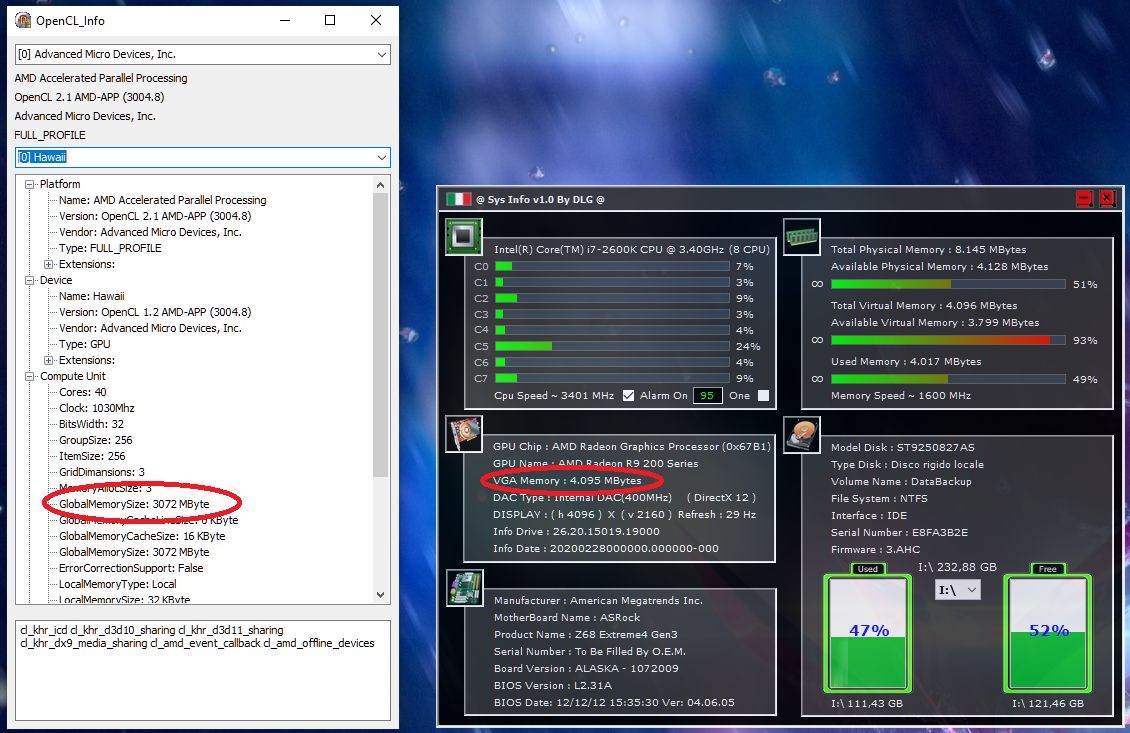
I don't understand the basics are here https://docs.microsoft.com/en-us/win...ideocontroller in the WMI class, because used DX structures, also I think that only the primary vga that is used is of interest.

Code:
        Name_GPU.Text = "GPU Name : " & GPU_Name()
        Ram_Adapter.Text = "VGA Memory : " & Format_Bytes(AdapterRAM)

...

    Private Function GPU_Name() As String
        'Info GPU
        Dim Name_GPU As String = ""
        Dim GPU As New ManagementObjectSearcher("SELECT Name FROM Win32_VideoController")
        For Each Info_GPU As ManagementObject In GPU.Get()
            Try
                Name_GPU = Info_GPU("Name").ToString()
                Exit For
            Catch ex As Exception
                Name_GPU = "?"
            End Try
        Next
        Return Name_GPU
    End Function

    Private Function AdapterRAM() As String
        'Info GPU
        Dim Adapter_RAM As String = ""
        Dim GPU As New ManagementObjectSearcher("SELECT AdapterRAM FROM Win32_VideoController")
        For Each Info_GPU As ManagementObject In GPU.Get()
            Try
                Adapter_RAM = Info_GPU("AdapterRAM").ToString()
                Exit For
            Catch ex As Exception
                Adapter_RAM = "?"
            End Try
        Next
        Return Adapter_RAM
    End Function

    Private Function Format_Bytes(ByVal Bytes_Convert As String) As String
        Dim Total_Convert As Double
        Try
            Select Case Bytes_Convert
                'Case Is >= 1073741824 'GB
                '    Total_Convert = CDbl(Bytes_Convert / 1073741824) 'GB
                '    Return FormatNumber(Total_Convert, 2) & " GBytes"
                Case Is >= 1048576 'To 1073741823
                    Total_Convert = CDbl(Bytes_Convert / 1048576) 'MB
                    Return FormatNumber(Total_Convert, 0) & " MBytes"
                Case 1024 To 1048575
                    Total_Convert = CDbl(Bytes_Convert / 1024) 'KB
                    Return FormatNumber(Total_Convert, 0) & " KBytes"
                Case 0 To 1023
                    Total_Convert = Bytes_Convert 'Bytes
                    Return FormatNumber(Total_Convert, 0) & " Bytes"
                Case Else
                    Return ""
            End Select
        Catch
            Return ""
        End Try
    End Function
__________________
≈≈≈≈≈≈≈≈≈≈≈≈≈≈≈≈≈≈≈≈≈≈≈≈≈≈≈≈≈≈≈≈≈≈≈≈≈≈≈≈≈≈≈≈≈≈≈≈≈≈ ≈≈≈≈≈≈≈≈≈≈≈≈≈≈≈≈≈≈≈≈≈≈≈≈≈≈≈≈≈≈≈≈≈≈≈≈≈≈≈
« I Mediocri Imitano, I Geni Copiano, Dio Crea & Distrugge » (Io Ridefinisco & Perfeziono le Loro Opere Rendendole Uniche)
≈≈≈≈≈≈≈≈≈≈≈≈≈≈≈≈≈≈≈≈≈≈≈≈≈≈≈≈≈≈≈≈≈≈≈≈≈≈≈≈≈≈≈≈≈≈≈≈≈≈ ≈≈≈≈≈≈≈≈≈≈≈≈≈≈≈≈≈≈≈≈≈≈≈≈≈≈≈≈≈≈≈≈≈≈≈≈≈≈≈
« Mediocrities Imitate, Genius Copy, God Creates & Destroys » (I Reconsider & Improve Their Works, Rending Them One And Only)

Last edited by felice2011; 31-05-2020 at 03:33.
Reply With Quote
  #15  
Old 31-05-2020, 05:48
Cesar82's Avatar
Cesar82 Cesar82 is offline
Registered User
 
Join Date: May 2011
Location: Brazil
Posts: 1,074
Thanks: 1,814
Thanked 2,304 Times in 787 Posts
Cesar82 is on a distinguished road
Quote:
Originally Posted by felice2011 View Post
I don't understand the basics are here https://docs.microsoft.com/en-us/win...ideocontroller in the WMI class, because used DX structures, also I think that only the primary vga that is used is of interest.
WMI class ( AdapterRAM ) does not support video cards over 4 GB.
Only for that reason the matter continues.
Reply With Quote
The Following User Says Thank You to Cesar82 For This Useful Post:
BLACKFIRE69 (31-05-2020)
Reply


Posting Rules
You may not post new threads
You may not post replies
You may not post attachments
You may not edit your posts

BB code is On
Smilies are On
[IMG] code is On
HTML code is Off

Forum Jump

Similar Threads
Thread Thread Starter Forum Replies Last Post
Nero Plugin to burn mdf/mds images Kall CD/DVD Software & Utilities 6 09-11-2007 02:29
REQUEST : SDF plugin and AHX tool --=FamilyGuy=-- DC Games 4 20-04-2007 13:13
is there a a gamecube plugin to 3d studio max gamesmell GameCube Games 1 12-03-2004 23:54
FlaskMPEG & Panasonic Plugin: Plugin has "Fatal Error" dan CD/DVD Software & Utilities 1 15-11-2000 16:23


All times are GMT -7. The time now is 05:36.


Powered by vBulletin® Version 3.8.11
Copyright ©2000 - 2026, vBulletin Solutions Inc.
FileForums @ https://fileforums.com