|
#31
 20-05-2020, 09:52
|
||||
|
||||
|
Quote:


|
| Sponsored Links |
|
#32
20-05-2020, 10:06
|
||||
|
||||
|
Quote:

__________________
≈≈≈≈≈≈≈≈≈≈≈≈≈≈≈≈≈≈≈≈≈≈≈≈≈≈≈≈≈≈≈≈≈≈≈≈≈≈≈≈≈≈≈≈≈≈≈≈≈≈ ≈≈≈≈≈≈≈≈≈≈≈≈≈≈≈≈≈≈≈≈≈≈≈≈≈≈≈≈≈≈≈≈≈≈≈≈≈≈≈ « I Mediocri Imitano, I Geni Copiano, Dio Crea & Distrugge » (Io Ridefinisco & Perfeziono le Loro Opere Rendendole Uniche)  ≈≈≈≈≈≈≈≈≈≈≈≈≈≈≈≈≈≈≈≈≈≈≈≈≈≈≈≈≈≈≈≈≈≈≈≈≈≈≈≈≈≈≈≈≈≈≈≈≈≈ ≈≈≈≈≈≈≈≈≈≈≈≈≈≈≈≈≈≈≈≈≈≈≈≈≈≈≈≈≈≈≈≈≈≈≈≈≈≈≈ « Mediocrities Imitate, Genius Copy, God Creates & Destroys » (I Reconsider & Improve Their Works, Rending Them One And Only)
|
|
#33
20-05-2020, 10:48
|
||||
|
||||
|
Quote:
Quote:
|
|
#34
20-05-2020, 16:55
|
||||
|
||||
|
I think a reading version of the registry does not work properly if you don't have a video card.
I created a version with both options in inno setup, if the result of the WMI verification is less than 0 (Negative value) it checks the registry.
|
| The Following 3 Users Say Thank You to Cesar82 For This Useful Post: | ||
|
#37
29-05-2020, 05:20
|
||||
|
||||
|
Quote:
 Quote:
Code:
GpuName: Intel(R) HD Graphics 4600 VRam: 1024 MB Last edited by Razor12911; 29-05-2020 at 05:25.
|
|
#38
29-05-2020, 05:25
|
||||
|
||||
|
Quote:
|
|
#39
29-05-2020, 05:38
|
||||
|
||||
|
Quote:
 Quote:
|
|
#40
29-05-2020, 05:54
|
|||
|
|||
|
GpuName: NVIDIA GeForce GTX 1060 6GB
VRam: -1 MB use Int64 Last edited by DiCaPrIo; 29-05-2020 at 06:09.
|
| The Following User Says Thank You to DiCaPrIo For This Useful Post: | ||
BLACKFIRE69 (29-05-2020) | ||
|
#41
29-05-2020, 06:27
|
||||
|
||||
|
I wonder what it is that you're doing wrong bro but here is another place in regedit where you can get GPU info for all GPUs installed.
|
| The Following User Says Thank You to Razor12911 For This Useful Post: | ||
BLACKFIRE69 (29-05-2020) | ||
|
#42
30-05-2020, 05:21
|
||||
|
||||
|
Quote:
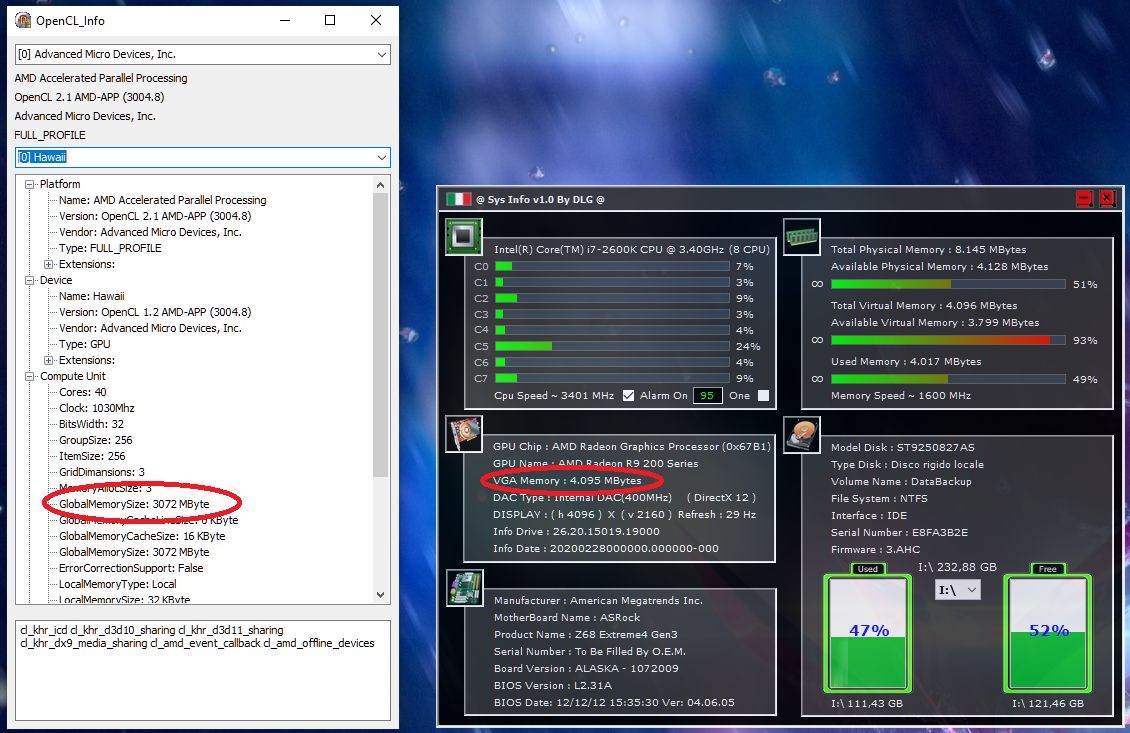
This GUID is variable from system to system. Here there are 6 GUIDs with DedicatedVideoMemory values, one of which is from the ON-BOARD video card. But the GUID bears no resemblance to those of your images.  How to identify the correct GUID to obtain the video value? Would this method work with older operating systems like WindowsXP or Vista, 7, etc? I could make a list and search all GUIDs until I found a value other than 0, but how do I know if it would be the correct GUID? The value in DedicatedVideoMemory is not correct here. It should be 4 GB but it results 4239917056 = 4043.5 MB = 3.94 GB.
|
| The Following User Says Thank You to Cesar82 For This Useful Post: | ||
BLACKFIRE69 (30-05-2020) | ||
|
#43
30-05-2020, 17:23
|
||||
|
||||
|
Quote:
SOFTWARE\Microsoft\DirectX\ - DirectX is a clue so one has to go on msdn which is here https://docs.microsoft.com/en-us/win...i_adapter_desc https://stackoverflow.com/questions/...r-amd/56599035 Also found this Visual Basic code so I translated it to pascal so here Code:
uses
  Winapi.Windows, Winapi.DXGI;

type
  TGPUInfo = record
    FName: String;
    FSize: Integer;
  end;

  TGPUs = array of TGPUInfo;

procedure GetGPUs(out V: TGPUs);
  function Align(Value, Size: Integer): Integer;
  begin
    if Value mod Size <> 0 then
      Result := Succ(Max(0, Value div Size)) * Size
    else
      Result := Value;
  end;

var
  GPUInfo: TGPUInfo;
  i: Integer;
  riid: TGUID;
  hr: HRESULT;
  pFactory: IDXGIFactory;
  pAdapter: IDXGIAdapter;
  dxAdapterDesc: DXGI_ADAPTER_DESC;
begin
  riid := StringToGUID('{7b7166ec-21c7-44ae-b21a-c9ae321ae369}');
  pFactory := nil;
  hr := CreateDXGIFactory(riid, pFactory);
  if (hr = S_OK) and Assigned(pFactory) then
  begin
    pAdapter := nil;
    i := 0;
    while (pFactory.EnumAdapters(i, pAdapter) = S_OK) do
    begin
      FillChar(dxAdapterDesc, SizeOf(DXGI_ADAPTER_DESC), 0);
      hr := pAdapter.GetDesc(dxAdapterDesc);
      if hr = S_OK then
      begin
        GPUInfo.FName := dxAdapterDesc.Description;
        GPUInfo.FSize := IfThen(dxAdapterDesc.DedicatedVideoMemory = 0,
          dxAdapterDesc.DedicatedSystemMemory,
          dxAdapterDesc.DedicatedVideoMemory) div 1048576;
        GPUInfo.FSize := Align(GPUInfo.FSize, IfThen(GPUInfo.FSize < 512,
          32, 512));
        Insert(GPUInfo, V, Length(V));
      end;
      inc(i);
    end;
  end;
end;

procedure TForm1.Button1Click(Sender: TObject);
var
  i: Integer;
  MyGPUs: TGPUs;
begin
  GetGPUs(MyGPUs);
  for i := Low(MyGPUs) to High(MyGPUs) do
    ShowMessage(MyGPUs[i].FName + ' (' + MyGPUs[i].FSize.ToString + ' MB)');
end;
Quote:
Quote:
Last edited by Razor12911; 30-05-2020 at 18:13.
|
|
#44
30-05-2020, 18:44
|
||||
|
||||
|
@Razor12911
If possible, share the compiled executable for me to check here. I changed the code to use with Delphi 2010 (I only have this version installed), but in the Delphi 2010 version it does not have uses DXGI, so I include this DXGI from the link The results here were well below what should be displayed (3584 MB).And in the second result he detected "Microsoft Basic Render Driver (0 MB)" I don't know if I did something wrong or the DXGI I used doesn't work, so if possible share the exe for me to compare. Thanks!
|
|
#45
30-05-2020, 18:51
|
||||
|
||||
|
there
edit: something I'm only realizing now XD, this method might have issues because it is SIZE_T that is being used which is an equivalent to NativeInt in Delphi. NativeInt in x86 is actually a 32-bit integer, however this can be fixed by merging this code to the same idea I shared earlier about the same info being available on registry here Last edited by Razor12911; 30-05-2020 at 18:57.
|
 |
|
|
 Similar Threads
|
||||
| Thread | Thread Starter | Forum | Replies | Last Post |
| Nero Plugin to burn mdf/mds images | Kall | CD/DVD Software & Utilities | 6 | 09-11-2007 02:29 |
| REQUEST : SDF plugin and AHX tool | --=FamilyGuy=-- | DC Games | 4 | 20-04-2007 13:13 |
| is there a a gamecube plugin to 3d studio max | gamesmell | GameCube Games | 1 | 12-03-2004 23:54 |
| FlaskMPEG & Panasonic Plugin: Plugin has "Fatal Error" | dan | CD/DVD Software & Utilities | 1 | 15-11-2000 16:23 |




 Linear Mode

