Go Back   FileForums > Game Backup > PC Games > PC Games - CD/DVD Conversions > Conversion Tutorials
Register FAQ Community Calendar Today's Posts Search

Reply
 
Thread Tools Search this Thread Display Modes
  #1396  
Old 27-04-2025, 08:04
wareck wareck is offline
Registered User
 
Join Date: Dec 2017
Location: Mars
Posts: 153
Thanks: 29
Thanked 113 Times in 80 Posts
wareck is on a distinguished road
hello
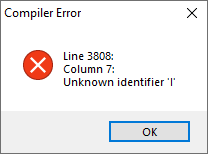
for me with this hotfix , I needed to add this line in script.iss:

procedure DSG_RefreshSelectedItems();
var
I: Integer;
Reply With Quote
Sponsored Links
  #1397  
Old 27-04-2025, 08:08
KaktoR's Avatar
KaktoR KaktoR is offline
Lame User
 
Join Date: Jan 2012
Location: From outer space
Posts: 4,689
Thanks: 1,106
Thanked 7,336 Times in 2,838 Posts
KaktoR is on a distinguished road
Could you send me your settings.ini file
__________________
Haters gonna hate
Reply With Quote
  #1398  
Old 27-04-2025, 10:44
wareck wareck is offline
Registered User
 
Join Date: Dec 2017
Location: Mars
Posts: 153
Thanks: 29
Thanked 113 Times in 80 Posts
wareck is on a distinguished road
Quote:
Originally Posted by KaktoR View Post
Could you send me your settings.ini file
It's from archive on patreon...
I take https://www.patreon.com/file?h=108191154&m=329602487
and
https://www.patreon.com/file?h=108191154&m=457434456

no editing file just unzip them...
If I click on compile script :
Reply With Quote
  #1399  
Old 27-04-2025, 10:52
KaktoR's Avatar
KaktoR KaktoR is offline
Lame User
 
Join Date: Jan 2012
Location: From outer space
Posts: 4,689
Thanks: 1,106
Thanked 7,336 Times in 2,838 Posts
KaktoR is on a distinguished road
Thanks!
__________________
Haters gonna hate
Reply With Quote
  #1400  
Old 30-05-2025, 08:46
wareck wareck is offline
Registered User
 
Join Date: Dec 2017
Location: Mars
Posts: 153
Thanks: 29
Thanked 113 Times in 80 Posts
wareck is on a distinguished road
Hello Kaktor
I very often use the function that run a command batch after data decompress
(like postprocess or something like patch, xdelta)

For example:
uncompress data1.bin
Run batch1.bat
uncompress data2.bin
final Batch.cmd (in setting of asis)
Check Crc and end installation

I would like to add a message during ASIS progression because sometimes my batch are long to execute and take time.

something like "Please wait during processing"

but I do not find yet where I can add theses lines

best regards

wareck
Reply With Quote
  #1401  
Old 30-05-2025, 08:59
KaktoR's Avatar
KaktoR KaktoR is offline
Lame User
 
Join Date: Jan 2012
Location: From outer space
Posts: 4,689
Thanks: 1,106
Thanked 7,336 Times in 2,838 Posts
KaktoR is on a distinguished road
I don't know, but my guess is look in DSG_Module.iss
__________________
Haters gonna hate
Reply With Quote
  #1402  
Old 30-05-2025, 12:57
wareck wareck is offline
Registered User
 
Join Date: Dec 2017
Location: Mars
Posts: 153
Thanks: 29
Thanked 113 Times in 80 Posts
wareck is on a distinguished road
ok I found
it's in tpExec function
Reply With Quote
  #1403  
Old 31-05-2025, 07:51
insertdisc insertdisc is offline
Registered User
 
Join Date: May 2025
Location: Earth
Posts: 12
Thanks: 5
Thanked 1 Time in 1 Post
insertdisc is on a distinguished road
Registry size information

Am I missing something simple? I everything working as intended, including custom font, messages, images, etc.,. .. what do I need to change to get the estimated uninstall size to work? It's only showing 1KB.

Thanks for all your hard work by the way. You made things fairly simple.
Reply With Quote
  #1404  
Old 31-05-2025, 08:00
wareck wareck is offline
Registered User
 
Join Date: Dec 2017
Location: Mars
Posts: 153
Thanks: 29
Thanked 113 Times in 80 Posts
wareck is on a distinguished road
you have to decompress setup.dll
copy record.ini
into the builder
the remove them from your install foder

if you have setup.dll, no progress bar/time
Reply With Quote
  #1405  
Old 31-05-2025, 08:03
wareck wareck is offline
Registered User
 
Join Date: Dec 2017
Location: Mars
Posts: 153
Thanks: 29
Thanked 113 Times in 80 Posts
wareck is on a distinguished road
For add text durring batch execution :

in DSG_MODULE.ISS
I moddify the tpExec function like this:

Quote:
tpExec :
begin
WizardForm.FilenameLabel.Caption := ExpandConstant('{cm:BatchExecution}');
ShellExec('open', DSG_ExpandConstantTry(Arcs[I].Source, 1), DSG_ExpandConstantTry(Arcs[I].Output, 1), '', SW_HIDE, ewWaitUntilTerminated, ResultCode);
end;
and during decompression, if a batch run, the message in script.iss is showed
Reply With Quote
  #1406  
Old 31-05-2025, 08:04
insertdisc insertdisc is offline
Registered User
 
Join Date: May 2025
Location: Earth
Posts: 12
Thanks: 5
Thanked 1 Time in 1 Post
insertdisc is on a distinguished road
Quote:
Originally Posted by wareck View Post
you have to decompress setup.dll
copy record.ini
into the builder
the remove them from your install foder

if you have setup.dll, no progress bar/time
Maybe you misunderstood. The progress bar is working just fine. The registry entry for the game install is never set. Not using components, not using compact mode. 'Installed size' is listed at 1kb in programs.

Edit: I thought you were replying to my post. My mistake.

Last edited by insertdisc; 31-05-2025 at 08:07. Reason: Mistaken identity for post reply.
Reply With Quote
  #1407  
Old 31-05-2025, 09:05
mausschieber's Avatar
mausschieber mausschieber is offline
Conversion Designer
 
Join Date: Jan 2011
Location: germany
Posts: 4,322
Thanks: 6,767
Thanked 11,725 Times in 3,235 Posts
mausschieber is on a distinguished road
Quote:
Originally Posted by insertdisc View Post
Maybe you misunderstood. The progress bar is working just fine. The registry entry for the game install is never set. Not using components, not using compact mode. 'Installed size' is listed at 1kb in programs.

Edit: I thought you were replying to my post. My mistake.
you have to enable these settings in the Settings.ini
Code:
CompactMode=1

[ComponentsSettings]
Enable=1

Name=MMPR Ritas Rewind
Size=658.673.664 Bytes
__________________
It would be nice if you appreciate my work with the thanks Button
Reply With Quote
The Following User Says Thank You to mausschieber For This Useful Post:
insertdisc (31-05-2025)
  #1408  
Old 31-05-2025, 09:50
insertdisc insertdisc is offline
Registered User
 
Join Date: May 2025
Location: Earth
Posts: 12
Thanks: 5
Thanked 1 Time in 1 Post
insertdisc is on a distinguished road
CRC Errors

Quote:
Originally Posted by mausschieber View Post
you have to enable these settings in the Settings.ini
Code:
CompactMode=1

[ComponentsSettings]
Enable=1

Name=MMPR Ritas Rewind
Size=658.673.664 Bytes
Maybe you could help me with another problem that just popped up.
Code:
[CRCCheck]
//----------------------------------------------- Setup\Filename.sfv \ Filename.md5 \ .sha1 \ .sha256 \ .sha512
Enable=1
StartCheck=1
QuickSFV=0
RapidCRC=0
DeleteHashFile=1
HashFile1=checksums.dat;DestDir:{app};Algo:crc32;

;;HashFile=checksums.md5

;; if QuickSFV=0 and RapidCRC=0 ( Using internal XHashEx.dll library }
;HashFile#=<hashfile>
;HashFile1=checksums.dat;DestDir:{app};Algo:crc32;
;HashFile1={src}\checksums.md5;DestDir:{pf64}\My Game;
;HashFile1={src}\checksums.md5;DestDir:{app};Algo:crc32;
;HashFile1={src}\checksums.md5;DestDir:C:\Program Files\My Game;
;HashFile1={src}\checksums.md5;DestDir:{app}\movies;Comp:1,3;Lang:EN,DE;Task:3;
Code:
[Record1]
Type=FreeArc_Original
Source={src}\Setup-01.bin
Output={app}\
Disk=1
Size=55.485.033.818 bytes

[Record2]
Type=Checksum_File
Source={tmp}\checksums.dat
Output={app}\
Disk=1
Size=md5

[InstallerSettings]
SingleDisk=1
Code:
Setup_DLL\
----                 -------------         ------ ----
d-----         5/31/2025  11:21 AM                7ZIP
-a----         9/22/2024  12:39 PM           6087 ARC_Optimal.ini
-a----         11/7/2024   1:36 PM           6100 ARC_Standard.ini
-a----         5/31/2025  10:50 AM         280729 checksums.dat
-a----        12/29/2017   9:29 AM          17408 CLS-SREP_NEW.dll
-a----         2/17/2018   8:28 PM         318464 CLS-SREP_NEW_x64.exe
-a----         2/17/2018   7:32 PM         188416 CLS-SREP_NEW_x86.exe
-a----         11/7/2024   1:38 PM            718 CLS_Optimal.ini
-a----         11/7/2024   1:27 PM            711 CLS_Standard.ini
-a----         5/31/2025  12:22 PM            242 Records.ini
Code:
Internal Error: An attempt was made to expand the "app" constant before it was initialized.
Reply With Quote
  #1409  
Old 31-05-2025, 11:38
insertdisc insertdisc is offline
Registered User
 
Join Date: May 2025
Location: Earth
Posts: 12
Thanks: 5
Thanked 1 Time in 1 Post
insertdisc is on a distinguished road
Dsg crc

I'm using DSG and including the checksum files; just not sure what I'm doing wrong here...
Reply With Quote
  #1410  
Old 31-05-2025, 12:54
mausschieber's Avatar
mausschieber mausschieber is offline
Conversion Designer
 
Join Date: Jan 2011
Location: germany
Posts: 4,322
Thanks: 6,767
Thanked 11,725 Times in 3,235 Posts
mausschieber is on a distinguished road
Quote:
Originally Posted by insertdisc View Post
Maybe you could help me with another problem that just popped up.
Code:
[CRCCheck]
//----------------------------------------------- Setup\Filename.sfv \ Filename.md5 \ .sha1 \ .sha256 \ .sha512
Enable=1
StartCheck=1
QuickSFV=0
RapidCRC=0
DeleteHashFile=1
HashFile1=checksums.dat;DestDir:{app};Algo:crc32;

;;HashFile=checksums.md5

;; if QuickSFV=0 and RapidCRC=0 ( Using internal XHashEx.dll library }
;HashFile#=<hashfile>
;HashFile1=checksums.dat;DestDir:{app};Algo:crc32;
;HashFile1={src}\checksums.md5;DestDir:{pf64}\My Game;
;HashFile1={src}\checksums.md5;DestDir:{app};Algo:crc32;
;HashFile1={src}\checksums.md5;DestDir:C:\Program Files\My Game;
;HashFile1={src}\checksums.md5;DestDir:{app}\movies;Comp:1,3;Lang:EN,DE;Task:3;
Code:
[Record1]
Type=FreeArc_Original
Source={src}\Setup-01.bin
Output={app}\
Disk=1
Size=55.485.033.818 bytes

[Record2]
Type=Checksum_File
Source={tmp}\checksums.dat
Output={app}\
Disk=1
Size=md5

[InstallerSettings]
SingleDisk=1
Code:
Setup_DLL\
----                 -------------         ------ ----
d-----         5/31/2025  11:21 AM                7ZIP
-a----         9/22/2024  12:39 PM           6087 ARC_Optimal.ini
-a----         11/7/2024   1:36 PM           6100 ARC_Standard.ini
-a----         5/31/2025  10:50 AM         280729 checksums.dat
-a----        12/29/2017   9:29 AM          17408 CLS-SREP_NEW.dll
-a----         2/17/2018   8:28 PM         318464 CLS-SREP_NEW_x64.exe
-a----         2/17/2018   7:32 PM         188416 CLS-SREP_NEW_x86.exe
-a----         11/7/2024   1:38 PM            718 CLS_Optimal.ini
-a----         11/7/2024   1:27 PM            711 CLS_Standard.ini
-a----         5/31/2025  12:22 PM            242 Records.ini
Code:
Internal Error: An attempt was made to expand the "app" constant before it was initialized.
Setup.dll contains the files needed by the installer to unpack your game, and Records.ini contains the compressed file information needed to unpack it.

You can include these files, but to do so you must use the DSG tools by clicking on the TOOLS button and then on the "Setup DLL" tab.
You must unpack Setup.dll and place all the unpacked contents of Setup.dll and Records.ini in a folder named "Setup_DLL" next to the installer script and recompile the script.

and did you read the helpfiles from helpfolder there is all information about the Installer for DSG is also an helpfile
__________________
It would be nice if you appreciate my work with the thanks Button
Reply With Quote
Reply


Posting Rules
You may not post new threads
You may not post replies
You may not post attachments
You may not edit your posts

BB code is On
Smilies are On
[IMG] code is On
HTML code is Off

Forum Jump

Similar Threads
Thread Thread Starter Forum Replies Last Post
[Help] need Advanced Installer script with Razor1911's UltraArc module rez3vil Conversion Tutorials 3 15-04-2024 02:24
Portable Installer Inno Setup Script y_thelastknight Conversion Tutorials 59 23-10-2020 00:02
INDEX - Conversion Tutorial Index Razor12911 Conversion Tutorials 5 11-06-2020 02:05
Simple Arc Installer 78372 Conversion Tutorials 1 15-06-2017 15:37
MSC+Srep+lzma Simple Script Example gozarck Conversion Tutorials 10 07-09-2015 16:31


All times are GMT -7. The time now is 08:56.


Powered by vBulletin® Version 3.8.11
Copyright ©2000 - 2026, vBulletin Solutions Inc.
FileForums @ https://fileforums.com