
 |
|
|
|
|||||||


 |
|
|
Thread Tools | Search this Thread | Display Modes |
| |
|
|
|
|||||||
|
|
|
Thread Tools | Search this Thread | Display Modes |
|
#1
 12-03-2022, 01:34
|
||||
|
||||
 ISArcEx - A FreeArc Archive Extractor Plugin for InnoSetup
ISArcEx - Advanced FreeArc Extraction API for Inno Setup
======================================== Code:
> Overview:
ISArcEx is a high-performance extraction library meticulously crafted
for Inno Setup. It provides a robust interface for handling FreeArc
archives, offering advanced progress tracking and precise extraction
metrics that standard tools often lack.

> Specifications:
- Version	: v0.5
- Author	: BLACKFIRE69
- Build		: 6997A400
- Compatibility	: Inno Setup v6.0 or later (Required)
- License       : Proprietary (See LICENSE file for details)
- Tested Engine	: FreeArc v0.67
Code:
> Key Features:
- Archive Support: Specialized in Normal FreeArc
  archives. Note: Splitted archives are not supported.
- Selective Extraction: Use ISArcExAddDisksEx to extract specific
  folders from within an archive.
- Advanced Progress Tracking: Real-time metrics for Overall Progress,
  Current Disk Progress, and Extracted/Total File Counts.
- Performance Metrics: Accurate Current and Average Speed (MB/s).
- Time Management: Intelligent "Time Remaining" and "Elapsed Time"
  tracking with three customizable display formats.
- Process Control: Built-in functions to Suspend, Resume, or Stop
  the extraction process safely.
- UI Stability: Includes "Calc Accuracy" reduction logic to prevent
  erratic jumping in speed and ETA displays.
- Localization: Easily switch between languages using external .ini
  configuration files.
Code:
> Supported External Tooling: ISArcEx integrates seamlessly with common FreeArc external-processors: - SREP, XTool, LOLZ, NZ, RZ. - Support for Facompress (MT and Standard). > Distribution Files: - ISArcEx.dll — Core API Library. - UnArc_32.dll — FreeArc engine integration. - ISArcEx.iss — Header for Inno Setup. - arc.ini / CLS.ini — Configuration for external-processors. - English.ini / Russian.ini — Language configuration files. Last edited by BLACKFIRE69; 19-04-2026 at 15:36. Reason: Added latest update 
|
| The Following 37 Users Say Thank You to BLACKFIRE69 For This Useful Post: | ||
ADMIRAL (27-03-2022), auaksa (09-01-2023), audiofeel (24-03-2022), buttignol (12-03-2022), Cesar82 (20-03-2022), chepgameps4 (21-03-2022), crachlow (01-08-2023), dixen (12-03-2022), Ele (13-03-2022), ffmla (12-03-2022), FIFA_LOVER (13-03-2022), Gehrman (13-03-2022), GTX590 (12-03-2022), Harsh ojha (12-03-2022), hdneo (11-05-2023), hitman797 (07-01-2023), Junior53 (14-09-2023), Karekas (08-03-2023), kj911 (16-03-2022), kozmik (28-02-2023), L0v3craft (13-03-2022), lolaya (20-03-2022), Lord.Freddy (17-08-2022), meadwey (17-05-2024), nordi (16-12-2024), ramydarkness (22-03-2022), Razor12911 (09-04-2026), RedDanzig (06-09-2023), ScOOt3r (12-03-2022), sennen (22-03-2024), shazzla (12-03-2022), st0rm (29-03-2022), TheTh1996 (17-07-2024), vint56 (12-03-2022), Vladislav989 (04-01-2023), Wanterlude (13-03-2022), wrathma (28-03-2026) | ||
| Sponsored Links |
|
#2
20-03-2022, 19:03
|
|||
|
|||
|
i love u work ♥
|
| The Following User Says Thank You to lolaya For This Useful Post: | ||
BLACKFIRE69 (21-03-2022) | ||
|
#4
28-03-2022, 13:09
|
||||
|
||||
|
Quote:
Code:
1. Goto line 546, (Ctrl + G then 546)

2.

Change
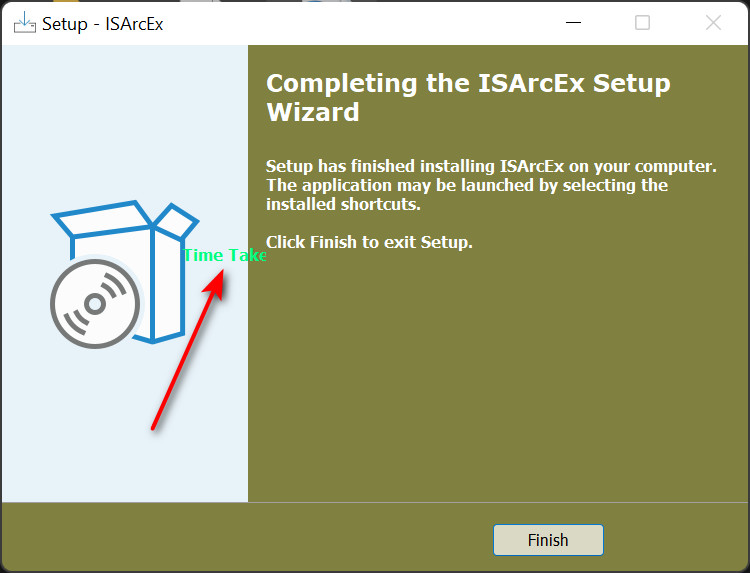
  LabelTime3 := TLabel.Create(WizardForm);
  with LabelTime3 do begin
    ...
    Left     := 180;
    Top      := 200;
  end;

To
  LabelTime3 := TLabel.Create(WizardForm);
  with LabelTime3 do begin
    ...
    Left     := WizardForm.FinishedLabel.Left;
    Top      := WizardForm.FinishedLabel.Top + ScaleY(120);
  end;
|
| The Following User Says Thank You to BLACKFIRE69 For This Useful Post: | ||
Gehrman (28-03-2022) | ||
|
#5
19-05-2022, 05:24
|
||||
|
||||
|
Hello Blackfire
Could you edit this script for me? i want to add launch a game check box to the finish page and when i type the shortcut name called Battle.net it must be Battle.net.lnk for my file location but it does not make it correct and open a website checkbox too and a question can i copy ur dll to a new empty script and add my archives to it? because i wanna do some edits with the wizardform designer thanks!
__________________
Be kind so that people be kind with you Last edited by Spotless; 19-05-2022 at 10:44.
|
| The Following User Says Thank You to Spotless For This Useful Post: | ||
ADMIRAL (27-07-2022) | ||
|
#6
26-07-2022, 03:49
|
||||
|
||||
|
Quote:
you can include ISArcEx for any script. but just copying the dll is not enough. you should know how to work with the ISArcEx.dll. follow the examples provided for help. or you can PM your script and i can help you out. Quote:
. Last edited by BLACKFIRE69; 03-04-2023 at 14:06.
|
|
#8
26-07-2022, 08:21
|
||||
|
||||
|
Quote:
Code:
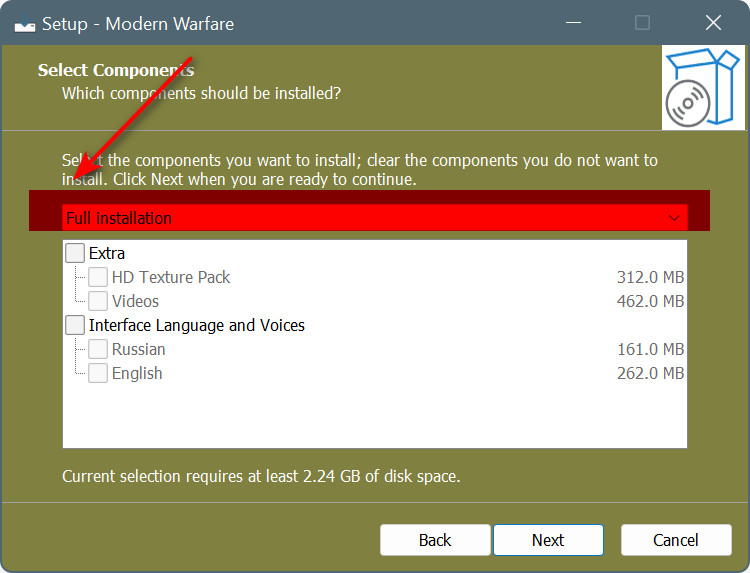
[Types] Name: full; Description: Full installation; Flags: iscustom ;Name: custom; Description: Custom installation; Code:
Before:

[Components]
Name: extra; Description: Extra; Types: full custom;
...
Name: voice; Description: Interface Language and Voices; Types: full;
...

After:

[Components]
Name: extra; Description: Extra;
...
Name: voice; Description: Interface Language and Voices;
...
|
|
#9
20-12-2022, 14:11
|
|||
|
|||
|
First of all, sorry for digging up this topic.
I have a small question about IsArcEx. If I wanted to run a batch file or other script after unpacking the FreeArc archive but also keep the elapsed timer running, whereabouts should I put the command? All my post-FreeArc command run in a procedure called masquerade_work, so I call this after the FreeArc extraction finishes. I have tried putting it on the line above IsArcExStop();, but this does not keep the timer running after the last archive has finished extracting: Code:
for i:= 1 to ISArcExDiskCount do
  begin
    ISArcExError := not ISArcExExtract(i, ExpandConstant('{app}\'), ExpandConstant('{tmp}\arc.ini'), ExpandConstant('{app}'));
    if ISArcExError then break;
  end;
  until true;
  masquerade_work();
ISArcExStop;
Thanks, Masquerade
|
|
#10
21-12-2022, 01:14
|
||||
|
||||
|
Quote:
@Masquerade Timer will run until it calls ISArcExStop.  Code:
...

  masquerade_work();
  ISArcExStop;  // Timer Stops

...
Last edited by BLACKFIRE69; 03-04-2023 at 14:07.
|
| The Following 2 Users Say Thank You to BLACKFIRE69 For This Useful Post: | ||
Cesar82 (21-12-2022), Masquerade (21-12-2022) | ||
|
#11
03-01-2023, 00:29
|
|||
|
|||
|
I have encountered a similar problem. Sometimes I need to extract an archive located in {app} and extract it to {app}. Adding a disk from {app} will cause the No Archives to Extract error.
|
|
#12
03-01-2023, 00:33
|
||||
|
||||
|
Quote:
The path to the My Documents folder.
|
| The Following User Says Thank You to hitman797 For This Useful Post: | ||
Guravkov2010 (03-01-2023) | ||
|
#13
03-01-2023, 03:00
|
||||
|
||||
|
Quote:
ok, i'll let you change the output directory when adding disks. Code:
 <--- Change --->

1. syntax:

   function ISArcExAddDisks(Inputfile, Password, OutputPath: Widestring): boolean;

   function ISArcExExtract(DiskNumber: Integer; CfgFile, WorkPath: Widestring): boolean;


2. example:

// Disk Adding part
repeat
  if FileExists(ExpandConstant('{src}\data1.bf')) then
  begin
    ISArcDiskAddingFalied:= ISArcExAddDisks(ExpandConstant('{src}\data1.bf'),
               '{#DiskPassword}', ExpandConstant('{app}'));

    if ISArcDiskAddingFalied then break;
    ISArcExDiskCount := ISArcExDiskCount + 1;
  end;

  ...

  #ifdef Components
  if IsComponentSelected('something1\something2') then
  begin
    ISArcDiskAddingFalied:= ISArcExAddDisks(ExpandConstant('{src}\ConfigShit.bf'),
               '{#DiskPassword}', ExpandConstant('{userdocs}\BFGames'));

    if ISArcDiskAddingFalied then break;
    ISArcExDiskCount := ISArcExDiskCount + 1;
  end;

  ...

  #endif
until true;


.....
  // Extraction

  for i := 1 to ISArcExDiskCount do
  begin
    ISArcExError := not ISArcExExtract(i, ExpandConstant('{tmp}\arc.ini'), ExpandConstant('{app}\temp'));
    if ISArcExError then break;
  end;
.....
Code:
summary:

  data1.bf       --->    {app}
  ...
  configShit.bf  --->    {userdocs}\BFGames}
  ...
Note: just replacing the library (.dll) is not enough. update your previous scripts as well. . Last edited by BLACKFIRE69; 03-04-2023 at 14:07.
|
| The Following 5 Users Say Thank You to BLACKFIRE69 For This Useful Post: | ||
ADMIRAL (06-01-2023), audiofeel (03-01-2023), Behnam2018 (24-11-2024), Gehrman (03-01-2023), hitman797 (16-12-2024) | ||
|
#14
03-01-2023, 03:03
|
||||
|
||||
|
Quote:
Code:
      ISArcExDiskCount:= 0;
      if FileExists(ExpandConstant('{src}\{#Data1Path}')) then
      begin
        ISArcDiskAddingFalied:= ISArcExAddDisks(ExpandConstant('{src}\{#Data1Path}'), '{#DiskPassword}');
        if ISArcDiskAddingFalied then break;
        ISArcExDiskCount:= ISArcExDiskCount + 1;
      end;
      for i:= 1 to ISArcExDiskCount do
      begin
        case i of
          1 : ISArcExError:= not ISArcExExtract(i, ExpandConstant('{app}\'), ExpandConstant('{tmp}\arc.ini'), ExpandConstant('{app}'));
          2 : ISArcExError:= not ISArcExExtract(i, ExpandConstant('{userdocs}\'), ExpandConstant('{tmp}\arc.ini'), ExpandConstant('{userdocs}'));
          3 : ISArcExError:= not ISArcExExtract(i, ExpandConstant('{tmp}\'), ExpandConstant('{tmp}\arc.ini'), ExpandConstant('{tmp}'));
          else
           ISArcExError:= not ISArcExExtract(i, ExpandConstant('{app}\'), ExpandConstant('{tmp}\arc.ini'), ExpandConstant('{app}'));
        end;
        if ISArcExError then break;
      end;
second data file to {userdocs} third data file to {tmp} all others data file to {app} Last edited by Cesar82; 03-01-2023 at 03:05.
|
| The Following 4 Users Say Thank You to Cesar82 For This Useful Post: | ||
|
#15
03-01-2023, 03:31
|
||||
|
||||
|
Quote:
guys, can you tell me is this lib detected as a virus? Last edited by BLACKFIRE69; 03-01-2023 at 03:34.
|
| The Following User Says Thank You to BLACKFIRE69 For This Useful Post: | ||
Behnam2018 (21-09-2026) | ||
|
|
|
 Similar Threads
|
||||
| Thread | Thread Starter | Forum | Replies | Last Post |
| ASIS: Advanced Simple Installer Script | KaktoR | Conversion Tutorials | 1482 | 16-08-2026 16:20 |
| XTool 2020 (Plugins) | Razor12911 | Conversion Tutorials | 405 | 24-12-2024 05:30 |
| Game Installer Designer by altef_4 | altef_4 | Conversion Tutorials | 236 | 28-05-2021 02:54 |
| Best Compression For Archiving | brispuss | PC Games | 12 | 03-01-2020 13:34 |
| Compression Questions | yasitha | Conversion Tutorials | 10 | 09-01-2019 12:29 |






 Linear Mode

