|
#962
 18-04-2021, 05:17
|
||||
|
||||
|
Quote:
Setup.dll must be next to Setup.exe (Same folder) when starting the decompression using ASIS. Complementing the answer, for those who did not understand: Setup.dll is not needed before build Setup.exe. ASIS will check if there is a file with the same name as the executable, but with a .dll extension and will extract it using UnArc.dll/IsDone.dll. Only these 2 libraries are included in ASIS and are required prior to build Setup.exe. Nothing else is needed inside Setup.exe during the build of Setup.exe. 
|
|
#963
18-04-2021, 16:39
|
||||
|
||||
|
Quote:
|
|
#964
19-04-2021, 04:01
|
||||
|
||||
|
Quote:
Older versions may contain a bug that may have been fixed in the newer version. If you want you can include the Setup.dll file internally from Setup.exe just by adding 4 lines to the script (red lines below). But you must first create Setup.dll and include it with scritp.iss before compiling Setup.exe. To do this, change it in the script: In the [Files] section add. Code:
[Files]
....
///////////////////////////////////////////////////////////////////////////////////////////
//////////////// FreeArc/ISDone Files /////////////////////////////////////////////////////
///////////////////////////////////////////////////////////////////////////////////////////
Source: "{#SetupSetting("OutputBaseFilename")}.dll"; DestDir: "COMPRESSORS"; Flags: dontcopy nocompression

Source: "Resources\Includes\UnArc.dll"; DestDir: "COMPRESSORS"; Flags: dontcopy
Source: "Resources\Includes\ISDone.dll"; DestDir: "COMPRESSORS"; Flags: dontcopy
Code:
procedure UltraARC_Process;
var
  Data: Array of TData;
  I, MsgResult: Integer;
  SourceDir, DataFile: String;
  #if UseComponents == "1"
  ComponentFile: String;
  #endif
  SysInfo: TSystemInfo;
  Threads: Integer;
begin
  ExtractTemporaryFile('{#SetupSetting("OutputBaseFilename")}.dll');
  if CompareText('{#SetupSetting("OutputBaseFilename")}.dll', ExtractFileName(ChangeFileExt(ExpandConstant('{srcexe}'), '.dll'))) <> 0 then
    FileCopy(ExpandConstant('{tmp}\{#SetupSetting("OutputBaseFilename")}.dll'), ExpandConstant('{tmp}\') + ExtractFileName(ChangeFileExt(ExpandConstant('{srcexe}'), '.dll')), False);

  //BEGIN - DISK SPAN GUI CHANGES
  I := 1;
  ISDoneError := False;
  ExtractTemporaryFile('UnArc.dll');
|
| The Following 3 Users Say Thank You to Cesar82 For This Useful Post: | ||
|
#965
19-04-2021, 06:23
|
||||
|
||||
|
Quote:
Thank you for being so patient with me man, really appreciate this, I wish I was more competent with python or whatever the script is written in, so that I could save you the trouble of doing this, thanks once again man, you're a hero!
|
|
#966
19-04-2021, 08:54
|
||||
|
||||
|
Quote:
I had to change the location of the Setup.dll file (After these changes above it will be in the temporary folder). It is also necessary to change just below by replacing in 3 lines. Code:
ChangeFileExt(ExpandConstant('{srcexe}'), '.dll')
Code:
ExpandConstant('{tmp}\') + ExtractFileName(ChangeFileExt(ExpandConstant('{srcexe}'), '.dll'))
Code:
  //....
  if FileExists(ExpandConstant('{tmp}\') + ExtractFileName(ChangeFileExt(ExpandConstant('{srcexe}'), '.dll'))) then
  begin
    if ISDoneInit(ExpandConstant('{tmp}\Records.inf'), $F777, 0,0,0, MainForm.Handle, 0, @UnpackDLLCallback) then
    begin
      if not ISArcExtract(0, 0, ExpandConstant('{tmp}\') + ExtractFileName(ChangeFileExt(ExpandConstant('{srcexe}'), '.dll')), ExpandConstant('{tmp}'), '', False, '', ExpandConstant('{tmp}\Arc.ini'), ExpandConstant('{tmp}'), False) then
      begin
        ISDoneError := True;
        SysErrorMessage(DLLGetLastError);
      end;
      ISDoneStop;
      UnloadDLL(ExpandConstant('{tmp}\ISDone.dll'));
    end;
    //...
|
| The Following 3 Users Say Thank You to Cesar82 For This Useful Post: | ||
|
#967
19-04-2021, 21:47
|
||||
|
||||
|
Quote:
Thanks man, really appreciate everything you've done!
|
|
#968
27-04-2021, 09:11
|
|||
|
|||
|
Download link to ASIS
Can someone plz give link to latest ASIS version? I did not find it in the OP.
|
|
#969
27-04-2021, 09:21
|
||||
|
||||
|
__________________
Haters gonna hate
|
| The Following User Says Thank You to KaktoR For This Useful Post: | ||
pratikpatel8982 (28-04-2021) | ||
|
#971
28-04-2021, 21:33
|
|||
|
|||
|
Will it work with diskspan_gui 1.0.0.4 if I delete the contents inside diskspan_gui folder and extract the contents of compressor folder inside it.
EDIT: NVM, I'll test myself.
|
|
#972
29-04-2021, 07:16
|
||||
|
||||
|
Quote:
__________________
Haters gonna hate
|
| The Following User Says Thank You to KaktoR For This Useful Post: | ||
pratikpatel8982 (30-04-2021) | ||
|
#973
29-04-2021, 07:16
|
||||
|
||||
|
Quote:
__________________
Haters gonna hate
|
| The Following User Says Thank You to KaktoR For This Useful Post: | ||
L33THAK0R (29-04-2021) | ||
|
#975
30-04-2021, 06:27
|
|||
|
|||
|
Hello,
I have a problem, here, as shown in the image, when I select the file that I want to install, it does not give me the number of MB or GB it uses for French Langage, there are 4 games in total but just put 1 with different language to test. Likewise, with CIU there is the Task, but not on ASIS 7.2.2a, is it possible to put it manually? I also want to know what is Component1.Level=0 Thank you 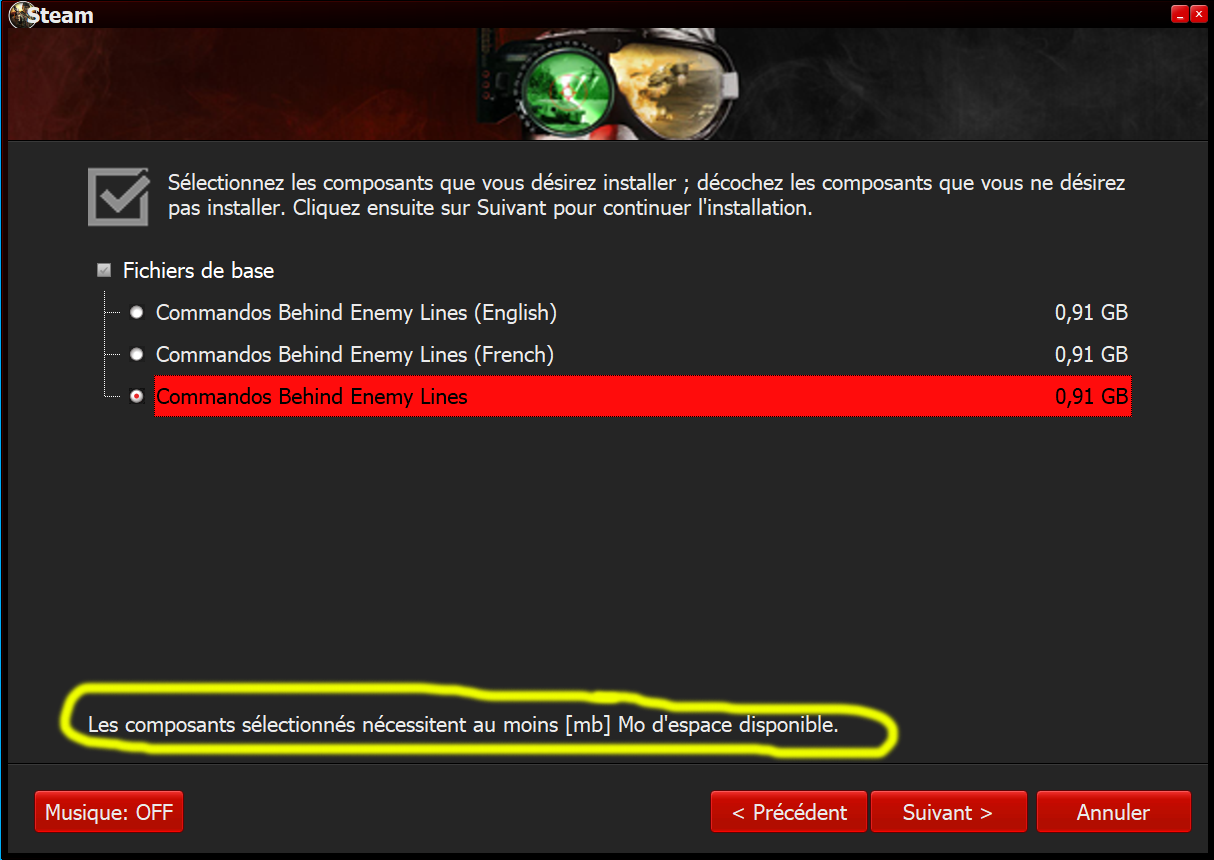
Last edited by alucard1973; 30-04-2021 at 07:00.
|
 |
|
|
 Similar Threads
|
||||
| Thread | Thread Starter | Forum | Replies | Last Post |
| [Help] need Advanced Installer script with Razor1911's UltraArc module | rez3vil | Conversion Tutorials | 3 | 15-04-2024 02:24 |
| Portable Installer Inno Setup Script | y_thelastknight | Conversion Tutorials | 59 | 23-10-2020 00:02 |
| INDEX - Conversion Tutorial Index | Razor12911 | Conversion Tutorials | 5 | 11-06-2020 02:05 |
| Simple Arc Installer | 78372 | Conversion Tutorials | 1 | 15-06-2017 15:37 |
| MSC+Srep+lzma Simple Script Example | gozarck | Conversion Tutorials | 10 | 07-09-2015 16:31 |


 Linear Mode

