|
#1
 25-09-2020, 04:05
|
||||
|
||||
 Setup Preview in Taskbar
All of the programs and opened files have a preview when you hover the mouse on their icons inside the taskbar.
But for inno setup installers it seems there is no preview. any fix or trick to solve this issue? 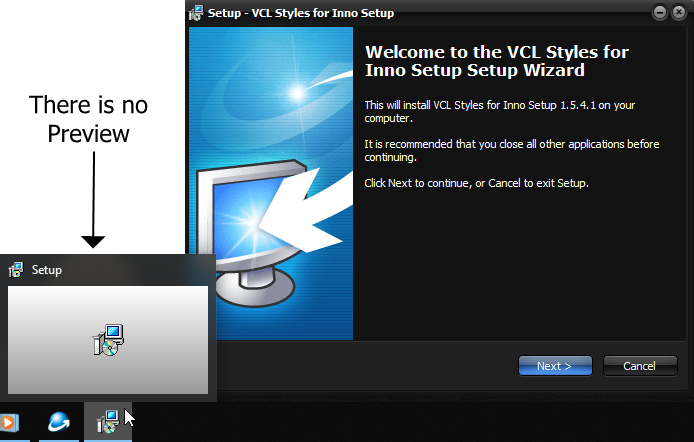

|
| The Following User Says Thank You to Cuttlas For This Useful Post: | ||
shazzla (25-09-2020) | ||
| Sponsored Links |
|
#2
25-09-2020, 22:32
|
||||
|
||||
|
the setup below (which uses 'Inno Setup version 5.5.1.ee2 (u)' and made by razor) has preview in taskbar.
http://fs2.filegir.com/cuttlas/setup.exe so how to accomplish such thing? Last edited by Cuttlas; 25-09-2020 at 23:17.
|
|
#4
30-09-2020, 22:13
|
||||
|
||||
|
Quote:
The autorun page is possibly a CustomForm and only after the WizardForm is displayed and the thumbnail stops showing. Inno Setup has a main window in full screen (Optional). This window is shown in the taskbar thumbnail by default. I don't think it is possible to display WizardForm in the taskbar thumbnail. To better understand, put this in the [Setup] section of a simple script. Code:
WindowShowCaption=True
WindowStartMaximized=False
WindowResizable=True
WindowVisible=True
|
| The Following User Says Thank You to Cesar82 For This Useful Post: | ||
Cuttlas (01-10-2020) | ||
|
#5
01-10-2020, 02:19
|
||||
|
||||

Quote:
but see this one: https://web.archive.org/web/20150523...ISSkinPack.exe It also has a preview on all pages (even if it is not full) but I think better than a blank view. How to implemet such a trick? about the previous setup, yes it has preview on autrorun page, but on some other pages the preview again will be visible !!!
|
|
#6
01-10-2020, 12:42
|
||||
|
||||
|
I found this for inno setup, but dp not know how to download:
WinTB plugin Library for working with taskbar on Windows Vista / 7. Features: - Display progress on the taskbar win 7/8 - Display sketch on the taskbar win vista /7/8 - Ability to add buttons to the thumbnail in the taskbar win 7/8 Compatible with ISWin7 and IsSkin . source: https://krinkels.org/resources/wintb...rce-update-612 any help here? Last edited by Cuttlas; 01-10-2020 at 12:59.
|
|
#7
01-10-2020, 14:10
|
|||
|
|||
|
[Code]
function SetWindowLong(Wnd: HWnd; Index: Integer; NewLong: Longint): Longint; external '[email protected] stdcall'; function GetWindowLong(Wnd: HWnd; Index: Integer): Longint; external '[email protected] stdcall'; Function GetWindow (HWND: Longint; uCmd: cardinal): Longint;external '[email protected] stdcall'; procedure InitializeWizard(); begin SetWindowLong(WizardForm.Handle, -8,GetWindowLong(GetWindow(WizardForm.Handle, 4),-8)); end;
|
 |
|
|
 Similar Threads
|
||||
| Thread | Thread Starter | Forum | Replies | Last Post |
| BlackBox v2 | y_thelastknight | Conversion Tutorials | 567 | 11-03-2025 07:16 |
| How to Hide Inno Setup in Taskbar? | Gehrman | Conversion Tutorials | 2 | 29-02-2020 22:08 |
| Useful Dll for Inno Setup users | peterf1999 | Conversion Tutorials | 88 | 01-12-2017 16:00 |
| Preview: Conversion Tool for Advanced Setup Creator | Razor12911 | Conversion Tutorials | 6 | 10-05-2017 00:30 |
| INNO TUTORIAL - Using Unicode and ANSI Versions of INNO Setup | REV0 | Conversion Tutorials | 51 | 26-03-2015 06:57 |


 Linear Mode

