|
#1
 03-09-2019, 13:15
|
||||
|
||||
 Forza Motorsport 7 Ultimate Edition UWP
Forza Motorsport 7 [?xDVD5]
Credits: --CIU By:Yener90 --InstallerScript: CIU 3.0.0.2 --Contributors:BAMsE; Razor12911; Simorq; KaktoR; Cesar82 CIU 3.0.0.2 --CLS-DiskSpan.dll R3 by Razor12911, modified version by Cesar82 --DiskSpan_GUI V2+ by Cesar82 Graphic found Ingame and Online Arts by mausschieber Thanks to houcine80 for using Design Info: Code:
UWP Conversion U can Start from the created Desktop Icon Code:
Version 1.0.0 - Initial Release (50 views before); Version 1.0.1 - Updated to new Script and DSG ; - Added DLC's Instructions: 1.-- Install Game, update to latest version + No-DVD. 2.-- Download the Conversion and extract to HD, (not in game folder) 3.-- Run DiskSpan_GUI Choose Input/Output folder, Choose compression method 4.-- Test the conversion, before burning ISO.
__________________
It would be nice if you appreciate my work with the thanks Button Last edited by mausschieber; Yesterday at 06:21. Reason: Updated to new Script and DSG 
|
| Sponsored Links |
|
#2
15-09-2019, 01:51
|
|||
|
|||
|
Thank you Mausschieber for conversion file.
Compress using xZLib+srep:m3f+LZMA-MT get 20x dvd5 Quote:
But when registering games get error like this 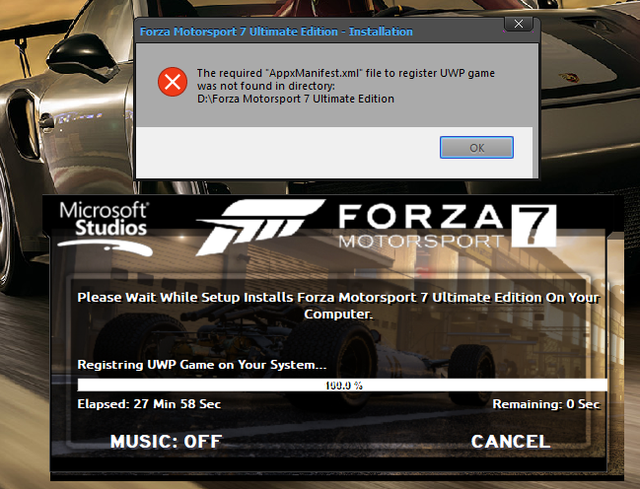 Can you fix this? Thank you
|
|
#3
16-09-2019, 02:36
|
||||
|
||||
|
Quote:
but i have seen the the smallinstaller isnt correct so i corrected this in new setup1.1
__________________
It would be nice if you appreciate my work with the thanks Button
|
|
#4
16-09-2019, 17:57
|
|||
|
|||
|
Quote:
Last edited by Grumpy; 17-09-2019 at 00:43.
|
|
#5
16-09-2019, 18:11
|
||||
|
||||
|
Quote:
__________________
It would be nice if you appreciate my work with the thanks Button Last edited by Grumpy; 17-09-2019 at 00:44.
|
|
#6
17-09-2019, 21:56
|
|||
|
|||
|
Quote:
Rather than having to recompile Please 
|
|
#7
18-09-2019, 03:46
|
||||
|
||||
|
Quote:
Done in First post
__________________
It would be nice if you appreciate my work with the thanks Button
|
| The Following User Says Thank You to mausschieber For This Useful Post: | ||
Danziel123 (18-09-2019) | ||
|
#8
18-09-2019, 18:10
|
|||
|
|||
|
Quote:
|
| The Following User Says Thank You to Danziel123 For This Useful Post: | ||
mausschieber (19-09-2019) | ||
|
#9
20-09-2019, 11:47
|
||||
|
||||
|
Information:
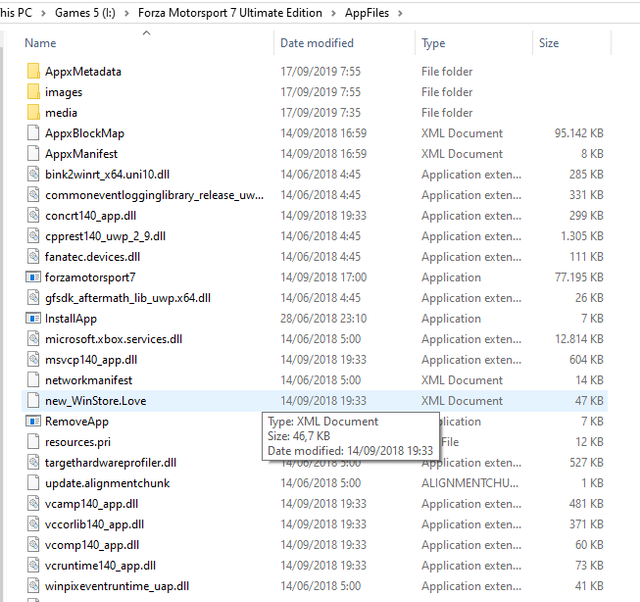
When you have different directories for the "AppxManifest.xml" file one solution is to enter the new path to the manifest file(s) using an external "Setup.ini" file with only the [UWPGame] section and its keys and put together (in the same folder) from Setup.exe file.
- If there is more than one manifest file, you must include it in the same order used in the internal "Setup.ini" for the shortcuts to be created correctly. Example external "Setup.ini" file: Code:
[UWPGame]
Manifest1={app}\Appfiles\AppxManifest.xml
|
| The Following User Says Thank You to Cesar82 For This Useful Post: | ||
mausschieber (20-09-2019) | ||
|
#10
Yesterday, 06:21
|
||||
|
||||
|
-Updated to new Script and DSG
__________________
It would be nice if you appreciate my work with the thanks Button
|
 |
|
|
 Similar Threads
|
||||
| Thread | Thread Starter | Forum | Replies | Last Post |
| Best Compression Methods for 'Specific' Games INDEX | JustFun | Conversion Tutorials | 62 | 10-08-2026 10:09 |
| INDEX - CD2DVD Conversion Index **UPDATED: 17-07-2024** | Grumpy | PC Games - CD/DVD Conversions | 252 | 16-07-2024 20:35 |
| Forza Horizon 4 Ultimate Edition | GTX590 | PC Games - CD/DVD Conversions | 17 | 13-03-2021 11:16 |


 Linear Mode

