Go Back   FileForums > Game Backup > PC Games > PC Games - CD/DVD Conversions > Conversion Tutorials
Register FAQ Community Calendar Today's Posts Search

Reply
 
Thread Tools Search this Thread Display Modes
  #601  
Old 16-08-2016, 07:40
Dante90 Dante90 is offline
Registered User
 
Join Date: Aug 2016
Location: London
Posts: 6
Thanks: 0
Thanked 3 Times in 3 Posts
Dante90 is on a distinguished road
Quote:
Originally Posted by Razor12911 View Post
you can just remove ultraarc.ini all together to use the program freely.
Thank you very much!

I've heard that Precomp 0.41+ uses bZip2 compression by default and some recommend to use "-c-" argument to turn it off. Can you plz comment on that and (maybe) tell me how to do it in UltraArc? Can I use something like -m4?

Thank you very much anyway! Cheers! ;-)

Last edited by Dante90; 16-08-2016 at 07:49.
Reply With Quote
The Following User Says Thank You to Dante90 For This Useful Post:
GonzaloM (07-02-2018)
Sponsored Links
  #602  
Old 16-08-2016, 07:45
Gupta Gupta is offline
Banned
 
Join Date: Aug 2016
Location: https://t.me/pump_upp
Posts: 399
Thanks: 139
Thanked 715 Times in 231 Posts
Gupta is on a distinguished road
Send a message via ICQ to Gupta Send a message via AIM to Gupta Send a message via Yahoo to Gupta
Quote:
Originally Posted by Dante90 View Post
Thank you very much!

I've heard that Precomp 0.41+ uses bZip2 compression by default and some recommend to use "-c-" argument to turn it off. Can you plz comment on that and (maybe) tell me how to do it in UltraArc?

Thank you very much anyway! Cheers! ;-)
yes, Disabling precomp's default compression gives u better compression ratio if u r planning to compress it further with better compressors like lzma

second thing, you don't have to do anything to do so, ultraARC does this work for u
simply add the source directory, chose the your compression parameters (u can use prcomp,srep,delta,lzma, will yield u best results) and then the output directory
one more thing use precomp version 0.38 this the stablest versio

Last edited by Gupta; 16-08-2016 at 07:50.
Reply With Quote
The Following User Says Thank You to Gupta For This Useful Post:
GonzaloM (07-02-2018)
  #603  
Old 16-08-2016, 07:51
Dante90 Dante90 is offline
Registered User
 
Join Date: Aug 2016
Location: London
Posts: 6
Thanks: 0
Thanked 3 Times in 3 Posts
Dante90 is on a distinguished road
Quote:
Originally Posted by PrinceGupta2000 View Post
yes, Disabling precomp's default compression gives u better compression ratio if u r planning to compress it further with better compressors like lzma

second thing, you don't have to do anything to do so, ultraARC does this work for u
simply add the source directory, chose the your compression parameters (u can use prcomp,srep,delta,lzma, will yield u best results) and then the output directory
one more thing use precomp version 0.38 this the stablest versio
Wow, this is very surprising.. 0.38? wow, I thought that the newer version == better..

Thank you!
Reply With Quote
The Following User Says Thank You to Dante90 For This Useful Post:
GonzaloM (07-02-2018)
  #604  
Old 16-08-2016, 07:59
Gupta Gupta is offline
Banned
 
Join Date: Aug 2016
Location: https://t.me/pump_upp
Posts: 399
Thanks: 139
Thanked 715 Times in 231 Posts
Gupta is on a distinguished road
Send a message via ICQ to Gupta Send a message via AIM to Gupta Send a message via Yahoo to Gupta
Quote:
Originally Posted by Dante90 View Post
Wow, this is very surprising.. 0.38? wow, I thought that the newer version == better..

Thank you!
Newer Versions Has Bugs and Bugs, they got nothing new bt the in-built compression
Reply With Quote
The Following User Says Thank You to Gupta For This Useful Post:
GonzaloM (07-02-2018)
  #605  
Old 16-08-2016, 09:56
Dante90 Dante90 is offline
Registered User
 
Join Date: Aug 2016
Location: London
Posts: 6
Thanks: 0
Thanked 3 Times in 3 Posts
Dante90 is on a distinguished road
Quote:
Originally Posted by PrinceGupta2000 View Post
Newer Versions Has Bugs and Bugs, they got nothing new bt the in-built compression
but 0.38 seems to be waaay slower in both compression and decompression o_O

and output file seems to be of the same size (exactly)

----------------------------

I'm not sure now, guess me perception of time is not consistent =)

Last edited by Dante90; 17-08-2016 at 01:40.
Reply With Quote
  #606  
Old 17-08-2016, 01:58
Dante90 Dante90 is offline
Registered User
 
Join Date: Aug 2016
Location: London
Posts: 6
Thanks: 0
Thanked 3 Times in 3 Posts
Dante90 is on a distinguished road
I've spent a whole day testing different precomp version in UltraArc and now I'm not sure which version I should stay with.. o_O

---------------------------------------

If I'm looking for precomp to use in UltraArc do I need Razor12911's version of precomp and cls-precomp.dll or schnaader's version should work as well? And how come the last version of precomp on schnaader's git-hub is 0.45 but I saw 0.46 from Razor12911?

Last edited by Dante90; 17-08-2016 at 02:44.
Reply With Quote
  #607  
Old 17-08-2016, 02:55
Dante90 Dante90 is offline
Registered User
 
Join Date: Aug 2016
Location: London
Posts: 6
Thanks: 0
Thanked 3 Times in 3 Posts
Dante90 is on a distinguished road
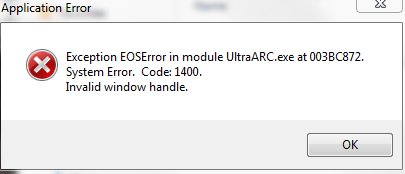
IMPORTANT!!! BUG FIX FOR UA v3030
Update:

You should start compression with another version of UltraArc (2400, for example) and THEN start a v.3030. Strange thing but it helps, I hope there is gonna be a fix for this soon (since we have located the problem)

Have nice day! Cheers! ;-)

Update 2:
Unfortunately, the compression fill start all over again after the end of compression. O_O
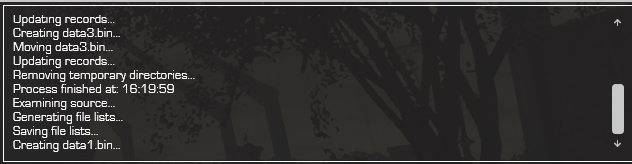
Update 3: System: Windows 7 Ultimate x64
Last edited by Dante90; 17-08-2016 at 07:06.
Reply With Quote
The Following User Says Thank You to Dante90 For This Useful Post:
kenzo34 (17-08-2016)
  #608  
Old 19-08-2016, 08:39
Razor12911's Avatar
Razor12911 Razor12911 is offline
Noob
 
Join Date: Jul 2012
Location: South Africa
Posts: 3,751
Thanks: 2,181
Thanked 11,211 Times in 2,309 Posts
Razor12911 is on a distinguished road
If only, I no longer have source of this anymore.
Reply With Quote
  #609  
Old 19-08-2016, 14:38
LuzhinE's Avatar
LuzhinE LuzhinE is offline
Registered User
 
Join Date: Jan 2014
Location: Peru
Posts: 227
Thanks: 26
Thanked 36 Times in 29 Posts
LuzhinE is on a distinguished road
works for me wonderfully, would only ask you to add support for new compresores
Reply With Quote
  #610  
Old 19-08-2016, 14:42
Razor12911's Avatar
Razor12911 Razor12911 is offline
Noob
 
Join Date: Jul 2012
Location: South Africa
Posts: 3,751
Thanks: 2,181
Thanked 11,211 Times in 2,309 Posts
Razor12911 is on a distinguished road
can't do that as well. either way, old is gold.
Reply With Quote
  #611  
Old 19-08-2016, 14:53
LuzhinE's Avatar
LuzhinE LuzhinE is offline
Registered User
 
Join Date: Jan 2014
Location: Peru
Posts: 227
Thanks: 26
Thanked 36 Times in 29 Posts
LuzhinE is on a distinguished road
anyway thank you very much, but it works perfectly
Reply With Quote
  #612  
Old 25-08-2016, 00:07
Gupta Gupta is offline
Banned
 
Join Date: Aug 2016
Location: https://t.me/pump_upp
Posts: 399
Thanks: 139
Thanked 715 Times in 231 Posts
Gupta is on a distinguished road
Send a message via ICQ to Gupta Send a message via AIM to Gupta Send a message via Yahoo to Gupta
hey Guys!
i am little bit of confused, Which version of ultraARC's CIU is best to use?

here is the screenshots of installer with different versions of CIU with same ini and resources

I have some doubts
1.Langsbox arrow keys are not visible in any of versions bt i seen such in many conversions done by our conversion guru
2. LAngBox's controls never works such as show only
and much more

and there is no tutorial for CIU V2, so if anyone could make it then it is very beneficial for every member of fileforums.

Best regards,
Prince Gupta
Attached Images
File Type: png CIU.PNG (1.00 MB, 226 views)
File Type: png ciu2.PNG (1.02 MB, 224 views)
File Type: png ciu3.PNG (946.0 KB, 223 views)
Reply With Quote
  #613  
Old 25-08-2016, 14:40
pakrat2k2's Avatar
pakrat2k2 pakrat2k2 is offline
Moderator
 
Join Date: Apr 2005
Location: Canada
Posts: 7,209
Thanks: 3,040
Thanked 9,043 Times in 3,086 Posts
pakrat2k2 is on a distinguished road
quick thought, in setup.ini
{installoptions}
Lang=en,de,es,fr,it,pl,prbr,ru,tr ( 9 choices, will not match what you have an example )

[LangBox]
showonly=9

those 2 numbers match NO arrows... make showonly= smaller number then arrows will show.
Reply With Quote
  #614  
Old 26-08-2016, 08:37
Gupta Gupta is offline
Banned
 
Join Date: Aug 2016
Location: https://t.me/pump_upp
Posts: 399
Thanks: 139
Thanked 715 Times in 231 Posts
Gupta is on a distinguished road
Send a message via ICQ to Gupta Send a message via AIM to Gupta Send a message via Yahoo to Gupta
what if i do what u told
getting the arrows but now see the position of langbox

in the attached image se close to ea logo
Attached Images
File Type: png Capture.PNG (1,016.6 KB, 193 views)
Reply With Quote
  #615  
Old 26-08-2016, 11:12
pakrat2k2's Avatar
pakrat2k2 pakrat2k2 is offline
Moderator
 
Join Date: Apr 2005
Location: Canada
Posts: 7,209
Thanks: 3,040
Thanked 9,043 Times in 3,086 Posts
pakrat2k2 is on a distinguished road
center=0

0=no ( you set it where you want )
1=yes ( it sets it to center of image based on Top=# )
Reply With Quote
The Following User Says Thank You to pakrat2k2 For This Useful Post:
houcine80 (29-08-2016)
Reply


Posting Rules
You may not post new threads
You may not post replies
You may not post attachments
You may not edit your posts

BB code is On
Smilies are On
[IMG] code is On
HTML code is Off

Forum Jump

Similar Threads
Thread Thread Starter Forum Replies Last Post
BlackBox v2 y_thelastknight Conversion Tutorials 567 11-03-2025 07:16
Useful Dll for Inno Setup users peterf1999 Conversion Tutorials 88 01-12-2017 16:00
Total War Collection - 6xDVD9 [LZMA + INNO SETUP + CIU] REV0 PC Games - CD/DVD Conversions 1 28-06-2015 17:00
Total War Collection - 2xBLURAY [LZMA + INNO SETUP + CIU] REV0 PC Games - CD/DVD Conversions 2 09-01-2013 18:02
Total War Collection - 11xDVD5 [LZMA + INNO SETUP + CIU] REV0 PC Games - CD/DVD Conversions 0 09-01-2013 16:38


All times are GMT -7. The time now is 11:53.


Powered by vBulletin® Version 3.8.11
Copyright ©2000 - 2026, vBulletin Solutions Inc.
FileForums @ https://fileforums.com