
 |
|
|
|
|||||||


 |
|
|
Thread Tools | Search this Thread | Display Modes |
| |
|
|
|
|||||||
|
|
|
Thread Tools | Search this Thread | Display Modes |
|
#16
 18-10-2014, 13:14
|
||||
|
||||
|
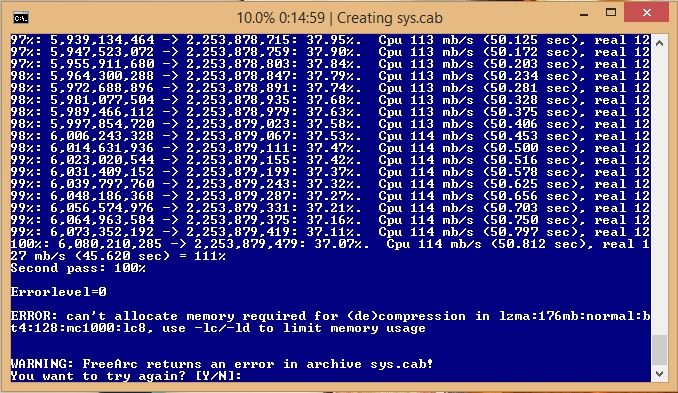
Well, i don't know what's the problem. I have tested compression on 3 different systems (one of them a 5 years old laptop) and i did not get this error. Try the conversion from an other folder and/or HDD/partition.

|
| The Following User Says Thank You to KaktoR For This Useful Post: | ||
n4f13666 (20-10-2014) | ||
| Sponsored Links |
|
#17
18-10-2014, 21:49
|
||||
|
||||
|
Quote:
Also on another PC have never been able to run the compress.bat on, as it gives exact same error message as you have, although its lower end pc it still has enough ram & HD space that SHOULDNT prevent it from completing that task but it always fails. I just gave up ever trying to do any work on that PC.
|
| The Following 2 Users Say Thank You to pakrat2k2 For This Useful Post: | ||
lukasgames (19-10-2014), n4f13666 (20-10-2014) | ||
|
#18
19-10-2014, 04:14
|
||||
|
||||

Quote:
|
|
#20
19-10-2014, 21:38
|
||||
|
||||
|
Conversion updated.
You don't need anything to remove from game folder (movie) from now, this step is obsolete. I have removed a font file that was not used by this conversion (around 22mb), changed the render from Hope (finally i found the right one lol), changed small button graphic (now it have effects! woohoo!) and last but not least i added more render files (Vanille, Sazh, Fang. I can't find a good one from Snow, sorry!). Just replace with old Setup... if you want.
|
|
#23
22-10-2014, 06:52
|
||||
|
||||
|
A new patch arrived on steam today. Well, the patchnotes sucks... Waiting for the next one
 http://steamcommunity.com/games/2921...00071459323982
__________________
Haters gonna hate
|
|
#27
13-11-2014, 04:50
|
||||
|
||||
|
Quote:
7xDVD5
__________________
Haters gonna hate
|
|
#28
13-11-2014, 19:14
|
|||
|
|||
|
Quote:
|
|
#30
14-11-2014, 02:43
|
||||
|
||||
|
Quote:
Data4.lst Data5.lst Data6.lst Data7.lst Data8.lst Data10.lst For example Data4.lst: Code:
white_data\movie\z002_us.win32.wmp white_data\movie\z006_us.win32.wmp Code:
white_data\movie\z002.win32.wmp
white_data\movie\z006.win32.wmp
__________________
Haters gonna hate
|
| The Following 3 Users Say Thank You to KaktoR For This Useful Post: | ||
|
|
|
 Similar Threads
|
||||
| Thread | Thread Starter | Forum | Replies | Last Post |
| Final Fantasy III STEAM Edition [1xCD - MULTI5 - m0 - CIUv2] | KaktoR | PC Games - CD/DVD Conversions | 12 | 22-07-2014 18:43 |
| Anno 1701 won't load, just get a blue screen! | Shadow22 | General Gaming | 5 | 28-08-2012 12:52 |
| CPU jumps up to 100% now, not before | dav6 | Software | 11 | 24-05-2008 03:33 |
| Elder Scrolls IV: Oblivion. WTF FOR ME. | SansMercy | General Gaming | 5 | 07-04-2007 23:05 |
| weird error.... | sheykh | PC Games | 5 | 07-05-2006 20:23 |




 Linear Mode

