|
#766
 17-10-2013, 04:24
|
|||
|
|||
|
Thanks!
I would have never realized I needed the "createvalueifdoesntexist" if you hadn't given me the example. 
|
| Sponsored Links |
|
#767
22-10-2013, 12:01
|
|||
|
|||
|
Hey REV0 and Yener
Hey guys I am Vishal.
I was going through your CI installscript...it is awesome. but this script adds and compress files from DVD(original file)...whereas i want to modify your script according to my game repack(external files that i run through "RUN and UNINSTALLRUN"....but was unable to do so. I can make a basic setup with splash screen...I need my setup to be good looking with minimum possible size...so can you guys help me out? also can i use ogg vorbis(small size) for music?
|
|
#768
23-10-2013, 07:05
|
||||
|
||||
|
How to create shourtcut in one folder with innoide? I do not know of one folder created with Inno shourtcut it just created in the home directory.
Please! Sorry my bad english 
|
|
#769
24-10-2013, 02:30
|
|||
|
|||
|
can anyone help me how to create a setup like this?
http://fileforums.com/showthread.php?t=91778 when i put my mouse over the install button it zooms out. can anyone gimme source code of this?
|
|
#771
28-10-2013, 15:03
|
||||
|
||||
|
using CIU you must have
#define Internal ( like it is in BOTH Installerscript / Langscript ISS files. In Installerscript.iss the ;#define ProgramFiles .... line MUST have the ; in front. Then the files from Setup.cab MUST be extracted in Setup subfolder. Then files from setup.cab will be included into the setup.exe.
|
|
#772
28-10-2013, 22:30
|
||||
|
||||
|
Quote:
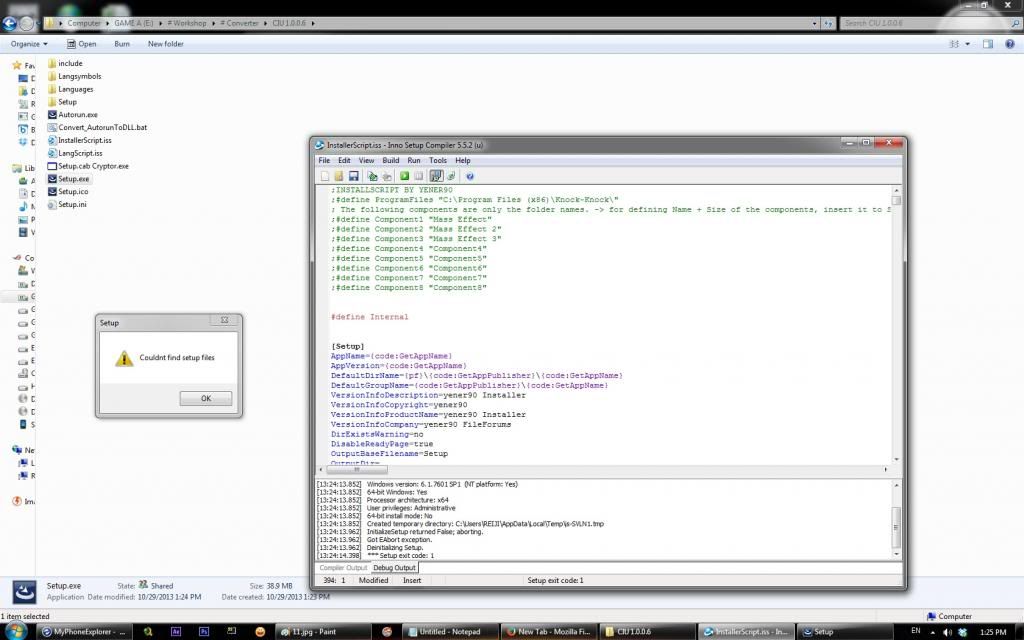 but when i deleted the setup.cab. setup.exe is still looking for the setup.cab And seems like the game not loaded into the script.
|
|
#773
29-10-2013, 02:13
|
|||
|
|||
|
Quote:
compile script first (with #define Internal) and then run file "Convert_AutorunToDLL.bat". after running this file you can delete setup.cab.
|
| The Following User Says Thank You to ASSAiL For This Useful Post: | ||
reiji777 (29-10-2013) | ||
|
#774
29-10-2013, 14:25
|
||||
|
||||
|
I've seen the scripts from some installer.
1st installer (tombraider survival) didn't put any registry code Quote:
Quote:
Quote:
what is the difference between three of them? how do i recognize a game which required alot of registry code to be inserted in the script or not at all? if I don't insert the registry key, then the game wouldn't compatible for the future updates of the game? (like in the first ver. splinter cell blacklist installer) sorry for my bad english 
Last edited by reiji777; 29-10-2013 at 14:37.
|
|
#775
29-10-2013, 15:05
|
||||
|
||||
|
some games don't care if they have any registry entries at all. The uninstall entry is only for INNO version, to uninstall properly. ( much like #1 & #2 installers )
Then there is the 3rd type of game which will NOT run at all, or allow any updates to be installed if the proper registry entries are not found. You need to search thru registry for entries that the particular game your doing, entered any. IF it has you MAY need to copy those types of entries into your INNO script.
|
| The Following User Says Thank You to pakrat2k2 For This Useful Post: | ||
reiji777 (29-10-2013) | ||
|
#776
30-10-2013, 22:48
|
|||
|
|||
|
Can anyone modify the installerscript?
I don't want to include "include" folder...that means no arc...no 7z...and nothing else....i want to use my custom files. and also i don't need disk spanning for three disk or more. I just need 1 disk slice. can any one modify the script???...i can't do that because everything is related to each other.
|
|
#777
01-11-2013, 08:34
|
||||
|
||||
|
i want to make a nice, simple, fast and very effective installer like this:
 with extra music on/off button the function is simple : install game => install support drivers (directx, phsyx dll.) in silent mode. is it possible? can someone share how to make it? it would be wonderful. thanks 
Last edited by reiji777; 01-11-2013 at 08:46.
|
|
#778
01-11-2013, 08:59
|
|||
|
|||
|
Quote:
and run files thru batch file like this Code:
#Soft#\vc80_redist\Vcredist_x86.exe /q:a /c:"msiexec /i vcredist.msi /qn /l*v %temp%\vcredist_x86.log"
#Soft#\DirectX\dxwebsetup.exe
|
| The Following User Says Thank You to ASSAiL For This Useful Post: | ||
reiji777 (01-11-2013) | ||
|
#779
01-11-2013, 10:08
|
||||
|
||||
|
Quote:
 btw is visual basic program capable to make the same exact installer like these scripts especially yener script? Last edited by reiji777; 01-11-2013 at 10:16.
|
|
#780
04-11-2013, 08:58
|
|||
|
|||
|
good evening
sorry to use google translation to translate i have the same problem that buttignol a solution? thank you Quote:

Last edited by Darkangel5; 04-11-2013 at 09:18.
|
 |
|
|
 Similar Threads
|
||||
| Thread | Thread Starter | Forum | Replies | Last Post |
| INNO TROUBLESHOOT - Tutorials and Answers about INNO Setup | REV0 | Conversion Tutorials | 129 | 21-05-2021 05:51 |
| INNO TUTORIAL - Using Unicode and ANSI Versions of INNO Setup | REV0 | Conversion Tutorials | 51 | 26-03-2015 06:57 |
| Frequently Asked Questions | Joe Forster/STA | PC Games - Frequently Asked Questions | 0 | 29-11-2005 09:48 |


 Linear Mode

