Go Back   FileForums > Game Backup > PC Games > PC Games - CD/DVD Conversions > Conversion Tutorials
Register FAQ Community Calendar Today's Posts Search

Reply
 
Thread Tools Search this Thread Display Modes
  #1  
Old 25-03-2015, 14:05
DCrepacks's Avatar
DCrepacks DCrepacks is offline
Registered User
 
Join Date: Jul 2014
Location: India
Posts: 25
Thanks: 6
Thanked 2 Times in 2 Posts
DCrepacks is on a distinguished road
There's a problem... when I unchecked "create desktop icon" while installing it is create a desktop Icon on my desktop even when unchecked. Don't know why... Please respond to this as soon as you can. Everything with the installer is fine except (Desktop Icon Issue).

Please solve this riddle for me ?! LOL sorry for my bad English....
Reply With Quote
Sponsored Links
  #2  
Old 01-04-2015, 02:14
Bilawal's Avatar
Bilawal Bilawal is offline
Registered User
 
Join Date: Apr 2014
Location: Pakistan
Posts: 127
Thanks: 176
Thanked 175 Times in 51 Posts
Bilawal is on a distinguished road
Change
Code:
WizardForm.TasksList.CheckItem(0,IconCB.Checked);
to

Code:
//WizardForm.TasksList.CheckItem(0,IconCB.Checked);
At CurPageID=wpInstalling.
Reply With Quote
  #3  
Old 18-04-2015, 11:52
DrakeMcCain DrakeMcCain is offline
Registered User
 
Join Date: Sep 2014
Location: Turkey
Posts: 10
Thanks: 0
Thanked 8 Times in 5 Posts
DrakeMcCain is on a distinguished road
Black Box Inno Setup Script Fix

I have fixed some issues:

1) Even, user doesn't check "Create desktop shortcut" option; setup will create it. This issue fixed.

2) If user cancels the installation, setup won't roll back changes. This issue fixed.

3) If user selects additional software(s) option(s) and cancels the installation, additional softwares will be installed. This issue fixed.

But, as a human being, perhaps I may overlook other possible errors/bugs.

So, if you discover another error, you can modify this script. Which means, I am open to suggestions and warnings.
Attached Files
File Type: zip Main.zip (7.7 KB, 106 views)
Reply With Quote
The Following 3 Users Say Thank You to DrakeMcCain For This Useful Post:
Gehrman (04-06-2022), punchao (18-04-2015), yasserdivar (16-09-2015)
  #4  
Old 19-04-2015, 10:53
punchao's Avatar
punchao punchao is offline
Registered User
 
Join Date: Apr 2014
Location: Barcelona
Posts: 156
Thanks: 112
Thanked 44 Times in 36 Posts
punchao is on a distinguished road
if using precomp 0.38, 0.40 or 0.41, make sure that the option is -slow in arc.ini

arc a -lc8 -ep1 -ed -r -w.\ Data\Setup-1.bin -mprecomp+srep+lzma:a1:mfbt4:d256m:fb128:mc1000:lc8

Where add-slow option,bro?
Reply With Quote
  #5  
Old 20-04-2015, 04:44
DrakeMcCain DrakeMcCain is offline
Registered User
 
Join Date: Sep 2014
Location: Turkey
Posts: 10
Thanks: 0
Thanked 8 Times in 5 Posts
DrakeMcCain is on a distinguished road
Quote:
Originally Posted by punchao View Post
if using precomp 0.38, 0.40 or 0.41, make sure that the option is -slow in arc.ini

arc a -lc8 -ep1 -ed -r -w.\ Data\Setup-1.bin -mprecomp+srep+lzma:a1:mfbt4:d256m:fb128:mc1000:lc8

Where add-slow option,bro?
Actually, I am not sure; but try this:

arc a -lc8 -ep1 -ed -r -slow -w.\ Data\Setup-1.bin -mprecomp+srep+lzma:a1:mfbt4:d256m:fb128:mc1000:lc8

It will work maybe.
Reply With Quote
The Following User Says Thank You to DrakeMcCain For This Useful Post:
punchao (21-04-2015)
  #6  
Old 27-04-2015, 04:52
alucard1973 alucard1973 is offline
Registered User
 
Join Date: Apr 2015
Location: Madrid
Posts: 45
Thanks: 1
Thanked 3 Times in 3 Posts
alucard1973 is on a distinguished road
Hello,
sorry for English
I have a problem with the script kurutucu
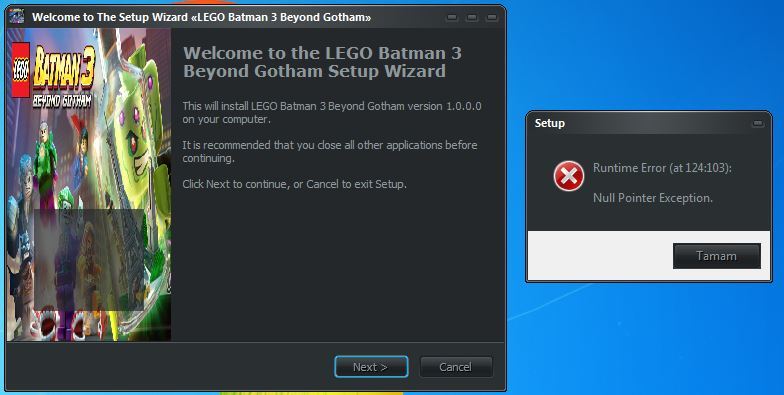
The first problem is that when there is a choice of language and I do cancel, I get an error message.
My second problem, I integrated the hardware setup page but I can not get enabled page indef components.
I attached the pictures you can see what I'm talking about and the script
thank you for your help

first problem:


second problem:


screen:
I would therefore like to create a page that will open before the directx components to make a page like this to choose the game that you want to pack install
eg I select Tomb Raider 2 only me and it will install only the setup-2.bin


script:
http://www85.zippyshare.com/v/VmDG0iq9/file.html

Last edited by alucard1973; 29-04-2015 at 13:01.
Reply With Quote
  #7  
Old 09-05-2015, 04:55
nhinchihap3 nhinchihap3 is offline
Registered User
 
Join Date: Feb 2014
Location: VietNam
Posts: 13
Thanks: 4
Thanked 2 Times in 2 Posts
nhinchihap3 is on a distinguished road
I have 10 file bin , 1 file = 3Gb
I want ask how to make auto install , i mean we don't need browse dvd ?
Sorry my bad english
Reply With Quote
  #8  
Old 09-05-2015, 09:40
Razor12911's Avatar
Razor12911 Razor12911 is offline
Noob
 
Join Date: Jul 2012
Location: South Africa
Posts: 3,754
Thanks: 2,191
Thanked 11,222 Times in 2,312 Posts
Razor12911 is on a distinguished road
There are instructions. Masks are supported I think. If you have ten files just do this data*.bin.
If your archive names are data1.bin data2.bin and so on.
Reply With Quote
  #9  
Old 11-05-2015, 14:29
belzack belzack is offline
Registered User
 
Join Date: Apr 2015
Location: UK
Posts: 1
Thanks: 0
Thanked 0 Times in 0 Posts
belzack is on a distinguished road
I get an error in line138 column1 identifier expected plz help and I didn't change anything
Reply With Quote
  #10  
Old 13-05-2015, 15:28
alucard1973 alucard1973 is offline
Registered User
 
Join Date: Apr 2015
Location: Madrid
Posts: 45
Thanks: 1
Thanked 3 Times in 3 Posts
alucard1973 is on a distinguished road
there is nobody who can help me to activate the components as shown? I unable to open an additional page in the blackbox, I would open a page like the audio and text language before directx components etc ... but I can not do I not understand why
thank you for your help
Reply With Quote
  #11  
Old 31-05-2015, 10:06
DrakeMcCain DrakeMcCain is offline
Registered User
 
Join Date: Sep 2014
Location: Turkey
Posts: 10
Thanks: 0
Thanked 8 Times in 5 Posts
DrakeMcCain is on a distinguished road
Blackbox Inno Setup Script Update

I have added some features to this script. So, I want to share it for you.

What's New?
--------------

1) Multi2 feature added. (English+Turkish) But, you can add your language, if you want.

2) Version information added.

PS: This version info is not game version. This version info is shown at file properties.

3) "MinVersion" code added. This code describes minumum Windows version that requires Setup can run.

But, you can remove it, if you want.

4) "UninstallDisplaySize" code added. This code describes game size that is shown at Program Add/Uninstall.

PS: This value must be in terms of bytes.

5) "PrivilegesRequired" code added. If you set this as "poweruser" or "admin" , setup will require admin rights. If you set this as "lowest", every user can run Setup; Setup won't require admin rights.

6) Ram detection feature added. To use this feature, you must move "kernel32.dll" into "include" folder. If the computer's ram size lower than ram size that you set, Setup will show message.

VERY IMPORTANT: This dll file checks max. usable memory, not installed memory size. So, if you have 4 gb ram and if you set ram limit to 4 gb; you will get insufficient ram error.

PS: This dll doesn't support ram sizes that are much than 8 GB.

PS-2: You must set ram size in terms of bytes.
Attached Files
File Type: rar Script.rar (93.0 KB, 147 views)

Last edited by DrakeMcCain; 02-06-2015 at 12:39.
Reply With Quote
The Following 2 Users Say Thank You to DrakeMcCain For This Useful Post:
Gehrman (04-06-2022), Simorq (31-05-2015)
  #12  
Old 04-06-2015, 09:33
punchao's Avatar
punchao punchao is offline
Registered User
 
Join Date: Apr 2014
Location: Barcelona
Posts: 156
Thanks: 112
Thanked 44 Times in 36 Posts
punchao is on a distinguished road
error below....

added directly to forum>pakrat2k2
Attached Images
File Type: png 2VpOTzj0.png (114.8 KB, 413 views)

Last edited by pakrat2k2; 04-06-2015 at 12:46.
Reply With Quote
  #13  
Old 04-06-2015, 12:43
pakrat2k2's Avatar
pakrat2k2 pakrat2k2 is offline
Moderator
 
Join Date: Apr 2005
Location: Canada
Posts: 7,209
Thanks: 3,040
Thanked 9,043 Times in 3,086 Posts
pakrat2k2 is on a distinguished road
Windows version uses numbers like below:

Second part of Windows Version as determined by Microsoft themselves. (Win2000 = 5.0) (Win XP = 5.1) (WinXP64 & WinServer2003 & 2003R2 = 5.2) (Win Vista & WinServer2008 = 6.0) (WinServer2008R2 & Win7 = 6.1) (WinServer2012 & Win8 = 6.2) (WinServer2012R2 & Win8.1 = 6.3) Numbers before the dot (.) are major & numbers after are minor.

SO in your image( from script ) number should be 5.1.3 NOT 5.1.2600

rather then always uploading to 3rd party site attatch directly to post
under manage attatchments.
Reply With Quote
  #14  
Old 08-06-2015, 05:19
ivanlakersss666 ivanlakersss666 is offline
Registered User
 
Join Date: Mar 2015
Location: Miami beach
Posts: 105
Thanks: 10
Thanked 11 Times in 11 Posts
ivanlakersss666 is on a distinguished road
I can add videos and slideshow at once?
Reply With Quote
  #15  
Old 08-06-2015, 07:52
ct-723d ct-723d is offline
Registered User
 
Join Date: Jun 2015
Location: United Kingdom
Posts: 1
Thanks: 0
Thanked 0 Times in 0 Posts
ct-723d is on a distinguished road
Question Blackbox script problems

Hello everyone, I am having a little problem with blackbox script. Everything works fine except I can not get it to install any components like directx, nivdiaphysx or framework. I have enable the buttons but for some reason, they will not install. I also downloaded and tried the Kurutucu black script to see if it something I am doing wrong, and it does the same thing. I went over the code, and nothing is missing. Any advise will be welcome.

Thank in advance
Reply With Quote
Reply


Posting Rules
You may not post new threads
You may not post replies
You may not post attachments
You may not edit your posts

BB code is On
Smilies are On
[IMG] code is On
HTML code is Off

Forum Jump

Similar Threads
Thread Thread Starter Forum Replies Last Post
INNO TROUBLESHOOT - Tutorials and Answers about INNO Setup REV0 Conversion Tutorials 129 21-05-2021 05:51
INNO TUTORIAL - Using Unicode and ANSI Versions of INNO Setup REV0 Conversion Tutorials 51 26-03-2015 06:57
Copy file with Inno Setup Script emrahcey Software 1 02-07-2010 08:24


All times are GMT -7. The time now is 23:59.


Powered by vBulletin® Version 3.8.11
Copyright ©2000 - 2026, vBulletin Solutions Inc.
FileForums @ https://fileforums.com