|
|
|
#1
 17-08-2016, 02:55
|
|||
|
|||
|
IMPORTANT!!! BUG FIX FOR UA v3030
Update: You should start compression with another version of UltraArc (2400, for example) and THEN start a v.3030. Strange thing but it helps, I hope there is gonna be a fix for this soon (since we have located the problem) Have nice day! Cheers! ;-) Update 2: Unfortunately, the compression fill start all over again after the end of compression. O_O 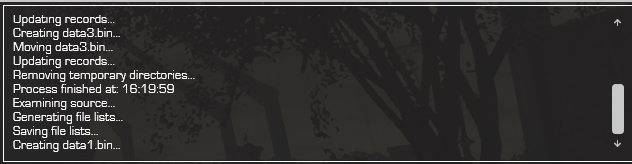 Update 3: System: Windows 7 Ultimate x64 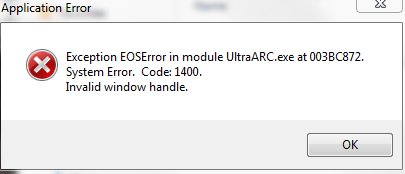
Last edited by Dante90; 17-08-2016 at 07:06. 
|
| The Following User Says Thank You to Dante90 For This Useful Post: | ||
kenzo34 (17-08-2016) | ||
| Sponsored Links |
|
#2
19-08-2016, 08:39
|
||||
|
||||
|
If only, I no longer have source of this anymore.
|
|
#4
19-08-2016, 14:42
|
||||
|
||||
|
can't do that as well. either way, old is gold.
|
|
#6
25-08-2016, 00:07
|
|||
|
|||
|
hey Guys!
i am little bit of confused, Which version of ultraARC's CIU is best to use? here is the screenshots of installer with different versions of CIU with same ini and resources I have some doubts 1.Langsbox arrow keys are not visible in any of versions bt i seen such in many conversions done by our conversion guru 2. LAngBox's controls never works such as show only and much more and there is no tutorial for CIU V2, so if anyone could make it then it is very beneficial for every member of fileforums. Best regards, Prince Gupta
|
|
#7
25-08-2016, 14:40
|
||||
|
||||
|
quick thought, in setup.ini
{installoptions} Lang=en,de,es,fr,it,pl,prbr,ru,tr ( 9 choices, will not match what you have an example ) [LangBox] showonly=9 those 2 numbers match NO arrows... make showonly= smaller number then arrows will show.
|
|
#9
26-08-2016, 11:12
|
||||
|
||||
|
center=0
0=no ( you set it where you want ) 1=yes ( it sets it to center of image based on Top=# )
|
| The Following User Says Thank You to pakrat2k2 For This Useful Post: | ||
houcine80 (29-08-2016) | ||
|
#10
31-08-2016, 10:44
|
|||
|
|||
|
no visible change even after making center=0
bt surprisingly if i input top in negative then i can been able to get the langBox at right place see image 2 can u explain why? i try to search source but can't see anything surprising and sorry for the late reply?
|
|
#12
26-09-2016, 07:45
|
|||
|
|||

hello, RG Mechanic's script is giving error even after the fix 2016 is applied.
Quote:
--EDIT-- that's perfectly fine, I'llleave it for others to take notice, you must use Inno Enhanced version for those scripts. Last edited by pakrat2k2; 26-09-2016 at 09:15.
|
|
#13
29-09-2016, 04:57
|
||||
|
||||
|
Hi
why not use version (UA_3030) with conversion ???
|
| The Following User Says Thank You to houcine80 For This Useful Post: | ||
MisterGames (03-10-2016) | ||
|
#15
29-09-2016, 05:25
|
||||
|
||||
|
Hi Razor
for FreeArc option (Method = 5) or (Method = exe, exe 2, delta, lzma) or both method works, and in version 3030 [Split] VolumeSizes=4470 ThresholdPercent=30 in version 2400 [Split] FirstVolumeSize=4470 CustomVolumeSize=4475 ThresholdPercent=30 Last edited by houcine80; 29-09-2016 at 06:46.
|
| The Following User Says Thank You to houcine80 For This Useful Post: | ||
MisterGames (03-10-2016) | ||
 |
|
|
 Similar Threads
|
||||
| Thread | Thread Starter | Forum | Replies | Last Post |
| BlackBox v2 | y_thelastknight | Conversion Tutorials | 567 | 11-03-2025 07:16 |
| Useful Dll for Inno Setup users | peterf1999 | Conversion Tutorials | 88 | 01-12-2017 16:00 |
| Total War Collection - 6xDVD9 [LZMA + INNO SETUP + CIU] | REV0 | PC Games - CD/DVD Conversions | 1 | 28-06-2015 17:00 |
| Total War Collection - 2xBLURAY [LZMA + INNO SETUP + CIU] | REV0 | PC Games - CD/DVD Conversions | 2 | 09-01-2013 18:02 |
| Total War Collection - 11xDVD5 [LZMA + INNO SETUP + CIU] | REV0 | PC Games - CD/DVD Conversions | 0 | 09-01-2013 16:38 |


 Hybrid Mode
