|
|
|
#1
|
||||
|
||||
|
The split function has been removed temporarily, I opted for compatibility with CLS-DISKSPAN of razor12911,
I will be able to integrate Universal CLS Generator 78372, I do not know yet if it's through the Tools menu or if it is automatically after compression (if the option is enabled). Version 0.9.8.5 is available, I included the folder "Masked Data Compressor 2.5" of the panker1992 project for demonstration purposes.
__________________
Practice makes perfect. |
| Sponsored Links |
|
#2
|
|||
|
|||
|
Remember, the cls generated with Universal CLS Generator requires to be in compression if you use it on decompression.
Instead of integrating the whole generator, you can generate some cls for methods that don't support stdio and add them to Arc GUI. Or, as you have source, you can add the generator directly to the program.
__________________
NOT AVAILABLE |
| The Following 3 Users Say Thank You to 78372 For This Useful Post: | ||
|
#3
|
||||
|
||||
|
Yes, I am thinking about the most suitable solution, thanks for the advice.
__________________
Practice makes perfect. |
|
#4
|
||||
|
||||
|
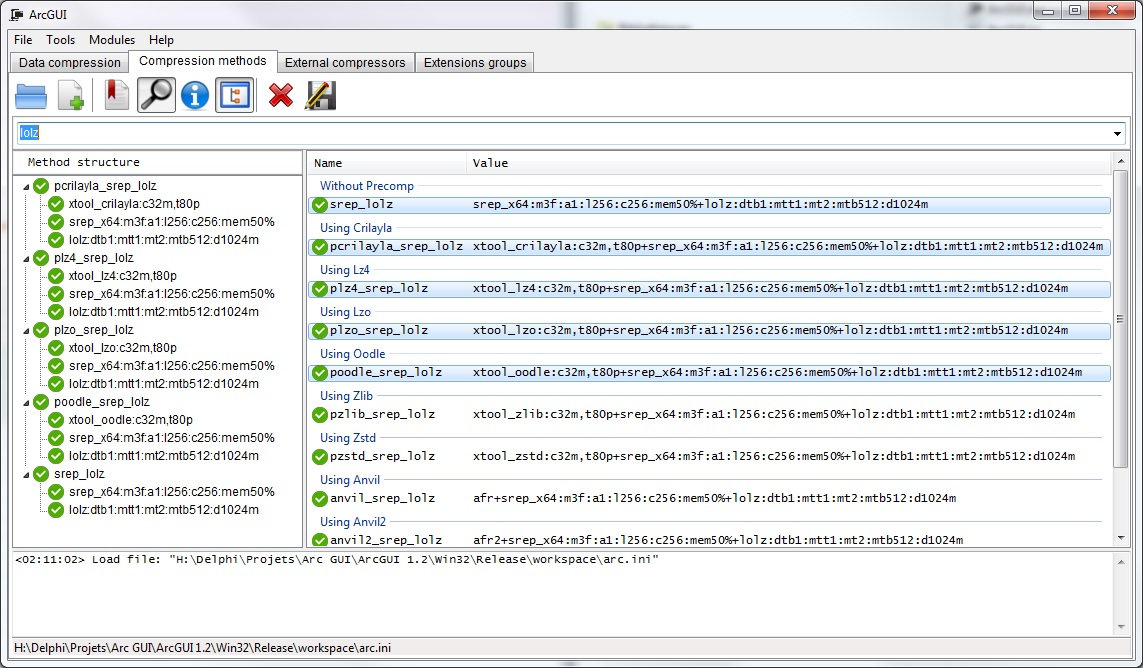
The next version will be clearly different from the previous one at least visually, the file manager has disappeared and the independent tabs have seen the day on the main interface.
A CLS tab has been added to support the encoding/decoding of the various libraries in the working folder. The creation of CLS will be possible and their editing should be possible.
__________________
Practice makes perfect. |
| The Following User Says Thank You to JRD! For This Useful Post: | ||
Simorq (21-12-2017) | ||
|
#5
|
||||
|
||||
|
An example of using CLS-DISKSPAN:
__________________
Practice makes perfect. |
|
#6
|
||||
|
||||
|
Sorry, I did not test the last share, this does not work because of the FREEARC commands that are managed internally by the application that are incompatible with the work of Panker,
I add the option solid archive for the Compatibility with CLS-Diskspan, please excuse me for this error, so I added an area where you can add your commands to ensure compatibility. I have improved the manager of external compressors, you can now create or edit external compressors with the format [external compressor: precomp043, precomp044], In order to quickly fix the problem, I'll soon be sharing the next version with CLS-Diskspan compatibility, the CLS creation feature will come a little later.
__________________
Practice makes perfect. |
|
#7
|
||||
|
||||
|
I will opt for an option in the settings of the application rather than by creating the method Diskspan:
__________________
Practice makes perfect. |
|
#8
|
|||
|
|||
|
Good Job Mate
![]() ![]() ![]() when you are using external compressors it becomes difficult to track decompression, so maybe an archive(Setup0.bin?) with all decomp exe(resources needed for decompression) can be created so that setup.exe can extract it before everything (in {tmp}) and walla we don't have to change every single script for a new compression also, we can know it's size beforehand so you can set disk span value accordingly |
| The Following User Says Thank You to Gupta For This Useful Post: | ||
JRD! (29-12-2017) | ||
|
#9
|
||||
|
||||
|
Thank you, I had already set up the system that copies the external compressors used, I have to revise it to integrate the management of CLS if it is used for compression.
Maybe I'll add a zone where you fill in the weight of the setup.exe, so you only have one value for the split, and add some presets: dvd5, dvd9... I have a little change the diskspan.dll of razor so what kind all the files in the same output directory, I will see to use the format "Setup-1.bin, Setup-2.bin", there are about fifteen changes to make, it should be functional in the evening or tomorrow. A big thank you to Razor12911 for his work!
__________________
Practice makes perfect. |
| The Following User Says Thank You to JRD! For This Useful Post: | ||
Simorq (30-12-2017) | ||
|
#10
|
||||
|
||||
|
Finally I will leave the original format, I just change the way to recovered the output path in order to be compatible with ArcGUI.
for those interested here are the changes: Code:
function IsRelativePath(const sPath: string): Boolean;
begin
Result:=True;
if Length(sPath) >= 2 then
Result:=sPath[2] <> ':';
end;
function ClsMain(operation: Integer; Callback: CLS_CALLBACK; Instance: Pointer): Integer; cdecl;
const
BuffSize = 64 * 1024;
var
CLS: TCLSStream;
SS: TSplitStream;
Bytes: TBytes;
X: Integer;
X8: Byte;
X64: Int64;
s: String;
FirstVolume, OtherVolume: Int64;
i: integer;
begin
Result := CLS_ERROR_GENERAL;
case (operation) of
CLS_COMPRESS:
begin
for i := 1 to ParamCount do
begin
if (ExtractFileExt(ParamStr(i)) = '.001') then
begin
Archive := ParamStr(i);
Break;
end;
end;
if IsRelativePath(Archive) then
Archive := ExtractFilePath(GetModuleName) + Archive;
Archive := ChangeFileExt(Archive, '');
SetLength(Bytes, 256);
FillChar(Bytes[0], Length(Bytes), #0);
X := Callback(Instance, CLS_GET_PARAMSTR, @Bytes[0], Length(Bytes));
s := StringOf(Bytes);
s := ReplaceStr(s, #0, '');
FirstVolume := ConvertToBytes(LeftStr(s, Pos(':', s) - 1));
OtherVolume := ConvertToBytes(ReplaceStr(s, LeftStr(s, Pos(':', s)), ''));
CLS := TCLSStream.Create(Callback, Instance);
CLS.WriteBuffer(FirstVolume, sizeof(FirstVolume));
Bytes := BytesOf(ExtractFileName(Archive));
X := Length(Bytes);
CLS.WriteBuffer(X, sizeof(X));
CLS.WriteBuffer(Bytes, Length(Bytes));
X64 := StreamToStream(CLS, CLS, BuffSize, FirstVolume);
if X64 = FirstVolume then
begin
X := CLS.Read(Bytes, Length(Bytes));
if X > 0 then
begin
X8 := 1;
CLS.WriteBuffer(X8, sizeof(X8));
SS := TSplitStream.Create(Archive, False, OtherVolume, OtherVolume);
SS.WriteBuffer(Bytes, X);
StreamToStream(CLS, SS, BuffSize);
SS.Free;
end else
begin
X8 := 0;
CLS.WriteBuffer(X8, sizeof(X8));
end;
end;
CLS.Free;
SetLength(Bytes, 0);
Result := CLS_OK;
end;
CLS_DECOMPRESS:
begin
try
if SrcPath = '' then
SrcPath := GetCurrentDir;
CLS := TCLSStream.Create(Callback, Instance);
CLS.ReadBuffer(FirstVolume, sizeof(FirstVolume));
CLS.ReadBuffer(X, sizeof(X));
SetLength(Bytes, X);
CLS.ReadBuffer(Bytes, Length(Bytes));
Archive := IncludeTrailingBackSlash(SrcPath) + StringOf(Bytes);
X64 := StreamToStream(CLS, CLS, BuffSize, FirstVolume);
if FirstVolume = X64 then
begin
CLS.ReadBuffer(X8, sizeof(X8));
if X8 = 1 then
begin
SS := TSplitStream.Create(Archive, True, OtherVolume, OtherVolume, MyDiskRequest);
StreamToStream(SS, CLS, BuffSize);
SS.Free;
end;
end;
CLS.Free;
SetLength(Bytes, 0);
Result := CLS_OK;
except
Result := CLS_ERROR_GENERAL;
end;
end;
else
Result := CLS_ERROR_NOT_IMPLEMENTED;
end;
end;
__________________
Practice makes perfect. |
|
#11
|
||||
|
||||
|
On this short video I add a folder to compressed which contains 2 files, one with the extension *.esm, the other with the extension *.mp4, the method used contains an extension group that is bound with a method,
the extension *.mp4 is located in the group "$void" this implies that the mp4 file will receive the srep64 compression method, so no have two files with 2 different compression methods and it works. I remove Precomp from the Max method in order to shorten the video... If someone has a remark he does not hesitate to share it with me. I need to update the language files, I will share a version in the day with the folder "masked Data Compressor 2.5" from Panker, the directory contains the categories files as you can see below: ![]() ![]() The CLS-Diskspan is not integrated with Arcgui at the moment, but the options present in the program implies its presence for it to work, it will have to use the version I have a little bit change. I'll post the DLL below the program. Thanks to Razor for his work! ![]() Sorry for the old-fashioned layout, when the version will be 100% functional, I'll make a great presentation page with big characters and colors like we do more since the invention of HTML
__________________
Practice makes perfect. |
|
#12
|
||||
|
||||
|
i applied full masked method: "/$text=ppmd/$jpeg=paq8pxd/$exe=exe2"
The result: Code:
G:\Delphi\Projets\Arc GUI\Arc GUI 0.9.8.7\Win32\Release\working_dir>arc a --logfile=C:\Temp\freearc.log -ma9 -ds -lc1024 -ld1024 -di -i1 -ep1 -ed -r -s -wE:\ArcGUI\Temp E:\ArcGUI\Output\Data.bin.001 -mdiskspan:10mb:10mb/$text=ppmd/$jpeg=paq8pxd/$exe=exe2 C:\Users\Arnaud\Desktop\Data FreeArc 0.67 (March 15 2014) Creating archive: E:\ArcGUI\Output\Data.bin.001 using diskspan:10mb:10mb, $text => ppmd:10:48mb, $jpeg => paq8pxd, $exe => dispack070 Memory for compression 450mb, decompression 450mb, cache 16mb Compressed 3 files, 39,415,777 => 10,485,792 bytes. Ratio 26.60% Compression time: cpu 0.03 sec/real 0.24 sec = 13%. Speed 164.91 mB/s All OK Code:
function SetDiskspanValuePosition(const sMethodValue, sDiskspanValue: string): string;
var
i: integer;
begin
if Length(sDiskspanValue) > 0 then
begin
i:=Pos('/$', sMethodValue);
if i > 0 then
begin
Result:=sMethodValue;
Insert(Copy(sDiskspanValue, 2, Length(sDiskspanValue)), Result, i);
end else
Result:=sMethodValue+sDiskspanValue;
end else
Result:=sMethodValue;
end;
Code:
ShowMessage('-m'+SetDiskspanValuePosition('/$text=ppmd/$jpeg=paq8pxd/$exe=exe2', '+diskspan:4460mb:4470mb'));
__________________
Practice makes perfect. Last edited by JRD!; 04-01-2018 at 23:55. |
|
#13
|
||||
|
||||
|
Quote:
Has this project been canceled? |
|
#14
|
||||
|
||||
|
Hi Simorq,
This is an example for those who want to implement cls-diskspan.dll in their program. This places the diskspan value before the part of the method that contains the groups. About cls-diskspan: The implementation in ArcGUI allows division into multiple DVDs or a custom size. The first volume size of the next archive is calculated by the size of the last previous volume, which greatly simplifies its use. If an error occurs during compression, it will retrieve information from the previous archive. About ArcGUI: I'm going to post version 1.15.1, it includes an automated compression method function that is based on the default values assigned to extension groups. With a simple click, you designate a default compression method for files whose extension is not part of the groups, it allows to apply the masks when it is necessary.
__________________
Practice makes perfect. Last edited by JRD!; 11-02-2019 at 13:53. |
|
#15
|
||||
|
||||
|
Updated
I must write for a long time a help file.... Some quick info; For favorite programs in the modules folder, add "module." in the name of the program to launch, the name of the menu "Modules -> External -> XXX" corresponds to the name of the folder in which your favorite program is located; for the repack project creation this is in development, used "Restore Game Structure" fonction from main menu to restore the structure after the loading of a project.
__________________
Practice makes perfect. |
| The Following 4 Users Say Thank You to JRD! For This Useful Post: | ||
![]() |
|
|
Similar Threads
|
||||
| Thread | Thread Starter | Forum | Replies | Last Post |
| Vista beta 2 blocking Starforce | ronandex | CD/DVD Copy Protections & Utilities | 4 | 31-05-2006 02:37 |
| Neverwinter Nights v1.66.8071 (Beta) | doomerdgr8 | PC Games | 1 | 28-05-2005 10:18 |
| Copying Socom2 Beta Is It Possible | dblue | PS2 Games | 6 | 14-10-2003 19:14 |
| OT: Opinion and BETA testers neded for my upcomming products! | krondike | PC Games | 3 | 06-10-2003 08:29 |
| PAL Patcher 0.93 Beta | Megalexxx | DC Games | 18 | 03-01-2003 09:23 |