|
|
|
#1
 07-01-2016, 00:43
|
||||
|
||||
 Massive Update
Masked compression Massive Update !!!
this project far exceeded my expectations, i wouldnt have believed that it would make even a scratch but it did. since you guys give something so do i, with almost 500 downloads i decided to give this project another go but before i go ahead and name the changes, I will have to thank Razor, Gozarck, Felice, Ramiro and many others that helped, troubleshooted and made inno for this project  [B] Changes Log : Updates on Inno, Decompression Tool and Masked Compression 1) bug fixes and corrections made on inno 2) all modes tested and working on decompression tool 3) removed zpaq to add nanozip stronger, denser and faster 4) added secondary support on nanozip now you can max compress with it entires games small note : doesnt show progress on Inno but it decomps successfully 5) removed lzham to add lzturbo (aka: lzt) inside. No reason, lzt is nice but needs work with stdin and stdout, i tried to add back in october but it didnt work 6) added Tiny Game Packer Script inside masked compression more of this in main post ( masks precomp msc srep all working flawlessly ) 7) precomp 0.42 support is now obsolete, precomp 0.42 is messy program, unstable and at some point unusable half the problems in this threads are from bad precomp management 8) reflate support is dropped as well, reflate as Razor stated 2 days ago is still under development even at this moment a working cls-reflate.dll doesnt exsist. Inno doesnt support reflate extraction !! Note: it works flawlessly if you rip games like i do !! Future Updates: 1) add reflate method in Inno 2) use the new precomp 4.4 3) add stdin and stdout to lzt 4) update bink Re-encoder, fix better menu , also add better options with some kind of help side by side 5) update zstd for windows Compression
__________________
My projects : Masked Compression, lzma2(xz) on Freearc, Zstd compressor for windows My optimizations : packjpg.exe, zstd, lzham, precomp-dev-0.45. 
|
| Sponsored Links |
|
#2
07-01-2016, 04:19
|
|||
|
|||
|
Panker1992, can you continue to give that last in no, which look like blackbox, I don't like WPI, and there are some people who also don't like, so can you please give me the in no which look like blackbox and which is supporting the updates you have done in the compression etc.
|
|
#3
07-01-2016, 04:21
|
||||
|
||||
|
Of course i can
 I will Upload it right away give me 5 minutes !!! i am preparing to release something new again It's very experimental but i like it Edit 1 ) black box inno is up i did it in haste let me know if it works
__________________
My projects : Masked Compression, lzma2(xz) on Freearc, Zstd compressor for windows My optimizations : packjpg.exe, zstd, lzham, precomp-dev-0.45. Last edited by panker1992; 07-01-2016 at 04:31.
|
|
#4
07-01-2016, 04:33
|
|||
|
|||
|
Quote:
And one suggestion - add the code on first page/post for the ram 4gb(I have this one), 6gb, 8gb for arc.ini Last edited by Amsal; 07-01-2016 at 04:38.
|
|
#5
07-01-2016, 04:40
|
||||
|
||||
|
Sorry as i said before i am not Inno Expert
i didnt make any of the Inno that i provided actually Razor did WPI and Kurutucu did the one you asked for. i can only make some modifications :/ Rinaldo and Razor are Script Experts, You can ask them although the scripts support my masked compression I will upload arc.ini with 4 8 12 and 16 gigs of ram so no worries
__________________
My projects : Masked Compression, lzma2(xz) on Freearc, Zstd compressor for windows My optimizations : packjpg.exe, zstd, lzham, precomp-dev-0.45.
|
| The Following User Says Thank You to panker1992 For This Useful Post: | ||
Amsal (07-01-2016) | ||
|
#6
07-01-2016, 04:43
|
|||
|
|||
|
Quote:
|
|
#7
07-01-2016, 04:52
|
||||
|
||||
|
4, 8 and 16 G ram optimize
yeah they are the same although download the newest ones just to be sure
the ones i uploaded today because i have uploaded updates on masked compression download everything new you see just to make sure you are compatible to every tool There goes the ini files with all optimizations
__________________
My projects : Masked Compression, lzma2(xz) on Freearc, Zstd compressor for windows My optimizations : packjpg.exe, zstd, lzham, precomp-dev-0.45. Last edited by panker1992; 07-01-2016 at 04:57.
|
|
#8
07-01-2016, 05:29
|
|||
|
|||
|
Quote:
|
|
#9
07-01-2016, 05:36
|
||||
|
||||
|
i have uploaded ram optimizations, check on them above
the files i provide are optimized for 12 gigs of ram so the error you get is ram related !!
__________________
My projects : Masked Compression, lzma2(xz) on Freearc, Zstd compressor for windows My optimizations : packjpg.exe, zstd, lzham, precomp-dev-0.45.
|
|
#10
07-01-2016, 05:48
|
||||
|
||||
|
you need to rename 4.ini ~> arc.ini
ahaa so a freearc remains, its from nanozip text compression, if it annoys you much you can dispose of it test either $text=nz without srep and rep or replace nz entirely with txtold although you will get worse compression in either case its your choice Solved by using nz alone so here it is $text=srep+rep:77mb+nz gets replaced by $text=nz positive is that ratio with nz alone is better so
__________________
My projects : Masked Compression, lzma2(xz) on Freearc, Zstd compressor for windows My optimizations : packjpg.exe, zstd, lzham, precomp-dev-0.45. Last edited by panker1992; 07-01-2016 at 06:03. Reason: Fixes
|
| The Following User Says Thank You to panker1992 For This Useful Post: | ||
Simorq (07-01-2016) | ||
|
#11
07-01-2016, 11:21
|
|||
|
|||
 Hello,Help
Masked Compression (Ultimate compression
 COMPUTER SPECIFICATIONS 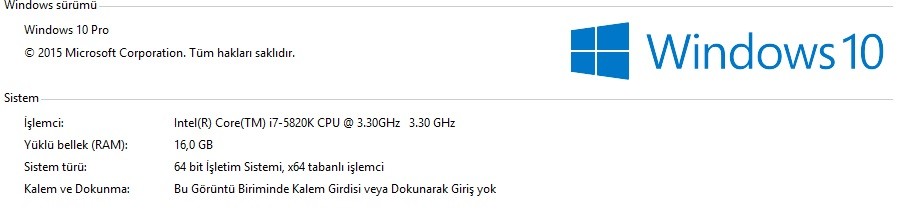 arc.ini [Compression methods] ; For Tiny SFX usage, dont use anything else other than that !!! sfx = msc+srep+delta+exe2+4x4:lzma:max/$text=dict  :128m+lzp:64m:105:d1m:s32:h22+ppmd:12: 192m :128m+lzp:64m:105:d1m:s32:h22+ppmd:12: 192msmartsfx = msc+srep+delta+exe2+4x4:lzma:max/$text=dict :128m+lzp:64m:105:d1m:s32:h22+ppmd:12: 192m/$precomp=precomp+msc+srep+delta+exe2+4x4:lzma:maxlzma2 = 4x4:lzma:a1:mfbt4:d256m:fb273:mc1000:lc8 oldtxt = dict :128m+lzp:64m:105:d1m:s32:h22+ppmd:12:192m; For Masked Compression Usage legacy = msc+srep+delta+exe2+lzma max = precomp:zl98:d1+msc+srep64+delta+exe2+xz/$jpgsolid=jpg+zstd/$void=srep64+zstd/$text=nz optimal = msc+srep64+delta+exe2+xz/$jpgsolid=jpg+zstd/$void=srep64+zstd/$text=nz sonido = msc+srep64+delta+exe2+zstd/$jpgsolid=jpg+zstd/$void=srep64+zstd/$text=nz smartmax = msc+srep64+delta+exe2+xz/$jpgsolid=jpg+zstd/$void=srep64+zstd/$text=nz/$precomp=precomp:zl98:d1+msc+srep64+delta+lz77 smartlzt = msc+srep64+delta+exe2+lzt/$jpgsolid=jpg+zstd/$void=srep64+zstd/$text=nz/$precomp=precomp:zl98:d1+msc+srep64+delta+lzt devastate = precomp:zl98:d1+msc+srep64+delta+exe2+nzmax/$jpgsolid=jpg+zstd/$void=srep64+zstd/$text=nz ; if you want to add them for custom usage txt = srep64+nz void = srep64+zstd jpeg = jpg+zstd [External compressor:srep] header = 0 packcmd = srep -m3f -a1 $$arcdatafile$$.tmp $$arcpackedfile$$.tmp unpackcmd = srep -d -s -- <stdin> <stdout> [External compressor:srep64] header = 0 packcmd = srep64 {options} -m3f -d1g -a2 $$arcdatafile$$.tmp $$arcpackedfile$$.tmp unpackcmd = srep64 -d -s -- <stdin> <stdout> [External compressor:xz] header = 0 packcmd = 7z a -txz -an -mcrc=0 -m1=lzma2:d450m:fb=273:mf=bt4:mc=1000000:lc=4:lp=0 -mmt=4 -mx9 -si -so <stdin> <stdout> unpackcmd = dec x -txz -an -y -si -so <stdin> <stdout> [External compressor recomp]header = 0 packcmd = precomp -slow -t-j -o$$arcpackedfile$$.tmp $$arcdatafile$$.tmp unpackcmd = precomp -o$$arcdatafile$$.tmp -r $$arcpackedfile$$.tmp [External compressor:reflate] header = 0 packcmd = reflate -process $$arcdatafile$$.tmp $$arcpackedfile$$.tmp unpackcmd = reflate -restore123 $$arcpackedfile$$.tmp $$arcdatafile$$.tmp [External compressor:zstd] header = 0 packcmd = zstd -f -9 $$arcdatafile$$.tmp $$arcpackedfile$$.tmp unpackcmd = zstd -d -f <stdin> <stdout> [External compressor:rep,lzma,4x4,delta,exe] header = 0 packcmd = fazip -i0 compress:{compressor}{  ption} <stdin> <stdout> ption} <stdin> <stdout>unpackcmd = fazip -i0 decompress:{compressor}{ ption} <stdin> <stdout>[External compressor:jpg] mem = 10 packcmd = packjpg -np $$arcdatafile$$.jpg unpackcmd = packjpg -np $$arcdatafile$$.pjg datafile = $$arcdatafile$$.jpg packedfile = $$arcdatafile$$.pjg solid = 0 [External compressor:lz77] header = 0 packcmd = 7z a -txz -an -mcrc=0 -m1=lzma2:d900m:fb=273:mf=bt4:mc=10000:lc=4:lp=0 -mmt=2 -mx9 -si -so <stdin> <stdout> unpackcmd = dec x -txz -an -y -si -so <stdin> <stdout> [External compressor:msc] ;Alt: c -v -f Forced //-frog=9 use this instead of -tak=9 header = 0 packcmd = MSC c -v -wav=1 -raw=1 -bmp=1 -ddsraw=1 -ddsdxt=1 -mp3=1 -bmf=9s -tak=9 -dxt=1 -lzma=hc4,lc8,lp2,pb2,fb273,mc1000 $$arcdatafile$$.tmp $$arcpackedfile$$.tmp [External compressor:nz] ;options -cc=best -m3g=memory -nm packcmd = nz a -r -v -cc -m3g -br128m -bw128m -p2 -t0 -nm $$arcpackedfile$$.tmp.nz $$arcdatafile$$.tmp unpackcmd = nz x -m1400m -t0 -p0 $$arcpackedfile$$.tmp.nz $$arcdatafile$$.tmp datafile = $$arcdatafile$$.tmp packedfile = $$arcpackedfile$$.tmp.nz [External compressor:lzt] ;x64 version ;fast: -32 ;max:-p1 -49 -b200 packcmd = lzt -p1 -49 -b200 $$arcdatafile$$.tmp $$arcpackedfile$$.tmp unpackcmd = lzt -d $$arcpackedfile$$.tmp $$arcdatafile$$.tmp datafile = $$arcdatafile$$.tmp packedfile = $$arcpackedfile$$.tmp [External compressor:nzmax] ;options -cc=best CM algo -m3g=memory -nm ; -cO fast option BWT algo packcmd = nz a -r -v -cc -m8g -br128m -bw128m -p4 -t0 -nm $$arcpackedfile$$.tmp.nz $$arcdatafile$$.tmp unpackcmd = nz x -m1400m -t0 -p0 $$arcpackedfile$$.tmp.nz $$arcdatafile$$.tmp datafile = $$arcdatafile$$.tmp packedfile = $$arcpackedfile$$.tmp.nz
|
|
#12
07-01-2016, 11:25
|
||||
|
||||
|
it only appears in windows 10 guys, i have no problems in windows 8.1
ramazan and lolaya both your windows 10 produce this error test method -mmax or reverse exe2 and delta experiment with this i dont have windows 10 to try  Edit 1) there you go it works perfectly ....... what are you doing wrong ? edit 2) Both of you and windows 10 user try devastate just to clarify if this works
__________________
My projects : Masked Compression, lzma2(xz) on Freearc, Zstd compressor for windows My optimizations : packjpg.exe, zstd, lzham, precomp-dev-0.45. Last edited by panker1992; 07-01-2016 at 11:41.
|
|
#13
07-01-2016, 11:42
|
|||
|
|||
|
Hello
I have a great interest in their work panker1992 in the work that I'm trying to follow the forum who is in a lot of Labor and help you the friends who I owe a debt of thanks to updates and future updates that you're giving a place in gelek: I'm interested to know when Deni....
1) Add a method in the related Inno 2) use the new building the meta-DTD 4.4 3) add the string to stdout and lzt 4) update the bin Re-encoder, fix better menu , better options with the help of some kind should also add side by side 5) update for Windows zstd Compression
|
| The Following 2 Users Say Thank You to ramazan19833 For This Useful Post: | ||
panker1992 (07-01-2016), Simorq (09-01-2016) | ||
|
#14
07-01-2016, 12:48
|
||||
|
||||
|
windows defender makes this problem ??
good to know
__________________
My projects : Masked Compression, lzma2(xz) on Freearc, Zstd compressor for windows My optimizations : packjpg.exe, zstd, lzham, precomp-dev-0.45.
|
|
#15
07-01-2016, 13:12
|
||||
|
||||
|
generally windows defender is useless, self compiled programs are scanned and killed
programs i have compiled myself 7z.exe and reduced version zstd packjpg lz77 custom version lzham maybe more most of them are found inside my compression pack so no wonder that is doent work :/ small bug fix, extract this to the v2 folder and replace precomp.exe edit update 1 moved to main post
__________________
My projects : Masked Compression, lzma2(xz) on Freearc, Zstd compressor for windows My optimizations : packjpg.exe, zstd, lzham, precomp-dev-0.45. Last edited by panker1992; 11-01-2016 at 10:51.
|
 |
|
|
 Similar Threads
|
||||
| Thread | Thread Starter | Forum | Replies | Last Post |
| Best Compression Format | DRAGoN.X | Chit Chat | 11 | 07-09-2017 23:13 |
| Dragon Age: Origins Ultimate Edition 3xDVD5 [CIU 2.0.2] | NamelessOne | PC Games - CD/DVD Conversions | 16 | 03-03-2017 11:38 |
| compression -msrep+rep+delta+nzip | Danik1B9 | Conversion Tutorials | 11 | 21-12-2014 08:13 |
| Borderlands 2: Ultimate Vault Hunter Edition - 3xDVD5 [ALL DLCs + CIU V2] | REV0 | PC Games - CD/DVD Conversions | 7 | 06-07-2013 03:14 |
| Fallout New Vegas Ultimate Edition 3xDVD9 to 2xDVD5 1LANGUAGE | senseman | PC Games - CD/DVD Conversions | 29 | 04-06-2013 10:36 |


 Hybrid Mode
