Go Back   FileForums > Game Backup > PC Games > PC Games - CD/DVD Conversions > Conversion Tutorials
Register FAQ Community Calendar Today's Posts Search

Reply
 
Thread Tools Search this Thread Display Modes
  #1  
Old 12-09-2019, 10:34
Kitsune1982's Avatar
Kitsune1982 Kitsune1982 is offline
Registered User
 
Join Date: Jun 2011
Location: USA
Posts: 110
Thanks: 5
Thanked 86 Times in 47 Posts
Kitsune1982 is on a distinguished road
hey guys, i figured out how to make an almost full screen setup wizard with CIU. just go into setup.ini and under 'Setup Interface' and 'Autorun Interface' change the 'width and height' to something like Width=1038 and Height=650
or if you want more room to position your button in, Width=1093 Height=750.
dont forget you will need to change the actual image sizes of your png autorun/installer1/installer2/installer3/etc pictures using a freeware or commercial image editor. I recommend irfanview for basic resizing but if you really want to get fancy, you can use photoshop. of course there are plenty of other freeware and payware image editors, i just find these two the easiest to use. also for the small installer, if you want a big small installer image, change 'Width and Height' under small installer to 630 x 330 respectively. Also keep in mind when you adjust the picture, you may also want to use razor12911's graphicstudio to adjust the left/top position of the buttons, but since there is no actual gui to do this, it will take trial and error. i am going to write a quick tutorial and attach it to the next post on how to do this.

paws out.

-Kitsune

Last edited by Kitsune1982; 12-09-2019 at 11:23.
Reply With Quote
Sponsored Links
  #2  
Old 12-09-2019, 11:25
Kitsune1982's Avatar
Kitsune1982 Kitsune1982 is offline
Registered User
 
Join Date: Jun 2011
Location: USA
Posts: 110
Thanks: 5
Thanked 86 Times in 47 Posts
Kitsune1982 is on a distinguished road
sorry for making a second post. i finished the tutorial and am attaching it along with my setup.ini and sample buttons/images for my CIU custom button tutorial in a single 7zip archive. hope you all find it useful!

Paws out.

-Kitsune1982
Reply With Quote
The Following User Says Thank You to Kitsune1982 For This Useful Post:
devil777 (29-09-2019)
  #3  
Old 17-09-2019, 11:33
andreiutzu21 andreiutzu21 is offline
Registered User
 
Join Date: Jul 2013
Location: Romania
Posts: 79
Thanks: 229
Thanked 25 Times in 19 Posts
andreiutzu21 is on a distinguished road
uninstall progressbar

hello to everyone . i have a issue . when i uninstall game progressbar is not on centre. what changes i have to make ????
Reply With Quote
The Following User Says Thank You to andreiutzu21 For This Useful Post:
Cesar82 (19-09-2019)
  #4  
Old 25-10-2019, 03:28
houcine80's Avatar
houcine80 houcine80 is offline
Registered User
 
Join Date: Jul 2013
Location: Save Palestine
Posts: 873
Thanks: 3,107
Thanked 3,913 Times in 570 Posts
houcine80 is on a distinguished road
Quote:
Originally Posted by Cesar82 View Post
Hello people...

Any of you would have the CI source code (Before being CIU) ....
I needed a very early version, specifically version 4.2.0.0. I searched the forum and found nothing.
I don't know if Yener shared this version with anyone, but he used it on some old conversions like Driver San Francisco and FIFA 2012.
If anyone has this source code and can share it would be very useful for me.

Thanks!
I do not have it sorry
Reply With Quote
The Following User Says Thank You to houcine80 For This Useful Post:
Cesar82 (25-10-2019)
  #5  
Old 25-10-2019, 17:46
Grumpy's Avatar
Grumpy Grumpy is offline
Moderator
 
Join Date: Jun 2004
Location: Australia
Posts: 5,695
Thanks: 1,256
Thanked 1,851 Times in 812 Posts
Grumpy is on a distinguished road
Quote:
Originally Posted by Cesar82 View Post
Hello people...

Any of you would have the CI source code (Before being CIU) ....
I have sent you a PM
__________________
Can't find a Game Conversion? Check the 'Conversion INDEX'
Reply With Quote
The Following 3 Users Say Thank You to Grumpy For This Useful Post:
Cesar82 (25-10-2019), houcine80 (26-10-2019), mausschieber (26-10-2019)
  #6  
Old 26-10-2019, 08:33
andreiutzu21 andreiutzu21 is offline
Registered User
 
Join Date: Jul 2013
Location: Romania
Posts: 79
Thanks: 229
Thanked 25 Times in 19 Posts
andreiutzu21 is on a distinguished road
Quote:
Originally Posted by Cesar82 View Post
CIU 3.0.0.0.u6

@KakoR is a bit busy at the moment, and has no time to perform tests on the new version of CIU.
So I decided to share with you the new version of the CIU source code right here.
If no bugs are reported in a while this file will be moved to the main post (For now the file can only be here in this post).

NOTES:
I removed the "FIFA 19 Cas Decryption Tool + Prepressor" tool from the "RazorTools" folder because most anti-viruses detect it as viruses (False Positive).
Those who need this tool just extract the contents of the tool file into the main CIU source code folder.
I will be posting the tool file in a separate attachment.

until now one small problem . when creator mode active there is a slide PROGRESS BAR MODE ACTIVATED can you disable that function ?
Reply With Quote
  #7  
Old 27-10-2019, 13:48
mausschieber's Avatar
mausschieber mausschieber is offline
Conversion Designer
 
Join Date: Jan 2011
Location: germany
Posts: 4,329
Thanks: 6,768
Thanked 11,735 Times in 3,239 Posts
mausschieber is on a distinguished road
Quote:
Originally Posted by Cesar82 View Post

@mausschieber I think it will be possible to include gif animation in CIU with this same library that I used in splash.
Not tested, but I believe it works and does not prevent access to the buttons. I will test later.
That's where amazing thanks for you great work on the CIU
__________________
It would be nice if you appreciate my work with the thanks Button
Reply With Quote
  #8  
Old 28-10-2019, 09:05
Simorq's Avatar
Simorq Simorq is offline
Registered User
 
Join Date: Mar 2014
Location: Iran
Posts: 642
Thanks: 3,602
Thanked 1,308 Times in 464 Posts
Simorq is on a distinguished road
Quote:
Originally Posted by Cesar82 View Post
@Simorq thanks for the info. Test this Setup.exe...
If anyone has a "native 4K" monitor please test this setup.exe to see if it is displaying the correct size and also without blurring the installer.


Thanks!
Very good and no problem.
Reply With Quote
The Following User Says Thank You to Simorq For This Useful Post:
Cesar82 (28-10-2019)
  #9  
Old 03-09-2020, 19:33
adammail14 adammail14 is offline
Registered User
 
Join Date: Jul 2020
Location: malaysia
Posts: 30
Thanks: 25
Thanked 0 Times in 0 Posts
adammail14 is on a distinguished road
Quote:
Originally Posted by Cesar82 View Post
@adammail14
You have tried other, simpler methods just to see if errors also occur?
I mean using one of the methods from 1 to 5 for example.
Or just test putting in custom method [21] and put "srep" (without quotes).

The link method you are trying to use must be from an older zstd.
It also displays this error here because the parameters are not supported.
Perhaps the parameter has changed in newer versions of zstd, or used zstd from another developer before.
The maximum supported compression value is 19 (not 22) and "-ultra" (not "ultra").
ohh so thats how it gets error

Quote:
Try it like this, here it is compressing using this method in Custom method option [21]:
Code:
srep:m5f:a2+zstd:-ultra:19
ok i'll try right now.

and another question, What is the difference between DVD and BD?
is there a memory difference?
is BD better than DVD?
Reply With Quote
  #10  
Old 31-10-2020, 06:43
alucard1973 alucard1973 is offline
Registered User
 
Join Date: Apr 2015
Location: Madrid
Posts: 45
Thanks: 1
Thanked 3 Times in 3 Posts
alucard1973 is on a distinguished road
Quote:
Originally Posted by Cesar82 View Post
Here is an update CIU 3.0.0.1.b7.u3 with small fixes.
I updated ZStandard to the latest version, so I think it would be good if someone tests it out.
Other corrections are reported in the changelog.
Any bug found please inform me by PM or comment here.
Thank you for understanding.
I just tested this beta 3 version, no more decompression works, I tested on Z the Game that I created yesterday and that it worked, but after updating this new version, it does not decompress anything anymore
Reply With Quote
  #11  
Old 01-11-2020, 07:55
mausschieber's Avatar
mausschieber mausschieber is offline
Conversion Designer
 
Join Date: Jan 2011
Location: germany
Posts: 4,329
Thanks: 6,768
Thanked 11,735 Times in 3,239 Posts
mausschieber is on a distinguished road
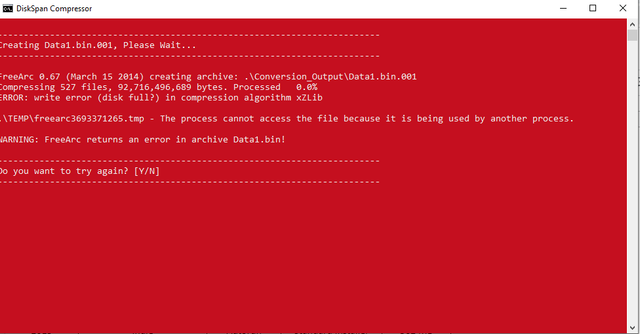
anybody have this error with these option in Borderlands 3
ue4dt+xzlib+srep:m3f+4x4:lzma
__________________
It would be nice if you appreciate my work with the thanks Button
Reply With Quote
  #12  
Old 03-11-2020, 18:59
Kitsune1982's Avatar
Kitsune1982 Kitsune1982 is offline
Registered User
 
Join Date: Jun 2011
Location: USA
Posts: 110
Thanks: 5
Thanked 86 Times in 47 Posts
Kitsune1982 is on a distinguished road
**post edit: never mind, i found the problem. it was with my setup.ini file not the dxfilters. i had only wanted to know if i could disable them for conversions without videos but i fixed the issue. i must have been using a setup.ini script or isscript that was not compatible with the latest release of CIU. everything is fine now.**

Last edited by Kitsune1982; 03-11-2020 at 19:19.
Reply With Quote
  #13  
Old 04-11-2020, 11:19
Kitsune1982's Avatar
Kitsune1982 Kitsune1982 is offline
Registered User
 
Join Date: Jun 2011
Location: USA
Posts: 110
Thanks: 5
Thanked 86 Times in 47 Posts
Kitsune1982 is on a distinguished road
Cesar, thank you for your assistance with my issue. I also discovered i indeed did not have all the proper codecs installed. i updated my klite mega codec pack and made sure LAV splitters and all required codecs were installed this time. i then replaced all the source setup and autorun files with my own including my downscaled mp3 and then tried to rerun setup and amazingly it worked!!
even turning off 'addDXFilter' in setup.ini did not return any errors plus i got the tiny setup exe size i wanted. thanks for your help, i never would have guessed it was me not having an updated codec pack installed.

PS - Here is the result of my downscaled mp3 size - Original in package: 14 mb for Music1.mp3 and MusicSI.mp3
After removing both and downscaling my autorun music to 64 bits and compressing pngs/wavs/etc, my music1.mp3 for a 1 min 12 sec clip was 504 kb and the output
setup.exe was 7 mb even with the proper encoder/decoders set up. cheers

-Kitsune
-

Last edited by Kitsune1982; 04-11-2020 at 11:22.
Reply With Quote
  #14  
Old 05-11-2020, 03:38
alucard1973 alucard1973 is offline
Registered User
 
Join Date: Apr 2015
Location: Madrid
Posts: 45
Thanks: 1
Thanked 3 Times in 3 Posts
alucard1973 is on a distinguished road
Smile

Quote:
Originally Posted by cesar82 View Post
@alucard1973, as far as i could see you have two versions of the game and want to check only one component at a time (exclusive);
if you use exclusive one of the checkboxes/radiobuttons must be checked by default.
Code:
[component1]
checked=1
i think the error is in the component number that both arc has the same component id 1 (check red color number):
Code:
[extractsettings]
arcfile1=setup1.cab;destdir:{app}\steamapps\common\final fantasy vii;type:arc;disk:1;comp:1
arcfile2=setup1nm.cab;destdir:{app}\steamapps\common\final fantasy vii;type:arc;disk:1;comp:1
arcfile3=setup1steam.cab;destdir:{app}\steamapps;type:arc;disk:1
arcfile4=setup1steamico.cab;destdir:{pf32}\steam\steam\games;type:arc;disk:1
i just tested and it works
thank you cesar82
Reply With Quote
  #15  
Old 05-11-2020, 03:41
alucard1973 alucard1973 is offline
Registered User
 
Join Date: Apr 2015
Location: Madrid
Posts: 45
Thanks: 1
Thanked 3 Times in 3 Posts
alucard1973 is on a distinguished road
Quote:
Originally Posted by alucard1973 View Post
i just tested and it works
thank you cesar82
last point
for the register, how i should do to set that the key is for comp1 and another key for comp2?
Reply With Quote
Reply


Posting Rules
You may not post new threads
You may not post replies
You may not post attachments
You may not edit your posts

BB code is On
Smilies are On
[IMG] code is On
HTML code is Off

Forum Jump

Similar Threads
Thread Thread Starter Forum Replies Last Post
INDEX - Conversion Tutorial Index Razor12911 Conversion Tutorials 5 11-06-2020 02:05
[GSERIES] Custom Installer Ultimate V2g Gupta Conversion Tutorials 226 01-06-2018 13:12
Crysis 3 DVD9 to 3xDVD5 Custom Installer spawniectes PC Games - CD/DVD Conversions 79 31-08-2017 07:19


All times are GMT -7. The time now is 07:35.


Powered by vBulletin® Version 3.8.11
Copyright ©2000 - 2026, vBulletin Solutions Inc.
FileForums @ https://fileforums.com