|
|
|
#1
 31-10-2014, 09:52
|
|||
|
|||

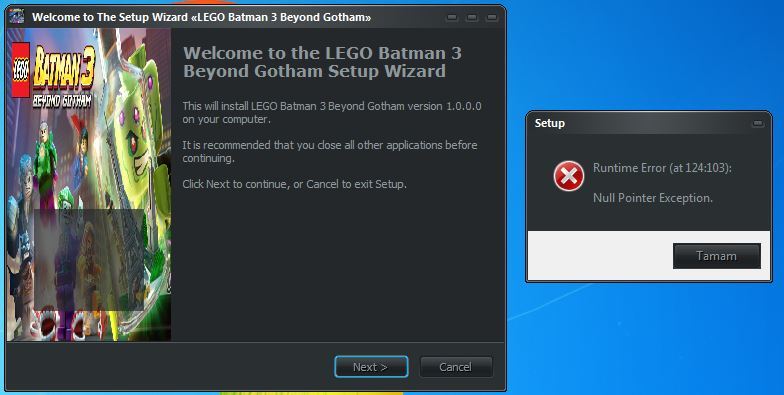
Hello i have 3 issues,..please fix them and help me.
FIRST :- In main.iss file i am setting "#define AppSize "1640" " but when installing game then it's showing "Game Space 1 Gb, Total Space Needed 1Gb" But my game size is 1.64 gb ,..so please help me to fix the error. http://i.imgur.com/KaVWxEM.jpg ======================================= SECOND :- i want to remove nvidia phyx and framework from installing (redist). help me to disable them and hide that 2 options. http://i.imgur.com/leNdU7m.jpg ======================================= THIRD :- i want to change right side upper corner 3 signs to good one. http://i.imgur.com/2u8HNw5.jpg ======================================= Attaching my main.iss file,..please fix it. Please help me. thanks gods. 
|
| Sponsored Links |
|
#3
31-10-2014, 18:33
|
|||
|
|||
|
How to fix
#define AppSize = 18600 but when run setup it only show 18gb (not 18.6gb) You can fix this main help me Dante  again ! thanks for everything 
Last edited by minh_k43sj; 31-10-2014 at 19:03.
|
|
#4
31-10-2014, 20:26
|
|||
|
|||
|
Quote:
and : - 18gb real is 18.432  => i get it => i get it- 600x1024=614,400 => what the 600x1024 ? i don't know - 18.432+614,400 = put this size on #define AppSize ?? Last edited by minh_k43sj; 31-10-2014 at 20:31.
|
|
#5
31-10-2014, 20:45
|
|||
|
|||
|
just remove the round to get the decimal
Code:
Function NumToStr(Float: Extended): String;
Begin
  Result:= Format('%.3n', [Float]); StringChange(Result, ',', '.');
  while ((Result[Length(Result)] = '0') or (Result[Length(Result)] = '.')) and (Pos('.', Result) > 0) do
  SetLength(Result, Length(Result));
End;

Function MbOrTb(Byte: Extended): String;
begin
if Byte < 1024 then Result:= NumToStr(Byte) + ' MB' else
  if Byte/1024 < 1024 then Result:= NumToStr((Byte/1024*100)/100) + ' GB' else
     Result:= NumToStr(((Byte/(1024*1024))*100)/100) + ' TB'
end;
Last edited by Dante1995; 31-10-2014 at 20:58.
|
|
#6
01-11-2014, 08:49
|
|||
|
|||
|
How to fix show my language ?
Đồng ý : correct with my language Đô`ng y' : how to fix to Đồng ý I use inno setup asi + unicode 
|
|
#7
02-11-2014, 10:35
|
|||
|
|||
|
How Can Make The Script Accept Srep64 & Lzma64 , Please Help Me
|
|
#8
10-11-2014, 22:23
|
||||
|
||||
|
Quote:
@texes06 Internal compression; I don't think it is supported. Last edited by Razor12911; 10-11-2014 at 22:31.
|
|
#9
06-11-2014, 03:15
|
|||
|
|||
|
Hi Kurutucu...
I need your help with something. I want to compress the game 35 Gb. I have this game as DVD5 "Setup1.B of = 4.7 Gb, 4.7 Gb = Setup2.B's like" I want to compress. Where in which you can help and I will make changes to the files I'm so glad you gave. Thank You in advance ...
|
|
#10
10-11-2014, 17:16
|
|||
|
|||
|
Is there any way to force the installer to unpacking files "on the fly". I mean instead of unpacking the files one by one arc -> SREP -> PCF -> arc -> the relevant data on the hard drive, unpack it in RAM to increase the speed of installation.
For packing games mostly I use Kurutucu Compresor with these two commands: Code:
arc a -ep1 -r -ed -lc2048 -ld1024 -mt8 -w. \ -msrep + lzma: a1: mfbt4: d158m: fb273: MC1000: LC8 arc a -ep1 -r -ed -lc2048 -ld1024 -mt8 -w. \ -mprecomp + SREP + lzma: a1: mfbt4: d158m: fb273: MC1000: LC8 Is there any way to temporary files (SREP, PCF, etc.) were unpacked directly in RAM, and appropriate files from the game directly on the hard drive? Last edited by hydefromt70s; 10-11-2014 at 18:21.
|
|
#11
10-11-2014, 22:19
|
||||
|
||||
|
Nope, you can't wanna extract on using ram memory bro, precomp files are normally big.I those methods extract on the fly for my installers.
|
|
#15
14-11-2014, 06:12
|
||||
|
||||
|
Quote:
|
 |
|
|
 Similar Threads
|
||||
| Thread | Thread Starter | Forum | Replies | Last Post |
| INNO TROUBLESHOOT - Tutorials and Answers about INNO Setup | REV0 | Conversion Tutorials | 129 | 21-05-2021 05:51 |
| INNO TUTORIAL - Using Unicode and ANSI Versions of INNO Setup | REV0 | Conversion Tutorials | 51 | 26-03-2015 06:57 |
| Copy file with Inno Setup Script | emrahcey | Software | 1 | 02-07-2010 08:24 |




 Hybrid Mode
