|
|
|
#1
 07-05-2021, 14:41
|
||||
|
||||
 BeamNG.drive
BeamNG.drive [3xDVD5]
Credits: --CIU By:Yener90 --InstallerScript: CIU 3.0.0.1 --Contributors:BAMsE; Razor12911; Simorq; KaktoR; Cesar82 CIU 3.0.0.1 --CLS-DiskSpan.dll R3 by Razor12911, modified version by Cesar82 --DiskSpan_GUI V2+ by Cesar82 Graphic found Ingame and Online Arts by mausschieber At Request from ostallica89 Info: Code:
---------------------------------------------------------------------------- ----------------------- CONVERSION DATE 30.12.2024 ------------------------- ---------------------------------------------------------------------------- 11:57:38 - You have chosen the DVD5 type for the media size. 11:57:38 - ISO images will not be created when conversion is complete. 11:57:38 - The computer will remain on when the conversion is complete. 11:57:38 - Selected ARC/DS method for Data1a-01.bin was: xtool:mzlib+srep_new:1+4x4:b64mb:lzma:ultra:64m:bt4:fb273:lc8:mc1000000 ---------------------------------------------------------------------------- 11:57:39 - Compression initialized in 30.12.2024 at 11:57:39. 11:57:48 - Starting Data1a-01.bin archive creation. 12:38:57 - Moving Data1a-01.bin » Data1a-03.bin files to media folder. 12:39:00 - Compression finished in 30.12.2024 at 12:39:00. ---------------------------------------------------------------------------- 12:39:00 - Getting size of the game: BeamNG Drive 12:39:00 - » Installation folder size: 51,70 GB 12:39:00 - » Compressed game size: 12,22 GB (Ratio 23.63%) ------------------------------------------------------------------------------- 12:39:00 - Overall input size: 51,70 GB 12:39:00 - Overall output size: 12,22 GB (Ratio 23.63%) 12:39:00 - Overall conversion time: 00:41:20 12:39:00 - Overall conversion discs: 3 DVD5 ------------------------------------------------------------------------------- Code:
Version 1.0.0 - Initial Release (30 views before); Version 1.0.1 - Updated to new Script and DSG ; Instructions: 1.-- Install Game, update to latest version + No-DVD. 2.-- Download the Conversion and extract to HD, (not in game folder) 2a.- Move _CommonRedist to Conversion output folder. (Last DVD) Code:
[Launch1]
-----------------------------------------------------
Name=DirectX (Jun 2010)
Exe1={src}\_CommonRedist\DirectX\Jun2010\DXSETUP.exe
Argument=/silent
BeforeInstall=0
Checked=0

[Launch2]
-----------------------------------------------------
Name=Microsoft Visual C++ 2019
Exe1={src}\_CommonRedist\vcredist\2019\VC_redist.x86.exe
Exe2={src}\_CommonRedist\vcredist\2019\VC_redist.x64.exe
Argument=/passive /norestart
BeforeInstall=0
Checked=0
4.-- Test the conversion, before burning ISO.
__________________
It would be nice if you appreciate my work with the thanks Button Last edited by mausschieber; 30-12-2024 at 03:57. Reason: Updateed to new Script and DSG 
|
| The Following 8 Users Say Thank You to mausschieber For This Useful Post: | ||
Cesar82 (07-05-2021), Grumpy (08-05-2021), Jarmen_Kell (05-02-2024), nazs_blueduck (11-05-2021), Newbie-repacker (07-05-2021), ostallica89 (07-05-2021), Prettyboy099 (07-05-2021), Stveboss (07-05-2021) | ||
| Sponsored Links |
|
#2
08-07-2021, 07:57
|
|||
|
|||
|
------------------------------------------------------------------------------------
---------------------------- CONVERSION DATE 08/07/2021 ---------------------------- ------------------------------------------------------------------------------------ 8:29:51 PM - Deleting files from the output folder. 8:29:51 PM - Files have been deleted. ------------------------------------------------------------------------------------ 8:29:51 PM - You have chosen the DVD5 type for the media size. 8:29:51 PM - ISO images will be created when the conversion is complete. 8:29:51 PM - The computer will remain on when the conversion is complete. 8:29:51 PM - Selected ARC method for Data1.bin was: xt_zlib+srep_new+LZMA ------------------------------------------------------------------------------------ 8:29:52 PM - Compression initialized in 08/07/2021 at 8:29:52 PM. 8:29:53 PM - Starting Data1.bin archive creation. 10:12:20 PM - Moving Data1.bin.001 file to media folder. 10:12:20 PM - Moving Data1.bin.002 file to media folder. 10:12:20 PM - Compression finished in 08/07/2021 at 10:12:20 PM. ------------------------------------------------------------------------------------ 10:12:20 PM - Creation of ISO files started. 10:12:20 PM - Creating DVD_1.iso file. 10:12:38 PM - Creating DVD_2.iso file. 10:12:43 PM - Creation of ISO files completed. ------------------------------------------------------------------------------------ 10:12:43 PM - Getting size of the game: BeamNG Drive 10:12:43 PM - >> Installation folder size: 23.39 GB 10:12:43 PM - >> Compressed game size: 5.58 GB ------------------------------------------------------------------------------------ 10:12:43 PM - Overall input size: 23.39 GB 10:12:43 PM - Overall output size: 5.58 GB 10:12:43 PM - Data files creation time: 01:42:27 10:12:43 PM - ISO images creation time: 00:00:22 10:12:43 PM - Overall conversion time: 01:42:50 10:12:43 PM - Overall conversion discs: 2 DVD5 ------------------------------------------------------------------------------------ Install & Working Well Thanks mausschieber
|
| The Following User Says Thank You to nazs_blueduck For This Useful Post: | ||
mausschieber (08-07-2021) | ||
|
#3
16-10-2024, 20:13
|
|||
|
|||
|
on the last update 0.32.2.0 + language update :
18:21:54 - Deleting files from the output folder. 18:21:54 - Files have been deleted. --------------------------------------------------------------------------------------------------------------------------------------------------------- 18:21:54 - You have chosen the unlimited type for the output size. 18:21:54 - ISO images will not be created when conversion is complete. 18:21:54 - The computer will remain on when the conversion is complete. 18:21:54 - Selected ARC/DS method for Data1.wrk was: xtool:mzlib:mreflate:mpng:d1:mbrunsli:dd3+4x4:b64m b:lzma:ultra:64m:bt4:fb273:lc8:mc1000000 --------------------------------------------------------------------------------------------------------------------------------------------------------- 18:21:55 - Compression initialized in 12/10/2024 at 18:21:55. 18:21:55 - Starting Data1.wrk archive creation. 18:54:12 - Moving Data1.wrk file to media folder. 18:54:12 - Compression finished in 12/10/2024 at 18:54:12. --------------------------------------------------------------------------------------------------------------------------------------------------------- 18:54:12 - Getting size of the game: Beam_Ng_Drive 18:54:12 - » Installation folder size: 49,10 GB 18:54:12 - » Compressed game size: 11,50 GB (Ratio 23.43%) --------------------------------------------------------------------------------------------------------------------------------------------------------- 18:54:12 - Overall input size: 49,10 GB 18:54:12 - Overall output size: 11,50 GB (Ratio 23.43%) 18:54:12 - Overall conversion time: 00:32:17 18:54:12 - Overall conversion media: 1 custom media
|
| The Following User Says Thank You to wareck For This Useful Post: | ||
mausschieber (17-10-2024) | ||
|
#4
16-10-2024, 21:35
|
|||
|
|||
|
---------------------------------------------------------------------------------------------------------------------------------------------------------
-------------------------------------------------------- CONVERSION DATE 2024/10/17 -------------------------------------------------------- --------------------------------------------------------------------------------------------------------------------------------------------------------- 06:03:41 - Deleting files from the output folder. 06:03:41 - Files have been deleted. --------------------------------------------------------------------------------------------------------------------------------------------------------- 06:03:41 - You have chosen the unlimited type for the output size. 06:03:41 - ISO images will not be created when conversion is complete. 06:03:41 - The computer will remain on when the conversion is complete. 06:03:41 - Selected ARC/DS method for Data1.UnK was: xtool:mzlib:mreflate:mpng:d1:mbrunsli:dd3+4x4:b64m b:lzma:ultra:64m:bt4:fb273:lc8:mc1000000 --------------------------------------------------------------------------------------------------------------------------------------------------------- 06:03:43 - Compression initialized in 17/10/2024 at 06:03:43. 06:03:44 - Starting Data1.UnK archive creation. 06:35:20 - Moving Data1.UnK file to media folder. 06:35:20 - Compression finished in 17/10/2024 at 06:35:20. --------------------------------------------------------------------------------------------------------------------------------------------------------- 06:35:20 - Getting size of the game: BeamNG.drive 06:35:20 - » Installation folder size: 50,86 GB 06:35:20 - » Compressed game size: 11,71 GB (Ratio 23.02%) --------------------------------------------------------------------------------------------------------------------------------------------------------- 06:35:20 - Overall input size: 50,86 GB 06:35:20 - Overall output size: 11,71 GB (Ratio 23.02%) 06:35:20 - Overall conversion time: 00:31:36 06:35:20 - Overall conversion media: 1 custom media --------------------------------------------------------------------------------------------------------------------------------------------------------- 06:35:26 - Merging Records.ini into the Setup.dll file. 06:35:26 - The Records.ini file was merged into Setup.dll successfully! ---------------------------------------------------------------------------------------------------------------------------------------------------------
|
| The Following User Says Thank You to fabrieunko For This Useful Post: | ||
mausschieber (17-10-2024) | ||
|
#5
29-12-2024, 07:09
|
|||
|
|||
|
Um . . .
I used "xtool:c128mb:mreflate:dd3:l6,d128mb" method and it was the resoult: 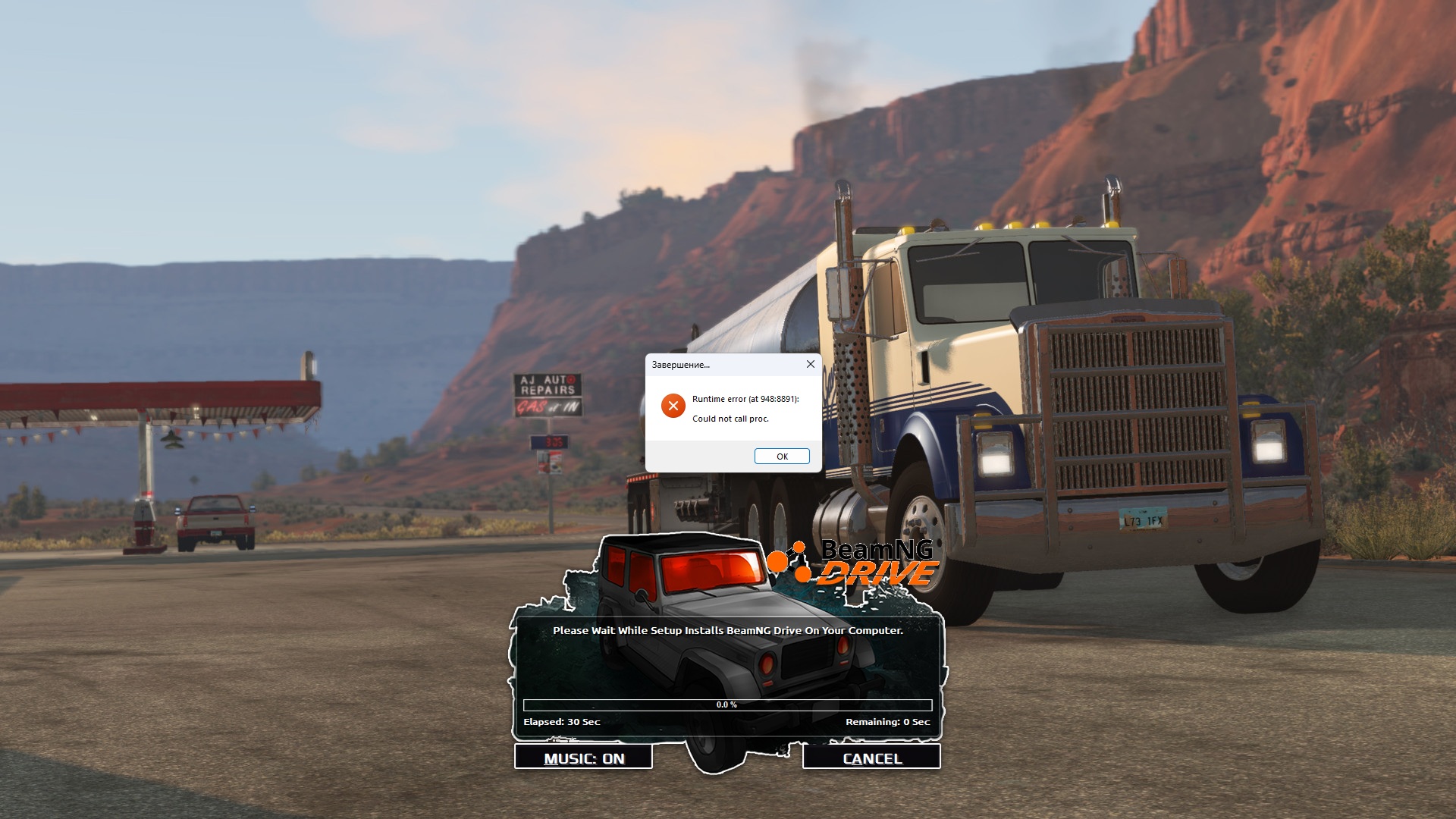 (However, I don't know how others used "xtool:mzlib:mreflate:mpng:d1:mbrunsli:dd3+4x4:b64 m b:lzma:ultra:64m:bt4:fb273:lc8:mc1000000", cuz the compressor didn't even accept that!)
|
|
#6
30-12-2024, 04:00
|
||||
|
||||
|
Quote:
so i make an update for this in First Post
__________________
It would be nice if you appreciate my work with the thanks Button
|
| The Following User Says Thank You to mausschieber For This Useful Post: | ||
Jarmen_Kell (30-12-2024) | ||
|
#7
31-12-2024, 00:59
|
|||
|
|||
|
Thanks a lot for new compressor and installer. Now everything works fine.
 ------------------------------------------------------------------------------------------ - Selected ARC/DS method for Data-01.cab was: xtool:c128mb:mreflate:dd3:l6,d128mb - Overall input size: 51.70 GB - Overall output size: 12.31 GB (Ratio 23.81%) - Overall conversion time: 00:50:47 - Overall conversion discs: 3 DVD5 ------------------------------------------------------------------------------------------------------- - Install Time: 00:15:08 (HDD on HDD) ------------------------------------------------------------------------------------------ - Selected ARC/DS method for Data-01.cab was: xtool:mzlib:dd3+4x4:b64mb:lzma:ultra:bt4:fb273:lc8 :mc1000000:64mb - Overall input size: 51.70 GB - Overall output size: 12.22 GB (Ratio 23.63%) - Overall conversion time: 00:47:17 - Overall conversion discs: 3 DVD5 ------------------------------------------------------------------------------------------------------- - Install Time: 00:07:20 (HDD on HDD)
|
| The Following User Says Thank You to Jarmen_Kell For This Useful Post: | ||
mausschieber (31-12-2024) | ||
 |
| Thread Tools | Search this Thread |
| Display Modes | |
|
|
 Similar Threads
|
||||
| Thread | Thread Starter | Forum | Replies | Last Post |
| Frequently Asked Questions | Joe Forster/STA | PC Games - Frequently Asked Questions | 0 | 29-11-2005 09:48 |
| Need info on how to change HDD. | Gen.Cutter | XBox Games | 13 | 09-03-2005 18:08 |
| DVD Drive won't read any disk? | Sparax | CD/DVD-Writers | 0 | 03-09-2004 01:53 |
| anyone noe anythin bout hdd's? | AXmichigan | Chit Chat | 29 | 30-05-2004 04:24 |
| Can I play my CD games on my laptop with no CD drive? | TortoiseBoy | PC Games | 1 | 28-01-2001 01:30 |


 Hybrid Mode
