
 |
|
|
|
|||||||


 |
|
|
Thread Tools | Search this Thread | Display Modes |
| |
|
|
|
|||||||
|
|
|
Thread Tools | Search this Thread | Display Modes |
|
#151
 07-09-2025, 19:06
|
|||
|
|||
|
Yes, that's right. After the installation is complete, a pop-up page will appear.
Quote:

|
| Sponsored Links |
|
#152
08-09-2025, 10:01
|
|||
|
|||
|
Quote:
|
|
#153
08-09-2025, 11:20
|
|||
|
|||
|
Quote:
Quote:
|
|
#154
08-09-2025, 19:01
|
|||
|
|||
|
Could you please help me see if this term 'secs' can be translated into Chinese
Quote:
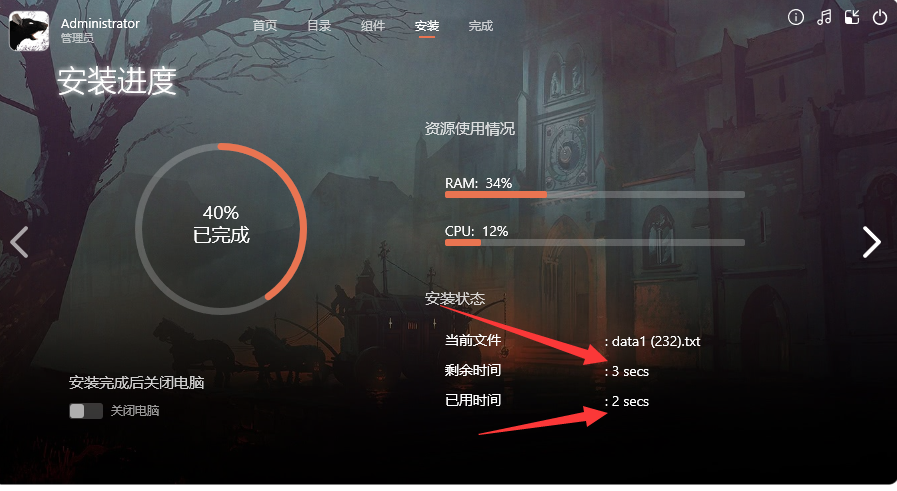 "Could you please help me see if this term 'secs' can be translated into Chinese?"
|
|
#155
08-09-2025, 19:02
|
|||
|
|||
|
Thank you
Quote:
|
|
#156
08-09-2025, 22:17
|
|||
|
|||
|
Quote:
Here's my INI configuration: Code:
[Execs]

[Execs\AppExe1]
name=Titan Quest II
exe=TQ2.exe
icon=TQ2.exe
args=TQ2_PC
workdir={app}
I also modified the `[Icons]` section, but it still doesn't create shortcuts: Code:
[Icons]
#sub InitIcon
  #define IcnSubSec ReadMInI('GetSubSection', '/MainSec=Execs /Idx=' + Str(i) + ' /RootOnly=true')
  #if IcnSubSec != ""
    #define IcnName ReadMInI('ReadSubString', '/MainSec=Execs /SubSec=' + IcnSubSec + ' /Key=Name')
    #define IcnExe ReadMInI('ReadSubString', '/MainSec=Execs /SubSec=' + IcnSubSec + ' /Key=Exe')
    #define IcnIcon ReadMInI('ReadSubString', '/MainSec=Execs /SubSec=' + IcnSubSec + ' /Key=Icon')
    #define IcnArgs ReadMInI('ReadSubString', '/MainSec=Execs /SubSec=' + IcnSubSec + ' /Key=Args')
    #define IcnWorkDir ReadMInI('ReadSubString', '/MainSec=Execs /SubSec=' + IcnSubSec + ' /Key=WorkDir')
Name: "{autodesktop}\{#IcnName}"; Filename: "{app}\{#IcnExe}"; IconFilename: "{app}\{#IcnIcon}"; Parameters: "{#IcnArgs}"; WorkingDir: "{app}"; Check: CreateDesktopIcons
Name: "{group}\{#IcnName}"; Filename: "{app}\{#IcnExe}"; IconFilename: "{app}\{#IcnIcon}"; Parameters: "{#IcnArgs}"; WorkingDir: "{app}"; Check: CreateGroupIcons
  #endif
#endsub
#for {i = 0; i < MAX_ICONS; i++} InitIcon
#endif
I see the problem now. [13:08:11.022] -- Icon entry -- [13:08:11.027] Target filename: C:\Users\Public\Desktop\Titan Quest II.lnk [13:08:11.030] Creating icon. [13:08:11.035] Icon successfully created. [13:08:11.080] -- Icon entry -- [13:08:11.083] Target filename: C:\ProgramData\Microsoft\Windows\Start Menu\Programs\(Default)\Titan Quest II.lnk [13:08:11.087] Creating directory: C:\ProgramData\Microsoft\Windows\Start Menu\Programs\(Default) But how to fix it? Code:
[Setup]
; Add this line to explicitly define the Start Menu folder name
DefaultGroupName=Game\{#ReadMInI('ReadString', '/Sec=Setup /Key=Path')}

[Icons]
; Fix: Use {userdesktop} instead of {autodesktop}
Name: "{userdesktop}\{#IcnName}"; Filename: "{app}\{#IcnExe}"; IconFilename: "{app}\{#IcnIcon}"; Parameters: "{#IcnArgs}"; WorkingDir: "{app}"; Check: CreateDesktopIcons
Name: "{group}\{#IcnName}"; Filename: "{app}\{#IcnExe}"; IconFilename: "{app}\{#IcnIcon}"; Parameters: "{#IcnArgs}"; WorkingDir: "{app}"; Check: CreateGroupIcons
  #endif
#endsub
#for {i = 0; i < MAX_ICONS; i++} InitIcon
#endif
It workit! Warning: The "[Setup]" section directive "PrivilegesRequired" is set to "admin," but the script uses the per-user area (userdesktop). Regardless of the Windows version, if the installation is running in administrative install mode, be cautious when making any changes to the per-user area: these changes may not achieve your intended effect. For more information, see the "UsedUserAreasWarning" topic in the help file. Last edited by nodesire7; 08-09-2025 at 23:05.
|
|
#157
09-09-2025, 23:39
|
|||
|
|||
|
Quote:
Code:
// 替换时分秒
function ReplaceTimeUnits(TimeStr: WideString): WideString;
var
i: Integer;
begin
Result := TimeStr;

// 先处理复数形式,再处理单数形式,避免替换不完整
while Pos(' hrs', Result) > 0 do
Result := Copy(Result, 1, Pos(' hrs', Result) - 1) + ' 小时' + Copy(Result, Pos(' hrs', Result) + 4, Length(Result));

while Pos(' hr', Result) > 0 do
Result := Copy(Result, 1, Pos(' hr', Result) - 1) + ' 小时' + Copy(Result, Pos(' hr', Result) + 3, Length(Result));

while Pos(' secs', Result) > 0 do
Result := Copy(Result, 1, Pos(' secs', Result) - 1) + ' 秒' + Copy(Result, Pos(' secs', Result) + 5, Length(Result));

while Pos(' sec', Result) > 0 do
Result := Copy(Result, 1, Pos(' sec', Result) - 1) + ' 秒' + Copy(Result, Pos(' sec', Result) + 4, Length(Result));

while Pos(' mins', Result) > 0 do
Result := Copy(Result, 1, Pos(' mins', Result) - 1) + ' 分钟' + Copy(Result, Pos(' mins', Result) + 5, Length(Result));

while Pos(' min', Result) > 0 do
Result := Copy(Result, 1, Pos(' min', Result) - 1) + ' 分钟' + Copy(Result, Pos(' min', Result) + 4, Length(Result));
end;

function ProgressCallbackEx(OverallPct, CurrentPct, DiskTotalMB, DiskExtractedMB, TotalFiles, CurFiles: Integer; DiskName, CurrentFile, RemainsTime, ElapsedTime, CurSpeed, AvgSpeed: WideString): longword;
begin
Page4Arc.Angle(OverallPct, 1000);
Page4Lbl[2].Text(IntToStr(OverallPct div 10) + '%');
Page4Lbl[11].Text(': ' + CurrentFile);
Page4Lbl[12].Text(': ' + ReplaceTimeUnits(RemainsTime));
Page4Lbl[13].Text(': ' + ReplaceTimeUnits(ElapsedTime));
Page5Lbl[3].Text(CustomMessage(UILang + 'Page5Lbl3') + #9 + ': ' + ReplaceTimeUnits(ElapsedTime));

Result:= ISArcExCancel;
end;
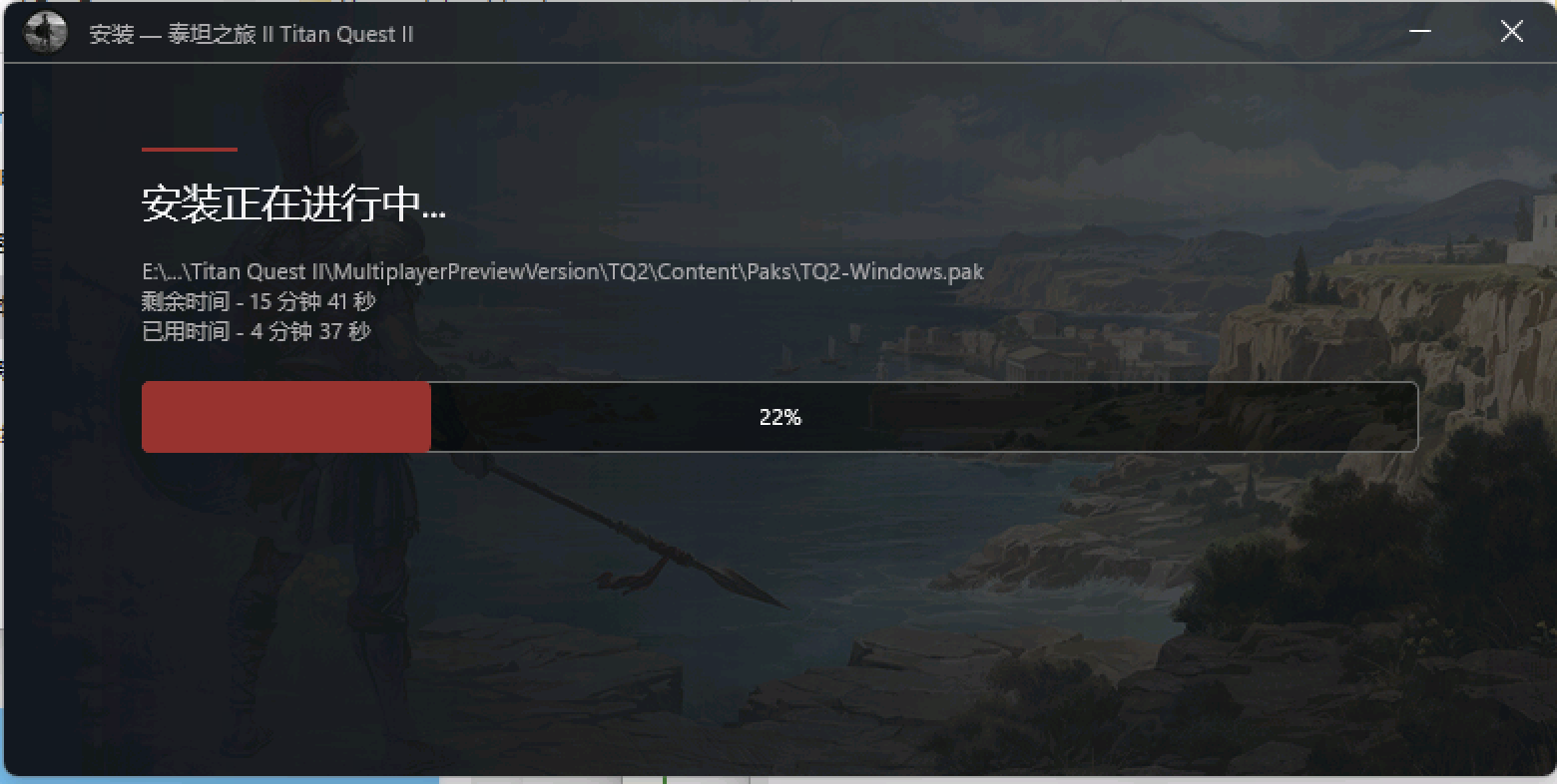 I checked other script, and it's all similar. Making slight modifications, similar to what I sent, allows for successful replacement. Last edited by nodesire7; 09-09-2025 at 23:41.
|
| The Following User Says Thank You to nodesire7 For This Useful Post: | ||
audiofeel (28-12-2025) | ||
|
#158
10-09-2025, 22:55
|
|||
|
|||
|
Quote:
 Why do other people encounter errors when installing the downloaded files? Did the file get corrupted during download? Have you ever encountered this situation where I can install the file normally after downloading it myself, but others can't? Does the packaging method have hardware requirements during decompression?
|
|
#159
14-09-2025, 07:25
|
|||
|
|||
|
I would like to report that my Windows 11 system is encountering recurring crashes an
Quote:
|
|
#160
14-09-2025, 07:26
|
|||
|
|||
|
https://fileforums.com/showpost.php?p=503592&postcount=7
Quote:
|
|
#162
23-12-2025, 10:56
|
|||
|
|||
|
Quote:
also I'm getting an error during compiling which says line 33 value of [setup] section directive "wizard style" is invalid Last edited by KenGamer; 23-12-2025 at 11:02.
|
|
#163
27-12-2025, 22:44
|
|||
|
|||
|
Hello, which version of InnoSetup should I compile with? I have version 6.0.5 (u) installed and I'm getting an error message.
|
|
#164
31-12-2025, 18:11
|
|||
|
|||
|
Quote:
|
|
#165
06-01-2026, 08:55
|
||||
|
||||
|
hello! I tried the DrearyGlass using panker1992 masked compressor, everytime I compile and click the install, there's always a error like "unknown compressor method srep64", may I know how to fix this? this is the compressor
arc a -ma9 -ds -lc1024 -ld1024 -di -i1 -ep1 -ed -r -hp -pYourpassword -w.\ Data\data1.bin -moptimal Last edited by ReDsHanks2; 06-01-2026 at 08:58.
|
|
| Thread Tools | Search this Thread |
| Display Modes | |
|
|
 Similar Threads
|
||||
| Thread | Thread Starter | Forum | Replies | Last Post |
| ASIS: Advanced Simple Installer Script | KaktoR | Conversion Tutorials | 1480 | 08-07-2026 10:58 |
| FMXInno - Windows Fluent Design Installer UI for Inno | BLACKFIRE69 | Conversion Tutorials | 628 | 02-07-2026 16:10 |
| INDEX - Conversion Tutorial Index | Razor12911 | Conversion Tutorials | 5 | 11-06-2020 02:05 |
| Installer Creator Source Code | Razor12911 | Conversion Tutorials | 19 | 13-12-2015 10:20 |


 Linear Mode

