|
#106
 17-03-2024, 19:40
|
|||
|
|||
|
After giving up on configuring FreeArc itself, I switched to DiskSpan GUI for a little bit. Now that I have a better understanding of repacking, I want to go back to FreeArc, but am running into some issues.
1) It won't let me put the compressors into different folders e.g. unpackcmd = "compressors\lolz_64.exe" {options} InFile OutFile gives me an error, where not using subfolders works just fine "The system cannot find the path specified." 2) cls-lolz refuses to unpack anything. I have all 4 necessary cls-* files, and am running an unpack.bat file as administrator, and nothing is working 3) When I have the cls files in the FreeArc bin folder, it tries to compress the files using the cls instead of the actual compressor. How can I stop this from happening? arc.ini at defining external compressors: [External compressor:lolz] packcmd = "compressors\lolz_x64.exe" {options} InFile OutFile datafile = InFile packedfile = OutFile 
|
| Sponsored Links |
|
#107
17-03-2024, 22:32
|
|||
|
|||
|
Quote:
As for file not found, don't try and use a FreeArc installation for your repacking. Make a separate folder with arc.exe, arc.ini and your tools. Make sure arc.exe from your FreeArc installation isn't in the PATH variable because things get messy this way. Quote:
cls-lolz.dll cls-lolz_x64.exe And the appropriate configuration in cls.ini. Quote:
You don't need to use datafile = / packedfile = in arc.ini either, you can simply use $$arcdatafile$$.tmp $$arcpackedfile$$.tmp in the command (this could be why your archives won't unpack with lolz cls). datafile/packedfile is reserved for awkward tools that require a specific in/out file extension to work and has no filename override. Code:
[External compressor:lolz]
packcmd = "compressors\lolz_x64.exe" {options} $$arcdatafile$$.tmp $$arcpackedfile$$.tmp
|
|
#108
18-03-2024, 05:56
|
|||
|
|||
|
I did everything you said and this is the error I am getting when extracting:
Quote:
After trying a few more things, it would seem that its the archives I make in FreeArc that are being corrupted, as unpacking one I created with DiskSpan GUI worked just fine. Last edited by ozerune; 18-03-2024 at 12:20.
|
|
#109
20-03-2024, 21:00
|
|||
|
|||
|
I feel so stupid now. For anyone else running into these issues, first, keep header = 0 at the top of the external compressors definition, and also run in cmd and not the windows 11 terminal. That was all it took and I feel like an idiot for spending 3 days on this lol
|
|
#110
04-04-2024, 19:17
|
|||
|
|||
|
Hello beautiful community
 I have a question about DiskSpan and I am on the latest version. I would like to know why when I go to arc compression and then I select FA-ULTRA custom compression, 50% of the time the compression remains at the beginning and the time only increases and without results after several hours and on other games it works ...I find that really strange. If anyone could enlighten me on this it would be really appreciated. I have a question about DiskSpan and I am on the latest version. I would like to know why when I go to arc compression and then I select FA-ULTRA custom compression, 50% of the time the compression remains at the beginning and the time only increases and without results after several hours and on other games it works ...I find that really strange. If anyone could enlighten me on this it would be really appreciated.
|
|
#111
05-04-2024, 03:32
|
||||
|
||||
|
Most probably because of the use of rep dedup. However I don't recommend to use any of the predefined freearc templates except for fa-store and fa-min inside of diskspangui because settings will not be the same as if you use them by freearc directly.
Example   Both archives were made with freearc ultra template (left: freearc, right: diskspangui) Freearc templates inside diskspangui will not be using predefined arc.ini settings from freearc installation folder and will not apply on different file types, hence the ratio difference.
__________________
Haters gonna hate
|
|
#112
06-04-2024, 16:14
|
||||
|
||||
|
Although not identical, the predefined modes FA-BEST_SP, FA-MAX_SP and FA-ULTRA_SP work with FreeArc's internal masks.
  But to use these methods you can NOT choose DiskSpan mode (You can use it together with SPLIT mode or WITHOUT any split mode). I don't know why these 3 methods don't give us the same results, taking into account that the final method formed on the command line is something like: Code:
FA-BEST_SP >> -m9x -ld192m FA-MAX_SP >> -mx -ld800m FA-ULTRA_SP >> -mx -ld1600m See below the presets used (They can be changed in "DSG_Arc.ini" whenever you want). Code:
FA-STORE=0
FA-MIN=1
FA-LOW=rep:1kb:256+exe+4x4:tor:1kb:h4kb
FA-FAST=rep:1kb+exe+delta+4x4:lzma:32kb:fast:32:mc4
FA-NORMAL=rep:1kb+exe+delta+4x4:lzma:32kb:normal:16:mc8
FA-HIGH=rep:1kb+exe+delta+4x4:lzma:32kb:normal:32:mc32
FA-BEST=exe+delta+lzma:32kb:normal:bt4:128
FA-MAX=rep:1kb+exe+delta+lzma:64m:ultra:bt4:128
FA-ULTRA=rep:1kb+exe+delta+lzma:128m:ultra:bt4:128
|
|
#113
09-04-2024, 12:18
|
|||
|
|||
|
best method to compress RIFF files
Hello
I would like to know how to process these king of fille (RIFF/FSB5) They take lot of space in the conversion. I think they could be converted before and after compression but I'm a beginner and I don't understand certain things... best regards Last edited by wareck; 16-11-2025 at 13:53.
|
|
#114
10-04-2024, 00:18
|
|||
|
|||
|
^^
Extract all FSB5 banks from the bank/data with this quickbms script: https://www.fileforums.com/showthrea...141#post502141 Then, extract those new FSB files with this script: https://github.com/HearthSim/python-fsb5 For the audio extracted, concatenate the files by file type with bincat by Aluigi. Bin files? Reextract the original FSB with fsbext and compress the extracted wav with msc WAV files? Compress with msc. Ogg? Compress with oggre. So you can have up to 3 different files at this point. Use oggvorbis2fsb5 to convert your decompressed ogg data into FMOD ogg audio. Concatenate your (up to) 3 files and make a patch to the original bank with hdiffz. During unpacking/installation use oggvorbis2fsb5 again, concatenate and then apply the hdiffz patch you made earlier to restore the original bank.
|
| The Following User Says Thank You to Masquerade For This Useful Post: | ||
wareck (10-04-2024) | ||
|
#116
10-04-2024, 08:10
|
||||
|
||||
|
VCL Style Test 1 - different title on each page
Hi there,
UPDATE : Solution found and attached !!! I created an installer with different titles for each page. I managed that it work without VCLstyles (or when I use ISSkin instead). But with VCLstyles it only changes the titles when i press e.g. the cancel button. 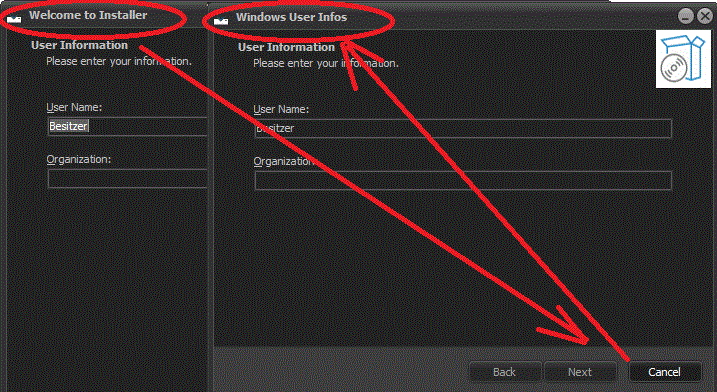 >> My test script is attached Thank you in advance... Nordi UPDATE : Solution found and attached !!! ( >> Procedure to hide + show WizardForm ) Solution 1 = managed with WinAPI function >> SendWindowsText Solution 2 = managed with WizardForm.Caption >> works without the styles too SOLUTION3 => no flickering Wizard : https://fileforums.com/showpost.php?...&postcount=121 Last edited by nordi; 13-04-2024 at 07:35.
|
|
#117
10-04-2024, 10:48
|
||||
|
||||
|
Library bug. Maybe you can try to refresh the WizardForm.Caption on each page change, but not sure.
__________________
Haters gonna hate
|
| The Following User Says Thank You to KaktoR For This Useful Post: | ||
nordi (10-04-2024) | ||
|
#119
10-04-2024, 21:49
|
||||
|
||||
 thx
thx
@ KaktoR - thx for replay and tip
 @ Cesar82 - thx for quick solution, titles are correct now > but now the buttons and text are not shown correctly... very strange behavior (using the WinAPI function) Solution 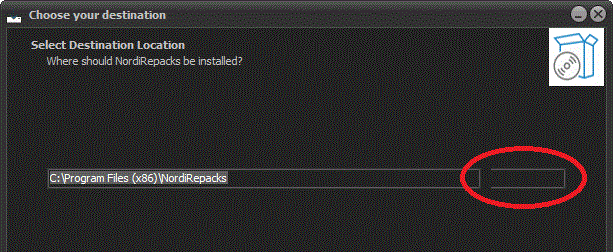 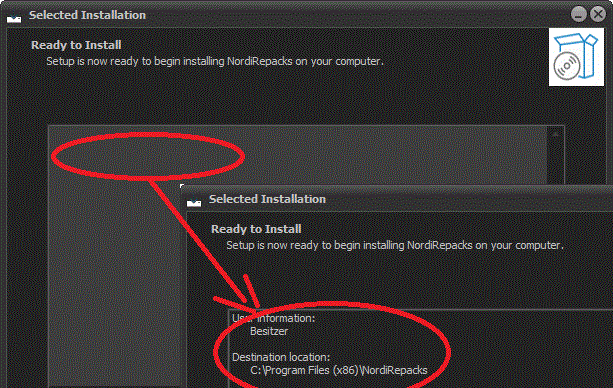
Last edited by nordi; 12-04-2024 at 21:39.
|
|
#120
12-04-2024, 09:27
|
||||
|
||||
|
VCL Style Test - different title on each page - Solution
Hello,
first of all thank you for the help and tips. I have found a solution to my problem. I have attached my solution here and in the first post: https://fileforums.com/showpost.php?...&postcount=116 Maybe it's just a simple workaround, but it's ok for me... ( >> Procedure to hide + show WizardForm ) Now all buttons + text are shown correctly too. Best regards Nordi UPDATE : Solution found and attached !!! Solution 1 = managed with WinAPI function > SendWindowsText Solution 2 = managed with WizardForm.Caption >> works without the styles too SOLUTION3 => no flickering Wizard : https://fileforums.com/showpost.php?...&postcount=121 Last edited by nordi; 13-04-2024 at 22:04.
|
 |
| Thread Tools | Search this Thread |
| Display Modes | |
|
|
 Similar Threads
|
||||
| Thread | Thread Starter | Forum | Replies | Last Post |
| newbie question | bigorangekitty | PS2 Games | 5 | 15-05-2002 16:51 |
| Total newbie...dumb question...patience please! | xxxMikexxx | PC Games | 1 | 02-04-2002 23:19 |
| newbie question | troi22 | PS2 Games | 1 | 28-02-2002 03:18 |
| newbie PAL patch question for Pro Evolution | Purple Cowboy | PS2 Games | 2 | 19-02-2002 12:39 |
| Newbie question...how do I know if the game I've downloaded is Autoboot or not? | konichiwa | DC Games | 1 | 23-11-2000 20:35 |


 Linear Mode

