hello, I downloaded version 7.4.2 I launched the script.bat compile file without modifying the settings.ini file and it worked well. but when I modify the settings.ini file for my game. I got an error message.
With version 7.4.1 I have no error when compiling
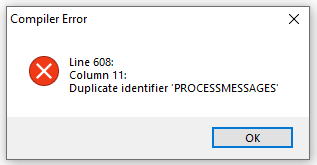
My ini
Code:
[Settings]
Name=From Space
Size=2.30 GB
Creator=UnK
DefaultInstallDir={sd}\Games
UnInstallFolder=_UnInstall
ShowLanguageBox=0
CompactMode=0
UWPGame=0
Savegamefolder={userdocs}\From Space
Win11Warning=0


[UpdateSettings]
UpdateMode=0
FileCheck=Hk_project\Binaries\Win64\Stray-Win64-Shipping.exe


[Executable1]
ShortcutName=From Space
Exe=FromSpace.exe
ExeParam=
IconFileName=UnK.ico
Component=


[INISettings]
Enable=0
INIFile={app}\steam_emu.ini
Section=Settings
Key=UserName
Value={username}


[Text]
WelcomeLabel1Top=235
WelcomeLabel2Top=295
FinishLabel1Top=235
FinishLabel2Top=295
WelcomeLabel1FontSize=14
WelcomeLabel2FontSize=10
FinishLabel1FontSize=14
FinishLabel2FontSize=10
Font=Alegreya Sans
FontColor=$ffffff


[Button]
PlaySound=1

[ComponentsSettings]
Enable=0
FlatPageMode=0
ShowComponentSize=1

;; requires at least two components to enable page.
;; if components is used the global size will be ignored.
Component1.Name=Component 1
Component1.ItemType=CHECK
Component1.Size=4.15 GB
Component1.Level=0
Component1.Checked=1
Component1.Enabled=1

Component2.Name=Component 2
Component2.ItemType=CHECK
Component2.Size=8.75 GB
Component2.Level=0
Component2.Checked=1
Component2.Enabled=1

Component3.Name=Component 3
Component3.ItemType=CHECK
Component3.Size=18.00 GB
Component3.Level=0
Component3.Checked=1
Component3.Enabled=1

Component4.Name=Component 4
Component4.ItemType=CHECK
Component4.Size=18.00 GB
Component4.Level=0
Component4.Checked=1
Component4.Enabled=1


[TasksSettings]
Enable=0
FlatPageMode=0
ShowTaskSize=1

Task1.Name=Soundtrack Game 1
Task1.ItemType=CHECK
Task1.Size=100 Mb
Task1.Level=0
Task1.Checked=1
Task1.Enabled=1

Task2.Name=Soundtrack Game 2
Task2.ItemType=CHECK
Task2.Size=210 Mb
Task2.Level=0
Task2.Checked=1
Task2.Enabled=1


[Background]
//----------------------------------------------- Setup\Background\#.jpg
Enable=0
BackgroundDuration=5000
BackgroundAnimation=1
BGAfterInstall=1


[SystemRequirement]
Enable=0
Processor=32
VideoRAM=2048
RAM=4096
OS=1000
DirectX=11
HWSectionLabelColor=$ea00ff
HWOkLabelColor=$357EC7
HWNotOkLabelColor=$ff0000
HWGoodLabelColor=$36ff00
HWPartiallyGoodLabelColor=$ff8400
HWNotGoodLabelColor=$ff0000


[CRCCheck]
//----------------------------------------------- Setup\Filename.sfv \ Filename.md5 \ .sha1 \ .sha256 \ .sha512
Enable=1
StartCheck=1
QuickSFV=0
QuickSFVFile=Stray.md5
QuickSFVDeleteHashFile=0


[Website]
Enable=1
WebsiteButtonText=Repack
URL=https://www.reddit.com/r/Gamepc_Repack/


[Splash]
//----------------------------------------------- Setup\Filename.png
Enable=1
SplashFile=Splash.png
SplashFadeIn=500
SplashShow=1000
SplashFadeOut=500


[Music]
//----------------------------------------------- Setup\Filename.mp3
Enable=1
MusicFile=Music.mp3
MusicVolume=70


[License]
//----------------------------------------------- Setup\EULA\English.rtf \ French.rtf \ German.rtf \ Italian.rtf \ Spanish.rtf \ Polish.rtf \ Russian.rtf \ PortugueseBrazil.rtf
Enable=0


[InfoBefore]
//----------------------------------------------- Setup\InfoBefore.rtf \ InfoBefore.txt
Enable=1


[Skin]
//----------------------------------------------- Setup\Filename.cjstyles \ Filename.vsf
EnableCjstyles=0
CjstylesFile=Concave.cjstyles
CjstylesParam=

EnableVCL=1
VCLFile=Amakrits.vsf


[Redists]
Enable=0

Redist1.Enable=1
Redist1.Name=Microsoft DirectX
Redist1.Level=0
Redist1.ItemType=CHECK
Redist1.Checked=0
Redist1.Enabled=1
//Redist1.Exe32={src}\_CommonRedist\DirectX\Juin2010\DXSETUP.exe
Redist1.Exe64={src}\_CommonRedist\DirectX\dxwebsetup.exe
Redist1.Param=

Redist2.Enable=1
Redist2.Name=Microsoft Visual C++ 2022
Redist2.Level=0
Redist2.ItemType=CHECK
Redist2.Checked=0
Redist2.Enabled=1
//Redist2.Exe32={src}\_CommonRedist\vcredist\2019\VC_redist.x86.exe
Redist2.Exe64={src}\_CommonRedist\vcredist\2022\VC_redist.x64.exe
Redist2.Param=


[Batch]
Enable=0
BatchFile=Patch.bat

//////////////////////////////////////////////////////////////////////
 30-11-2022, 22:17


 Similar Threads


 Threaded Mode