|
#1
 18-11-2022, 13:22
|
||||
|
||||
 Marvel's Spider-Man: Miles Morales
Marvel’s Spider-Man: Miles Morales [9xDVD5]
Credits: --CIU By:Yener90 --InstallerScript: CIU 3.0.0.1 --Contributors:BAMsE; Razor12911; Simorq; KaktoR; Cesar82 CIU 3.0.0.1 --CLS-DiskSpan.dll R3 by Razor12911, modified version by Cesar82 --DiskSpan_GUI V2+ by Cesar82 Graphic found Ingame and Online Arts by mausschieber Info: Code:
---------------------------------------------------------------------------- ----------------------- CONVERSION DATE 22.11.2022 ------------------------- ---------------------------------------------------------------------------- 17:59:34 - You have chosen the DVD5 type for the media size. 17:59:34 - ISO images will not be created when conversion is complete. 17:59:34 - The computer will remain on when the conversion is complete. 17:59:34 - Selected ARC/DS method for Data1a-01.bin was xtool:mzlib+srep_new:1+4x4:b64mb:lzma:ultra:64m:bt4:fb273:lc8:mc1000000 ---------------------------------------------------------------------------- 17:59:36 - Compression initialized in 22.11.2022 at 17:59:36. 17:59:36 - Starting Data1a-01.bin archive creation. 19:31:49 - Moving Data1a-01.bin » Data1a-09.bin files to media folder. 19:31:50 - Compression finished in 22.11.2022 at 19:31:50. ----------------------------------------------------------------------------- 19:31:50 - Getting size of the game: Marvel’s Spider-Man Miles Morales 19:31:50 - » Installation folder size: 48,81 GB 19:31:50 - » Compressed game size: 35,18 GB (Ratio 72.07%) ----------------------------------------------------------------------------- 19:31:50 - Overall input size: 48,81 GB 19:31:50 - Overall output size: 35,18 GB (Ratio 72.07%) 19:31:50 - Overall conversion time: 01:32:14 19:31:50 - Overall conversion discs: 9 DVD5 ----------------------------------------------------------------------------- Code:
Version 1.0.0 - Initial Release (107 views before); Version 1.0.1 - Updated to new Script and DSG ; Instructions: 1.-- Install Game, update to latest version + No-DVD. 2.-- Download the Conversion and extract to HD, (not in game folder) 2a.- Move _CommonRedist to Conversion output folder. (Last DVD) Code:
[Launch1]
-----------------------------------------------------
Name=DirectX (Jun 2010)
Exe1={src}\_CommonRedist\DirectX\Jun2010\DXSETUP.exe
Argument=/silent
BeforeInstall=0
Checked=0

[Launch2]
-----------------------------------------------------
Name=Microsoft Visual C++ 2019
Exe1={src}\_CommonRedist\vcredist\2019\VC_redist_x86.exe
Exe2={src}\_CommonRedist\vcredist\2019\VC_redist_x64.exe
Argument=/passive /norestart
BeforeInstall=0
Checked=0
4.-- Test the conversion, before burning ISO.
__________________
It would be nice if you appreciate my work with the thanks Button Last edited by mausschieber; 07-01-2026 at 01:17. Reason: Updated to new Script and DSG 
|
| The Following 11 Users Say Thank You to mausschieber For This Useful Post: | ||
antff (22-11-2022), Cesar82 (18-11-2022), Danziel123 (22-11-2022), fabrieunko (18-11-2022), frangoru (10-01-2024), Gls74 (18-11-2022), kokousic (11-12-2022), nazs_blueduck (20-11-2022), Prettyboy099 (18-11-2022), swara_1st (19-11-2022), xanander (29-11-2022) | ||
| Sponsored Links |
|
#2
20-11-2022, 20:08
|
|||
|
|||
|
Anyone know why it error?

|
|
#3
21-11-2022, 02:46
|
||||
|
||||
|
Quote:
For Spiderman Miles Morales, use XTool Spidey plugin with liblz4 v1.9.4 to get all streams and this one from post #3289 "msys-lz4-1.dll" is the file you need. Rename it to "liblz4.dll that should help otherwise i dont know
__________________
It would be nice if you appreciate my work with the thanks Button
|
|
#5
21-11-2022, 03:04
|
||||
|
||||
|
Quote:
Close all DSG opend and go to "..\Resource"folder and open "DSG_Methods.ini" with notepad or notepad++ (save after edit file). - Find sections [Copy.Spiderman_Remaster] and [Decomp.Spiderman_Remaster] - Replace lz4_180 to lz4_193 in both sections Code:
[Copy.Spiderman_Remaster]
PRE\XTool_2020\Plugins\Spiderman_Remaster.7z|Spidey.dll;                                      Destination: PRE\XTool_2020\Spidey.dll;
ADDONS\Libraries\LZ4\LZ4_Libs.7z|lz4_193\liblz4.dll;                                          Destination: PRE\XTool_2020\liblz4.dll;

...

[Decomp.Spiderman_Remaster]
ADDONS\Libraries\LZ4\LZ4_Libs.7z|lz4_193\liblz4.dll;                                          Destination: XTool_2020\liblz4.dll;
|
| The Following User Says Thank You to Cesar82 For This Useful Post: | ||
Grumpy (30-11-2022) | ||
|
#7
21-11-2022, 07:03
|
|||
|
|||
|
Quote:
Quote:

|
|
#8
21-11-2022, 07:16
|
|||
|
|||
 Marvel’s Spider-Man Miles Morales institution error
Hello
mausschieber i'm getting an error in the institution, why is it caused? 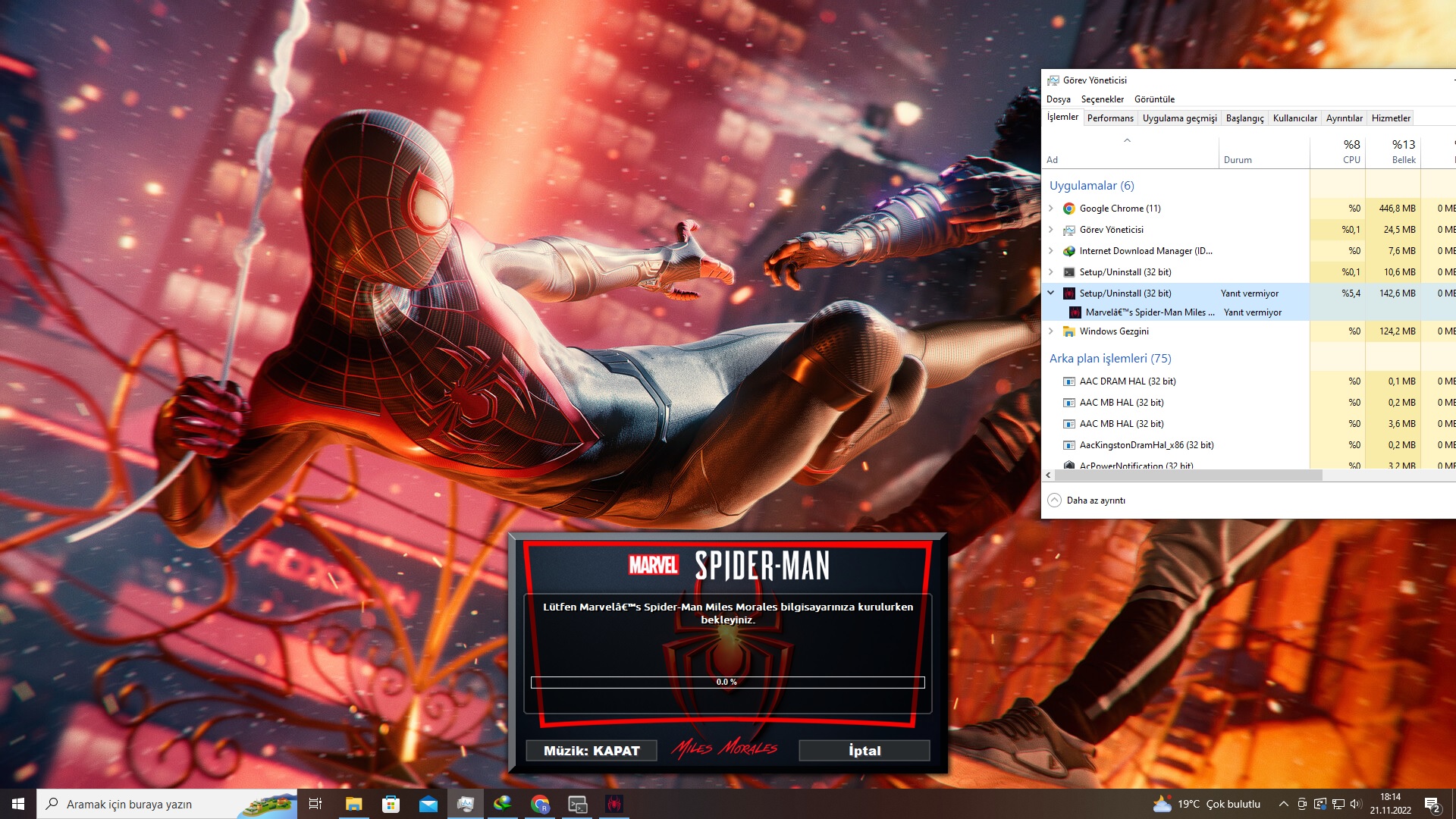 ----------------------------------------------------------------------------------------- -------------------------------- CONVERSION DATE 20.11.2022 -------------------------------- ----------------------------------------------------------------------------------------- 21:08:34 - You have chosen the DVD5 type for the media size. 21:08:34 - ISO images will not be created when conversion is complete. 21:08:34 - The computer will remain on when the conversion is complete. 21:08:34 - Selected ARC/DS method for Data1a-01.bin was: xtool:c32mb:mspidey+srep_new:1+lolz ----------------------------------------------------------------------------------------- 21:08:35 - Compression initialized in 20.11.2022 at 21:08:35. 21:08:35 - Starting Data1a-01.bin archive creation. 17:28:42 - Moving Data1a-01.bin » Data1a-07.bin files to media folder. 17:28:44 - Compression finished in 21.11.2022 at 17:28:44. ----------------------------------------------------------------------------------------- 17:28:44 - Getting size of the game: Marvel’s Spider-Man Miles Morales 17:28:44 - » Installation folder size: 47,41 GB 17:28:44 - » Compressed game size: 27,49 GB (Ratio 57.99%) ----------------------------------------------------------------------------------------- 17:28:44 - Overall input size: 47,41 GB 17:28:44 - Overall output size: 27,49 GB (Ratio 57.99%) 17:28:44 - Overall conversion time: 20:20:08 17:28:44 - Overall conversion discs: 7 DVD5 -----------------------------------------------------------------------------------------
|
|
#9
21-11-2022, 15:00
|
||||
|
||||
|
Quote:
__________________
It would be nice if you appreciate my work with the thanks Button
|
| The Following User Says Thank You to mausschieber For This Useful Post: | ||
Cesar82 (21-11-2022) | ||
|
#10
21-11-2022, 15:00
|
||||
|
||||
|
Quote:
__________________
It would be nice if you appreciate my work with the thanks Button
|
|
#11
21-11-2022, 16:36
|
||||
|
||||
|
Quote:
Method is missing a letter "m" in Method:xtool:mspidey; in the [DOWNLOAD] section. It will be fixed in the next version of the DSG.
|
| The Following User Says Thank You to Cesar82 For This Useful Post: | ||
Grumpy (30-11-2022) | ||
|
#12
22-11-2022, 01:57
|
|||
|
|||
|
Quote:
Quote:

|
|
#13
22-11-2022, 04:39
|
||||
|
||||
|
Quote:
I think the more complicated compression methods are used, the more errors there are, and people always think it's the setup. But that's not true. and why does it always have to be the best compression method?
__________________
It would be nice if you appreciate my work with the thanks Button Last edited by mausschieber; 22-11-2022 at 05:38.
|
|
#14
22-11-2022, 08:40
|
|||
|
|||
|
I didn't try the "mspidey" compression, but I tried the following compression methods successfully.
Game version v1.1116.0.0 (47.39GB English Language Voiceovers only) Predefined Methods (NEW) - Option 20 (XTool 2020 Preflate + SREP + LOLZ) -------------------------------------------------------------------------------- ------------------------ CONVERSION DATE 21/11/2022 ------------------------ -------------------------------------------------------------------------------- 08:15:05 - You have chosen the DVD5 type for the media size. 08:15:05 - ISO images will not be created when conversion is complete. 08:15:05 - The computer will shut down when the conversion is complete. 08:15:05 - Selected ARC/DS method for Data1a-01.bin was: xtool:mpreflate+srep_new:1+lolz:d104:mtt1:mt8:mc10 23 -------------------------------------------------------------------------------- 08:15:07 - Compression initialized in 21/11/2022 at 08:15:07. 08:15:07 - Starting Data1a-01.bin archive creation. 17:19:46 - Moving Data1a-01.bin » Data1a-08.bin files to media folder. 17:19:48 - Compression finished in 21/11/2022 at 17:19:48. -------------------------------------------------------------------------------- 17:19:48 - Getting size of the game: Marvel’s Spider-Man Miles Morales 17:19:48 - » Installation folder size: 47.39 GB 17:19:48 - » Compressed game size: 33.83 GB (Ratio 71.38%) -------------------------------------------------------------------------------- 17:19:48 - Overall input size: 47.39 GB 17:19:48 - Overall output size: 33.83 GB (Ratio 71.38%) 17:19:48 - Overall conversion time: 09:04:41 17:19:48 - Overall conversion discs: 8 DVD5 -------------------------------------------------------------------------------- Install time 10m:25s, no problems at all. I'm happy with 8 DVD5, 8th DVD5 is not too small or not too big (3.32GB with CommonRedist), just right with enough space to add a few txt walk-throughs, trainers, saves, etc. I also tried "xtool:mkraken:9+xtool:mzlib+srep_new:1+lolz:d130: mtt1:mt8:mc1023" (from the Uncharted Collection conversion thread). Took longer to convert and to install. Saved just a few megabytes, so I opted to keep the "Preflate + SREP + LOLZ" conversion. -------------------------------------------------------------------------------- ------------------------ CONVERSION DATE 20/11/2022 ------------------------ -------------------------------------------------------------------------------- 22:18:26 - You have chosen the DVD5 type for the media size. 22:18:26 - ISO images will not be created when conversion is complete. 22:18:26 - The computer will shut down when the conversion is complete. 22:18:26 - Selected ARC/DS method for Data1a-01.bin was: xtool:mkraken:9+xtool:mzlib+srep_new:1+lolz:d130:m tt1:mt8:mc1023 -------------------------------------------------------------------------------- 22:18:27 - Compression initialized in 20/11/2022 at 22:18:27. 22:18:28 - Starting Data1a-01.bin archive creation. 08:02:55 - Moving Data1a-01.bin » Data1a-08.bin files to media folder. 08:02:57 - Compression finished in 21/11/2022 at 08:02:57. -------------------------------------------------------------------------------- 08:02:57 - Getting size of the game: Marvel’s Spider-Man Miles Morales 08:02:57 - » Installation folder size: 47.39 GB 08:02:57 - » Compressed game size: 33.79 GB (Ratio 71.29%) -------------------------------------------------------------------------------- 08:02:57 - Overall input size: 47.39 GB 08:02:57 - Overall output size: 33.79 GB (Ratio 71.29%) 08:02:57 - Overall conversion time: 09:44:29 08:02:57 - Overall conversion discs: 8 DVD5 -------------------------------------------------------------------------------- Either one worked without errors. Conversion times is from using Intel Core i7-4790 CPU. Thank you Mausschieber for another nice conversion.
|
| The Following 2 Users Say Thank You to antff For This Useful Post: | ||
Grumpy (30-11-2022), mausschieber (22-11-2022) | ||
|
#15
22-11-2022, 10:59
|
||||
|
||||

Quote:
Please edit the "DSG_Methods.ini" file in the "Resources" folder and include the line highlighted below in red (You will need recompress game). Give it a try and let me know if it works. Code:
[Decomp.Spiderman_Remaster] PRE\XTool_2020\Plugins\Spiderman_Remaster.7z|Spidey.dll; Destination: XTool_2020\Spidey.dll; ADDONS\Libraries\LZ4\LZ4_Libs.7z|lz4_193\liblz4.dll; Destination: XTool_2020\liblz4.dll; UNPACK Setup DLL: 1) Run the "DiskSpan GUI" and click the "Tools" button and click the "DLL" tab and then click the "Unpacker" subtab 2) Select the "Setup.dll" file from the output folder of your compression by clicking on the "Select" button and on the displayed message select "YES" to extract it to a folder next to the Setup.dll file. 3) Click "Unpack DLL" and click OK but do not close the DiskSpan GUI. BROWSE and ADD missing file: 1) Navigate in explorer to the folder "..\Resources\PRE\XTool_2020\Plugins" and locate the Spiderman_Remaster.7z file and open the file with 7-Zip/WinRAR and leave the window open. 2) Navigate in explorer to the output folder of your conversion (Probably "..\Conversion_Output\DISK_1") and find the folder "Setup_DLL", open it and drag the file "spidey.dll" from the 7-Zip interface/ WinRAR into the "XTool_2020" subfolder (Probably "..\Conversion_Output\DISK_1\Setup_DLL\XTool_2020" ). PACK Setup DLL: 1) Go back to the "DiskSpan GUI" and now select the "Packer" subtab. For that drag and drop the "Setup_DLL" folder in the "Edit" (DSG 2.0.1.3 has a small bug when searching for the browse button, it will be fixed in the next version) and answer "YES" for the output path to be defined automatically. 2) Click "Pack DLL" and in the message click "OK". 3) Delete the "Setup_DLL" folder, test it and if it worked, be happy. EDIT: I have attached the modified DSG_Methods.ini file (If you want to recompress). The plugin will download during compression in not exist. Last edited by Cesar82; 22-11-2022 at 22:36.
|
| The Following 2 Users Say Thank You to Cesar82 For This Useful Post: | ||
Grumpy (30-11-2022), mausschieber (22-11-2022) | ||
 |
| Thread Tools | Search this Thread |
| Display Modes | |
|
|
 Similar Threads
|
||||
| Thread | Thread Starter | Forum | Replies | Last Post |
| Marvel's Avengers | mausschieber | PC Games - CD/DVD Conversions | 30 | 15-08-2024 02:04 |
| Installed spider chip 1.1, terrible fit and non-working - help please !:( | JaMbo87 | XBox Games | 4 | 21-01-2005 04:20 |


 Linear Mode

