|
|
|
#1
 30-04-2021, 07:27
|
|||
|
|||
|
Hello,
I have a problem, here, as shown in the image, when I select the file that I want to install, it does not give me the number of MB or GB it uses for French Langage, there are 4 games in total but just put 1 with different language to test. Likewise, with CIU there is the Task, but not on ASIS 7.2.2a, is it possible to put it manually? I also want to know what is Component1.Level=0 Thank you 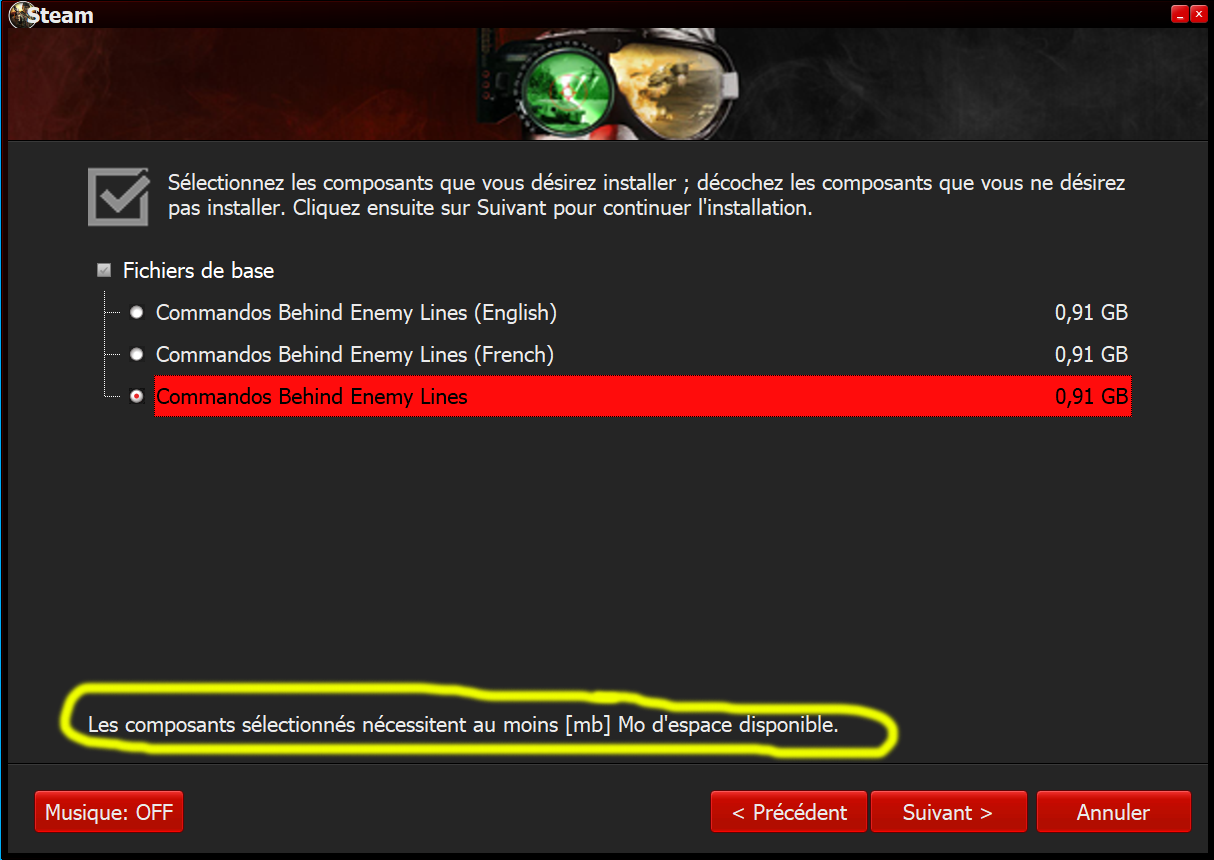
Last edited by alucard1973; 30-04-2021 at 08:00. 
|
| Sponsored Links |
|
#2
30-04-2021, 09:48
|
||||
|
||||
|
Quote:
__________________
It would be nice if you appreciate my work with the thanks Button
|
|
#3
30-04-2021, 13:01
|
|||
|
|||
|
How do I put comp in the records.ini file?
I tried everything and it doesn't work for me when I want to install the game [Record1] Type=Freearc_Original Source={src}\Setup1FR.cab Output={app}\SteamApps\common\Commandos Behind Enemy Lines\ Disk=1 Comp=2 [Record2] Type=FreeArc_Original Source={src}\Setup1.cab Output={app}\SteamApps\common\Commandos Behind Enemy Lines\ Disk=1 Comp=3 [Record3] Type=Freearc_Original Source={src}\Setup2FR.cab Output={app}\SteamApps\common\Commandos Beyond the Call of Duty\ Disk=1 Comp=5 [Record4] Type=FreeArc_Original Source={src}\Setup2.cab Output={app}\SteamApps\common\Commandos Beyond the Call of Duty\ Disk=1 Comp=6 [Record5] Type=Freearc_Original Source={src}\Setup3FR.cab Output={app}\SteamApps\common\Commandos 2 Men of Courage\ Disk=1 Comp=8 [Record6] Type=FreeArc_Original Source={src}\Setup3.cab Output={app}\SteamApps\common\Commandos 2 Men of Courage\ Disk=1 Comp=9 [Record7] Type=Freearc_Original Source={src}\Setup4FR.cab Output={app}\SteamApps\common\Commandos 3 Destination Berlin\ Disk=1 Comp=11 [Record8] Type=FreeArc_Original Source={src}\Setup4.cab Output={app}\SteamApps\common\Commandos 3 Destination Berlin\ Disk=1 Comp=12 it is in relation to this, to have the choice of which game I want to install [ComponentsSettings] Enable=1 FlatPageMode=0 ShowComponentSize=1 Component1.Name=Commandos Behind Enemy Lines Component1.Level=0 Component1.Exclusive=0 Component1.Checked=1 Component1.Enabled=1 Component2.Name=French Component2.File=Setup1FR.cab Component2.Size=930 Component2.Level=1 Component2.Exclusive=1 Component2.Checked=0 Component2.Enabled=1 Component3.Name=English Component3.File=Setup1.cab Component3.Size=930 Component3.Level=1 Component3.Exclusive=1 Component3.Checked=0 Component3.Enabled=1 Component4.Name=Commandos Beyond the Call of Duty Component4.Level=0 Component4.Exclusive=0 Component4.Checked=1 Component4.Enabled=1 Component5.Name=French Component5.File=Setup2FR.cab Component5.Size=660 MB Component5.Level=1 Component5.Exclusive=1 Component5.Checked=0 Component5.Enabled=1 Component6.Name=English Component6.File=Setup2.cab Component6.Size=660 MB Component6.Level=1 Component6.Exclusive=1 Component6.Checked=0 Component6.Enabled=1 Component7.Name=Commandos 2 Men of Courage Component7.Level=0 Component7.Exclusive=0 Component7.Checked=1 Component7.Enabled=1 Component8.Name=French Component8.File=Setup3FR.cab Component8.Size=3.82 GB Component8.Level=1 Component8.Exclusive=1 Component8.Checked=0 Component8.Enabled=1 Component9.Name=English Component9.File=Setup3.cab Component9.Size=3.82 GB Component9.Level=1 Component9.Exclusive=1 Component9.Checked=0 Component9.Enabled=1 Component10.Name=Commandos 3 Destination Berlin Component10.Level=0 Component10.Exclusive=0 Component10.Checked=1 Component10.Enabled=1 Component11.Name=French Component11.File=Setup4FR.cab Component11.Size=3.76 GB Component11.Level=1 Component11.Exclusive=1 Component11.Checked=0 Component11.Enabled=1 Component12.Name=English Component12.File=Setup4.cab Component12.Size=3.76 GB Component12.Level=1 Component12.Exclusive=1 Component12.Checked=0 Component12.Enabled=1 Last edited by alucard1973; 30-04-2021 at 14:08.
|
|
#4
30-04-2021, 22:17
|
||||
|
||||
|
Quote:
Last edited by L33THAK0R; 30-04-2021 at 22:18. Reason: made shorter
|
|
#5
30-04-2021, 22:25
|
|||
|
|||
|
Quote:
There is also a helpfile for settings.ini.
|
|
#6
01-05-2021, 01:27
|
|||
|
|||
|
Multiple Music Files Support in ASIS??
I wanted to ask if I can add multiple music files like background images. For example:
Code:
For background images in settings.ini [Background] //---------------Setup\Background\#.jpg Enable=1 InstallBGDuration=5000 InstallBGAnimation=1 BGAfterInstall=1 Similarly for music: [Music] Enable=1 MusicFile=Setup\Music\Track#.mp3 OR ALTERNATIVELY, MusicFile=Setup\Music\*.mp3 [To Load all mp3 files] MusicVolume=10 Code:
Track1.mp3 Track2.mp3 Track3.mp3 Track4.mp3 Track5.mp3 Track6.mp3 ... And one more thing, does it loop music like FG Repacks? If it's not possible, then I will merge all the tracks into a single music file. Last edited by pratikpatel8982; 01-05-2021 at 01:36.
|
|
#7
01-05-2021, 04:58
|
|||
|
|||
|
Quote:
|
|
#8
01-05-2021, 09:24
|
|||
|
|||
|
Quote:
Also you forgot to add this line for each component: Code:
Component#.File=(The archive linked for the component)
For example:
Component1.File=Component1.arc
|
 |
| Thread Tools | Search this Thread |
| Display Modes | |
|
|
 Similar Threads
|
||||
| Thread | Thread Starter | Forum | Replies | Last Post |
| [Help] need Advanced Installer script with Razor1911's UltraArc module | rez3vil | Conversion Tutorials | 3 | 15-04-2024 03:24 |
| Portable Installer Inno Setup Script | y_thelastknight | Conversion Tutorials | 59 | 23-10-2020 01:02 |
| INDEX - Conversion Tutorial Index | Razor12911 | Conversion Tutorials | 5 | 11-06-2020 03:05 |
| Simple Arc Installer | 78372 | Conversion Tutorials | 1 | 15-06-2017 16:37 |
| MSC+Srep+lzma Simple Script Example | gozarck | Conversion Tutorials | 10 | 07-09-2015 17:31 |


 Hybrid Mode
