Go Back   FileForums > Game Backup > PC Games > PC Games - CD/DVD Conversions > Conversion Tutorials

Reply
 
Thread Tools Search this Thread Display Modes
  #1  
Old 28-04-2021, 10:23
Cesar82's Avatar
Cesar82 Cesar82 is offline
Registered User
 
Join Date: May 2011
Location: Brazil
Posts: 1,074
Thanks: 1,814
Thanked 2,304 Times in 787 Posts
Cesar82 is on a distinguished road
Quote:
Originally Posted by Gehrman View Post
Cesar82 Dear
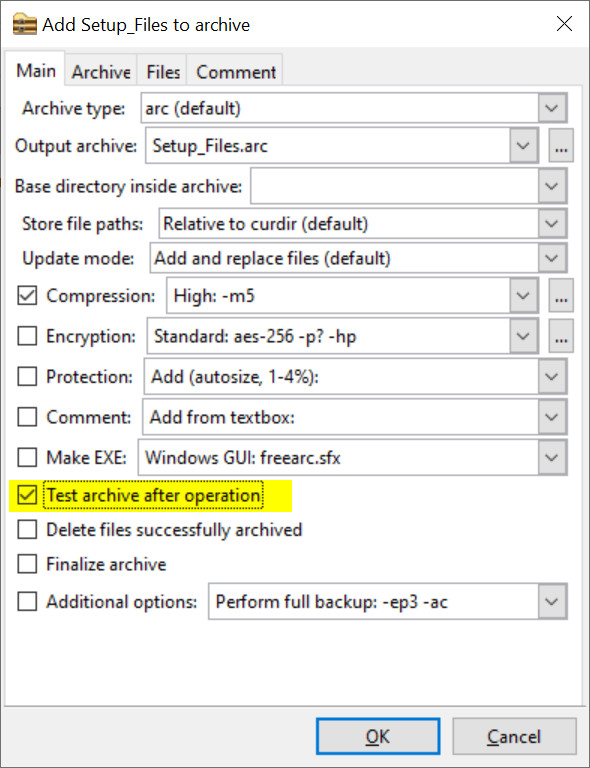
Please add the archive test option (arc t data.bin) after compression and create MD5 hash.
I did not understand your request. If possible, explain further.
If you want you can send a PM with more details of your request.
Reply With Quote
The Following 2 Users Say Thank You to Cesar82 For This Useful Post:
Gehrman (28-04-2021), Mypko (21-06-2021)
Sponsored Links
  #2  
Old 28-04-2021, 13:35
Gehrman's Avatar
Gehrman Gehrman is online now
Registered User
 
Join Date: Jan 2020
Location: Save Palestine
Posts: 78
Thanks: 1,375
Thanked 89 Times in 48 Posts
Gehrman is on a distinguished road
Quote:
Originally Posted by Cesar82 View Post
I did not understand your request. If possible, explain further.
If you want you can send a PM with more details of your request.
Test archive after operation
Very useful and essential. This option

Last edited by Gehrman; 28-04-2021 at 13:38.
Reply With Quote
  #3  
Old 28-04-2021, 18:59
Cesar82's Avatar
Cesar82 Cesar82 is offline
Registered User
 
Join Date: May 2011
Location: Brazil
Posts: 1,074
Thanks: 1,814
Thanked 2,304 Times in 787 Posts
Cesar82 is on a distinguished road
Quote:
Originally Posted by Gehrman View Post
Test archive after operation
Very useful and essential. This option

I did some tests using the -t parameter on the commandline, and for me to include this functionality it would be necessary to include several files (More than 15 Mb) in the resources folder just for testing.
It would also be necessary to include a checkbox to enable the test.

I may include this in version 2.0 of DiskSpan_GUI, but I don't promise anything (I don't know if it will work for all methods).

Currently it has a button that makes the extraction process simulating the installer. This test is more reliable because if for some reason any decompressor is missing it will fail.
The FreeArc test will test the file, but if any decompressor or config is missing from Setup.dll, even though the FreeArc test is OK, it may happen that the installer fails during installation (If anything is missing from Setup.dll).


About the MD5 check, what was your suggestion?
Generate a hash for the Data.bin.001 files?
If so, I don't think it would work because the files would be in separate folders or on some kind of disk. It would only work if they had all files in one folder.
Reply With Quote
The Following User Says Thank You to Cesar82 For This Useful Post:
Gehrman (29-04-2021)
  #4  
Old 01-09-2021, 00:01
oo7's Avatar
oo7 oo7 is offline
Registered User
 
Join Date: Aug 2020
Location: QUANTUM SPACE
Posts: 33
Thanks: 270
Thanked 84 Times in 22 Posts
oo7 is on a distinguished road
Wink TPI theme For LIS

TPI(3 page Installer) Theme

Instruction:
Just extract the archive contents to Light Installer Script 1.0.0.9 Folder and compile TPI THEME [2021.06.30].iss

Credits:
LIS By Cesar82
Attached Images
File Type: jpg 1.jpg (110.1 KB, 261 views)
File Type: jpg 2.jpg (96.9 KB, 253 views)
Attached Files
File Type: rar TPI_THEME.rar (113.2 KB, 43 views)
__________________
Maybe I'm destined to be distraught

Last edited by oo7; 01-09-2021 at 00:05.
Reply With Quote
The Following 4 Users Say Thank You to oo7 For This Useful Post:
Cesar82 (01-09-2021), ffmla (01-10-2021), Gehrman (01-09-2021), Valtus (03-09-2021)
  #5  
Old 28-09-2021, 05:11
alley_u2's Avatar
alley_u2 alley_u2 is offline
Registered User
 
Join Date: Aug 2013
Location: India
Posts: 64
Thanks: 19
Thanked 42 Times in 21 Posts
alley_u2 is on a distinguished road
Unhappy Logo Issue

Hi Cesar82 and thanks for providing such a simple and easy to use installer that suits my style.

I am facing just one issue. When I change the logo using the .psd file provided (I just changed the name from "light installer" to "allen installer" using photoshop) and the save the file to LightInstallerLogoOrange.bmp, the setup file still displays the original .bmp file. Please note that I am using Charcoal Dark Slate.vsf style file

Setup File:


BMP File.
Attached Images
File Type: png Screenshot 2021-09-28 173413.png (52.8 KB, 212 views)
Reply With Quote
  #6  
Old 28-09-2021, 08:53
Cesar82's Avatar
Cesar82 Cesar82 is offline
Registered User
 
Join Date: May 2011
Location: Brazil
Posts: 1,074
Thanks: 1,814
Thanked 2,304 Times in 787 Posts
Cesar82 is on a distinguished road
Quote:
Originally Posted by alley_u2 View Post
Hi Cesar82 and thanks for providing such a simple and easy to use installer that suits my style.

I am facing just one issue. When I change the logo using the .psd file provided (I just changed the name from "light installer" to "allen installer" using photoshop) and the save the file to LightInstallerLogoOrange.bmp, the setup file still displays the original .bmp file. Please note that I am using Charcoal Dark Slate.vsf style file
You must also recreate the alpha channel layer for the new text.
Attached is a video tutorial on how to change the logo text.
Also includes logo image and psd.

P.S: As I changed the name of the theme to allen then it would be necessary to put the images WizardSmallImageAllen.bmp and WizardImageAllen.bmp so that the bitmaps image stayed with the default bitmap images from Inno Setup during the video.
Attached Files
File Type: 7z Changing Logo Text.7z (12.84 MB, 40 views)

Last edited by Cesar82; 31-10-2021 at 06:45.
Reply With Quote
The Following User Says Thank You to Cesar82 For This Useful Post:
alley_u2 (28-09-2021)
  #7  
Old 28-09-2021, 10:18
alley_u2's Avatar
alley_u2 alley_u2 is offline
Registered User
 
Join Date: Aug 2013
Location: India
Posts: 64
Thanks: 19
Thanked 42 Times in 21 Posts
alley_u2 is on a distinguished road
Thumbs up

Thanks for the help mate ! Genius

I did what you asked and it worked. Thanks again !

Last edited by alley_u2; 29-09-2021 at 00:28.
Reply With Quote
Reply

Tags
asis, ciu, inno, installer, ultraarc

Thread Tools Search this Thread
Search this Thread:

Advanced Search
Display Modes

Posting Rules
You may not post new threads
You may not post replies
You may not post attachments
You may not edit your posts

BB code is On
Smilies are On
[IMG] code is On
HTML code is Off

Forum Jump

Similar Threads
Thread Thread Starter Forum Replies Last Post
[Help] need Advanced Installer script with Razor1911's UltraArc module rez3vil Conversion Tutorials 3 15-04-2024 02:24
Ultimate Conversion Compressor (UCC) vollachr Conversion Tutorials 55 26-04-2021 09:27
INDEX - Conversion Tutorial Index Razor12911 Conversion Tutorials 5 11-06-2020 02:05
How many forum members does it take to change a light bulb? rms2001 XBox Games 6 12-01-2004 05:31


All times are GMT -7. The time now is 02:40.


Powered by vBulletin® Version 3.8.11
Copyright ©2000 - 2026, vBulletin Solutions Inc.
FileForums @ https://fileforums.com