|
#587
 30-10-2020, 12:44
|
|||
|
|||
|
Quote:
I would test tomorrow morning with the record.ini I saw in the script that there was for the backups, is there an argument to put in the Setup.ini file like SaveFolderGame={userdocs}\Total War Warhammer? I ask for my No Steam games Last edited by alucard1973; 30-10-2020 at 12:56. 
|
|
#588
30-10-2020, 15:17
|
|||
|
|||

Quote:
it does not work, it does not uninstall the backup Also testing .md5, doesn't work either Well i think that's all for now [InstallOptions] ------------------------------------------------------------------------------------------------------------------------------------------------------ ApplicationName=Streets of Rage 4 //Publisher=Square Enix //GameSize=32200 GameSize=5049535945 Bytes Lang=ar,en,fr,it,de,es,ko,pl,ptbr,pt,ru,cns,cnt Editor=Cesar82 ProductCode=Streets of Rage 4 SetupVersion=1.0.0 GameVersion=05-g //UninstallFolder={userdocs}\Shadow of the Tomb Raider\Uninstall AllowWithoutAutorun=1 AllowWithoutSmallInstaller=1 64BitOnly=0 AllowYouTube=0 AddDXFilter=0 [SaveGameFolder] SaveGameFolder1={userdocs}\Streets of Rage 4 Save and Config [HashSettings_] //.md5, .sha1, .sha256, .sha512 ------------------------------------------------------------------------------------------------------------------------------------------------------ StartCheck=1 HashFile1={src}\Streets of Rage 4.md5;DestDir:{app};
|
|
#589
31-10-2020, 01:57
|
||||
|
||||
|
Arc.ini in EXTERNAL folder using [Ressources] will not be copied to %temp% folder (or copied before internal Setup.exe arc.ini, which will be overwritten then).
__________________
Haters gonna hate
|
|
#590
31-10-2020, 02:05
|
||||
|
||||
|
My external arc.ini is different from the internal arc.ini.
I checked %temp% folder when installation starts and it's still the internal arc.ini. Edit: Add taskkill for dst_oo2reck.exe (if you cancel installation).
__________________
Haters gonna hate
Last edited by KaktoR; 31-10-2020 at 02:16.
|
| The Following User Says Thank You to KaktoR For This Useful Post: | ||
Cesar82 (31-10-2020) | ||
|
#591
31-10-2020, 06:43
|
|||
|
|||
|
Quote:
|
|
#592
01-11-2020, 07:55
|
||||
|
||||
|
anybody have this error with these option in Borderlands 3
ue4dt+xzlib+srep:m3f+4x4:lzma 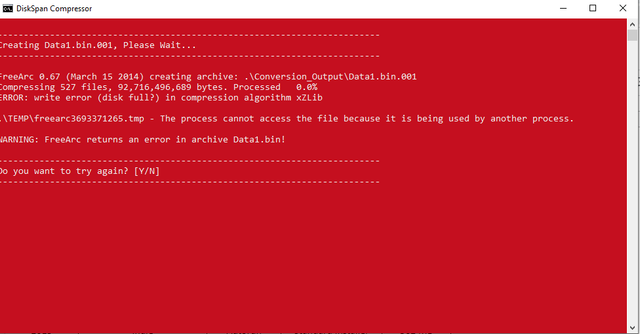
__________________
It would be nice if you appreciate my work with the thanks Button
|
|
#593
03-11-2020, 04:04
|
|||
|
|||
|
Quote:
I come back to another concern I can't change {pf} to {sd} in the script, it tells me Line 21: Unknown constant "commonsd". Use two consecutive "{" characters if you are trying to embed a single "{" and not a constant. after test, the backup to delete works, I had written it wrong Last edited by alucard1973; 03-11-2020 at 04:54.
|
|
#594
03-11-2020, 05:58
|
|||
|
|||
|
Quote:
thanks Last edited by alucard1973; 03-11-2020 at 06:01.
|
| The Following User Says Thank You to alucard1973 For This Useful Post: | ||
Cesar82 (03-11-2020) | ||
|
#595
03-11-2020, 18:59
|
||||
|
||||
|
**post edit: never mind, i found the problem. it was with my setup.ini file not the dxfilters. i had only wanted to know if i could disable them for conversions without videos but i fixed the issue. i must have been using a setup.ini script or isscript that was not compatible with the latest release of CIU. everything is fine now.**
Last edited by Kitsune1982; 03-11-2020 at 19:19.
|
|
#596
04-11-2020, 11:19
|
||||
|
||||
|
Cesar, thank you for your assistance with my issue. I also discovered i indeed did not have all the proper codecs installed. i updated my klite mega codec pack and made sure LAV splitters and all required codecs were installed this time. i then replaced all the source setup and autorun files with my own including my downscaled mp3 and then tried to rerun setup and amazingly it worked!!
 even turning off 'addDXFilter' in setup.ini did not return any errors plus i got the tiny setup exe size i wanted. thanks for your help, i never would have guessed it was me not having an updated codec pack installed.  PS - Here is the result of my downscaled mp3 size - Original in package: 14 mb for Music1.mp3 and MusicSI.mp3 After removing both and downscaling my autorun music to 64 bits and compressing pngs/wavs/etc, my music1.mp3 for a 1 min 12 sec clip was 504 kb and the output setup.exe was 7 mb even with the proper encoder/decoders set up. cheers-Kitsune - Last edited by Kitsune1982; 04-11-2020 at 11:22.
|
|
#597
05-11-2020, 02:57
|
|||
|
|||
|
Hello cesar82
Do you have a solution or see my error in the setup.ini? I don't know why it isn't working to choose the version of the game I want to install thank you [ExtractSettings] //DiskSpan ------------------------------------------------------------------------------------------------------------------------------------------------------ ArcFile1=Setup1.cab;DestDir:{app}\SteamApps\common \FINAL FANTASY VII;Type:ARC;Disk:1;Comp:1 ArcFile2=Setup1NM.cab;DestDir:{app}\SteamApps\comm on\FINAL FANTASY VII;Type:ARC;Disk:1;Comp:1 ArcFile3=Setup1STEAM.cab;DestDir:{app}\SteamApps;T ype:ARC;Disk:1 ArcFile4=Setup1STEAMICO.cab;DestDir:{pf32}\Steam\s team\games;Type:ARC;Disk:1 [ComponentsSettings] AlignOnTop=0 AlignOnLeft=0 ShowCheckAll=1 ScrollBarLeft=0 ScrollBarWidth=25 ScrollUpDownHeight=17 ScrollSliderHeight=52 ListBoxItemsHeight=20 Font=D-DIN FontColor=$ffffff FontSize=0 FontUC=1 FontBold=0 ShadowVisible=1 ShadowColor=$000000 ShadowMoveX=0 ShadowMoveY=0 LabelX=0 LabelY=2 [Component1] ------------------------------------------------------------------------------------------------------------------------------------------------------ Name=Final Fantasy VII Size=1.42 GB FirstBGImage=1 ShowInstallLabel=0 Exclusive=1 Checked=0 Enabled=1 [Component2] ------------------------------------------------------------------------------------------------------------------------------------------------------ Name=Final Fantasy VII (Neo Midgar 1.7) Size=1.42 GB FirstBGImage=4 ShowInstallLabel=0 Exclusive=1 Checked=0 Enabled=1
|
|
#598
05-11-2020, 03:38
|
|||
|
|||

Quote:
thank you cesar82
|
|
#599
05-11-2020, 03:41
|
|||
|
|||
|
Quote:
for the register, how i should do to set that the key is for comp1 and another key for comp2?
|
|
#600
06-11-2020, 13:06
|
|||
|
|||
|
little bug that I just saw without realizing it, the decompression percentage never goes to 100, all my decompression ends at 33% instead of 100
|
 |
| Thread Tools | Search this Thread |
| Display Modes | |
|
|
 Similar Threads
|
||||
| Thread | Thread Starter | Forum | Replies | Last Post |
| INDEX - Conversion Tutorial Index | Razor12911 | Conversion Tutorials | 5 | 11-06-2020 02:05 |
| [GSERIES] Custom Installer Ultimate V2g | Gupta | Conversion Tutorials | 226 | 01-06-2018 13:12 |
| Crysis 3 DVD9 to 3xDVD5 Custom Installer | spawniectes | PC Games - CD/DVD Conversions | 79 | 31-08-2017 07:19 |


 Linear Mode

