|
#1
 25-08-2020, 01:57
|
||||
|
||||
 Project Cars 3
Project Cars 3 [?xDVD5]
Credits: --CIU By:Yener90 --InstallerScript: CIU 3.0.0.1 --Contributors:BAMsE; Razor12911; Simorq; KaktoR; Cesar82 CIU 3.0.0.1 --CLS-DiskSpan.dll R3 by Razor12911, modified version by Cesar82 --DiskSpan_GUI by Cesar82 Graphic found Ingame and Online Arts by mausschieber Thanks to omdj for using Design Version History: Code:
Version 1.0 - Initial Release (21 views before); Version 1.1 - Conversion Updated ; Instructions: 1.-- Install Game, update to latest version + No-DVD. 2.-- Download the Conversion and extract to HD, (not in game folder) 2a.- Move _CommonRedist to Conversion output folder. (Last DVD) Code:
[Launch1] -----------------------------------------------------
Name=DirectX (Jun 2010)
32Exe={src}\_CommonRedist\DirectX\Jun2010\DXSETUP.exe
Argument=/silent
BeforeInstall=0
Checked=0

[Launch2] -----------------------------------------------------
Name=Microsoft Visual C++ 2012
32Exe={src}\_CommonRedist\vcredist\2012\vcredist_x86.exe
64Exe={src}\_CommonRedist\vcredist\2012\vcredist_x64.exe
Argument=/quiet /norestart
BeforeInstall=0
Checked=0

[Launch3] -----------------------------------------------------
Name=Microsoft Visual C++ 2015
32Exe={src}\_CommonRedist\vcredist\2015\vc_redist_x86.exe
64Exe={src}\_CommonRedist\vcredist\2015\vc_redist_x64.exe
Argument=/q /norestart
BeforeInstall=0
Checked=0
4.-- Test the conversion, before burning ISO.
__________________
It would be nice if you appreciate my work with the thanks Button Last edited by mausschieber; 22-07-2021 at 16:15. Reason: Conversion Updated 
|
| The Following 9 Users Say Thank You to mausschieber For This Useful Post: | ||
..:: Popeye ::.. (25-08-2020), Danziel123 (28-08-2020), houcine80 (25-08-2020), jabervamp (28-08-2020), moj007 (02-11-2020), nazs_blueduck (26-08-2020), Prettyboy099 (25-08-2020), Snake288 (28-08-2020), swara_1st (25-08-2020) | ||
| Sponsored Links |
|
#2
25-08-2020, 02:52
|
||||
|
||||
|
Compress Method NOPE
------------------------------------------------------------ -------------- CONVERSION DATE 25.08.2020 ------------------ ------------------------------------------------------------ 11:02:36 - DiskSpan LOG initialized. 11:02:44 - You Have Choosen BD50 Size. 11:02:46 - ISO Images Will NOT Be Created After Conversion is Finished. 11:02:47 - PC Will NOT Shutdown After Conversion is Finished. ------------------------------------------------------------ 11:02:50 - Conversion Initialized. 11:02:50 - Starting "Data1.bin" Archive Creation. 11:28:47 - Archive "Data1.bin" Creation Complete. 11:28:47 - Sorting Storage Directories Started. 11:28:48 - Sorting Storage Directories Complete. 11:28:49 - Conversion is Finished! ------------------------------------------------------------ 11:28:49 - Input Size: 45.55 GB. 11:28:50 - Output Size: 45.55 GB. 11:28:50 - DiskSpan LOG finalized. ------------------------------------------------------------ Install Time is 18 min. and 32 sec. THX mausschieber    
|
| The Following User Says Thank You to ..:: Popeye ::.. For This Useful Post: | ||
mausschieber (25-08-2020) | ||
|
#4
28-08-2020, 11:44
|
||||
|
||||
|
|
|
#5
28-08-2020, 21:21
|
||||
|
||||
|
Quote:
__________________
It would be nice if you appreciate my work with the thanks Button
|
| The Following User Says Thank You to mausschieber For This Useful Post: | ||
jabervamp (29-08-2020) | ||
|
#7
31-08-2020, 18:48
|
||||
|
||||
|
Quote:
__________________
It would be nice if you appreciate my work with the thanks Button
|
|
#8
01-09-2020, 14:13
|
||||
|
||||
|
Conversion Updated and Corrected
__________________
It would be nice if you appreciate my work with the thanks Button
|
| The Following User Says Thank You to mausschieber For This Useful Post: | ||
jabervamp (02-09-2020) | ||
|
#10
06-09-2020, 12:42
|
||||
|
||||
|
First go to "\Resources\PE\RazorTools\pcars2" and delete "oo2core_4_win64.dll" file.
Then go to your PCARS3 game folder and copy "oo2core_8_win64.dll" to above directory I mentioned before and rename the file to "oo2core_7_win64.dll" (as stated here: https://fileforums.com/showpost.php?...1&postcount=23). Then use custom compression on diskspan.bat and type in command: Code:
bdt+pcars2_oo2reck+srep+lolz:mtt1:t6:d160:mc1023 Code:
SREP
RazorTools
LOLZ
__________________
Haters gonna hate
Last edited by KaktoR; 06-09-2020 at 12:44.
|
| The Following User Says Thank You to KaktoR For This Useful Post: | ||
mausschieber (06-09-2020) | ||
|
#11
06-09-2020, 16:33
|
||||
|
||||
|
Quote:
__________________
It would be nice if you appreciate my work with the thanks Button
|
|
#12
13-09-2020, 01:18
|
|||
|
|||

Hi
Project CARS 3 DiskSpan.bat how can i prepare ? compression method : bdt+pcars2_oo2reck+srep+lolz:mtt1:t6:d160:mc1023 Preparing a compatible setup file 11:58:58 - Conversion Initialized. 11:58:58 - Starting "Data3.bin" Archive Creation. 11:06:10 - Archive "Data3.bin" Creation Complete. 11:06:10 - Sorting Storage Directories Started. 11:06:13 - Sorting Storage Directories Complete. 11:06:13 - Conversion is Finished! ------------------------------------------------------------ 11:06:14 - Input Size: 42.53 GB. 11:06:15 - Output Size: 17.06 GB. 11:06:15 - DiskSpan LOG finalized. 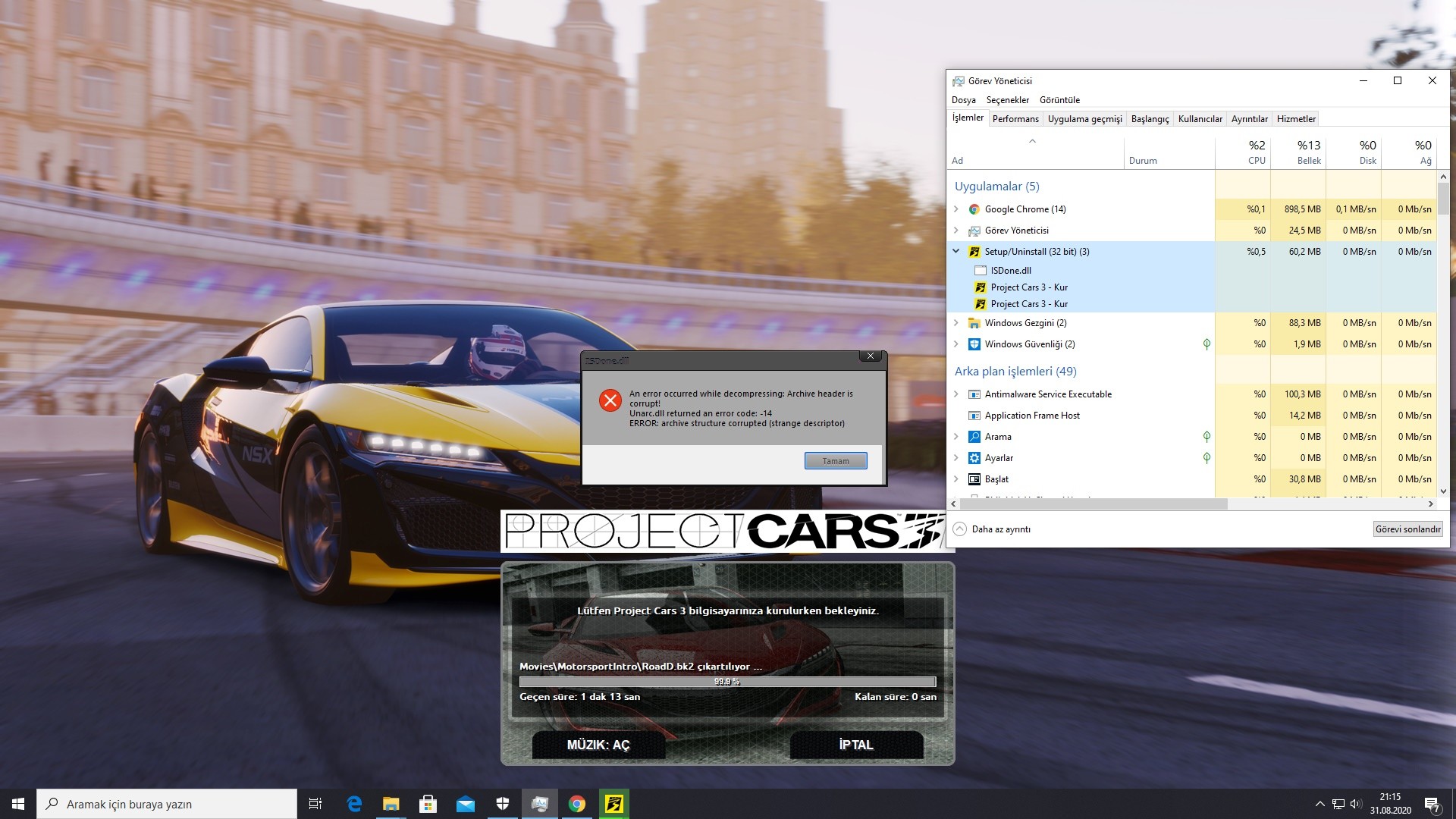 Please whatever I do I'm trying to reduce the game size I keep getting this error
|
|
#13
13-09-2020, 01:42
|
||||
|
||||
|
Quote:
compression type in your method alternate setup has the Compressors that Kaktor wrote. otherweise i dont know whats wrong
__________________
It would be nice if you appreciate my work with the thanks Button
|
|
#15
13-09-2020, 05:11
|
||||
|
||||
|
Quote:
now i think it is ok. i make the changes tha Kaktor wrote for you please download the new Alternate Conversion. other wise why you use not Normal Compress? option 6
__________________
It would be nice if you appreciate my work with the thanks Button
|
| The Following User Says Thank You to mausschieber For This Useful Post: | ||
jabervamp (14-09-2020) | ||
 |
| Thread Tools | Search this Thread |
| Display Modes | |
|
|
 Similar Threads
|
||||
| Thread | Thread Starter | Forum | Replies | Last Post |
| Project CARS 2/3 Bff Decryption Tool | Razor12911 | Conversion Tutorials | 32 | 28-03-2022 10:37 |
| Project Cars 2 | mausschieber | PC Games - CD/DVD Conversions | 32 | 23-07-2021 11:19 |
| Project cars GOTY (4xDVD5) CIU V2 + UltraARC | omdj | PC Games - CD/DVD Conversions | 14 | 30-09-2019 02:48 |
| Project Cars Digital Edition (3xDVD5) (srep+lzma) | GTX590 | PC Games - CD/DVD Conversions | 10 | 28-08-2017 08:34 |


 Linear Mode

