|
#1171
 25-03-2020, 03:43
|
|||
|
|||
|
I haven't used UA for a while now, since I've been using my own compressor however I'm having a small issue.
No matter what I do, the size always snaps back to the following values:  Either the values above or just 6. I'm really unsure as to what could be causing this. 
|
| Sponsored Links |
|
#1172
25-03-2020, 05:19
|
||||
|
||||
|
Quote:
__________________
It would be nice if you appreciate my work with the thanks Button
|
|
#1173
15-04-2020, 12:32
|
|||
|
|||
 Help me i'm a newbie and complete noob
Hi
 everyone I'm a complete newbie here and I just don't understand how this forum works because I'm a noob kindly anyone plz refer me a complete pdf or video tutorial how to use latest UltraArc to compress a game as .bin and then how to create a Setup.exe which extracts the .bin file? i have no knowledge of Libraries, Scripts and I don't know to use Inno. I also don't know how to hook up inno with ultraarc or customize .ini files. everyone I'm a complete newbie here and I just don't understand how this forum works because I'm a noob kindly anyone plz refer me a complete pdf or video tutorial how to use latest UltraArc to compress a game as .bin and then how to create a Setup.exe which extracts the .bin file? i have no knowledge of Libraries, Scripts and I don't know to use Inno. I also don't know how to hook up inno with ultraarc or customize .ini files.i just compressed Age of Empires II HD with all DLC's from 5.20 GB to 2 GB using UltraARC 2900 R7 with these FreeArc options: precomp_p.zt+msc+srep+lzma2+mask and the output had a compressed file of 2 GB which is named as Data.bin and a Records.ini file. Now how can i use Installer Creator v3.1 to make Setup.exe which extracts Data.bin and after all this i need to make an ISO image of this Repack.
|
|
#1174
09-05-2020, 23:07
|
|||
|
|||
|
AFR decompress error
When I try to decompress any afr method with any inno script all give same error "Unarc.dll returned an error code:-11".
My arc.ini - [External compressor:afr] header = 0 unpackcmd = AFR_x64.exe d #in #out <stdin> <stdout> Please anyone help
|
|
#1175
17-07-2020, 22:44
|
|||
|
|||
|
AFR help plzzz
I want to compress .forge files with AFR methods (like AFR+srep+lolz) but I can't find any option in UltraArc to use AFR...help me on how to do this please...
Assume I have less knowledge
|
|
#1176
18-07-2020, 02:18
|
||||
|
||||
|
Do you want disk splitting, or just one archive?
Just one archive: Open Resources\Config0.ini Change MASK Code:
MASK = srep+lolz/$anvilpack=afr:a2+srep+lolz In UltraArc.ini use the following settings Code:
[Split] FirstVolumeSize=999999 CustomVolumeSize=999999 ThresholdPercent=100 DiskSpan.bat settings: Code:
set GAME[1].NAME=For Honor set GAME[1].DATA[1]=Data1.bin set GAME[1].LIST[1]=Lists\Include1.txt set GAME[1].METH[1]=afr:a2+srep+lolz set GAME[1].DATA[2]=Data2.bin set GAME[1].LIST[2]=Lists\Include2.txt set GAME[1].EXCL[2]=Lists\Include1.txt set GAME[1].METH[2]=srep+lolz Code:
*.forge Code:
*
__________________
Haters gonna hate
Last edited by KaktoR; 18-07-2020 at 02:41.
|
| The Following User Says Thank You to KaktoR For This Useful Post: | ||
Sanskar Mandothia (18-07-2020) | ||
|
#1177
18-07-2020, 03:24
|
|||
|
|||

Thanks KaktoR,
That was precisely what i was looking for... UPDATE: I was able to create the bin archieve peacefully (using split)... but the ASIS installer gets automatically closed after few percentage even after disabling antivirus(When enabled, Bitdefender says : The file C:\Users\sansk\AppData\Local\Temp\is-G6D20.tmp\CLS-SREP_x86.exe is infected with Trojan.GenericKD.32772131. Bitdefender blocked this item, your device is safe.) Literally after spending 3 complete days in forum, I think it's impossible for me to backup my .forge game in small size as there is no single tool & installer that supports each other by stock and provide just click and try methods of compression for diferent files. But Thanks to you.. Last edited by Sanskar Mandothia; 18-07-2020 at 03:57.
|
|
#1178
03-08-2020, 09:13
|
|||
|
|||
|
Guys, I'm new in UltraARC, I edited Config0.ini and my Masked Compression settings:
<Masked Compression> MASK = srep:m3f+XZ/$binkpack=BPK/$mscdolid=MSC/$deflate=xZlib:e  recomp:t75p:zlib+srep:m3f:l256+X Z/ recomp:t75p:zlib+srep:m3f:l256+X Z/I am choosing only MASK option under FreeARC under Options tab(and fill other tabs of course) but program says Failed to create data1.arc. If I select other choices like Precomp, MSC, SREP etc., program starts and use chosen options. It's not using MASK option. But I don't want to use that options, I just want to use MASK option(my codes in config0.ini). What am I missing?
|
|
#1179
03-08-2020, 09:21
|
||||
|
||||
|
Your $deflate is horibly wrong.
Just write like that Code:
$deflate=xZLib+srep:m3f:l256+XZ
__________________
Haters gonna hate
|
| The Following User Says Thank You to KaktoR For This Useful Post: | ||
Atakanbasturk (04-08-2020) | ||
|
#1180
03-08-2020, 09:58
|
|||
|
|||
|
Quote:
|
|
#1182
03-08-2020, 11:19
|
|||
|
|||
|
Quote:
I want to ask something too. In xZLib: [External compressor:xZLib] header = 0 ;packcmd = "PE\XT" e recomp:t75p:zlib InFile <stdout>packcmd = "PE\XT" e recomp:t75p,c32m:zlib - - <stdin> <stdout>datafile = InFile precomp normally first precompress, than compress any file automatically. We need to use -cn command for no compress. Is there any way to add -cn for xZLib? For example in config0.ini file there is a line: #Pre-Compressors PJ = precomp:t-j If I do this PJ = precomp:cn (I want precomp compress jpg files so I deleted t-j) Than precomp in xZLib has no compress option? Last edited by Atakanbasturk; 03-08-2020 at 12:20.
|
|
#1183
04-08-2020, 03:07
|
|||
|
|||
|
I have a problem now.
My last MASK is: xZLib+srep:m5f:l256+lzma2/$binkpack=BPK/$MscSolid=msc/$void=0 In my config0.ini(edited) xZLib="PE\XT" e recomp:t75p:zlib - - <stdin> <stdout>BPK="FAZip32" -i0 compress:bpk_c <stdin> <stdout> msc="MSC" c -f -v -wav=1 InFile OutFile lzma2="7-Zip" a -txz -an -mcrc=0 -m1=lzma2:d1536m:mf=bt4 -mmt=off -mx9 -si -so <stdin> <stdout> My Arc.groups: [IMG] 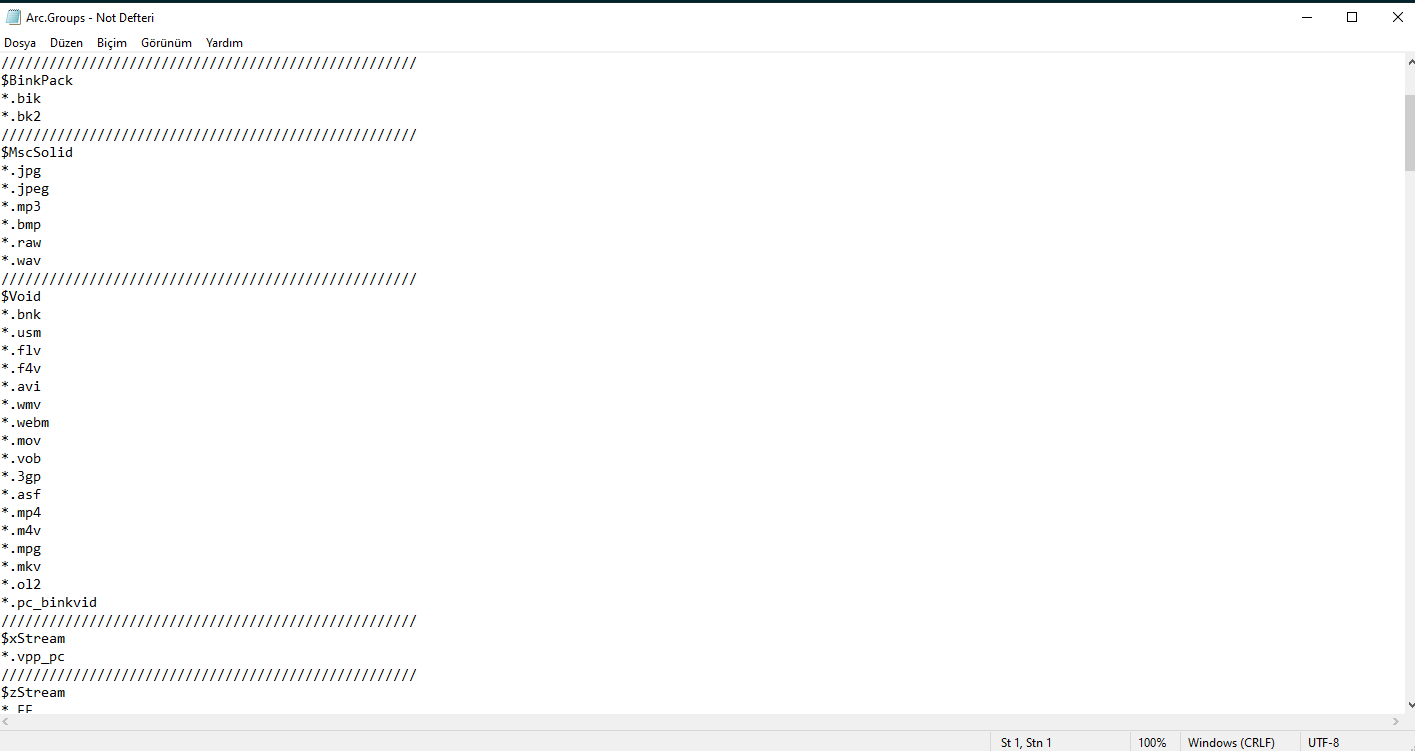 My folder has 8963 files. 151 .bik, 8071.wav files, 741 other game files. Game File Scanner found over 1.000.000 zlib data. So according to my MASK, 151 files must process with binkpack, 8071 wav files (or supported by MSC ones) must process with MSC, files with extensions in $Void must process with store, then remaining files first process with Xtool then srep then lzma2, am I right? Or horribly wrong? I'm watching from Task Manager and cmd simultenously When I hit Start button, in cmd windows: Memory for compression 256kb, decompression 256kb, cache 0b (and waits a few seconds) then Compressing 8,963 files, 5,726,317,223 bytes than compressing a.bik compressing b.bik compressing c.bik etc... all bik files(task manager says FAZip32.exe works) without stopping, continues compressing all other files but task manager says XT.exe works(no msc or something, all files except .bik processing with XT.exe)[some files has .bnk extension and $void has .bnk so these files must not process with XT???] When compression ends, it says; Compressing 4,954,668,369 bytes with "SREP" -m5f -l256 InFile OutFile (How it reach 4,954,668,369 bytes? Does 8,963 files processed with FAZip32 and XT and result is 4,954,668,369?) Result: SREP 3.92 beta (July 23, 2013): input size 4725 mb, memory used 855 mb, -m5f -l256 -c128 -a4/4 -hash=vmac -b8mb 100%: 4,954,668,369 -> 3,118,866,147: 62.95%. Cpu 234 mb/s (20.203 sec), real 22 mb/s (216.414 sec) = 9% Sorting matches... Second pass:100.0% Than it continues with lzma2 compression(Task Manager says 7-Zip Standalone Console works) Result: Uncompressed: 5.726.317.223 Compressed: 3.220.382.950 (data1.arc, records.ini) Time: ~15 min GAIN: %43,7 If I don't choose MASK and tick others (LZMA2, MSC, PRECOMP(P.XT),SREP): First compress everything with XT.exe (according to task manager), then try to compress result with MSC(analyzes it and finds wav files, I don't know how they compressed with XT), COMPRESS supported .wav files with PackTAK(thats what I want too), then compress result file with SREP(default settings), then compress result file with 7-zip(default settings) Uncompressed: 5.726.317.223 Compressed: 2.667.545.125 (data1.arc, records.ini, unpack.exe) Time: ~19 min GAIN: %53,4 (WTH) Note: I want one single file so I choose threshold %100 and both size 65536(it's not necessary normally, but in comments, many says it has better compress result) Normally, it looks like second way easier and result is better. But, it's for 5,33 GB. Think about 50-60 GB or more. It must not compress everything with XT or any preprocessor. It's gonna be huugeee waste of time. So I want to choose what compressed with what or store. What I want is: 1-Compress compressible media and music files with suitable compressor(As far as I know, wav or bik not compressible with lzma or any other usual compressing programs) 2-Store uncompressible files(trying to compress them is huge waste of time and ssd-hdd exhaustive) 3-Compress remain files with all the force I have. (I have Windows 10 Pro x64, 32 GB DDR 4 RAM, i7-6700K processor.) So; 1-Where did I make mistake? What the heck is wrong with my mask code? 2-Did anyone know lzma2 maximum compress options?(I have 32 GB RAM)(As far as I know, multithreading in LZMA2 is not good for result files size sometimes) 3-Did anyone know sREP maximum compress options? 4-How can I prevent precomp's self compress in XTool or any precompresser includes precomp?(Precomp compresses precompressed data by default)[For detailed explanation look my previous comment] Last edited by Atakanbasturk; 04-08-2020 at 08:59. Reason: Updating problems...
|
|
#1184
04-08-2020, 08:22
|
||||
|
||||
|
You have to write the mask groups in lowercase
Code:
$MscSolid => $mscsolid precomp is always used by xtool (well, the command precomp, not the tool). You can't call xtool without precomp command (precomp = precompression). That's what xtool is for. You can only change used codecs or options. For uncompressable files use $void mask group (or your own). Open arc.groups with a text editor and add files to $void mask (by filename (+ subfolder) or by file extension (*.abc). You can define files for every other mask group or make a new group ($groupxyz).
__________________
Haters gonna hate
|
|
#1185
04-08-2020, 12:43
|
|||
|
|||
|
Quote:
Quote:
Quote:
|
 |
| Thread Tools | Search this Thread |
| Display Modes | |
|
|
 Similar Threads
|
||||
| Thread | Thread Starter | Forum | Replies | Last Post |
| BlackBox v2 | y_thelastknight | Conversion Tutorials | 567 | 11-03-2025 07:16 |
| Useful Dll for Inno Setup users | peterf1999 | Conversion Tutorials | 88 | 01-12-2017 16:00 |
| Total War Collection - 6xDVD9 [LZMA + INNO SETUP + CIU] | REV0 | PC Games - CD/DVD Conversions | 1 | 28-06-2015 17:00 |
| Total War Collection - 2xBLURAY [LZMA + INNO SETUP + CIU] | REV0 | PC Games - CD/DVD Conversions | 2 | 09-01-2013 18:02 |
| Total War Collection - 11xDVD5 [LZMA + INNO SETUP + CIU] | REV0 | PC Games - CD/DVD Conversions | 0 | 09-01-2013 16:38 |


 Linear Mode

