Go Back   FileForums > Game Backup > PC Games > PC Games - CD/DVD Conversions

Reply
 
Thread Tools Search this Thread Display Modes
  #1  
Old 14-05-2019, 14:27
KaktoR's Avatar
KaktoR KaktoR is offline
Lame User
 
Join Date: Jan 2012
Location: From outer space
Posts: 4,689
Thanks: 1,106
Thanked 7,336 Times in 2,838 Posts
KaktoR is on a distinguished road
@mausschieber

You have to use the FULL version of UltraArc, because the PUBLIC version don't have all the "special tools" to unpack the game archives

However, cmd to get some more out of size should be something like this
Code:
oo2reck+oo2recm+srep:m3f+LZMA-MT
*To be used for [18] Custom compression in _DiskSpan.bat

Additionally, you can rip languages you don't want in the following folders:
archives_win64\initial\languages\
archives_win64\supplemental\languages\

--- Edit ---

4xDVD5 with ENG/DEU language
Code:
 1:15:49 - Starting Archive Creation
 3:01:50 - Archive Creation Complete
 3:01:52 - Input Size:  29.732g
 3:01:58 - Output Size: 14.658g
__________________
Haters gonna hate

Last edited by KaktoR; 14-05-2019 at 18:04.
Reply With Quote
The Following 5 Users Say Thank You to KaktoR For This Useful Post:
Danziel123 (15-05-2019), GTX590 (14-05-2019), Jarmen_Kell (15-02-2020), mausschieber (14-05-2019), zirkhaki (15-05-2019)
Sponsored Links
  #2  
Old 15-05-2019, 04:51
Danziel123 Danziel123 is offline
Registered User
 
Join Date: Mar 2013
Location: Surabaya
Posts: 1,334
Thanks: 1,213
Thanked 813 Times in 699 Posts
Danziel123 is on a distinguished road
Quote:
Originally Posted by KaktoR View Post
@mausschieber

You have to use the FULL version of UltraArc, because the PUBLIC version don't have all the "special tools" to unpack the game archives

However, cmd to get some more out of size should be something like this
Code:
oo2reck+oo2recm+srep:m3f+LZMA-MT
*To be used for [18] Custom compression in _DiskSpan.bat

Additionally, you can rip languages you don't want in the following folders:
archives_win64\initial\languages\
archives_win64\supplemental\languages\

--- Edit ---

4xDVD5 with ENG/DEU language
Code:
 1:15:49 - Starting Archive Creation
 3:01:50 - Archive Creation Complete
 3:01:52 - Input Size:  29.732g
 3:01:58 - Output Size: 14.658g
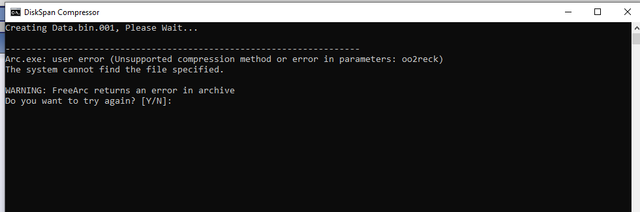
I get error like this when try to compress with your method

Can you help me?
Thank you
Reply With Quote
The Following User Says Thank You to Danziel123 For This Useful Post:
mausschieber (15-05-2019)
  #3  
Old 15-05-2019, 06:17
yasitha's Avatar
yasitha yasitha is offline
Registered User
 
Join Date: Apr 2013
Location: Krypton
Posts: 297
Thanks: 204
Thanked 48 Times in 33 Posts
yasitha is on a distinguished road
Quote:
Originally Posted by Danziel123 View Post
I get error like this when try to compress with your method

Can you help me?
Thank you
Add oodles to your compressor...
Then try..
__________________
Keep Up The Good Works!
Reply With Quote
The Following User Says Thank You to yasitha For This Useful Post:
mausschieber (15-05-2019)
  #4  
Old 15-05-2019, 06:29
Danziel123 Danziel123 is offline
Registered User
 
Join Date: Mar 2013
Location: Surabaya
Posts: 1,334
Thanks: 1,213
Thanked 813 Times in 699 Posts
Danziel123 is on a distinguished road
Quote:
Originally Posted by yasitha View Post
Add oodles to your compressor...
Then try..
Can you give the steps to do that?
Sorry i'm newbie
Reply With Quote
  #5  
Old 15-05-2019, 06:41
mausschieber's Avatar
mausschieber mausschieber is offline
Conversion Designer
 
Join Date: Jan 2011
Location: germany
Posts: 4,322
Thanks: 6,767
Thanked 11,725 Times in 3,235 Posts
mausschieber is on a distinguished road
Quote:
Originally Posted by Danziel123 View Post
Can you give the steps to do that?
Sorry i'm newbie
Setup Reworked and Background corrected and Resource Full added

please load new Setup conversuion
__________________
It would be nice if you appreciate my work with the thanks Button
Reply With Quote
  #6  
Old 15-05-2019, 06:25
KaktoR's Avatar
KaktoR KaktoR is offline
Lame User
 
Join Date: Jan 2012
Location: From outer space
Posts: 4,689
Thanks: 1,106
Thanked 7,336 Times in 2,838 Posts
KaktoR is on a distinguished road
Quote:
Originally Posted by Danziel123 View Post
I get error like this when try to compress with your method

Can you help me?
Thank you
Add the files to UltraArc folder and try again
Attached Files
File Type: 7z Resources.7z (476.3 KB, 223 views)
__________________
Haters gonna hate
Reply With Quote
The Following 3 Users Say Thank You to KaktoR For This Useful Post:
Danziel123 (16-05-2019), mausschieber (15-05-2019), wit (16-05-2019)
Reply

Thread Tools Search this Thread
Search this Thread:

Advanced Search
Display Modes

Posting Rules
You may not post new threads
You may not post replies
You may not post attachments
You may not edit your posts

BB code is On
Smilies are On
[IMG] code is On
HTML code is Off

Forum Jump

Similar Threads
Thread Thread Starter Forum Replies Last Post
Rage - All updates+DLC+1 language+SP only Fabioddq PC Games - CD/DVD Conversions 26 17-05-2019 04:19
Rage - 3XDVD9 to 5XDVD5 (Inno Setup) Fabioddq PC Games - CD/DVD Conversions 38 13-04-2014 17:26
Alien Rage Unlimited 1xDVD5 *CIU 1.0.0.6* dark_prince69 PC Games - CD/DVD Conversions 3 02-02-2014 11:36
RAGE - (3xDVD9 to 3x or 5xDVD5) *Inno Setup* pakrat2k2 PC Games - CD/DVD Conversions 31 29-09-2012 08:49
The rage crack needed Bigb_uk CD/DVD Copy Protections & Utilities 0 06-11-2001 14:20


All times are GMT -7. The time now is 03:30.


Powered by vBulletin® Version 3.8.11
Copyright ©2000 - 2026, vBulletin Solutions Inc.
FileForums @ https://fileforums.com