|
|
|
#1
 28-10-2013, 22:30
|
||||
|
||||
|
Quote:
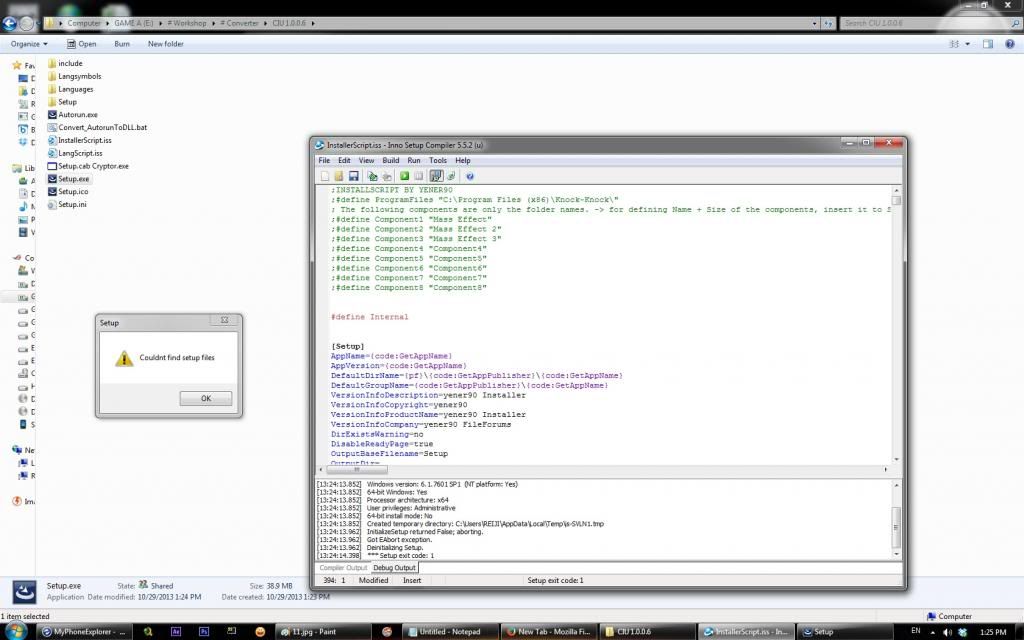 but when i deleted the setup.cab. setup.exe is still looking for the setup.cab And seems like the game not loaded into the script. 
|
| Sponsored Links |
|
#2
29-10-2013, 02:13
|
|||
|
|||
|
Quote:
compile script first (with #define Internal) and then run file "Convert_AutorunToDLL.bat". after running this file you can delete setup.cab.
|
| The Following User Says Thank You to ASSAiL For This Useful Post: | ||
reiji777 (29-10-2013) | ||
|
#3
29-10-2013, 14:25
|
||||
|
||||
|
I've seen the scripts from some installer.
1st installer (tombraider survival) didn't put any registry code Quote:
Quote:
Quote:
what is the difference between three of them? how do i recognize a game which required alot of registry code to be inserted in the script or not at all? if I don't insert the registry key, then the game wouldn't compatible for the future updates of the game? (like in the first ver. splinter cell blacklist installer) sorry for my bad english 
Last edited by reiji777; 29-10-2013 at 14:37.
|
 |
| Thread Tools | Search this Thread |
| Display Modes | |
|
|
 Similar Threads
|
||||
| Thread | Thread Starter | Forum | Replies | Last Post |
| INNO TROUBLESHOOT - Tutorials and Answers about INNO Setup | REV0 | Conversion Tutorials | 129 | 21-05-2021 05:51 |
| INNO TUTORIAL - Using Unicode and ANSI Versions of INNO Setup | REV0 | Conversion Tutorials | 51 | 26-03-2015 06:57 |
| Frequently Asked Questions | Joe Forster/STA | PC Games - Frequently Asked Questions | 0 | 29-11-2005 09:48 |


 Hybrid Mode
