|
#211
 08-03-2012, 16:55
|
|||
|
|||
|
hey yener90,
Can you add a wizard page to show system requirements like in peterf1999 installer. And thank you very much for what you have done so far.It's really a great installer with a lot of convenience. |
| Sponsored Links |
|
#212
08-03-2012, 17:14
|
||||
|
||||
|
Quote:
New Precomp 42 & Srep 3 precomp -intense -o[arc archive]arc archive.arc Like this ,, precomp -intense -oHL2 HL2.arc 1 creates, arc file with 0 compression -m0 2 use precomp with this commands precomp -intense -oHL2 HL2.arc ( HL2 is an example) 3 use srep with this commands srep -m2 HL2.pcf HL2.srep (srep -m2 or srep -m3) 4 Compress with Freearc , HL2.srep file compression -mx -ld1600m arc , or cab file 5 Use Yener installers for Descompresion : FreeArcFile1={src}\HL2.cab;DestDir:{app};Disk:1;Pr ecSrep:1 Credits to Bamsee Last edited by sulfurum1989; 08-03-2012 at 17:26. |
|
#213
08-03-2012, 17:41
|
||||
|
||||
|
Quote:
Is called HWREQ LINK , would be nice app in the Yener code |
|
#214
08-03-2012, 22:26
|
|||
|
|||
|
Quote:
Should I use these paramets to every game. I'm confused because for instance with Fallout we use precomp -slow -c6 -m8 and sprep m2. Dead Rising: precomp -slow -c189 -m16. How do I know which paramets I should use? @yener90 Is it possible to use splash screen .gif with a transparent background and to change the layout/skin of the installer to look (for example) similar to this one: 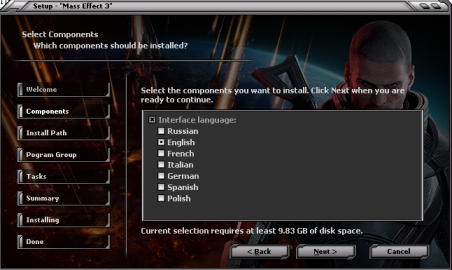
|
|
#215
09-03-2012, 01:33
|
|||
|
|||
|
Can anyone send me simple example script with freearc and precomp support i really want to add this to my installer i have only unarc.dll that is working but my game is too big even on ultra compression with freearc
|
|
#216
09-03-2012, 02:58
|
|||
|
|||
|
Sisah
use this one: http://krinkels.ru/showthread.php?t=34&page=36 vlv yes you can use. but not gif, png is required. call it Splash.png and put it to Setup.cab. If in Setup.cab is a Splash.bmp then delete this. Nothing is impossible  but i prefer simple setup. too much useless page and it would be much more easier, if inno setup would support alphablend for such setup :/ darshana :/ for me its useless. if you buy a game, you always look to system requirement. so tell me the sense of this 
Last edited by yener90; 09-03-2012 at 03:03. |
|
#217
09-03-2012, 04:02
|
|||
|
|||
|
Quote:
[autorun] open=Autorun.exe, open=(Leer.txt) icon=Sims3EP06.ico [IMG]  Uploaded with ImageShack.us[/IMG] Uploaded with ImageShack.us[/IMG]thanks |
|
#219
09-03-2012, 06:00
|
|||
|
|||
|
yener90
1. Is there any way to remove the black border below the background image and to center the image in the screen? 2. Can you add a feature to support "PNG" type to the buttons. |
|
#221
09-03-2012, 06:49
|
|||
|
|||
|
I tried to do a conversion with CI 7.2.5. and even I could but I noticed some minor problems with languages in menu install.One of them is that in English instead of Uninstall is Deinstall (I think the only problem with English) and in Romanian instead of Dezinstalare appears Dezinstala and instead Iesire appears Capat.
How can I change the script? (do not know which, languages or installer?) Although I looked into them and I changed everything I wanted to change, but nothing has changed, remain the same issues with both languages! I mention I copied all ISL files from Languages folder in the Languages folder of Inno Setup Unicode ! http://img210.imageshack.us/img210/5016/deinstall.png http://img651.imageshack.us/img651/7...instaleaza.png Yener90 Thanks for the work that we enjoy the rest of us!! And thanks to REV0 for me3 theme and buttons. Last edited by Joe Forster/STA; 23-03-2012 at 04:35. |
|
#222
09-03-2012, 08:12
|
|||
|
|||
|
AT yener90
When the background slideshow is displayed the black area below the image is lager than the black area above the image.I think the image is not in the center of the screen.I temporally fixed that by editing a line in the script.(by adding 50 pixels to the top position). I don't know if this is a permanent solution . Top:= GetSystemMetrics(1) /2 - BackgroundPicSizeCalcY / 2 //original Top:= GetSystemMetrics(1) /2 - BackgroundPicSizeCalcY / 2 +50 //edited Last edited by darshana; 09-03-2012 at 08:19. |
|
#224
09-03-2012, 10:28
|
||||
|
||||
|
Quote:
it actually need a shellexecute to open the text file.. IE: ShellExecute=datafile - Specifies an application or data file that is to be opened. Windows will launch the application associated with that file type to open the datafile. So for your example. Code:
[autorun] open=Autorun.exe icon=Sims3EP06.ico ShellExecute=Leer.txt icon=Leer.txt |
|
#225
09-03-2012, 11:01
|
|||
|
|||
|
Please guys,I need an answer to this...
I tried to do a conversion with CI 7.2.5. and even I could but I noticed some minor problems with languages in menu install.One of them is that in English instead of Uninstall is Deinstall (I think the only problem with English) and in Romanian instead of Dezinstalare appears Dezinstala and instead Iesire appears Capat. How can I change the script? (do not know which, languages or installer?) Although I looked into them and I changed everything I wanted to change, but nothing has changed, remain the same issues with both languages! I mention I copied all ISL files from Languages folder in the Languages folder of Inno Setup Unicode ! http://img210.imageshack.us/img210/5016/deinstall.png http://img651.imageshack.us/img651/7...instaleaza.png Yener90 Thanks for the work that we enjoy the rest of us!! Last edited by silviugut; 09-03-2012 at 14:44. |
 |
| Thread Tools | Search this Thread |
| Display Modes | |
|
|
 Similar Threads
|
||||
| Thread | Thread Starter | Forum | Replies | Last Post |
| INNO TROUBLESHOOT - Questions Here | REV0 | Conversion Tutorials | 1567 | 26-08-2026 10:04 |
| Inno Setup: Additional Libraries | altef_4 | Conversion Tutorials | 50 | 21-10-2020 09:59 |
| INNO TUTORIAL - Using Unicode and ANSI Versions of INNO Setup | REV0 | Conversion Tutorials | 51 | 26-03-2015 06:57 |
| Help- How to extract a .bin file compressed by a code ? | Adonix | Conversion Tutorials | 22 | 22-03-2015 15:02 |
| yener90's older Inno Project Source Codes | THADEADMAN2011 | PC Games - CD/DVD Conversions | 0 | 16-06-2012 03:40 |


 Linear Mode

