|
#1
 24-01-2006, 00:52
|
||||
|
||||
|
How I Backup MY Movie DVD’s
I use AnyDVD, CloneDVD2 and Nero.
100% successful all the time! AnyDVD – This is used to remove the Copy Protection and the Region codes etc. First we will check some of the basic settings. After installing and starting AnyDVD you will have a little red fox face sitting down on in the system tray.  Right Click the AnyDVD Red Fox Face (Shown above) and choose Settings. On the DVD Tab: 1. Choose your location. 2. Navigation: Tick ‘Remove annoying adverts and trailers’. Choose ‘Jump directly to Main Movie’ 3. Feature Removal: TICK them all. On the CD Tab: TICK ‘Remove CD Digital Audio Protection’. On the Drive Selection Tab: 1. Tick all Drives. 2. Tick ‘Enable Speed Control’. On the Program Tab: 1. Choose your Language. 2. Tick ‘Enable any DVD’. That is all you need to do to setup AnyDVD so you can now click OK! Right Click the Red fox face again and untick ‘Autostart’. (I do this as I don’t want it starting every time Windows starts! I start it manually when I want to use it!) Now when you want to backup a DVD Movie all you need to do is start AnyDVD so you see the red fox face in the system tray. AnyDVD is now ready for you to insert you DVD Movie. NOTE: Always start AnyDVD before inserting the DVD Movie!!
__________________
Can't find a Game Conversion? Check the 'Conversion INDEX'
 Last edited by Grumpy; 25-03-2011 at 04:41. 
|
| Sponsored Links |
|
#2
24-01-2006, 01:07
|
||||
|
||||
|
CloneDVD2 – This will read the DVD Movie.
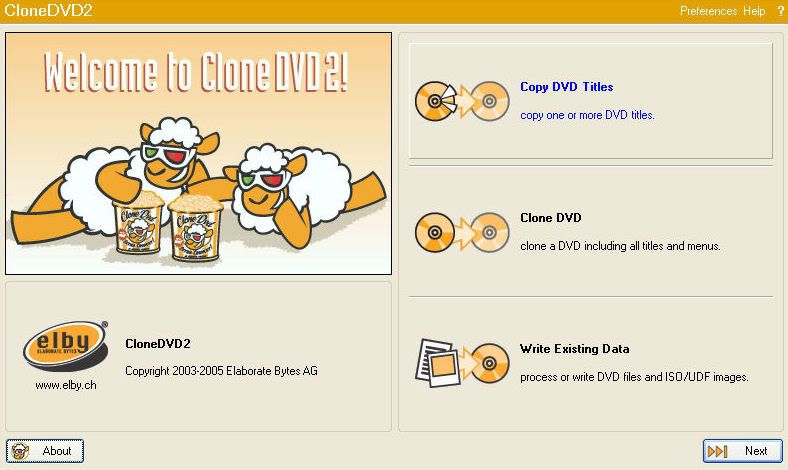 Step 1: Refer to above Picture. Start CloneDVD2 and Click the top button, the ‘Copy DVD Titles’ button. (Shown Above) Note: I do this when I only want to copy the Main Movie! (Remembering AnyDVD will also be removing the extra’s.) Click ‘Next’. 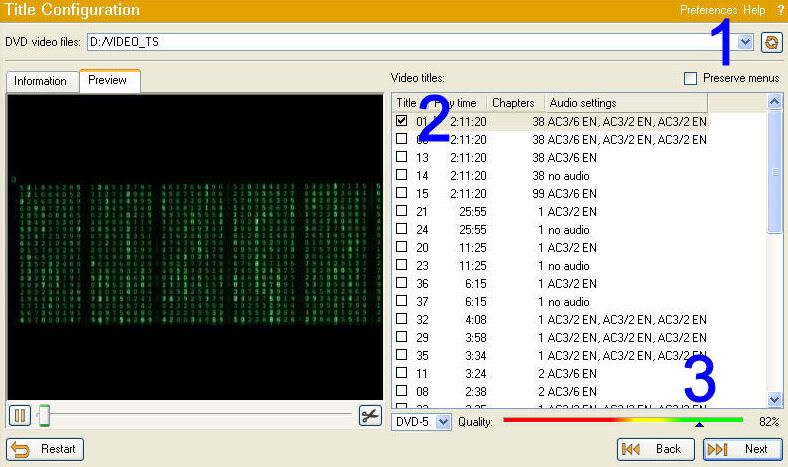 Step 2: Refer to above Picture. 1. Use the little drop down arrow and choose the DVD drive which holds your movie. 2. Notice how only the main movie title is ticked! 3. Notice at this stage it is saying that our quality will be 82%. Anywhere in the green area of the quality bar is very good quality!! 4. Click ‘Next’. 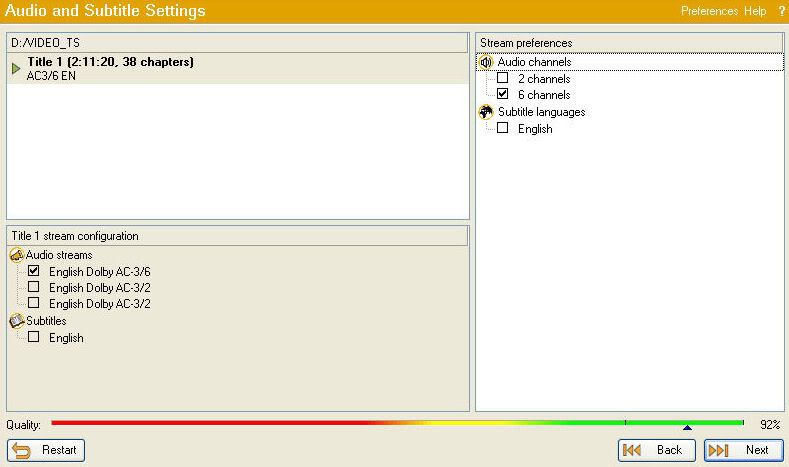 Step 3: Refer to above Picture. In this picture you will notice we only have the one Audio Stream ticked and the one Audio Channel. We don’t want subtitles so its not ticked! Click ‘Next’. 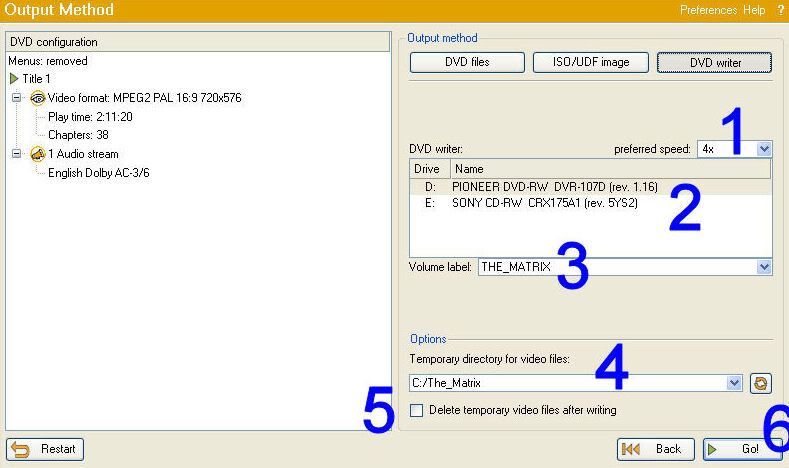 Step 4: Refer to above Picture. 1. Choose your preferred Read speed. I ALWAYS use 4x!! 2. Choose your DVD Writer. 3. The DVD Label. Most times I just leave this as the default! 4. Choose where you would like to save the files. NOTE: I always name the Save folder the same as the DVD Volume Label!! This is so I remember the correct Label when I write the DVD later! 5. THE IMPORTANT PART!! UNTICK THE BOX!! You DO NOT want to ‘Delete temporary video files after writing’!!! So UNTICK THE BOX!!6. Click ‘GO’ CloneDVD2 will now read your Movie DVD. It will take approximately 12-15 minutes at 4x. 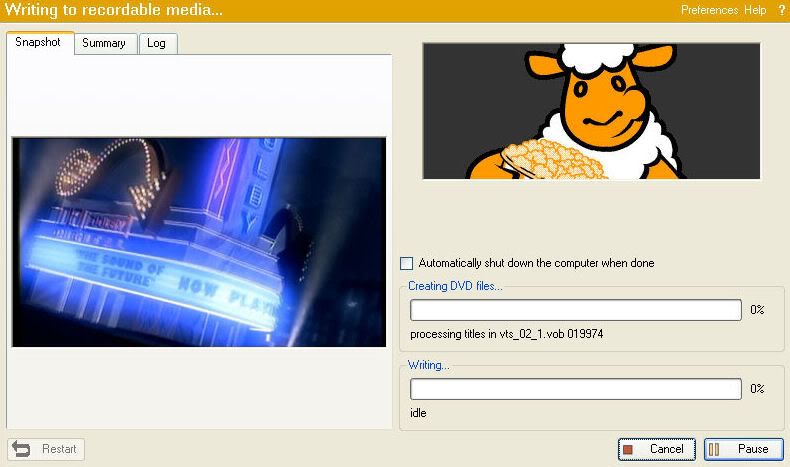 Step 5: Refer to above Picture. When the reading has completed the DVD will eject and you will be prompted to insert a recordable media into the drive. At this point I choose ‘Cancel’!! Yes that’s right ‘I choose Cancel!!’ That is the disc read completed. You can close CloneDVD2 and exit AnyDVD. (CloneDVD probably closed when you chose ‘Cancel’) Now to write our movie!
__________________
Can't find a Game Conversion? Check the 'Conversion INDEX'
Last edited by Grumpy; 25-03-2011 at 04:43.
|
|
#3
24-01-2006, 01:13
|
||||
|
||||
|
Nero – This will write our DVD files to our Blank DVD.
Insert a Blank DVD into your DVD Drive!! 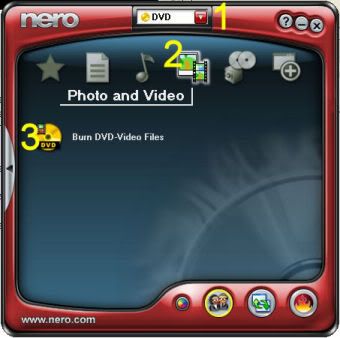 Step 1: Refer to above Picture. 1. Open Nero and use the drop down arrow to choose DVD. 2. Choose ‘Photo and Video’. 3. Click on ‘Burn DVD-Video Files’. Step 2: Refer to Picture below. 1. Change to the DVD Recorder. 2. Browse to where you saved your DVD files. 3. Label the disc the same as the original. NOTE: Remember we named our folder the same as the original DVD! So just click on the folder (number 2) and copy the text, then paste it in for the label. (number 3). 4. Open the ‘Edit’ menu and choose ‘Select All’. This will highlite all our files. 5. Left Click, AND HOLD THE LEFT CLICK, on the highlited files and drag them over and drop them onto the red VIDEO_TS folder icon. (Drag 5 to 5) 6. The files will now show up in the column where you just dropped the files. 7. The blue bar will now show up to let you know how much of the Blank DVD will be used. 8. Click the ‘Burns the current compilation’ button. (its just below the 8) 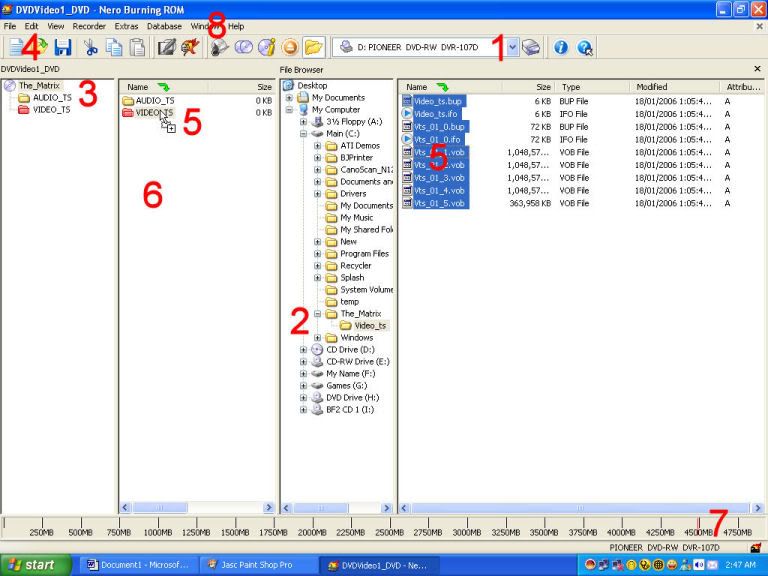 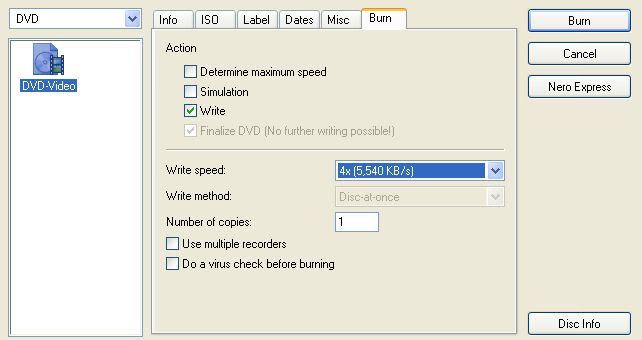 Step 3: Refer to above Picture. All there is to do now is to check the write speed, (I always use 4x) and click the ‘Burn’ button. The writing should take approximately 12-15 minutes at 4x. Have fun and enjoy.
__________________
Can't find a Game Conversion? Check the 'Conversion INDEX'
Last edited by Grumpy; 25-03-2011 at 04:32.
|
|
#5
10-02-2006, 14:40
|
|||
|
|||
 I use AnyDVD, CloneDVD2 and Nero too now
I am writing to Thank you Grumpy, for your very detailed instructions, (which i have printed out). I have about 7 coasters of "Doom" Was having a very hard time with it. My back-up would burn but in plyback it would just freeze up about 3/4 through the movie. Now with your guidance I have a perfect back-up. Thank you again for taking the time to help...j
|
|
#7
12-02-2006, 04:21
|
|||
|
|||
|
theres a new movie coming out tuesday called proof has some new locks on it burn it your regular way first and see if it plays for you in dvd player if not then with combination of shrink and anydvd then click reauthor on dvd shrink drag and drop the warning insigma over like you would do a movie then drag and drop movie in the warning insigma throws the lock off since you making that play first should help also on the first chapter skipping on some dvd players.//
|
|
#8
12-02-2006, 19:02
|
|||
|
|||
|
try anydvd and vobblanker programs and you should have no problems on any movie.
or use dvd fab decrypter with vobblannker.
__________________
Life is just a dream that you can not wake up from. All I need, is my Dugout full of weed.
|
|
#9
13-02-2006, 15:08
|
|||
|
|||
|
hey grumpy on your guide there where u say to do this 4. Open the ‘Edit’ menu and choose ‘Select All’. This will highlite all our files.
5. Left Click, AND HOLD THE LEFT CLICK, on the highlited files and drag them over and drop them onto the red VIDEO_TS folder icon. (Drag 5 to 5) 6. The files will now show up in the column where you just dropped the files to make things a little faster do this just a little suggestion your dvd file is in vts folder just take that folder and drag and drop into 3 and it will automatically go into 5 so basically just drag 2 over to 3 and drop then your files will go into 5 auto.. drop into video on 3
|
|
#10
19-02-2006, 05:43
|
||||
|
||||
|
@Warlock
Quote:
@cardman Quote:
I wrote it my way only to try and explain where the files actually end up. I wanted people to realize what files went where. But thanks all the same for you tip.
__________________
Can't find a Game Conversion? Check the 'Conversion INDEX'
|
|
#11
23-03-2006, 19:38
|
|||
|
|||
 I dont have a burn-video files tab
Grumpy I am going threw your prosses of copying a movie using your instrucutions When i pull up nero on step 1 (3.) I dont have a burn dvd-video files tab what do I do ????
|
|
#12
25-03-2006, 07:43
|
|||
|
|||
|
Quote:
I've noticed this alot in the past with just about any blank media. It happens more often when backing up original DVD's that have episodes on them. Burning the movie with Nero 7 from a CloneDVD2 shrunken file on your harddrive increases the chances of a good burn by alot.
|
|
#13
25-03-2006, 09:06
|
||||
|
||||
|
@tontosmudflap
What version of Nero are you using? I use Nero Ultra Edition version 6.6.0.16
__________________
Can't find a Game Conversion? Check the 'Conversion INDEX'
|
|
#14
26-03-2006, 08:52
|
|||
|
|||
|
Quote:
Nero 7 Ultra version 7.0.5.4. , and the latest version of CloneDVD2 and AnyDVD.
|
|
#15
26-03-2006, 09:39
|
||||
|
||||
|
@whoeverxxx
Yes the questions was actually to tontosmudflap! And no I havent updated Nero yet. I never update until I am sure the newer versions are as reliable as the previous versions. Not always is the latest the greatest.
__________________
Can't find a Game Conversion? Check the 'Conversion INDEX'
|
 |
| Thread Tools | Search this Thread |
| Display Modes | |
|
|
 Similar Threads
|
||||
| Thread | Thread Starter | Forum | Replies | Last Post |
| Suggestions for DVD (movie) backup software? | jbmaps | DVD Backup Forum | 5 | 22-01-2005 11:31 |
| I can't backup the movie called LITTLE BLACK BOOK. | whoeverxxx | CD/DVD Copy Protections & Utilities | 7 | 18-01-2005 11:18 |
| dvd movie backup | apock666 | XBox Games | 7 | 06-12-2004 06:48 |
| backup movie dvds on xbox??? | Utzenflatz | XBox Games | 8 | 18-09-2004 16:19 |
| DVD movie to VCD backup. | heat6275 | DVD Backup Forum | 1 | 11-03-2003 06:00 |


 Linear Mode

