|
#2
 19-08-2006, 22:16
|
||||
|
||||
|
VMU problem FIX
ok
When you overclock your DC ... the VMU now don't work properly !!! You CANT SAVE!!! But !! there's a trick to get them to work well !! You need to overclock your vmu by the same ration than the DC !! So for a DC OC'ed at 240 Mhz (20%) you'll need to OC the VMU from 6 MHz to 7.2Mhz(20%[Dùh]) You cam use aproximative Xtal rate if you can't find the exact parts( ex: 7.372Mhz will work instead of 7.2Mhz) Just remove the Xtal in the middle on the vmu board (batery-side) [it's 3 pin Xtal ... middle Pin is not important] Then replace it by a Xtal of the right frequency. 2 Pin Xtal works fine Here's a pic of the Xtal to remove: 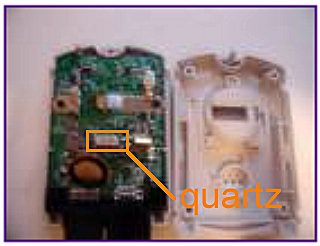 Here's a pic of a OC'ed VMU: 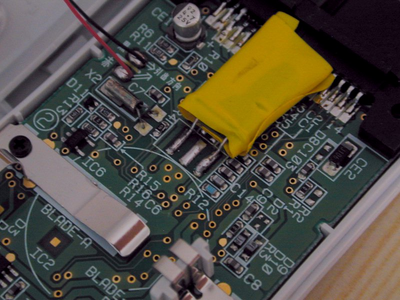 You Might now Save with your vmu !! Thanks to Doccy to have find how to OC the VMU -=FamilyGuy=-
__________________
Ripping DC GD-R with dvd drive :[url]http://homepage.ntlworld.com/menace-59/gd-rom_stuff/[/url] Overclocked DC at 240MHZ With Sync VMU ...288MHZ to come ... Bleemcast GT2 own backup disc boots ! But can't load GT2... DAMN :mad: I can even swap for the real disc at the LAST check it does and it'd boot ! Almost got it :cool: ! -=FamilyGuy=- Last edited by --=FamilyGuy=--; 30-08-2006 at 14:53. Reason: I need to edit my posts to make sense because I don't speak english very well 
|
|
|


 Threaded Mode