Go Back   FileForums > Game Backup > PC Games > PC Games - CD/DVD Conversions
Register FAQ Community Calendar Today's Posts Search

Reply
 
Thread Tools Search this Thread Display Modes
  #1  
Old 01-10-2016, 16:54
mausschieber's Avatar
mausschieber mausschieber is offline
Conversion Designer
 
Join Date: Jan 2011
Location: germany
Posts: 4,311
Thanks: 6,755
Thanked 11,698 Times in 3,223 Posts
mausschieber is on a distinguished road
Smile Divinity Anthology

Divinity Anthology [?xDVD5]

Credits:
--CIU By:Yener90
--InstallerScript: CIU 3.0.0.1 b9
--Contributors:BAMsE; Razor12911; Simorq; KaktoR; Cesar82 CIU 3.0.0.1
--CLS-DiskSpan.dll R3 by Razor12911, modified version by Cesar82
--DiskSpan_GUI V2+ by Cesar82

Graphic found Ingame and Online
Arts by mausschieber


At Request from WaltonSimons

Info:

Code:
Conversion is for Steam and GOG so choose Diskspan_gui to change 
wich Version should Compressed [ Default is Steam ] 
Version History:
Code:
Version 1.0.0 
- Initial Release  (40 views before); 
Version 1.0.1 
- Conversion Updated to New Script and DSG ;
- GOG Added;
Include: All DLC's

Instructions:

1.-- Install Game, update to latest version + No-DVD.
2.-- Download the Conversion and extract to HD, (not in game folder)
2a.- Move _CommonRedist to Conversion output folder. (Last DVD)

Code:
[Launch1]
-----------------------------------------------------
Name=DirectX (Jun 2010)
Exe1={src}\_CommonRedist\DirectX\Jun2010\DXSETUP.exe
Argument=/silent
BeforeInstall=0
Checked=0

[Launch2]
-----------------------------------------------------
Name=Microsoft Visual C++ 2012
Exe1={src}\_CommonRedist\vcredist\2012\vcredist_x86.exe
Exe2={src}\_CommonRedist\vcredist\2012\vcredist_x64.exe
Argument=/passive /norestart
BeforeInstall=0
Checked=0

[Launch3]
-----------------------------------------------------
Name=Microsoft Visual C++ 2013
Exe1={src}\_CommonRedist\vcredist\2013\vcredist_x86.exe
Exe2={src}\_CommonRedist\vcredist\2013\vcredist_x64.exe
Argument=/passive /norestart
BeforeInstall=0
Checked=0

[Launch4]
-----------------------------------------------------
Name=Microsoft Visual C++ 2015
Exe1={src}\_CommonRedist\vcredist\2015\vc_redist.x86.exe
Exe2={src}\_CommonRedist\vcredist\2015\vc_redist.x64.exe
Argument=/passive /norestart
BeforeInstall=0
Checked=0

[Launch5]
-----------------------------------------------------
Name=Microsoft NET Framework 3.5
Exe1={src}\_CommonRedist\DotNet\3.5\dotNetFx35.exe
Argument=/q /norestart
BeforeInstall=0
Checked=0

[Launch6]
-----------------------------------------------------
Name=Microsoft NET Framework 4.0
Exe1={src}\_CommonRedist\DotNet\4.0\dotNetFx40_Full_x86_x64.exe
Argument=/q /norestart
BeforeInstall=0
Checked=0
3.-- Run DiskSpan_GUI Choose Input/Output folder, Choose compression method
4.-- Test the conversion, before burning ISO.

Folder Structure: Depending on Path Length
Code:
   Divinity Anthology   (This is the Main Folder) 

these are the installed Game Folders 

Folder Structure must Match for the Collection. Otherwise the Games do not work

---- Divine Divinity ------------------------------| div.exe
---- Beyond Divinity ------------------------------| div.exe
---- Divinity II Developers Cut  ------------------| Divinity2.exe
---- Divinity Dragon Commander --------------------| DCApp.exe
---- Divinity Original Sin Enhanced Edition -------| EOCApp.exe
---- Divinity Original Sin 2  ---------------------| Divinity2.exe
Attached Images
File Type: png Autorun.png (574.1 KB, 35 views)
File Type: png Installer.png (409.9 KB, 35 views)
Attached Files
File Type: rar Divinity Anthology-01.rar (76.36 MB, 23 views)

Last edited by mausschieber; 18-09-2023 at 04:58. Reason: Conversion Updated to new Script and DSG
Reply With Quote
The Following 7 Users Say Thank You to mausschieber For This Useful Post:
Danziel123 (17-09-2023), GTX590 (16-10-2016), houcine80 (02-10-2016), omdj (16-10-2016), pakrat2k2 (01-10-2016), Razor12911 (01-10-2016), zirkhaki (16-10-2016)
Sponsored Links
  #2  
Old 16-10-2016, 00:45
WaltonSimons's Avatar
WaltonSimons WaltonSimons is offline
Registered User
 
Join Date: Feb 2007
Location: Poland
Posts: 491
Thanks: 223
Thanked 220 Times in 176 Posts
WaltonSimons is on a distinguished road
Finally got around to doing this on my machine.

Here's a more detailed critique/feedback. Hope it's useful for the future. Take note that it's just subjective opinion and nobody should feel OBLIGATED to agree with it. It's an opinion, not scientific fact.

The bad:

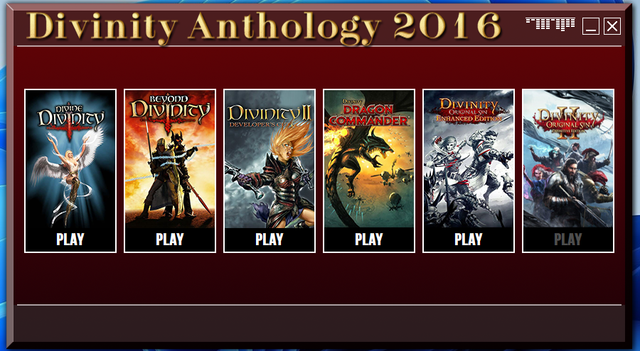
- buttons on start screen: red text on red buttons? (white only on highlight?) unreadable
- start screen: the red bars between images look completely unlike you. You can do much better, Mouse. Much better.
- lack of II in Divinity Original Sin II logo on start screen.
- Divinity Anthology has its own logo. - granted it's from a smaller set but what was stopping you from adding a 2016 on top of it?
- same issue with the splash screen ("Divine" Divinity Anthology? :-P) and the main setup window.
- alphabetic ordering of the components also looks weird given that this series of games has a sequence (LMK, Divine, Beyond, II, Commander, OS1, OS2) and I believe an anthology type conversion SHOULD reflect that.

The good:

- the music choices and the screenshot choices.
- well, it works as a repackaging of the games, I'll give you this much.

Overall, with your previous fullfillments of my requests, you really came through. The installers were ultimate in eye candy and there were next to no issues with them - and if there were, they were being fixed fast.

However this looks more like you were in a hurry to get this off your chest. I'm sorry if it was the case because if I made you feel this way, the fault is all mine. However, this does look genuinely rushed. 6/10 from me.
Reply With Quote
The Following User Says Thank You to WaltonSimons For This Useful Post:
mausschieber (16-10-2016)
  #3  
Old 16-10-2016, 00:56
mausschieber's Avatar
mausschieber mausschieber is offline
Conversion Designer
 
Join Date: Jan 2011
Location: germany
Posts: 4,311
Thanks: 6,755
Thanked 11,698 Times in 3,223 Posts
mausschieber is on a distinguished road
Quote:
Originally Posted by WaltonSimons View Post
Finally got around to doing this on my machine.

Here's a more detailed critique/feedback. Hope it's useful for the future. Take note that it's just subjective opinion and nobody should feel OBLIGATED to agree with it. It's an opinion, not scientific fact.

The bad:

- buttons on start screen: red text on red buttons? (white only on highlight?) unreadable
- start screen: the red bars between images look completely unlike you. You can do much better, Mouse. Much better.
- lack of II in Divinity Original Sin II logo on start screen.
- Divinity Anthology has its own logo. - granted it's from a smaller set but what was stopping you from adding a 2016 on top of it?
- same issue with the splash screen ("Divine" Divinity Anthology? :-P) and the main setup window.
- alphabetic ordering of the components also looks weird given that this series of games has a sequence (LMK, Divine, Beyond, II, Commander, OS1, OS2) and I believe an anthology type conversion SHOULD reflect that.

The good:

- the music choices and the screenshot choices.
- well, it works as a repackaging of the games, I'll give you this much.

Overall, with your previous fullfillments of my requests, you really came through. The installers were ultimate in eye candy and there were next to no issues with them - and if there were, they were being fixed fast.

However this looks more like you were in a hurry to get this off your chest. I'm sorry if it was the case because if I made you feel this way, the fault is all mine. However, this does look genuinely rushed. 6/10 from me.
Thanks for your opinion, I will implement your suggestions and make it the next time better
Reply With Quote
The Following User Says Thank You to mausschieber For This Useful Post:
WaltonSimons (16-10-2016)
  #4  
Old 16-10-2016, 01:15
WaltonSimons's Avatar
WaltonSimons WaltonSimons is offline
Registered User
 
Join Date: Feb 2007
Location: Poland
Posts: 491
Thanks: 223
Thanked 220 Times in 176 Posts
WaltonSimons is on a distinguished road
Glad I've turned out useful! ;-)
Reply With Quote
  #5  
Old 16-10-2016, 03:41
mausschieber's Avatar
mausschieber mausschieber is offline
Conversion Designer
 
Join Date: Jan 2011
Location: germany
Posts: 4,311
Thanks: 6,755
Thanked 11,698 Times in 3,223 Posts
mausschieber is on a distinguished road
Update

UPDATE: Design Update
Reply With Quote
The Following User Says Thank You to mausschieber For This Useful Post:
houcine80 (16-10-2016)
  #6  
Old 17-09-2023, 01:25
Danziel123 Danziel123 is offline
Registered User
 
Join Date: Mar 2013
Location: Surabaya
Posts: 1,334
Thanks: 1,213
Thanked 813 Times in 699 Posts
Danziel123 is on a distinguished road
Hi, can you update the conversion to the latest DSG and add GOG registry? Thank you
Reply With Quote
  #7  
Old 17-09-2023, 05:28
mausschieber's Avatar
mausschieber mausschieber is offline
Conversion Designer
 
Join Date: Jan 2011
Location: germany
Posts: 4,311
Thanks: 6,755
Thanked 11,698 Times in 3,223 Posts
mausschieber is on a distinguished road
Quote:
Originally Posted by Danziel123 View Post
Hi, can you update the conversion to the latest DSG and add GOG registry? Thank you
The collection no longer exists because some items that were discontinued are missing
so what should i do
__________________
It would be nice if you appreciate my work with the thanks Button
Reply With Quote
  #8  
Old 17-09-2023, 05:53
Danziel123 Danziel123 is offline
Registered User
 
Join Date: Mar 2013
Location: Surabaya
Posts: 1,334
Thanks: 1,213
Thanked 813 Times in 699 Posts
Danziel123 is on a distinguished road
Quote:
Originally Posted by mausschieber View Post
The collection no longer exists because some items that were discontinued are missing
so what should i do
Can you just remove the lmk and the divinty engine enhanced edition & change divinity original sin 2 to divinity original sin 2 enhanced edition? Or just update the conversion divinity orignal sin 2 EE from your conversion in here https://fileforums.com/showthread.php?t=102839. Thank you

Last edited by Danziel123; 17-09-2023 at 06:02.
Reply With Quote
  #9  
Old 18-09-2023, 04:09
mausschieber's Avatar
mausschieber mausschieber is offline
Conversion Designer
 
Join Date: Jan 2011
Location: germany
Posts: 4,311
Thanks: 6,755
Thanked 11,698 Times in 3,223 Posts
mausschieber is on a distinguished road
Quote:
Originally Posted by Danziel123 View Post
Can you just remove the lmk and the divinty engine enhanced edition & change divinity original sin 2 to divinity original sin 2 enhanced edition? Or just update the conversion divinity orignal sin 2 EE from your conversion in here https://fileforums.com/showthread.php?t=102839. Thank you;)
Done Updated

Code:
[Executable1]
Name=Divine Divinity
ExeFile=div.exe
ExePath=Divine Divinity

[Executable2]
Name=Beyond Divinity
ExeFile=div.exe
ExePath=Beyond Divinity

[Executable3]
Name=Divinity II Developers Cut
ExeFile=Divinity2.exe
ExePath=Divinity II Developers Cut\bin

[Executable4]
Name=Divinity Dragon Commander
ExeFile=DCApp.exe
ExePath=Divinity Dragon Commander\Shipping

[Executable5]
Name=Divinity Original Sin Enhanced Edition
ExeFile=EOCApp.exe
ExePath=Divinity Original Sin Enhanced Edition\Shipping

[Executable6]
Name=Divinity Original Sin 2
ExeFile=SupportTool.exe
ExePath=Divinity Original Sin 2\Bin
@mods Please Change Title to Only Divinity Anthology
Attached Images
File Type: png Play Worked.png (565.9 KB, 35 views)
__________________
It would be nice if you appreciate my work with the thanks Button
Reply With Quote
  #10  
Old 24-09-2023, 02:01
Danziel123 Danziel123 is offline
Registered User
 
Join Date: Mar 2013
Location: Surabaya
Posts: 1,334
Thanks: 1,213
Thanked 813 Times in 699 Posts
Danziel123 is on a distinguished road
Thank you
Quote:
-----------------------------------------------------------------------------------------
-------------------------------- CONVERSION DATE 24/09/2023 --------------------------------
-----------------------------------------------------------------------------------------
09:42:58 - You have chosen the unlimited type for the output size.
09:42:58 - ISO images will not be created when conversion is complete.
09:42:58 - The computer will remain on when the conversion is complete.
09:42:58 - Selected ARC/DS method for Data1a-01.bin was: xtool:mzlib:dd3+4x4:b64mb:lzma:ultra:64m:bt4:fb273 :lc8:mc1000000
09:42:58 - Selected ARC/DS method for Data2a-01.bin was: xtool:mzlib:dd3+4x4:b64mb:lzma:ultra:64m:bt4:fb273 :lc8:mc1000000
09:42:58 - Selected ARC/DS method for Data3a-01.bin was: xtool:mzlib:dd3+4x4:b64mb:lzma:ultra:64m:bt4:fb273 :lc8:mc1000000
09:42:58 - Selected ARC/DS method for Data4a-01.bin was: xtool:mzlib:dd3+4x4:b64mb:lzma:ultra:64m:bt4:fb273 :lc8:mc1000000
09:42:58 - Selected ARC/DS method for Data5a-01.bin was: srep_new:392+4x4:b64mb:lzma:ultra:64m:bt4:fb273:lc 8:mc1000000
09:42:58 - Selected ARC/DS method for Data6a-01.bin was: xtool:c512mb:mbk2:df20p+xtool:dd3
09:42:58 - Selected ARC/DS method for Data6b-01.bin was: srep_new:392+4x4:b64mb:lzma:ultra:64m:bt4:fb273:lc 8:mc1000000
09:42:58 - Selected ARC/SPLIT method for Data6c-01.bin was: xtool:dd3+4x4:b64mb:lzma:ultra:64m:bt4:fb273:lc8:m c1000000/$mp3pack=7zdll-pm:m0=mp3det:m1=packmp3c/$jpgpack=xtool:mbrunsli/$deflatepack=xtool:mzlib:mreflate:dd3+4x4:b64mb:lz ma:ultra:64m:bt4:fb273:lc8:mc1000000
-----------------------------------------------------------------------------------------
09:43:00 - Compression initialized in 24/09/2023 at 09:43:00.
09:43:00 - Starting Data1a-01.bin archive creation.
09:45:55 - Moving Data1a-01.bin file to media folder.
09:45:56 - Game 1 conversion time: 00:02:56
09:45:59 - Starting Data2a-01.bin archive creation.
09:48:46 - Moving Data2a-01.bin file to media folder.
09:48:48 - Game 2 conversion time: 00:02:51
09:48:48 - Starting Data3a-01.bin archive creation.
09:57:39 - Moving Data3a-01.bin file to media folder.
09:57:40 - Game 3 conversion time: 00:08:51
09:57:44 - Starting Data4a-01.bin archive creation.
10:17:07 - Moving Data4a-01.bin file to media folder.
10:17:08 - Game 4 conversion time: 00:19:28
10:17:08 - Starting Data5a-01.bin archive creation.
10:35:38 - Moving Data5a-01.bin file to media folder.
10:35:38 - Game 5 conversion time: 00:18:30
10:35:39 - Starting Data6a-01.bin archive creation.
10:45:14 - Moving Data6a-01.bin file to media folder.
10:45:14 - Starting Data6b-01.bin archive creation.
12:06:59 - Moving Data6b-01.bin file to media folder.
12:07:00 - Starting Data6c-01.bin archive creation.
12:07:46 - Moving Data6c-01.bin file to media folder.
12:07:46 - Game 6 conversion time: 01:32:08
12:07:47 - Compression finished in 24/09/2023 at 12:07:47.
-----------------------------------------------------------------------------------------
12:07:47 - Getting size of data file of the game: Divine Divinity
12:07:47 - Installation folder size: 2,21 GB
12:07:47 - Compressed game size: 1,43 GB (Ratio 64.77%)
12:07:47 - Getting size of data file of the game: Beyond Divinity
12:07:47 - Installation folder size: 1,48 GB
12:07:47 - Compressed game size: 0,93 GB (Ratio 62.71%)
12:07:47 - Getting size of data file of the game: Divinity II Developers Cut
12:07:47 - Installation folder size: 7,02 GB
12:07:47 - Compressed game size: 3,74 GB (Ratio 53.24%)
12:07:47 - Getting size of data file of the game: Divinity Dragon Commander
12:07:47 - Installation folder size: 12,46 GB
12:07:47 - Compressed game size: 8,80 GB (Ratio 70.61%)
12:07:47 - Getting size of data file of the game: Divinity Original Sin Enhanced Edition
12:07:47 - Installation folder size: 10,08 GB
12:07:47 - Compressed game size: 8,87 GB (Ratio 88.01%)
12:07:47 - Getting size of data file of the game: Divinity Original Sin 2 - Definitive Edition
12:07:47 - Installation folder size: 58,71 GB
12:07:47 - Data6a-01.bin file size: 4,10 GB
12:07:47 - Data6b-01.bin file size: 25,90 GB
12:07:47 - Data6c-01.bin file size: 97,80 MB
12:07:47 - Compressed game size: 30,09 GB (Ratio 51.25%)
-----------------------------------------------------------------------------------------
12:07:47 - Overall input size: 91,95 GB
12:07:47 - Overall output size: 53,85 GB (Ratio 58.56%)
12:07:47 - Overall conversion time: 02:24:46
12:07:47 - Overall conversion media: 1 custom media
-----------------------------------------------------------------------------------------
But can you check launcher for divinity original sin 2 - EE? Just this game the launcher doesn't work

Here is the folder structure after the game installed
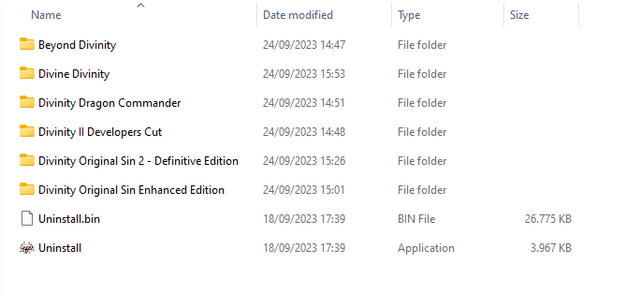
Reply With Quote
The Following User Says Thank You to Danziel123 For This Useful Post:
mausschieber (24-09-2023)
  #11  
Old 24-09-2023, 05:11
mausschieber's Avatar
mausschieber mausschieber is offline
Conversion Designer
 
Join Date: Jan 2011
Location: germany
Posts: 4,311
Thanks: 6,755
Thanked 11,698 Times in 3,223 Posts
mausschieber is on a distinguished road
Quote:
Originally Posted by Danziel123 View Post
Thank you

But can you check launcher for divinity original sin 2 - EE? Just this game the launcher doesn't work

Here is the folder structure after the game installed
its on your end Check the Folder structure
your folder Divinity Original Sin 2 - Enhanced Edition is wrong
it have to be Divinity Original Sin 2\Bin
__________________
It would be nice if you appreciate my work with the thanks Button
Reply With Quote
  #12  
Old 24-09-2023, 05:41
Danziel123 Danziel123 is offline
Registered User
 
Join Date: Mar 2013
Location: Surabaya
Posts: 1,334
Thanks: 1,213
Thanked 813 Times in 699 Posts
Danziel123 is on a distinguished road
Quote:
Originally Posted by mausschieber View Post
its on your end Check the Folder structure
your folder Divinity Original Sin 2 - Enhanced Edition is wrong
it have to be Divinity Original Sin 2\Bin
Found the mistake because i load game preset database for divinity orinal sin 2 from DSG thats why the name folder change it
Reply With Quote
The Following User Says Thank You to Danziel123 For This Useful Post:
mausschieber (24-09-2023)
  #13  
Old 24-09-2023, 10:32
KaktoR's Avatar
KaktoR KaktoR is offline
Lame User
 
Join Date: Jan 2012
Location: From outer space
Posts: 4,684
Thanks: 1,106
Thanked 7,331 Times in 2,834 Posts
KaktoR is on a distinguished road
Remember you can always change all the paths with external Setup.ini
__________________
Haters gonna hate
Reply With Quote
The Following User Says Thank You to KaktoR For This Useful Post:
mausschieber (24-09-2023)
  #14  
Old 24-09-2023, 16:15
Danziel123 Danziel123 is offline
Registered User
 
Join Date: Mar 2013
Location: Surabaya
Posts: 1,334
Thanks: 1,213
Thanked 813 Times in 699 Posts
Danziel123 is on a distinguished road
Quote:
Originally Posted by KaktoR View Post
Remember you can always change all the paths with external Setup.ini
How to do it? Before i recompress the whole game again
Reply With Quote
  #15  
Old 25-09-2023, 00:04
KaktoR's Avatar
KaktoR KaktoR is offline
Lame User
 
Join Date: Jan 2012
Location: From outer space
Posts: 4,684
Thanks: 1,106
Thanked 7,331 Times in 2,834 Posts
KaktoR is on a distinguished road
No need to recompress the game.

Create Setup.ini file next to Setup.exe and change the name, exe files and game folder names, etc.
Code:
[Executable#]
------------------------------------------------------------------------------------------------------------------------------------------------------
//Name=                         // string
//Type=                         // string                ("", "NORMAL", "STEAM", "GOG", "UWP", without quotes) ("" = "NORMAL")
//Exe=                          // string
//ExePath=                      // string
//WorkDir=                      // string
//Parameter=                    // string
//Icon=                         // string
//GDFBinary=                    // string
//GDFBinary<LNG>=               // string
//ShortcutProt=                 // 0 / 1
//RunAsAdmin=                   // 0 / 1
//ManifestID=                   // integer

[Component#]
------------------------------------------------------------------------------------------------------------------------------------------------------
//Name=                         // string
//Size=                         // string
//ItemType=                     // string                ("", "CHECK", "RADIO", "GROUP", without quotes) ("" = "CHECK")
//ShowInstallLabel=             // 0 / 1
//Checked=                      // 0 / 1
//Enabled=                      // 0 / 1
//Level=                        // integer
I have highlighted the code you need to edit in your case. You just have to reinstall the game to make proper shortcuts.
__________________
Haters gonna hate
Reply With Quote
The Following User Says Thank You to KaktoR For This Useful Post:
mausschieber (25-09-2023)
Reply


Posting Rules
You may not post new threads
You may not post replies
You may not post attachments
You may not edit your posts

BB code is On
Smilies are On
[IMG] code is On
HTML code is Off

Forum Jump

Similar Threads
Thread Thread Starter Forum Replies Last Post
INDEX - CD2DVD Conversion Index **UPDATED: 17-07-2024** Grumpy PC Games - CD/DVD Conversions 252 16-07-2024 20:35
Divinity Anthology (?xDVD) omdj PC Games - CD/DVD Conversions 4 18-10-2016 08:22
Divinity Anthology ( ?xDVD5 ) CIUv2 + UltraArc houcine80 PC Games - CD/DVD Conversions 1 23-09-2016 07:43
Assassin's Creed: Anthology 9xDVD5 [INNO SETUP] REV0 PC Games - CD/DVD Conversions 21 12-02-2014 21:22
Divine Divinity + Beyond Divinity Axell PC Games - CD/DVD Conversions 2 09-11-2009 11:43


All times are GMT -7. The time now is 00:33.


Powered by vBulletin® Version 3.8.11
Copyright ©2000 - 2026, vBulletin Solutions Inc.
FileForums @ https://fileforums.com