|
#1
 08-09-2020, 12:59
|
||||
|
||||
 VCL Style Progress Bar
I'm using a VCL style for my inno setup.
the VCL style will stretch the progress bar image which is not what I need. How to avoid such effects and have a correct progress bar show with the specific lined image? 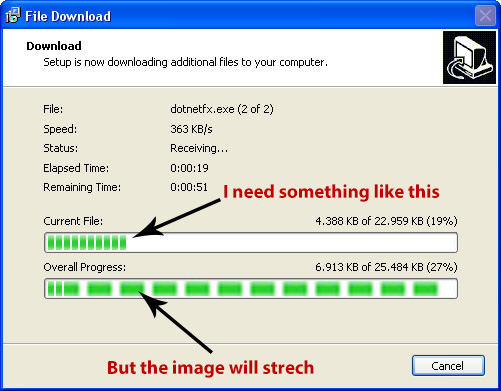

|
| Sponsored Links |
|
#2
08-09-2020, 13:11
|
|||
|
|||
|
windows xp

|
| The Following User Says Thank You to DiCaPrIo For This Useful Post: | ||
Razor12911 (08-09-2020) | ||
|
#7
09-09-2020, 06:56
|
||||
|
||||

Here you can find VCL styles for inno setup:
https://theroadtodelphi.com/2013/12/...or-inno-setup/ You can edit any style as you want. they are some images that can be edited very simple.
|
 |
|
|
 Similar Threads
|
||||
| Thread | Thread Starter | Forum | Replies | Last Post |
| Help With WPI Progress Bar | Cyber_Phantom | Conversion Tutorials | 5 | 13-03-2018 02:35 |
| installer win10 style | kenzo34 | Game Coders | 5 | 18-09-2017 23:17 |
| Unpack files with progress in batch | gozarck | Conversion Tutorials | 3 | 29-06-2016 12:38 |
| Progress bar for Tasks | danswano | PC Games - CD/DVD Conversions | 22 | 09-03-2013 12:09 |


 Linear Mode

