|
|
|
#1
 21-06-2025, 16:30
|
||||
|
||||
 oodle xtool vs dsg
i've recently used dsg to make repacks and i've successfully made a few repacks with good ratio ending with RE4 with a compression ratio of 69%
but recently when i tried to repack Hogwarts legacy & Doom the dark ages, i first analyze pre-compressor using xtools as per KaktoR recommendation, and i've found streams using oodle kraken, i try to compress test files using xtools and i get decent rates like 70% or less, but once i get to DSG and apply same methods, it always gives me 90%+ rates no matter what i do: - i've manually copied both Quote:
Quote:
i'll give further details of a sample file "gameresources_3_2_1.streamdb" @112mb from doom the dark ages: - using xtool 0.7.9_hotfix Quote:
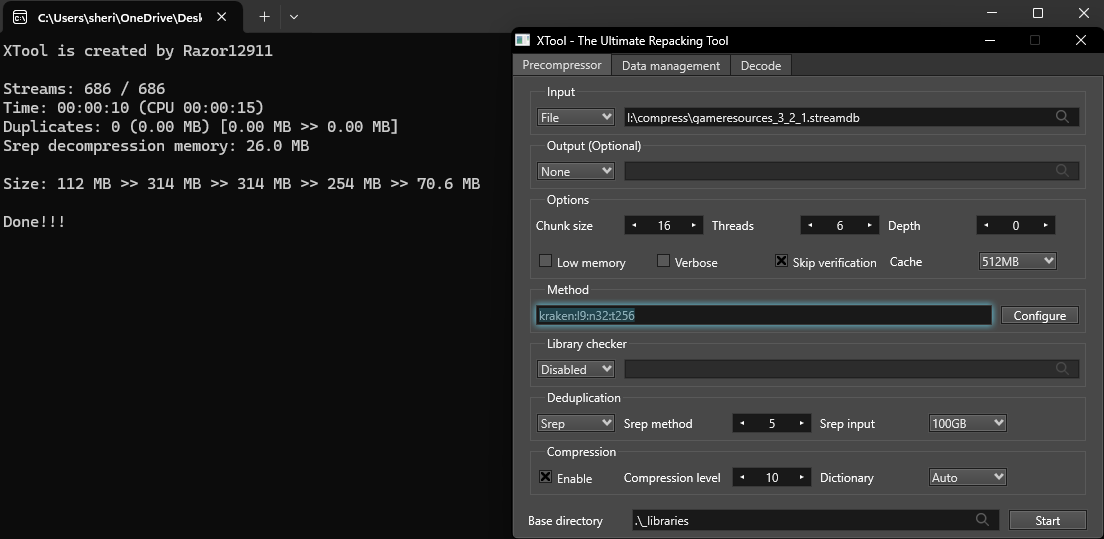 - using xtool 0.8.9, same method, i get 112mb  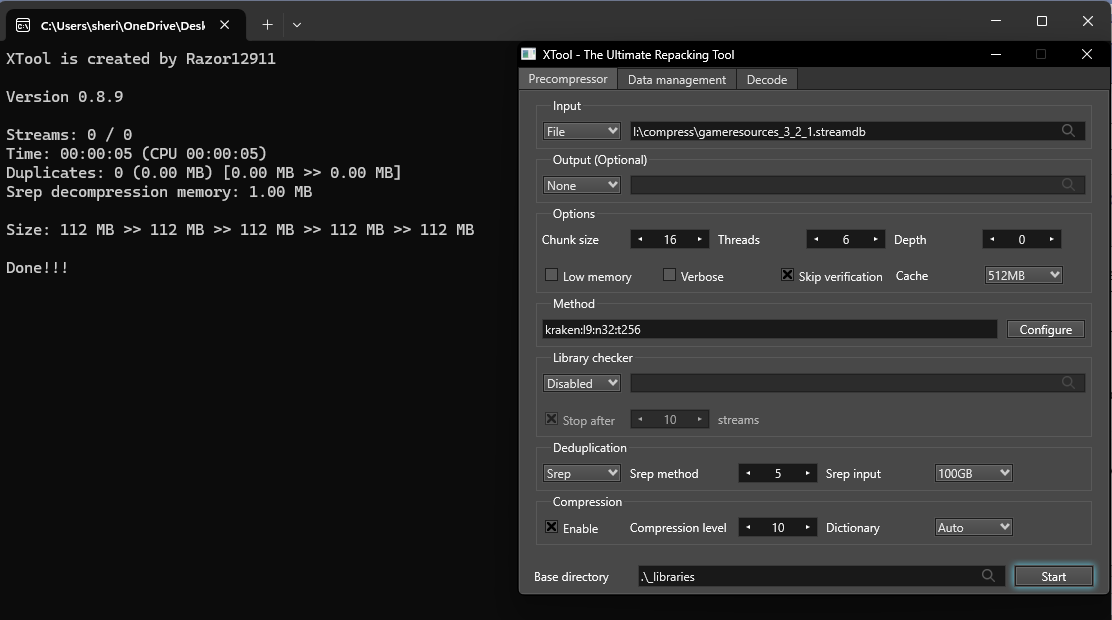 - using both DSG 2.0.2.0 or 2.0.2.3, Quote:
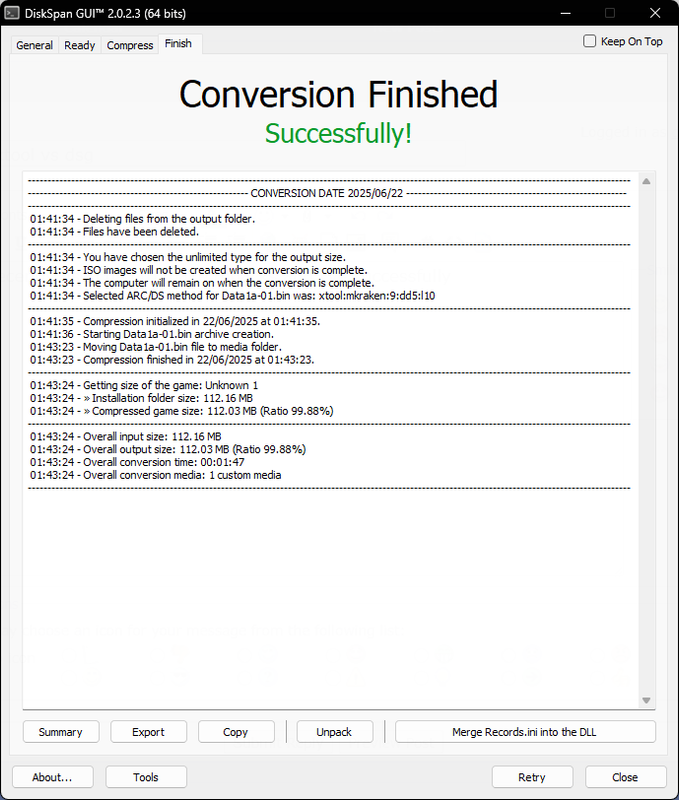 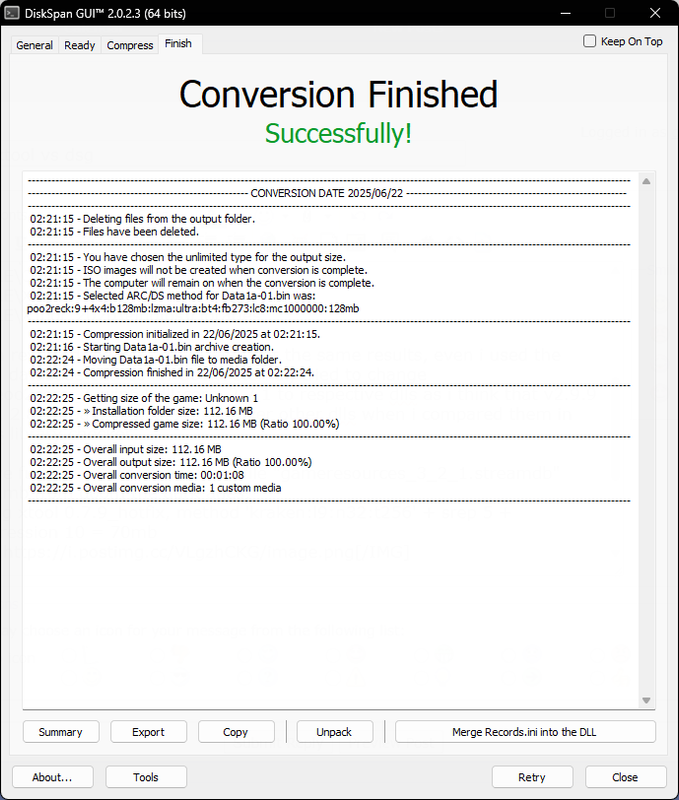 here's a link for the sample file https://pixeldrain.com/u/ScAreX21 i've no idea what im doing wrong, so please guide me <3 excuse my language 
|
| Sponsored Links |
|
#2
21-06-2025, 17:39
|
||||
|
||||
|
Quote:
Code:
xtool:c128mb:mkraken:core_2.9.10:lib_2:dd3:l10,d128mb  Code:
xtool:c128mb:mkraken:core_2.9.12:lib_2:dd3:l10,d128mb 
Last edited by Cesar82; 21-06-2025 at 17:49.
|
|
#3
22-06-2025, 07:38
|
|||
|
|||
|
[QUOTE=Cesar82;508058]
Code:
xtool:c128mb:mkraken:core_2.9.10:lib_2:dd3:l10,d128mb How did you analyze and derive the code `xtool:c128mb:mkraken:core_2.9.10:lib_2:dd3:l10,d1 28mb`? In other words, how can you determine that this is the best compression method for that particular file?
|
|
#4
22-06-2025, 09:26
|
||||
|
||||
|
Do not use option "Skip verification" in xtoolui if you don't know what you're doing. Skip verification option is only usefull in verbose mode to fast check used options as levels or if you want to know how big the output could possibly get if all streams get processed.
If you want to check if streams can get processed with a selected library, use "Stop after # streams" option.
__________________
Haters gonna hate
|
| The Following User Says Thank You to KaktoR For This Useful Post: | ||
danger9 (22-06-2025) | ||
|
#5
26-06-2025, 22:28
|
|||
|
|||
|
Hello, when compressing a game, I made a mistake by selecting components 1 instead of task 1 to add the bonuses separately.
Can you manually correct the records.ini file? To avoid starting from scratch?
|
|
#6
27-06-2025, 18:37
|
||||
|
||||
|
Quote:
|
| The Following User Says Thank You to Cesar82 For This Useful Post: | ||
fabrieunko (27-06-2025) | ||
|
#7
27-06-2025, 23:49
|
|||
|
|||
|
Quote:
Code:
    if ISDoneInit(ExpandConstant('{tmp}\record.inf'), $F777, 0, 0, 0, MainForm.Handle, 512, @ProgressCallback) and FileSearchInit(True) then
    begin
      ExtractTemporaryFile('ENGLISH.INI');
      ChangeLanguage('English');
      repeat
        if ISArcExtract(0, 0, ExpandConstant('{src}\data-1.bin, ExpandConstant('{app}'), '', False, '', ExpandConstant('{tmp}\Arc.ini'), ExpandConstant('{app}'), False) then
          ISDoneError := False
        else
          Break;
      until True;
      ISDoneStop;
    end;
Last edited by Dunnowho69; 27-06-2025 at 23:52.
|
|
#8
28-06-2025, 18:28
|
||||
|
||||
|
Quote:
|
| The Following User Says Thank You to Cesar82 For This Useful Post: | ||
Dunnowho69 (28-06-2025) | ||
|
#9
28-06-2025, 21:34
|
|||
|
|||
|
I asked in the Newbie Question thread for any generic answers, but decided it may be best to ask here for specifics.
Is there a way to bypass the 255-character limit with installations? A game I am repacking has a file that is in a structure 245 characters long, which doesn't leave much room for an installation path when installing with the installer, and it errors out when the install path is long. Thanks for this GUI and the sample installer script, both have been very helpful.
|
|
#10
29-06-2025, 08:05
|
||||
|
||||
|
Quote:
Code:
\\?\C:\folder\etc\etc\install folder\
|
|
#11
30-06-2025, 00:57
|
|||
|
|||
|
Quote:
For now, I have renamed the affected files to reduce their characters by a lot and written a bat file that is executed when unpacking is done, that renames them back to their original names. This avoids the error and allows some semblance of a real installation path.
|
|
#12
07-07-2025, 07:38
|
|||
|
|||
 Unreal Engine xtool Plugin weird results
i'm facing another issue
when i try the unreal-engine plugin by razor on xtool, it "sometimes" gives me different results than DSG the following sample file is one of stellar blade .utoc files, it's an UnrealEngine 4 game, through xtool app "0.8.9 & 0.7.9HF" it's compressed properly using both UE4 or UE5 plugin with kraken precompressor xtool method Code:
ue4:k0x014AEC0148FBDEE9640633AAB67521AAB4E1083A98F76FF33DDCF78DAD05BE66+kraken 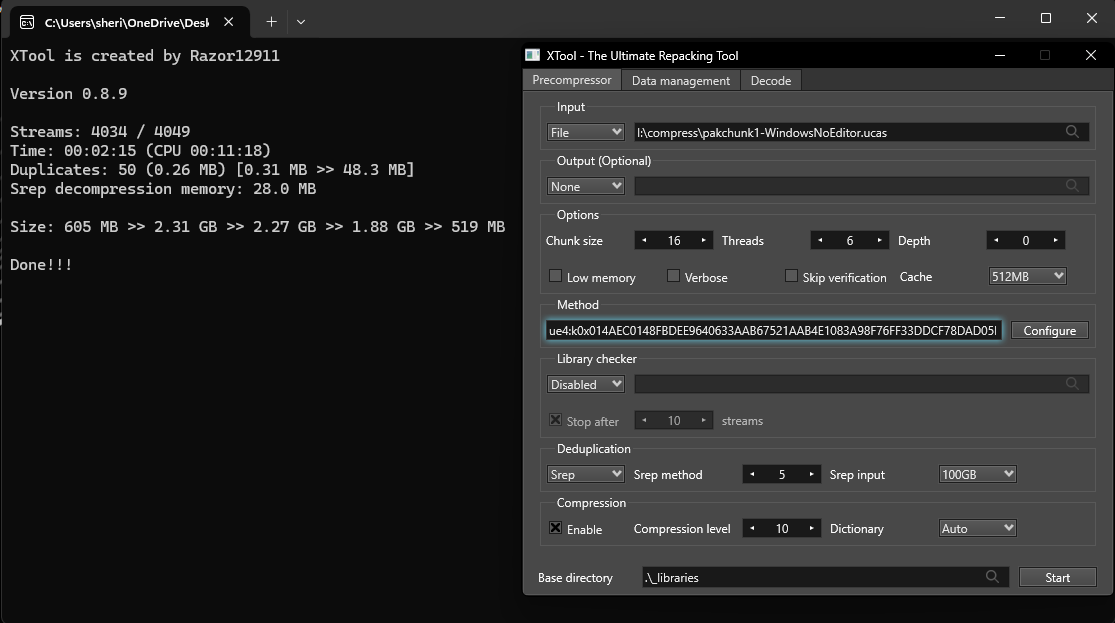 however on DSG, i always get 2% compression, so i suppose that the file isn't read properly through precompression 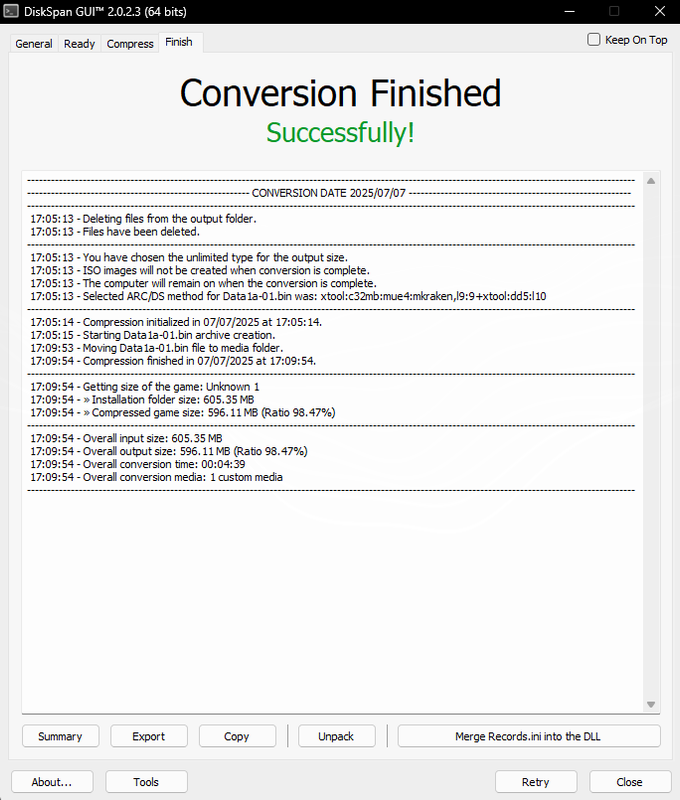 i've tried several methods .. tried both crypted ue4 & ue5 and used AES keys dumped by me. tried to change oodle library manually "not sure if i did it correctly but i tried to cope with ur previous reply to me" DGS Methods trials Code:
xtool:c32mb:mue4:mkraken:core_2.9.9:dd5:l10,d128mb xtool:c32mb:mue4:mkraken,l9:9+xtool:dd5:l10 xtool:c32mb:d1:mue4,k0x<key>:mkraken,l9:9+xtool:dd5:l10 Code:
0x06890528488905294889052A4889053B48890554890556C70F7F052E4883C428 0xC51B693F6132AD3E5F298B3E0000803F0000803F9432B63D99A6933D0000803F 0x6F168073B9B21449D742241700068ADABC306FA9AA3831164DEE8DE34E0EFBB0 https://pixeldrain.com/u/XsZL27Br
|
|
#13
28-06-2025, 21:49
|
||||
|
||||
|
You could try this
https://learn.microsoft.com/en-us/wi...1607-and-later But not sure if it will work since DSG and all the installers are 32-bit applications I guess.
__________________
Haters gonna hate
|
|
#14
07-07-2025, 08:15
|
||||
|
||||
|
utoc is ue5
Whenever you have to use a key, you have to use d1 option aswell. dsg command line Code:
xtool:d1:mue5,k0x06890528488905294889052A4889053B48890554890556C70F7F052E4883C428:mkraken:core_2.9.9:dd5:l10,d128mb Code:
17:13:50 - Overall input size: 605,35 MB 17:13:50 - Overall output size: 520,66 MB (Ratio 86.01%) 
__________________
Haters gonna hate
|
| The Following User Says Thank You to KaktoR For This Useful Post: | ||
danger9 (07-07-2025) | ||
|
#15
11-07-2025, 13:37
|
|||
|
|||
|
error
Hello! Can you tell me what could be the cause . This error is and on 2.0.2.2 and v2.0.2.3 (much more often began to appear ). Windows 11 23H2 32 GB Ram
https://fileforums.com/attachment.ph...1&d=1752266161
|
 |
| Tags |
| cls-diskspan, compressor, diskspan, diskspan_gui |
|
|
 Similar Threads
|
||||
| Thread | Thread Starter | Forum | Replies | Last Post |
| How to use diskspan bat | mausschieber | Conversion Tutorials | 13 | 14-01-2026 19:20 |
| DiskSpan on Linux | hydefromt70s | Conversion Tutorials | 1 | 15-10-2020 07:12 |
| DiskSpan FreeArc returns an error | Titeuf | Conversion Tutorials | 2 | 18-07-2020 01:46 |
| CIU 3.0.0.0.u3 (2019-03-28) - Diskspan Issues | mesut28 | Conversion Tutorials | 17 | 30-03-2019 02:28 |
| R.G. Gamers DiskSpan | Simorq | Conversion Tutorials | 1 | 28-10-2017 08:22 |


 Hybrid Mode
