|
|
|
#1
 27-09-2022, 18:30
|
||||
|
||||
|
Quote:
Code:
[SETTINGS] ... DatabaseUrl=19NYj-u97NIawwNEV1llH0Ukj3gvDJRsnf EDIT: Reuploaded in first post. Last edited by Cesar82; 27-09-2022 at 18:56. 
|
| The Following 3 Users Say Thank You to Cesar82 For This Useful Post: | ||
| Sponsored Links |
|
#2
27-09-2022, 06:07
|
||||
|
||||
|
Quote:
|
| The Following User Says Thank You to Cesar82 For This Useful Post: | ||
fabrieunko (27-09-2022) | ||
|
#3
09-10-2022, 01:06
|
|||
|
|||
|
Quote:
Hello Cesar82 Asterigos: Curse of the Stars Place asterigos.xtl and asterigos.key in the same folder as XTool, use "-masterigos+preflate -d1". Asterigos: Curse of the Stars is the mask of the XTool 2020 (Add-ons) game published by Asterigos.7z file DiskSpan GUI can I get help with adding?
|
| The Following User Says Thank You to Snake288 For This Useful Post: | ||
ScOOt3r (09-10-2022) | ||
|
#4
09-10-2022, 13:46
|
||||
|
||||
|
Quote:
|
| The Following User Says Thank You to Cesar82 For This Useful Post: | ||
mausschieber (09-10-2022) | ||
|
#5
01-11-2022, 04:38
|
|||
|
|||
|
I’m new to repacking games. I started using DiskSpan last week to compress my games to save some hdd space. I know different games compress better with different compression methods.
I don’t need the best compression for each game, but what is the general best compression method with DiskSpan?
|
|
#6
01-11-2022, 06:14
|
|||
|
|||
|
Quote:
With that out of the way, srep+lolz will yield best results for uncompressed game textures.
|
| The Following 2 Users Say Thank You to Masquerade For This Useful Post: | ||
Cesar82 (01-11-2022), ScarAce1989 (01-11-2022) | ||
|
#7
05-11-2022, 06:01
|
||||
|
||||
|
Thank you very much for the program, I'm trying to learn how to create an installer, I'll try to find out how it works.
|
| The Following User Says Thank You to jojo670 For This Useful Post: | ||
Cesar82 (06-11-2022) | ||
|
#8
10-11-2022, 12:46
|
|||
|
|||
|
dixen
F.I.S.T.: Forged In Shadow Torch Tests XZlib+Reflate (-d3 -c32mb) 21.2 gb > 39 gb unreal.dll+Xzlib+Reflate (-d3 c128mb) 21.2 gb > 65 gb AES Key [CODE]0xEABBDBD5A27C73D8CDAE3179A36C9EB793C3C61188A5763F BC35ACD155D0C604 the method given above, for example, information about the Disk Span GUI application, and can you help?
|
|
#9
10-11-2022, 12:52
|
||||
|
||||
|
Try this
Code:
xtool:d3:c128mb:mzlib:mreflate:mue4,k0xEABBDBD5A27C73D8CDAE3179A36C9EB793C3C61188A5763FBC35ACD155D0C604
__________________
Haters gonna hate
|
| The Following 2 Users Say Thank You to KaktoR For This Useful Post: | ||
pcblizzard (13-11-2022), ScOOt3r (11-11-2022) | ||
|
#10
21-11-2022, 07:37
|
|||
|
|||
|
Hello
i'm getting an error in the institution, why is it caused? 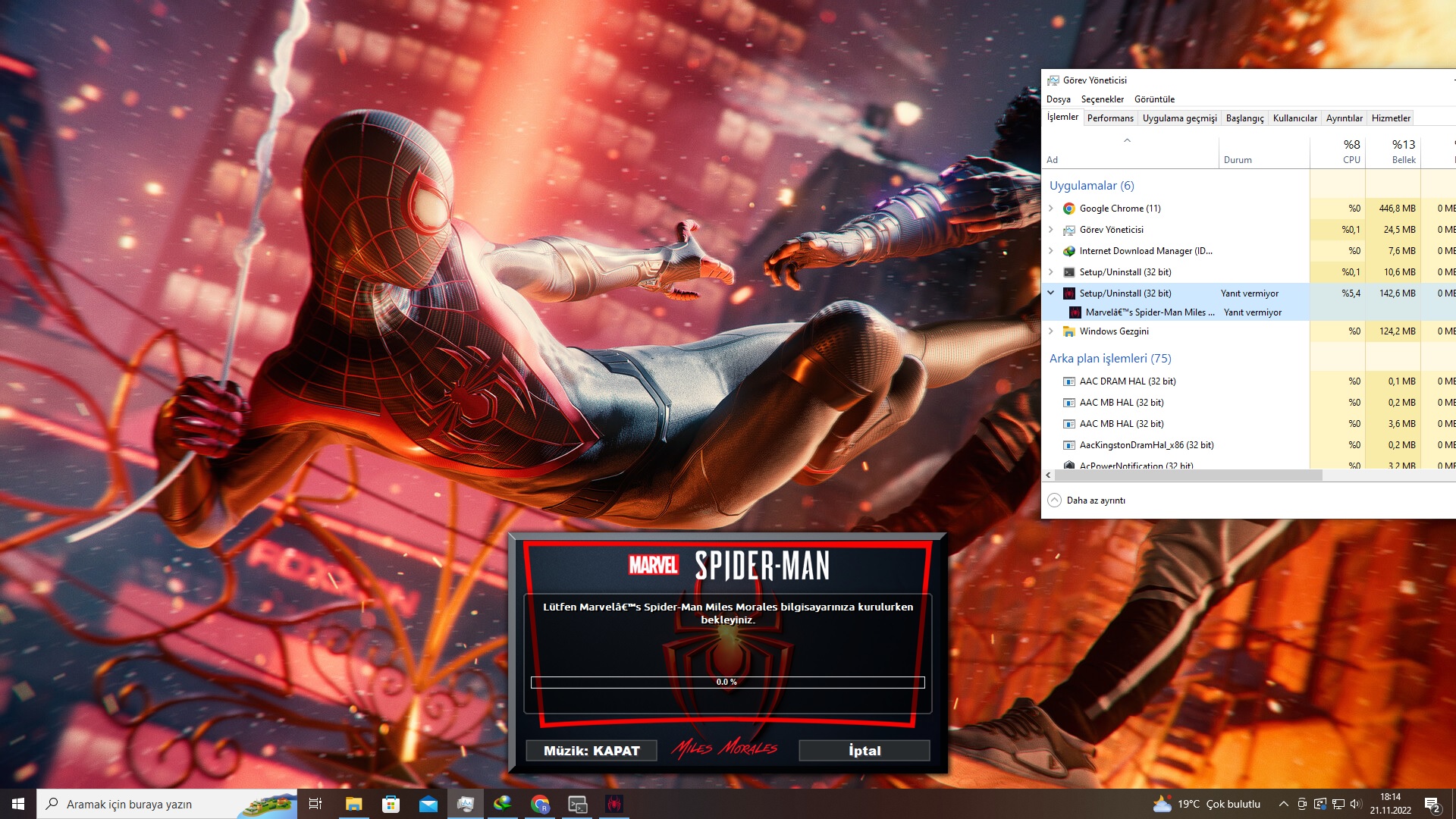 ----------------------------------------------------------------------------------------- -------------------------------- CONVERSION DATE 20.11.2022 -------------------------------- ----------------------------------------------------------------------------------------- 21:08:34 - You have chosen the DVD5 type for the media size. 21:08:34 - ISO images will not be created when conversion is complete. 21:08:34 - The computer will remain on when the conversion is complete. 21:08:34 - Selected ARC/DS method for Data1a-01.bin was: xtool:c32mb:mspidey+srep_new:1+lolz ----------------------------------------------------------------------------------------- 21:08:35 - Compression initialized in 20.11.2022 at 21:08:35. 21:08:35 - Starting Data1a-01.bin archive creation. 17:28:42 - Moving Data1a-01.bin » Data1a-07.bin files to media folder. 17:28:44 - Compression finished in 21.11.2022 at 17:28:44. ----------------------------------------------------------------------------------------- 17:28:44 - Getting size of the game: Marvel’s Spider-Man Miles Morales 17:28:44 - » Installation folder size: 47,41 GB 17:28:44 - » Compressed game size: 27,49 GB (Ratio 57.99%) ----------------------------------------------------------------------------------------- 17:28:44 - Overall input size: 47,41 GB 17:28:44 - Overall output size: 27,49 GB (Ratio 57.99%) 17:28:44 - Overall conversion time: 20:20:08 17:28:44 - Overall conversion discs: 7 DVD5 -----------------------------------------------------------------------------------------
|
|
#11
05-12-2022, 12:07
|
|||
|
|||
|
I got an error message today with version 2.0.1.4:
The settings are not special, except that I have the files compared by MD5 (other options I have not tested) checksum. Have I set anything wrong there? Whereas it worked with the same settings with v2.0.1.3. And since I'm here: This "Disc format" is irrelevant for me and there would be no matter what I set (if I could change it - which probably currently not possible anyway?). KR blizz
|
|
#12
05-12-2022, 14:56
|
||||
|
||||
|
Quote:
You sensed the path used. The paths used must not exceed 255 characters and cannot contain some special characters. If possible, see if the error always happens. try to move the folder files keeping only a few mb and recompress with the same configs and let me know if the error continues. EDIT: I did several tests here to check the hash and never once did this bug happen. Maybe it could have something to do with some filename. Last edited by Cesar82; 05-12-2022 at 19:17.
|
| The Following User Says Thank You to Cesar82 For This Useful Post: | ||
pcblizzard (06-12-2022) | ||
|
#13
06-12-2022, 13:03
|
|||
|
|||
|
Okay, I think I found the "problem", after 8 hours: If I select, like on the first picture, in the bottom right corner anything (OTHER, STEAM, GOG, UWP) and in the tab "Game 1" at "List to filter exclude files:" delete the entries
_CommonRedist\* _Backup\* (they are already there or at least I didn't enter them), then I can reproduce this "XHashEx.dll" error. If I add the entries again, everything works without problems.
|
|
#14
06-12-2022, 16:14
|
||||
|
||||
|
Quote:
I already asked BLACKFIRE69 to correct the bug in the XHashEx.dll library. Soon I will post a hotfix for DSG 2.0.1.4.
|
| The Following 3 Users Say Thank You to Cesar82 For This Useful Post: | ||
|
#15
07-12-2022, 16:43
|
||||
|
||||
|
DiskSpan GUI v2.0.1.4
Updated DiskSpan GUI to v2.0.1.4 in the first post (reuploaded).
 Code:
Changes:

- Updated XTool plugin "Unit Engine (R6)"
- Updated XTool plugin EA "Frostbite Engine (R9)"
- Updated XTool precompressor from v0.6.5 to v0.6.7
- Updated XHashEx.dll library to v1.0.0.0 build 221207 (Thanks to BLACKFIRE69).
  >> Improved matching when using masks in internal CalculateHashesForDirEx function.
- Updated DiskSpan GUI database to version 1.0.5.9 (Thanks to KaktoR).
  >> Now with 330 game presets and 26 collection presets.
- Updated the ISDone script example and also updated the SplitLib.dll and XHashEx.dll libraries.
  >> Fixed script errors when applying xdelta patch when file has no extension.
- Added MFT.exe (Multi Functional Tool) by BLACKFIRE69 to TOOLS folder.
- Added XTool plugin "crysys2rem" (Cryisis 2 Remastered).
- Added XTool plugin "Spidey (R2)" support to Marvel's Spider-Man: Miles Morales.
- Added new compressor option SREP 3.93b (srep_3.92, srep 3.93a, srep_3.93b).
- Added support to "Sonic Forces" plugin downloading .xtl file (Ratio 135.88%).
- Added support to media compressor mpzmt method (Thanks to BLACKFIRE69 for CLS-MPZMT.dll library).
- Added support to "lzma_sdk" method in DiskSpan GUI, more info at: https://7-zip.org/sdk.html
- Added new "Patcher" tab in the group of tools accessed from the "Tools" button (In NORMAL" mode of DiskSpan GUI).
  >> In this tab you can create XDelta patches using masking of inclusion and/or exclusion of files or loading list of files from an external file.
  >> You can manually insert masksin each line or load an external file with the masks just by including the "@" character at the beginning of the line as an example: @{src}\include.txt
  >> The generated patch can be used with compatible installers needing to define the compression folder and compress a file with the patch files and activate the XDelta patch mode in DEVELOPER mode.
- Fixed a bug in CLS-DiskSpan.dll that after changing the Disk/ISO and clicking OK, it always showed a dialog box to search for the compressed file.
- Fixed several bugs regarding applying xdelta patch by IsDone when a file has no extension (need update scripts).
- Fixed some bugs found and several parts of the DSG code was redone in order to correct errors.
- Fixed some bugs regarding XTool UE4 plugin on use codecs like kraken, mermaid, etc.
  >> Redone part of the DSG code referring to the "xtool:mue4" and "ue4dt" methods.
- Removed support to all BMS2 plugins for Assassin's Creed games.
  >> We have xtool anvil plugin now, it is better and faster.
- Removed "Calc.exe" (Command Line Calculator), "crc32.exe", "md5.exe" and "IniFile.exe" from TOOLS folder.
|
| The Following 8 Users Say Thank You to Cesar82 For This Useful Post: | ||
exorc (12-12-2022), fabrieunko (07-12-2022), Gehrman (07-12-2022), hdneo (09-12-2022), houcine80 (08-12-2022), mausschieber (07-12-2022), pcblizzard (08-12-2022), Prettyboy099 (07-12-2022) | ||
 |
| Tags |
| cls-diskspan, compressor, diskspan, diskspan_gui |
|
|
 Similar Threads
|
||||
| Thread | Thread Starter | Forum | Replies | Last Post |
| How to use diskspan bat | mausschieber | Conversion Tutorials | 13 | 14-01-2026 19:20 |
| DiskSpan on Linux | hydefromt70s | Conversion Tutorials | 1 | 15-10-2020 07:12 |
| DiskSpan FreeArc returns an error | Titeuf | Conversion Tutorials | 2 | 18-07-2020 01:46 |
| CIU 3.0.0.0.u3 (2019-03-28) - Diskspan Issues | mesut28 | Conversion Tutorials | 17 | 30-03-2019 02:28 |
| R.G. Gamers DiskSpan | Simorq | Conversion Tutorials | 1 | 28-10-2017 08:22 |


 Hybrid Mode
