|
|
|
#1
 12-04-2021, 07:29
|
||||
|
||||
|
Quote:

|
| Sponsored Links |
|
#2
12-04-2021, 07:34
|
||||
|
||||
|
I think you have to hold CTRL key and click on "default" if I remember right.
__________________
Haters gonna hate
|
| The Following User Says Thank You to KaktoR For This Useful Post: | ||
L33THAK0R (12-04-2021) | ||
|
#4
13-04-2021, 20:35
|
||||
|
||||
|
Hey dunno if anyone knows how to or if it's even possible with ASIS, but is there a way to get ASIS to delete a specified file at the end of install? Got this really annoying 40mb junk temp file that isn't getting cleaned up and was wondering if there was a way I can get the installer to remove it.
|
|
#5
13-04-2021, 23:42
|
|||
|
|||
|
Quote:
Code:
if CurStep = ssPostInstall then begin
    DeleteFile(ExpandConstant('{app}\<path to file>'));
|
|
#6
14-04-2021, 16:07
|
||||
|
||||

Quote:
|
|
#7
14-04-2021, 18:33
|
||||
|
||||
|
Alright got 2 more questions for you lads and then I promise I'll stop spamming 'em.
So I've got a repack with a few optional components and I was wondering if its possible for the setup once launched to have a look to see if the component file is present, and if it comes back false, can the setup disable the user from selecting that component? like changing Code:
Component1.Enabled=1 Code:
Component1.Enabled=0 (like checksums1.md5 for main files & checksums2.md5 for main files + ost)
|
|
#8
17-04-2021, 01:10
|
||||
|
||||
|
Quote:
Quote:
asis itself doesn't have any compressor settings anymore.
__________________
Haters gonna hate
|
| The Following User Says Thank You to KaktoR For This Useful Post: | ||
L33THAK0R (17-04-2021) | ||
|
#9
17-04-2021, 20:19
|
||||
|
||||
|
Quote:
|
|
#10
17-04-2021, 21:16
|
||||
|
||||
|
Quote:
If you rename the Setup.exe file for example to Install.exe, you must also rename the Setup.dll file to Install.dll. The Setup.dll file is automatically generated by DiskSpan_GUI when compressing the game, but you can include different compressors as long as you also create the settings in the INI files. In the COMPRESSOR folder on DiskSpan_GUI you have a ".bat" file called "_Compress Optional DLL (Drop Folder or Setup.dll) .bat" that is especially useful for this situation. You just create a folder and put compressors, cls libraries and .ini files After placing all decompressor files in a folder just click on the folder and drop the folder on the .bat file to create Setup.dll file. The standard INI file names are: Code:
- ARC_Optimal_x64.ini / ARC_Standard_x64.ini / CLS_Optimal.ini for when installation is done on 64-bit systems. - ARC_Optimal_x64.ini / ARC_Standard_x64.ini / CLS_Standard.ini for when installation is done on 64-bit systems. Code:
- ARC_Optimal_x86.ini / ARC_Standard_x86.ini / CLS_Optimal.ini for when installation is done on 32-bit systems.
- ARC_Optimal_x86.ini / ARC_Standard_x86.ini / CLS_Standard.ini for when installation is done on 32-bit systems.
|
| The Following 2 Users Say Thank You to Cesar82 For This Useful Post: | ||
L33THAK0R (18-04-2021), pratikpatel8982 (29-04-2021) | ||
|
#11
18-04-2021, 02:57
|
||||
|
||||
|
Quote:
|
|
#12
16-04-2021, 20:55
|
||||
|
||||
|
Also a super small question, if I have a compressor that is name differently to how it is named in ASIS, is it possible to change this in ASIS? in this case I'm using "afr_019" but this isn't recognised by ASIS.
|
|
#14
30-04-2021, 06:27
|
|||
|
|||
|
Hello,
I have a problem, here, as shown in the image, when I select the file that I want to install, it does not give me the number of MB or GB it uses for French Langage, there are 4 games in total but just put 1 with different language to test. Likewise, with CIU there is the Task, but not on ASIS 7.2.2a, is it possible to put it manually? I also want to know what is Component1.Level=0 Thank you 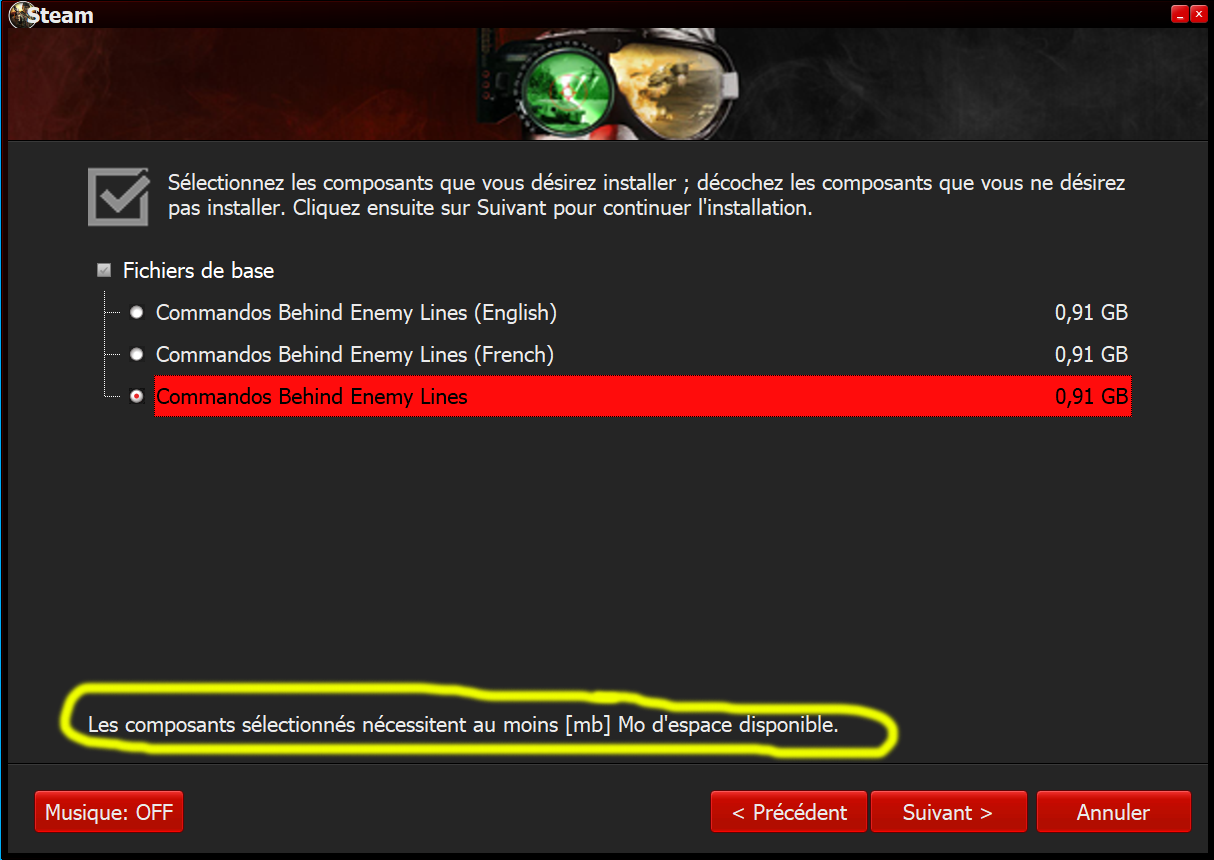
Last edited by alucard1973; 30-04-2021 at 07:00.
|
|
#15
30-04-2021, 08:48
|
||||
|
||||
|
Quote:
__________________
It would be nice if you appreciate my work with the thanks Button
|
 |
|
|
 Similar Threads
|
||||
| Thread | Thread Starter | Forum | Replies | Last Post |
| [Help] need Advanced Installer script with Razor1911's UltraArc module | rez3vil | Conversion Tutorials | 3 | 15-04-2024 02:24 |
| Portable Installer Inno Setup Script | y_thelastknight | Conversion Tutorials | 59 | 23-10-2020 00:02 |
| INDEX - Conversion Tutorial Index | Razor12911 | Conversion Tutorials | 5 | 11-06-2020 02:05 |
| Simple Arc Installer | 78372 | Conversion Tutorials | 1 | 15-06-2017 15:37 |
| MSC+Srep+lzma Simple Script Example | gozarck | Conversion Tutorials | 10 | 07-09-2015 16:31 |


 Hybrid Mode
