|
|
|
#1
 07-01-2016, 14:18
|
|||
|
|||
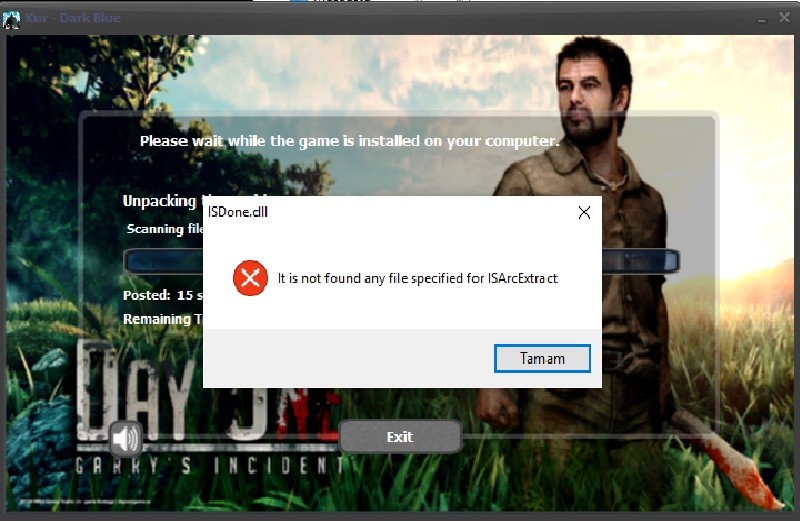
 Hello,Help
Hello,Help
 Mask Data Compression @echo off color 0c Title Compressor - by Panker1992 echo. ************************************************** ************************ echo. * External Options for Compressor By Panker1992 * echo. * Modes: Options stored in arc.ini see below for best results * echo. * 1) sonido =super fast, optimal =best w/o precomp, max =optimal+precomp * echo. * smartmax =masked precomp, smartlzt =smartmax + lzt, legacy =oldmethod * echo. * devastate = heavy duty comp, will take so much time you will freak * echo. * 2) I added txt, void and jpeg as external for custom made bat files * echo. ************************************************** ************************ pause @echo Recompressing Data... arc a -lc1024 -ld1024 -ep1 -ed -r -hp -pYourpassword -w.\ Data\data1.bin -moptimal "C:\Program Files (x86)\Adobe\*" ::examples, I recommend optimal and smartmax for ultimate results ::devastate has ultimate compression but its so slow that its best only when you store long term ::arc a -lc1024 -ld1024 -ep1 -ed -r -hp -pYourpassword -w.\ Data\data1.bin -msonido "D:\Games\Steam\*" ::arc a -lc1024 -ld1024 -ep1 -ed -r -hp -pYourpassword -w.\ Data\data1.bin -msmartmax "D:\Games\Steam\*" ::arc a -lc1024 -ld1024 -ep1 -ed -r -hp -pYourpassword -w.\ Data\data1.bin -mdevastate "D:\Games\Steam\*" ::arc a -lc1024 -ld1024 -ep1 -ed -r -hp -pYourpassword -w.\ Data\data1.bin -mlegacy "D:\Games\Steam\*" echo ************************************************** ***************************** echo. echo Compressing is Completed echo. echo ************************************************** ***************************** pause MainScriptEnglish.iss arc.ini [External compressor:reflate] header = 0 unpackcmd = reflate -restore123 $$arcpackedfile$$.tmp $$arcdatafile$$.tmp [External compressor:lz77] header = 0 unpackcmd = lz77 d -si -so <stdin> <stdout> [External compressor  recomp] recomp]header = 0 packcmd = precomp -intense0 -c- {options} -o$$arcpackedfile$$.tmp $$arcdatafile$$.tmp unpackcmd = precomp -o$$arcdatafile$$.tmp -r $$arcpackedfile$$.tmp [External compressor:srep] header = 0 packcmd = srep {options} -m3f -d1g -a2 $$arcdatafile$$.tmp $$arcpackedfile$$.tmp unpackcmd = srep {options} -d -s - - <stdin> <stdout> [External compressor:lzmh] packcmd = 7z.exe a -t7z -mcrc=0 -m0=bcj2 -m1=lzmh:{option}:fb256 -mx $$arcpackedfile$$.7z $$arcdatafile$$.dll unpackcmd = 7z.exe x -y $$arcpackedfile$$.7z $$arcdatafile$$.dll packedfile = $$arcpackedfile$$.7z datafile = $$arcdatafile$$.dll [External compressor:7z] packcmd = 7z.exe a -t7z -mcrc=0 -m0=bcj2 -m1=lzma:fb256 -mx9 $$arcpackedfile$$.7z $$arcdatafile$$.dll unpackcmd = 7z.exe x -y $$arcpackedfile$$.7z $$arcdatafile$$.dll packedfile = $$arcpackedfile$$.7z datafile = $$arcdatafile$$.dll [External compressor:bcj2] packcmd = 7z.exe a -mcrc=0 -m0=bcj2 $$arcpackedfile$$.7z $$arcdatafile$$.dll unpackcmd = 7z.exe x -y $$arcpackedfile$$.7z $$arcdatafile$$.dll packedfile = $$arcpackedfile$$.7z datafile = $$arcdatafile$$.dll [External compressor:rar] ;-m5:1024 ;-md512m cmem = 130 dmem = 130 default=32 packcmd = rar a -s -m5 -ma5 -md1024m -mt4 $$arcpackedfile$$.tmp.rar $$arcdatafile$$.tmp unpackcmd = rar e -mt4 $$arcpackedfile$$.tmp.rar datafile = $$arcdatafile$$.tmp packedfile = $$arcpackedfile$$.tmp.rar [External compressor acket];x64 version packcmd = packet.exe a -v -r -mx -b512 -h4 $$arcpackedfile$$.tmp $$arcdatafile$$.tmp unpackcmd = packet.exe x -v $$arcpackedfile$$.tmp $$arcdatafile$$.tmp datafile = $$arcdatafile$$.tmp packedfile = $$arcpackedfile$$.tmp [External compressor:split] ;x64 version packcmd = split.exe s $$arcpackedfile$$.tmp 1024 $$arcdatafile$$.tmp unpackcmd = split.exe m $$arcpackedfile$$.tmp $$arcdatafile$$.tmp datafile = $$arcdatafile$$.tmp packedfile = $$arcpackedfile$$.tmp [External compressor:zm] packcmd = zmolly64.exe -b99 -e $$arcdatafile$$.tmp $$arcpackedfile$$.tmp unpackcmd = zmolly64.exe -d $$arcpackedfile$$.tmp $$arcdatafile$$.tmp [External compressor lzma];x64 version packcmd = plzma c2 $$arcdatafile$$.tmp $$arcpackedfile$$.tmp 26 1024 273 8 0 0 4096 128 16 272 unpackcmd = plzma d $$arcpackedfile$$.tmp $$arcdatafile$$.tmp datafile = $$arcdatafile$$.tmp packedfile = $$arcpackedfile$$.tmp [External compressor:bssc] ;x64 version packcmd = bssc.exe e $$arcdatafile$$.tmp $$arcpackedfile$$.tmp -b1024aeflzrs unpackcmd = bssc.exe d $$arcpackedfile$$.tmp $$arcdatafile$$.tmp datafile = $$arcdatafile$$.tmp packedfile = $$arcpackedfile$$.tmp [External compressor:rzm] ;x64 version packcmd = rzm.exe c $$arcdatafile$$.tmp $$arcpackedfile$$.tmp unpackcmd = rzm.exe d $$arcpackedfile$$.tmp $$arcdatafile$$.tmp datafile = $$arcdatafile$$.tmp packedfile = $$arcpackedfile$$.tmp [External compressor:smoke] ;x64 version packcmd = smoke.exe $$arcdatafile$$.tmp $$arcpackedfile$$.tmp [External compressor ause];x64 version packcmd = cmd.exe "type exit and press ENTER please" [External compressor:cls] ;x64 version packcmd = start /b cmd.exe cls [External compressor:lzturbo] ;x64 version packcmd = lzturbo {options} $$arcdatafile$$.tmp $$arcpackedfile$$.tmp unpackcmd = lzturbo -d $$arcpackedfile$$.tmp $$arcdatafile$$.tmp datafile = $$arcdatafile$$.tmp packedfile = $$arcpackedfile$$.tmp [External compressor:exdupe] ;x64 version packcmd = exdupe.exe -x0 -m512 $$arcdatafile$$.tmp $$arcpackedfile$$.tmp unpackcmd = exdupe.exe -R $$arcpackedfile$$.tmp $$arcdatafile$$.tmp datafile = $$arcdatafile$$.tmp packedfile = $$arcpackedfile$$.tmp [External compressor:zpaq] ;-method s4.3ci1 ;x64 version packcmd = zpaq64.exe a $$arcpackedfile$$.tmp $$arcdatafile$$.tmp -method 46,36,26 unpackcmd = zpaq64.exe x $$arcpackedfile$$.tmp $$arcdatafile$$.tmp -summary datafile = $$arcdatafile$$.tmp packedfile = $$arcpackedfile$$.tmp [External compressor:xdelta3] ;x64 version ;-S djw9 packcmd = xdelta3.exe -0 $$arcdatafile$$.tmp $$arcpackedfile$$.tmp unpackcmd = xdelta3.exe -d $$arcpackedfile$$.tmp $$arcdatafile$$.tmp datafile = $$arcdatafile$$.tmp packedfile = $$arcpackedfile$$.tmp [External compressor:bro] ;brotli google compressor packcmd = bro.exe -q 9 -v -f -i $$arcdatafile$$.tmp -o $$arcpackedfile$$.tmp unpackcmd = bro.exe -d -i $$arcpackedfile$$.tmp -o $$arcdatafile$$.tmp datafile = $$arcdatafile$$.tmp packedfile = $$arcpackedfile$$.tmp [External compressor:zh] ;x64 version packcmd = zhuff.exe -c2t2 $$arcdatafile$$.tmp $$arcpackedfile$$.tmp unpackcmd = zhuff.exe -d $$arcpackedfile$$.tmp $$arcdatafile$$.tmp datafile = $$arcdatafile$$.tmp packedfile = $$arcpackedfile$$.tmp [External compressor:nz] ;x64 version packcmd = nz.exe a -r -v -cc -m512m -t0 -br128m -bw128m -p2 $$arcpackedfile$$.tmp.nz $$arcdatafile$$.tmp unpackcmd = nz.exe x -m256m -t0 -p4 $$arcpackedfile$$.tmp.nz $$arcdatafile$$.tmp datafile = $$arcdatafile$$.tmp packedfile = $$arcpackedfile$$.tmp.nz http://www.dosya.tc/server6/npl0gb/Dark_Blue.rar.html 
|
| Sponsored Links |
|
#2
07-01-2016, 14:29
|
||||
|
||||
|
razaman i didnt provide the above files, i have uploaded a blackbox Inno in page 1 for you to download
i cannot rewrite this sorry :/ no time
__________________
My projects : Masked Compression, lzma2(xz) on Freearc, Zstd compressor for windows My optimizations : packjpg.exe, zstd, lzham, precomp-dev-0.45.
|
|
#4
09-01-2016, 02:19
|
||||
|
||||
|
my first impression is that you have -f switch inside arc.ini
-f switch is no limit on input size then msc tries to compress something very big and fails try to disable the command here is the correct one [External compressor:msc] header = 0 packcmd = MSC c -v -wav=1 -raw=1 -bmp=1 -ddsraw=1 -ddsdxt=1 -mp3=1 -bmf=9s -tak=9 -dxt=1 -lzma=hc4,lc8,lp2,pb2,fb273,mc1000 $$arcdatafile$$.tmp $$arcpackedfile$$.tmp if this doent solve the case then disable msc and leave everything else alone to do the job  i havent tested sims myself, and i am not the author of msc Though i hope Shegorat will make a new msc sometime in the future 
__________________
My projects : Masked Compression, lzma2(xz) on Freearc, Zstd compressor for windows My optimizations : packjpg.exe, zstd, lzham, precomp-dev-0.45.
|
| The Following User Says Thank You to panker1992 For This Useful Post: | ||
Simorq (09-01-2016) | ||
|
#5
09-01-2016, 04:46
|
|||
|
|||
|
Quote:
|
|
#6
09-01-2016, 07:03
|
||||
|
||||
|
Read This, Important
I am constantly asked about MSC problems, so i decided to give some kind of guide ( troubleshooting) !!!!
First things first i am not the author of msc , nor i can make it magically work many of these programs arent easy to use on Windows 10 especially !! I myself have tested windows 10 and i had many errors/warnings etc so i had to roll back to win 8.1 !!!  From here on I will not help/troubleshoot anything that i havent provided, there are people here that ask for help with tools and methods that someone else has provided, Here is a troubleshooting guide, Do those before you decide to post an error!! 1) disable all kinds of antivirus 2) disable the -f switch in msc if you have it on 3) windows defender reported to be delivering many errors on precomp, xz , and msc disable it for good and forget that it ever excisted 4)when a method gives an error, try a different approach 5) Do not by any means mix tools together, from different methods the only sure is that it will break every author has different approach if you mix them all together it will never work
__________________
My projects : Masked Compression, lzma2(xz) on Freearc, Zstd compressor for windows My optimizations : packjpg.exe, zstd, lzham, precomp-dev-0.45.
|
|
#7
11-01-2016, 03:25
|
|||
|
|||
|
latest version of msc can't use bmf compression, even cls-msc.dll can't extract it
for more information visit http://krinkels.org/threads/msc-medi...mpressor.1587/
|
| The Following User Says Thank You to truerepacks For This Useful Post: | ||
panker1992 (11-01-2016) | ||
|
#8
11-01-2016, 04:57
|
||||
|
||||
|
truerepacks thanks for this info ....
unfortunately i dont speak russian nor i can read or understand them, krinkels.org is a treasure forum in which i cannot participate please if you have info regarding msc or any other tool that is used inform us like you did just now
__________________
My projects : Masked Compression, lzma2(xz) on Freearc, Zstd compressor for windows My optimizations : packjpg.exe, zstd, lzham, precomp-dev-0.45.
|
|
#9
11-01-2016, 05:48
|
||||
|
||||
|
lolaya this sovles your problem ....
remove msc until we get an update on this , i hope in 2016 Shegorat will give us a new one about your other problem i have found a nice alternative use lzma:max:512m this will give you about the same compress ratio as my method xz and lz77 but its gonna be so slow. xz method uses 4 cores as i have provided making it super fast (lzma2) post some feedback to let me know if lzma:max:512m worked !!!
__________________
My projects : Masked Compression, lzma2(xz) on Freearc, Zstd compressor for windows My optimizations : packjpg.exe, zstd, lzham, precomp-dev-0.45.
|
| The Following User Says Thank You to panker1992 For This Useful Post: | ||
lolaya (12-01-2016) | ||
|
#10
15-01-2016, 00:46
|
|||
|
|||
|
Dear Panker,
are you going to update your Masked Data Compression tool with the new Precomp 0.44 version (decomp as well)? I am wondering if there is a better performance + ratio
|
|
#11
15-01-2016, 02:00
|
||||
|
||||
|
Hello Hans,
I will update it in time, i properly havent tested it myself yet. Christian the author of precomp is working on Multithreaded bruteforce to make this process faster, Now to make this clear, precomp 0.44 doesnt support stdin to stdout support until a proper stdin and stdout are implemented, or a cls-precomp.dll is written i will stay with 0.38 because its faster. Up untill now i havent seen any improvements on precomp, my tests took the same time with 0.38 and 0.44. if you want to update your tools you will have to 1) download my alpha precomp i posted it. 2) delete old precomp.exe and packjpg_dll.dll and copy-paste new 3) change the line in arc.ini from -slow -t-j ~~~> -intense0 -cn Inno changes are 1) delete precomp.exe both packjpg_dll.dll and packjpg_dll1.dll and cls-precomp.dll 2) copy paste new precomp and leave arc.ini as it is it will workNOTE:Due to the lack of proper stdin - stdout and cls-precomp.dll it will never show progress in Inno, and will take x2 time to unpack Good luck
__________________
My projects : Masked Compression, lzma2(xz) on Freearc, Zstd compressor for windows My optimizations : packjpg.exe, zstd, lzham, precomp-dev-0.45.
|
| The Following User Says Thank You to panker1992 For This Useful Post: | ||
Simorq (15-01-2016) | ||
|
#12
15-01-2016, 04:51
|
|||
|
|||
|
And panker, give a new arc.ini for 4gb ram,6gb ram, 8gb ram, because you added update 1, which will change the arc.ini, so upload the arc.ini for 4gb ram, 6gb ram, 8gb ram AGAIN!
Do it fast as possible
|
|
#13
15-01-2016, 05:38
|
||||
|
||||
|
New Optimizations (requested)
Quote:
New arc.ini for 8G of ram, 12G and 16G Best optimizations for those ram i decided to drop 4G ram support because it doesnt worth it, i dont think that anyone has 4G of ram !!! you will not find a 12G.7z because i have 12G of ram so it comes optimized for it. enjoy
__________________
My projects : Masked Compression, lzma2(xz) on Freearc, Zstd compressor for windows My optimizations : packjpg.exe, zstd, lzham, precomp-dev-0.45.
|
|
#14
15-01-2016, 05:39
|
|||
|
|||
|
Quote:
|
|
#15
15-01-2016, 05:43
|
||||
|
||||
|
i will write you for 6G ram
your 4G pc will most likely crash  lzt(lzturbo) uses minimum 5G it's up and running 6G ram added per requested anything less than that will freeze, and probably crash your pc to death
__________________
My projects : Masked Compression, lzma2(xz) on Freearc, Zstd compressor for windows My optimizations : packjpg.exe, zstd, lzham, precomp-dev-0.45. Last edited by panker1992; 15-01-2016 at 05:49. Reason: 6G ram added
|
| The Following User Says Thank You to panker1992 For This Useful Post: | ||
Amsal (15-01-2016) | ||
 |
|
|
 Similar Threads
|
||||
| Thread | Thread Starter | Forum | Replies | Last Post |
| Best Compression Format | DRAGoN.X | Chit Chat | 11 | 07-09-2017 23:13 |
| Dragon Age: Origins Ultimate Edition 3xDVD5 [CIU 2.0.2] | NamelessOne | PC Games - CD/DVD Conversions | 16 | 03-03-2017 11:38 |
| compression -msrep+rep+delta+nzip | Danik1B9 | Conversion Tutorials | 11 | 21-12-2014 08:13 |
| Borderlands 2: Ultimate Vault Hunter Edition - 3xDVD5 [ALL DLCs + CIU V2] | REV0 | PC Games - CD/DVD Conversions | 7 | 06-07-2013 03:14 |
| Fallout New Vegas Ultimate Edition 3xDVD9 to 2xDVD5 1LANGUAGE | senseman | PC Games - CD/DVD Conversions | 29 | 04-06-2013 10:36 |


 Hybrid Mode
