|
|
|
#1
 12-03-2019, 21:38
|
|||
|
|||
|
Quote:

|
| Sponsored Links |
|
#2
12-03-2019, 23:30
|
|||
|
|||
|
Quote:
Pack All files with srep+lolz, ( exe, dll, bin, etc..) and all small (.pak) files with zstdrec+zlib+srep+lolz For that Big 33GB file, Use exact settings that i gave you earlier. and You have to remove 6.05GB useless video DLC file with that one you'll never even able to get 24GB So remove that one... Quote:
Quote:
No one, Its like a joke... It's replacing the original video on game so who need it?? Last edited by pakrat2k2; 14-03-2019 at 06:40. Reason: all combined into one post so enduser knows whats going on
|
| The Following User Says Thank You to FitGirl For This Useful Post: | ||
lordminion777 (12-03-2019) | ||
|
#3
13-03-2019, 01:21
|
|||
|
|||
|
Quote:
header = 0 packcmd = srep -a2 -m3f $$arcdatafile$$.tmp $$arcpackedfile$$.tmp [External compressor:lolz] header = 0 packcmd = lolz.exe -mtt1 -tt2 -d128m -mc512 -mt4 $$arcdatafile$$.tmp $$arcpackedfile$$.tmp
|
|
#4
11-03-2019, 13:01
|
||||
|
||||
|
Frostpunk
v1.3.3 Code:
xZLib+srep:m3f+4x4:lzma
18:07:40 - Starting Data1.bin.001 creation
18:47:33 - Finished Data1.bin.001 creation

18:47:35 - Original size:   7.122g
18:47:35 - Compressed size: 4.732g


xZLib+srep:m3f+lolz:dtb1:mtt1:mt6:d128m:mc1023
19:11:26 - Starting Data1.bin.001 creation
21:50:32 - Finished Data1.bin.001 creation

21:50:34 - Original size:   7.122g
21:50:34 - Compressed size: 3.919g
__________________
Haters gonna hate
|
|
#5
11-03-2019, 13:51
|
||||
|
||||
|
Devil May Cry 5 Deluxe Edition
method Xtool zlib Combined with zstd precompression nothing ripped or recoded
Xzlib+zstdrec+srep+lolz:dt1:dtp1:dto1:dtm1:dtw1:dt d1:mtt0:mt4:d100m:tt8 original size 37.4 gb repack size 28.9 gb
__________________
Ideas are bulletproof... Last edited by darkwolves; 13-03-2019 at 04:03. Reason: minor error in what i wrote replaced pzlib with xzlib
|
|
#6
12-03-2019, 23:57
|
|||
|
|||
|
^You got 21.7 GB with this lolz setting = lolz:dtb1:d128m:mtt1:mt4 ?
Also I saw you used srep:m3f so srep by default went with l512, srep:m3f:l512 is what you used.
|
|
#7
13-03-2019, 05:30
|
||||
|
||||
|
Ace Combat 7: Skies Unknown
Code:
Title:           Ace Combat 7: Skies Unknown - Deluxe Launch Edition
Version:         1.0.1

PC:              6 Cores 3.2GHz + 16GB Ram + HDD + DiskSpan

Re-Encoded:    Yes (1080p 25MB Bitrate > 1080p VBR Bitrate)
Video Folder:  Game\Content\CriWare\Scene
               Game\Content\CriWare\Briefing

Original Size:   39.6 GB
Compressed Size: 24.2 GB

Method:          srep:m3f:l512+lolz:d64m:mtt1:mt6:mc1023

Disk:     6xDVD5
VGMToolBox XviD4PSP Scaleform VideoEncoder 4 Fast m2v to avi 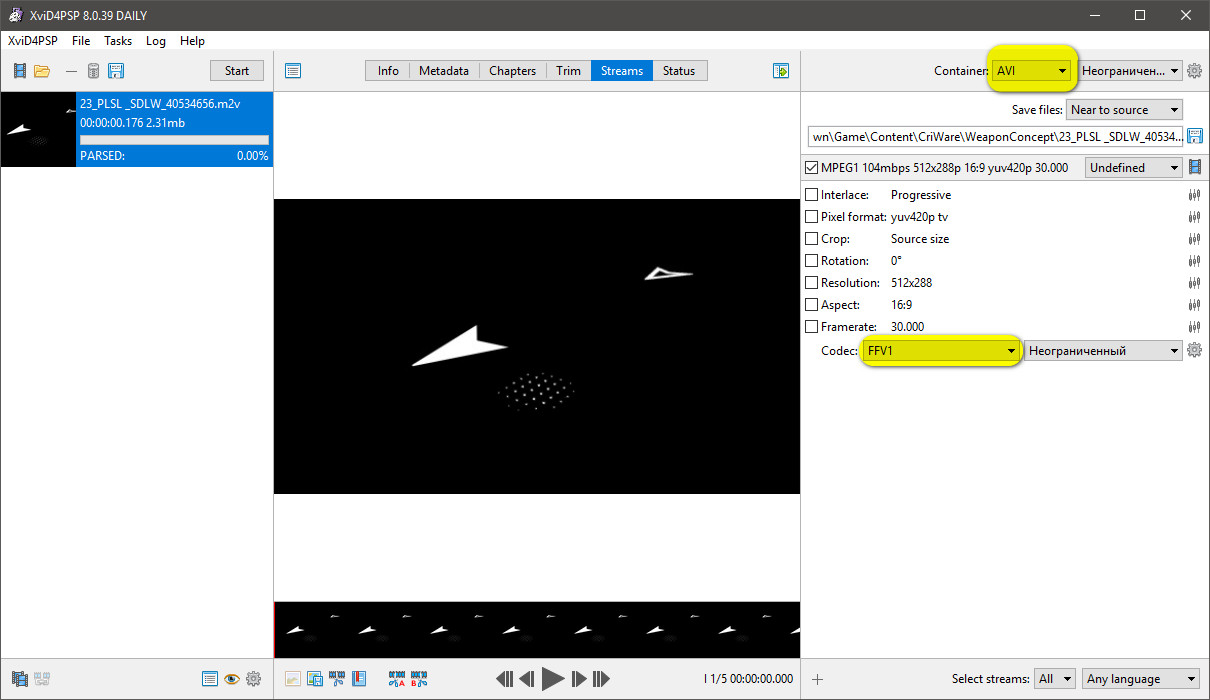 can use Batch to reduce time. Example: Code:
SET Scaleform="D:\GameTools\Scaleform VideoEncoder\medianoche.exe" SET Dir=L:\Program Files (x86)\Ace Combat 7 - Skies Unknown\Game\Content\CriWare\Briefing SET ODir=L:\Program Files (x86)\Ace Combat 7 - Skies Unknown\Game\Content\CriWare\Briefing %Scaleform% -gop_closed=on -gop_i=1 -gop_p=4 -gop_b=2 -video00="%Dir%\ms01.avi" -output="%ODir%\ms01.usm" -bitrate=12000000 %Scaleform% -gop_closed=on -gop_i=1 -gop_p=4 -gop_b=2 -video00="%Dir%\ms02.avi" -output="%ODir%\ms02.usm" -bitrate=12000000 %Scaleform% -gop_closed=on -gop_i=1 -gop_p=4 -gop_b=2 -video00="%Dir%\ms03.avi" -output="%ODir%\ms03.usm" -bitrate=12000000 %Scaleform% -gop_closed=on -gop_i=1 -gop_p=4 -gop_b=2 -video00="%Dir%\ms04.avi" -output="%ODir%\ms04.usm" -bitrate=12000000 %Scaleform% -gop_closed=on -gop_i=1 -gop_p=4 -gop_b=2 -video00="%Dir%\ms05.avi" -output="%ODir%\ms05.usm" -bitrate=12000000 %Scaleform% -gop_closed=on -gop_i=1 -gop_p=4 -gop_b=2 -video00="%Dir%\ms06.avi" -output="%ODir%\ms06.usm" -bitrate=12000000 %Scaleform% -gop_closed=on -gop_i=1 -gop_p=4 -gop_b=2 -video00="%Dir%\ms07.avi" -output="%ODir%\ms07.usm" -bitrate=12000000 %Scaleform% -gop_closed=on -gop_i=1 -gop_p=4 -gop_b=2 -video00="%Dir%\ms08.avi" -output="%ODir%\ms08.usm" -bitrate=12000000 %Scaleform% -gop_closed=on -gop_i=1 -gop_p=4 -gop_b=2 -video00="%Dir%\ms09.avi" -output="%ODir%\ms09.usm" -bitrate=12000000 %Scaleform% -gop_closed=on -gop_i=1 -gop_p=4 -gop_b=2 -video00="%Dir%\ms10.avi" -output="%ODir%\ms10.usm" -bitrate=12000000 %Scaleform% -gop_closed=on -gop_i=1 -gop_p=4 -gop_b=2 -video00="%Dir%\ms11.avi" -output="%ODir%\ms11.usm" -bitrate=12000000 %Scaleform% -gop_closed=on -gop_i=1 -gop_p=4 -gop_b=2 -video00="%Dir%\ms12.avi" -output="%ODir%\ms12.usm" -bitrate=12000000 %Scaleform% -gop_closed=on -gop_i=1 -gop_p=4 -gop_b=2 -video00="%Dir%\ms13.avi" -output="%ODir%\ms13.usm" -bitrate=12000000 %Scaleform% -gop_closed=on -gop_i=1 -gop_p=4 -gop_b=2 -video00="%Dir%\ms14.avi" -output="%ODir%\ms14.usm" -bitrate=12000000 %Scaleform% -gop_closed=on -gop_i=1 -gop_p=4 -gop_b=2 -video00="%Dir%\ms15.avi" -output="%ODir%\ms15.usm" -bitrate=12000000 %Scaleform% -gop_closed=on -gop_i=1 -gop_p=4 -gop_b=2 -video00="%Dir%\ms16.avi" -output="%ODir%\ms16.usm" -bitrate=12000000 %Scaleform% -gop_closed=on -gop_i=1 -gop_p=4 -gop_b=2 -video00="%Dir%\ms17.avi" -output="%ODir%\ms17.usm" -bitrate=12000000 %Scaleform% -gop_closed=on -gop_i=1 -gop_p=4 -gop_b=2 -video00="%Dir%\ms18.avi" -output="%ODir%\ms18.usm" -bitrate=12000000 %Scaleform% -gop_closed=on -gop_i=1 -gop_p=4 -gop_b=2 -video00="%Dir%\ms19.avi" -output="%ODir%\ms19.usm" -bitrate=12000000 %Scaleform% -gop_closed=on -gop_i=1 -gop_p=4 -gop_b=2 -video00="%Dir%\ms20.avi" -output="%ODir%\ms20.usm" -bitrate=12000000 pause 
Last edited by Simorq; 13-03-2019 at 05:36.
|
|
#9
13-03-2019, 07:19
|
||||
|
||||
|
Quote:
Don't use xtool+zstdrec I get 51GB ratio like 176%! if you use xtool+zstdrec, ratio going to be low, like 172% I have test it, that's why i know. To your problem, Download xtool_11 and zstdrec, then combine them And edit pack.bat and add zstdrec+xtool to - m method. Do you know right? Then test only that big pak file. Youll get 51.065MB zlib use c32mb chunk.
__________________
Keep Up The Good Works!
|
| The Following User Says Thank You to yasitha For This Useful Post: | ||
danswano (13-03-2019) | ||
|
#10
14-03-2019, 03:59
|
||||
|
||||
|
Far Cry New Dawn
1 language + HD Pack Code:
Xtool+srep+lolz:dtb1:mtt1:mt6:d128m:mc1023

19:27:11 - Starting Data1.bin.001 creation
 1:20:14 - Finished Data1.bin.001 creation
 1:20:15 - Starting Data2.bin.001 creation
 2:00:47 - Finished Data2.bin.001 creation

Original size:   39.626g
Compressed size: 23.446g
__________________
Haters gonna hate
|
| The Following 2 Users Say Thank You to KaktoR For This Useful Post: | ||
JustFun (15-03-2019), sanekbest1 (09-06-2020) | ||
|
#11
17-03-2019, 02:15
|
||||
|
||||
|
Quote:
|
|
#12
16-03-2019, 22:37
|
|||
|
|||
|
Hi , Need Some help , on DeviL May Cry 5!
when i try to use "zstdrec" , i got always the "crc check error" even when i'm using it only! via the MASK method (UltraARC V2.9.0.0. Final Rev.)! ido not have any problems using "xZLib+srep:m5f+lolz:dtb1:d192m:mtt1:mt6:mc1023"!: )
|
|
#13
17-03-2019, 02:21
|
||||
|
||||
|
lz4
PS: According to this https://fileforums.com/showpost.php?...20&postcount=9 there is only a small difference (xtool did inflate the files up to ~160% or so If I remember right).
__________________
Haters gonna hate
|
|
#14
19-03-2019, 18:42
|
||||
|
||||
|
assistance appreciated
i recently sufferd HDD hard drive failure i lost all the tools i used
i have replaced it with a hybrid SSD and am nowgood to go i have been slowly collecting things but i cannot find what i was using to pack back up unreal engine 4 files after extractng if anyone can kindly point me in the right direction i would very much appreciate it
__________________
Ideas are bulletproof...
|
|
#15
19-03-2019, 22:17
|
||||
|
||||
|
Quote:
http://krinkels.org/threads/uelr.3645/
__________________
Keep Up The Good Works!
|
 |
|
|
 Similar Threads
|
||||
| Thread | Thread Starter | Forum | Replies | Last Post |
| Games Are For Kids | JoyBoy | Chit Chat | 83 | 16-11-2021 14:28 |
| CorePack Compression methods ? Help | ramazan19833 | Conversion Tutorials | 34 | 09-08-2018 06:51 |
| i got the email in the mail about copying ps2 games | EVOEvo | PS2 Games | 7 | 21-11-2003 07:56 |
| Self-booting games on an older Japanese DC? | Named | DC Games | 1 | 26-09-2003 17:48 |
| Having Problems Burning Numerous *Recent* Games....Help is Appreciated | Protosstic | PSX Games | 2 | 15-01-2002 21:27 |


 Hybrid Mode
