Go Back   FileForums > Game Backup > PC Games > PC Games - CD/DVD Conversions > Conversion Tutorials
Register FAQ Community Calendar Today's Posts Search

Reply
 
Thread Tools Search this Thread Display Modes
  #1  
Old 15-08-2021, 02:32
Cesar82's Avatar
Cesar82 Cesar82 is offline
Registered User
 
Join Date: May 2011
Location: Brazil
Posts: 1,077
Thanks: 1,828
Thanked 2,311 Times in 789 Posts
Cesar82 is on a distinguished road
Light Installer Script 1.0.0.9.u1

Added Light Installer Script 1.0.0.9 update 1 in first post (Fixed some bugs).
Reply With Quote
The Following 5 Users Say Thank You to Cesar82 For This Useful Post:
ffmla (16-08-2021), Gehrman (28-08-2021), Grumpy (15-08-2021), mausschieber (15-08-2021), XxAZAxX (16-08-2021)
Sponsored Links
  #2  
Old 28-08-2021, 08:06
Gehrman's Avatar
Gehrman Gehrman is offline
Registered User
 
Join Date: Jan 2020
Location: Save Palestine
Posts: 78
Thanks: 1,377
Thanked 89 Times in 48 Posts
Gehrman is on a distinguished road
please
add taskkill for XTool.exe
Reply With Quote
  #3  
Old 28-08-2021, 08:29
Cesar82's Avatar
Cesar82 Cesar82 is offline
Registered User
 
Join Date: May 2011
Location: Brazil
Posts: 1,077
Thanks: 1,828
Thanked 2,311 Times in 789 Posts
Cesar82 is on a distinguished road
Quote:
Originally Posted by Gehrman View Post
please
add taskkill for XTool.exe
Why?
Is there any problem?
is Xtool still running?

All executables in the temp folder are checked if they are running and processes are closed when an error occurs or is still running after successfully installing (if this worked correctly).
Reply With Quote
The Following User Says Thank You to Cesar82 For This Useful Post:
Gehrman (28-08-2021)
  #4  
Old 28-08-2021, 09:58
Gehrman's Avatar
Gehrman Gehrman is offline
Registered User
 
Join Date: Jan 2020
Location: Save Palestine
Posts: 78
Thanks: 1,377
Thanked 89 Times in 48 Posts
Gehrman is on a distinguished road
Quote:
Originally Posted by Cesar82 View Post
Why?
Is there any problem?
is Xtool still running?

All executables in the temp folder are checked if they are running and processes are closed when an error occurs or is still running after successfully installing (if this worked correctly).
see video
Attached Files
File Type: zip video.zip (1.80 MB, 25 views)
Reply With Quote
  #5  
Old 28-08-2021, 11:29
Cesar82's Avatar
Cesar82 Cesar82 is offline
Registered User
 
Join Date: May 2011
Location: Brazil
Posts: 1,077
Thanks: 1,828
Thanked 2,311 Times in 789 Posts
Cesar82 is on a distinguished road
Quote:
Originally Posted by Gehrman View Post
see video
Try with attached script.
Inform if it works.
Attached Files
File Type: 7z InstallerScript [2021.08.15].7z (17.2 KB, 15 views)
Reply With Quote
The Following User Says Thank You to Cesar82 For This Useful Post:
Gehrman (28-08-2021)
  #6  
Old 29-08-2021, 04:14
Gehrman's Avatar
Gehrman Gehrman is offline
Registered User
 
Join Date: Jan 2020
Location: Save Palestine
Posts: 78
Thanks: 1,377
Thanked 89 Times in 48 Posts
Gehrman is on a distinguished road
Thanks Cesar82

Another request

Please add Persian language in later versions
Code:
#ifdef Farsi
Farsi.ButtonPause=تعلیق کردن
Farsi.ButtonResume=ادامه یافتن
Farsi.Extracting=‫استخراج کردن... %1
Farsi.Merging=‫ادغام فایل %1 (%3%) به %2 (%4%)...
Farsi.ChangeDiskLabel=‫لطفاً دیسک %1 را با فایل %2 وارد کنید.%n فایل مورد نیاز را جستجو کنید؟
Farsi.ExtractingTempFiles=‫استخراج فایل های موقت. لطفا صبر کنید!
#endif
Attached Files
File Type: zip ISDONE and Inno Setup version 6.1.0+ Farsi messages.zip (10.7 KB, 21 views)
Reply With Quote
The Following User Says Thank You to Gehrman For This Useful Post:
Cesar82 (29-08-2021)
  #7  
Old 29-09-2021, 08:21
alley_u2's Avatar
alley_u2 alley_u2 is offline
Registered User
 
Join Date: Aug 2013
Location: India
Posts: 64
Thanks: 19
Thanked 42 Times in 21 Posts
alley_u2 is on a distinguished road
I am using the latest versions and I have also replaced the U1 file in the folder
Reply With Quote
  #8  
Old 29-09-2021, 08:41
Cesar82's Avatar
Cesar82 Cesar82 is offline
Registered User
 
Join Date: May 2011
Location: Brazil
Posts: 1,077
Thanks: 1,828
Thanked 2,311 Times in 789 Posts
Cesar82 is on a distinguished road
Light Installer Script 1.0.0.9.u2

Added Light Installer Script 1.0.0.9.u2 in first post.
Download u2 file, extract replace in your LIS source code.
Reply With Quote
  #9  
Old 29-09-2021, 22:08
alley_u2's Avatar
alley_u2 alley_u2 is offline
Registered User
 
Join Date: Aug 2013
Location: India
Posts: 64
Thanks: 19
Thanked 42 Times in 21 Posts
alley_u2 is on a distinguished road
Thumbs up

Quote:
Originally Posted by Cesar82 View Post
Added Light Installer Script 1.0.0.9.u2 in first post.
Download u2 file, extract replace in your LIS source code.
The new update (U2) works flawlessly thanks !
Reply With Quote
The Following User Says Thank You to alley_u2 For This Useful Post:
Cesar82 (30-09-2021)
  #10  
Old 29-09-2021, 09:35
alley_u2's Avatar
alley_u2 alley_u2 is offline
Registered User
 
Join Date: Aug 2013
Location: India
Posts: 64
Thanks: 19
Thanked 42 Times in 21 Posts
alley_u2 is on a distinguished road
I will try this tomorrow and let you know. Thanks in advance.
Reply With Quote
  #11  
Old 24-10-2021, 01:38
Cesar82's Avatar
Cesar82 Cesar82 is offline
Registered User
 
Join Date: May 2011
Location: Brazil
Posts: 1,077
Thanks: 1,828
Thanked 2,311 Times in 789 Posts
Cesar82 is on a distinguished road
@sakhjack, Inno Setup does not allow skins to be included
The skin file is loaded when calling the initialize setup function, however the language selection box is displayed before calling this function, not allowing to display the form already with skin.

If you find it interesting I can create a custom form for language selection that will be displayed when calling initialize setup (as is done in ASIS).
Reply With Quote
  #12  
Old 30-10-2021, 22:07
giruthanders giruthanders is offline
Registered User
 
Join Date: Oct 2021
Location: Japan
Posts: 3
Thanks: 1
Thanked 1 Time in 1 Post
giruthanders is on a distinguished road
Internal error: CallSpawnServer: Unexpected response: $0

Sorry if this is a stupid question but how do I fix this error when trying to launch the game in the installer?

This happens when I check "Launch [game]" after the install is finished. The desktop shortcut works though

"Internal error: CallSpawnServer: Unexpected response: $0"

Last edited by giruthanders; 30-10-2021 at 22:09.
Reply With Quote
  #13  
Old 31-10-2021, 06:50
Cesar82's Avatar
Cesar82 Cesar82 is offline
Registered User
 
Join Date: May 2011
Location: Brazil
Posts: 1,077
Thanks: 1,828
Thanked 2,311 Times in 789 Posts
Cesar82 is on a distinguished road
Quote:
Originally Posted by giruthanders View Post
Sorry if this is a stupid question but how do I fix this error when trying to launch the game in the installer?

This happens when I check "Launch [game]" after the install is finished. The desktop shortcut works though

"Internal error: CallSpawnServer: Unexpected response: $0"
See if the line given below does not contain ";" before the line, or if you correctly set the path to the game's executable relative to the {app} installation folder.
Code:
#define GameExec "bin\game.exe"
Reply With Quote
  #14  
Old 01-11-2021, 04:10
giruthanders giruthanders is offline
Registered User
 
Join Date: Oct 2021
Location: Japan
Posts: 3
Thanks: 1
Thanked 1 Time in 1 Post
giruthanders is on a distinguished road
Quote:
Originally Posted by Cesar82 View Post
See if the line given below does not contain ";" before the line, or if you correctly set the path to the game's executable relative to the {app} installation folder.
Code:
#define GameExec "bin\game.exe"
Thank you for responding! Yes, it does not contain a ; before the line but still didn't work. In the end I found that adding "runascurrentuser" to the flags made it work. Hope this helps anyone who had the same problem I did.
Reply With Quote
The Following User Says Thank You to giruthanders For This Useful Post:
Cesar82 (01-11-2021)
  #15  
Old 01-11-2021, 07:52
Cesar82's Avatar
Cesar82 Cesar82 is offline
Registered User
 
Join Date: May 2011
Location: Brazil
Posts: 1,077
Thanks: 1,828
Thanked 2,311 Times in 789 Posts
Cesar82 is on a distinguished road
Light Installer Script 1.0.1.0

Added Light Installer Script 1.0.1.0 in first post.
Code:
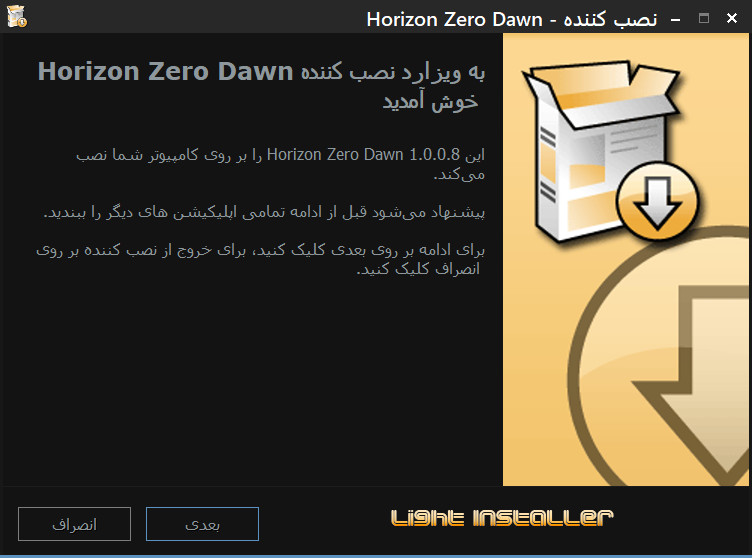
- Added support for Persian (Farsi) language to Light Installer Script (Thanks to Gehrman for collaboration). 
- Added support for skinsharp skins (SkinH.dll library by Shegorat) to Light Installer Script. 
  >> The library of the skinsharp does not support special characters like cyrillic characters.
  >> So languages like Russian and Japanese and Persian should get broken using skinsharp.
- Fixed some minor bugs.
PS: SkinSharp skins only work if compiling with Inno Setup 6.0 or higher.
Attached Images
File Type: png snap2972.png (154.3 KB, 426 views)

Last edited by Cesar82; 01-11-2021 at 08:26.
Reply With Quote
The Following User Says Thank You to Cesar82 For This Useful Post:
Gehrman (03-11-2021)
Reply

Tags
asis, ciu, inno, installer, ultraarc


Posting Rules
You may not post new threads
You may not post replies
You may not post attachments
You may not edit your posts

BB code is On
Smilies are On
[IMG] code is On
HTML code is Off

Forum Jump

Similar Threads
Thread Thread Starter Forum Replies Last Post
[Help] need Advanced Installer script with Razor1911's UltraArc module rez3vil Conversion Tutorials 3 15-04-2024 02:24
Ultimate Conversion Compressor (UCC) vollachr Conversion Tutorials 55 26-04-2021 09:27
INDEX - Conversion Tutorial Index Razor12911 Conversion Tutorials 5 11-06-2020 02:05
How many forum members does it take to change a light bulb? rms2001 XBox Games 6 12-01-2004 05:31


All times are GMT -7. The time now is 09:38.


Powered by vBulletin® Version 3.8.11
Copyright ©2000 - 2026, vBulletin Solutions Inc.
FileForums @ https://fileforums.com