Go Back   FileForums > Game Backup > PC Games > PC Games - CD/DVD Conversions > Conversion Tutorials
Register FAQ Community Calendar Today's Posts Search

Reply
 
Thread Tools Search this Thread Display Modes
  #1  
Old 19-09-2022, 10:11
L33THAK0R's Avatar
L33THAK0R L33THAK0R is offline
Registered User
 
Join Date: Feb 2021
Location: Saudi Arabia
Posts: 406
Thanks: 137
Thanked 117 Times in 70 Posts
L33THAK0R is on a distinguished road
Is it possible to implement external labels to replace TimeStr1/2/3? I've got the issue currently where the time elapsed/remaining labels are cut off by the WizardForm boundaries, however this issue would be resolved if I were able to shorten "hour(s)"/"minute(s)"/"second(s)" to something simpler such as "hr(s)"/"min(s)"/"sec(s)", however I'm currently unable to figure out how to do so.
Reply With Quote
Sponsored Links
  #2  
Old 19-09-2022, 11:10
Masquerade Masquerade is offline
Registered User
 
Join Date: Jan 2020
Location: Monte d'Or
Posts: 1,217
Thanks: 294
Thanked 1,404 Times in 637 Posts
Masquerade is on a distinguished road
Quote:
Originally Posted by L33THAK0R View Post
Is it possible to implement external labels to replace TimeStr1/2/3? I've got the issue currently where the time elapsed/remaining labels are cut off by the WizardForm boundaries, however this issue would be resolved if I were able to shorten "hour(s)"/"minute(s)"/"second(s)" to something simpler such as "hr(s)"/"min(s)"/"sec(s)", however I'm currently unable to figure out how to do so.
If I am correct in thinking, these strings are read from ISDone's configurations. So, just edit the corresponding ini file for each language in "Resources\Includes" folder. Should fix your problem.
Reply With Quote
The Following User Says Thank You to Masquerade For This Useful Post:
Titeuf (19-09-2022)
  #3  
Old 19-09-2022, 21:27
L33THAK0R's Avatar
L33THAK0R L33THAK0R is offline
Registered User
 
Join Date: Feb 2021
Location: Saudi Arabia
Posts: 406
Thanks: 137
Thanked 117 Times in 70 Posts
L33THAK0R is on a distinguished road
Thumbs up

Quote:
Originally Posted by Masquerade View Post
If I am correct in thinking, these strings are read from ISDone's configurations. So, just edit the corresponding ini file for each language in "Resources\Includes" folder. Should fix your problem.
Ah cheers, I didn't even think to check the config files, definitely makes things easier!
Reply With Quote
  #4  
Old 21-09-2022, 10:37
KaktoR's Avatar
KaktoR KaktoR is offline
Lame User
 
Join Date: Jan 2012
Location: From outer space
Posts: 4,689
Thanks: 1,106
Thanked 7,336 Times in 2,838 Posts
KaktoR is on a distinguished road
Code:
v7.3.9
_____________________________________________________
- The script is now compatible with DiskSpan_GUI v2.0.1.2+ (thanks to César)
  > Hash files created with DSG v2.0.1.2+ can be used with ASIS now
  > Note that for QuickSFV you have to create hash file manually and place it in Setup folder (like before)
- Removed RunFromAppFolder setting completely
  > If you use QuickSFV for hash checking, hash file and QuickSFV.exe will now be executed from {app} folder
  > QuickSFV.exe and QuickSFV.ini will be deleted from {app} folder after hash check is finished
Attached Files
File Type: 7z ASIS.v7.3.9.7z (36.88 MB, 53 views)
__________________
Haters gonna hate
Reply With Quote
The Following 7 Users Say Thank You to KaktoR For This Useful Post:
fabrieunko (21-09-2022), Gehrman (21-09-2022), LinkSystem (12-07-2023), mausschieber (21-09-2022), pcblizzard (23-09-2022), ScOOt3r (21-09-2022), Titeuf (21-09-2022)
  #5  
Old 25-09-2022, 08:17
abror's Avatar
abror abror is offline
Registered User
 
Join Date: May 2022
Location: indonesia
Posts: 33
Thanks: 19
Thanked 0 Times in 0 Posts
abror is on a distinguished road
anyone please tell me how to remove or hide the "Pause" button
Reply With Quote
  #6  
Old 25-09-2022, 10:17
L33THAK0R's Avatar
L33THAK0R L33THAK0R is offline
Registered User
 
Join Date: Feb 2021
Location: Saudi Arabia
Posts: 406
Thanks: 137
Thanked 117 Times in 70 Posts
L33THAK0R is on a distinguished road
Quote:
Originally Posted by abror View Post
anyone please tell me how to remove or hide the "Pause" button
At least for compact mode, just change all entries of
Code:
PauseButton.Show;
to
Code:
PauseButton.Hide;
in your "Script.iss"
Reply With Quote
The Following User Says Thank You to L33THAK0R For This Useful Post:
abror (25-09-2022)
  #7  
Old 25-09-2022, 10:42
abror's Avatar
abror abror is offline
Registered User
 
Join Date: May 2022
Location: indonesia
Posts: 33
Thanks: 19
Thanked 0 Times in 0 Posts
abror is on a distinguished road
Quote:
Originally Posted by L33THAK0R View Post
At least for compact mode, just change all entries of
Code:
PauseButton.Show;
to
Code:
PauseButton.Hide;
in your "Script.iss"
thank you for helping
Reply With Quote
  #8  
Old 25-09-2022, 10:45
abror's Avatar
abror abror is offline
Registered User
 
Join Date: May 2022
Location: indonesia
Posts: 33
Thanks: 19
Thanked 0 Times in 0 Posts
abror is on a distinguished road
I want to report a problem with version v7.3.9

If I turn off the crc check an error will occur

Screenshot 2022-09-26 013843.png
Reply With Quote
  #9  
Old 22-09-2022, 19:31
fabrieunko fabrieunko is offline
Registered User
 
Join Date: Sep 2021
Location: france
Posts: 217
Thanks: 516
Thanked 78 Times in 71 Posts
fabrieunko is on a distinguished road
Hello, I have just tested ASIS 7.3.9 with the QuickSFV function and I have a small error when the installation is finished and it asks to test the files. here are the screens:

Code:
[CRCCheck]
//----------------------------------------------- Setup\Filename.md5 \ .sha1 \ .sha256 \ .sha512
Enable=1
StartCheck=1
QuickSFV=1
QuickSFVFile=checksums.md5
in my setup I have created a file checksums.md5

but when the installer finished. and want to test the files I have:
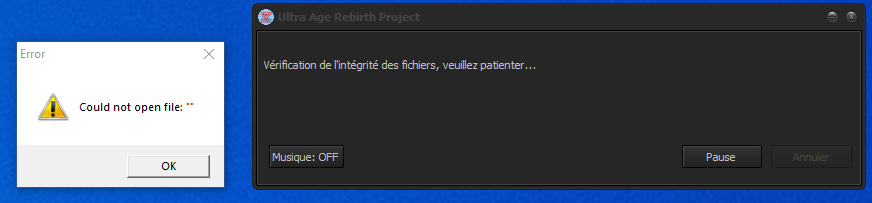


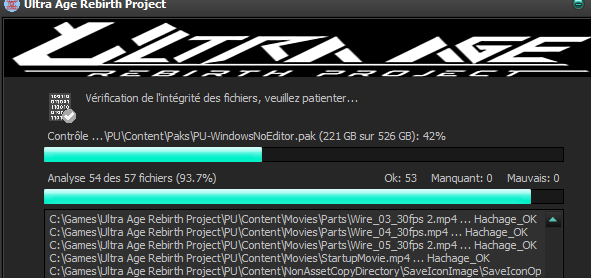
another problem when the file test starts, this one says:
Control ... directory name / filename.pak (221 GB out of 526 GB) when it should indicate 2.21 and 5.26

Last edited by fabrieunko; 22-09-2022 at 19:42.
Reply With Quote
The Following User Says Thank You to fabrieunko For This Useful Post:
KaktoR (23-09-2022)
  #10  
Old 25-09-2022, 11:28
KaktoR's Avatar
KaktoR KaktoR is offline
Lame User
 
Join Date: Jan 2012
Location: From outer space
Posts: 4,689
Thanks: 1,106
Thanked 7,336 Times in 2,838 Posts
KaktoR is on a distinguished road
Code:
v7.4.0
_____________________________________________________
- The script is now compatible with DiskSpan_GUI v2.0.1.3+ (thanks to César)
- Fixed some bugs
Hotfix 1:
 - Fixed QuickSFV not reading hash file if path/file name contains spaces
 - Added option to turn off Windows 11 information
Attached Files
File Type: 7z ASIS.v7.4.0.7z (36.88 MB, 61 views)
File Type: 7z ASIS.v7.4.0.Hotfix.1.7z (45.8 KB, 19 views)
__________________
Haters gonna hate

Last edited by KaktoR; 26-09-2022 at 09:24.
Reply With Quote
The Following 5 Users Say Thank You to KaktoR For This Useful Post:
Gehrman (25-09-2022), jacknilmo (26-09-2022), LinkSystem (12-07-2023), mausschieber (25-09-2022), Titeuf (25-09-2022)
  #11  
Old 26-09-2022, 04:00
ROKA1969's Avatar
ROKA1969 ROKA1969 is offline
Registered User
 
Join Date: May 2017
Location: Poland
Posts: 27
Thanks: 6
Thanked 1 Time in 1 Post
ROKA1969 is on a distinguished road
I would like to have only two languages in the language selection window: Polish and English, I removed all entries for other languages in the script, but they are still displayed in the selection window


I also deleted the ASIS folder but they keep showing up. Anyone help?

I will add that using QuickSFV also displays the same error as my friend fabrieunko

Last edited by ROKA1969; 26-09-2022 at 04:04.
Reply With Quote
  #12  
Old 26-09-2022, 04:23
KaktoR's Avatar
KaktoR KaktoR is offline
Lame User
 
Join Date: Jan 2012
Location: From outer space
Posts: 4,689
Thanks: 1,106
Thanked 7,336 Times in 2,838 Posts
KaktoR is on a distinguished road
Quote:
Originally Posted by ROKA1969 View Post
I will add that using QuickSFV also displays the same error as my friend fabrieunko

Works here


Send me Settings.ini + Script.iss
__________________
Haters gonna hate
Reply With Quote
  #13  
Old 26-09-2022, 09:00
Masquerade Masquerade is offline
Registered User
 
Join Date: Jan 2020
Location: Monte d'Or
Posts: 1,217
Thanks: 294
Thanked 1,404 Times in 637 Posts
Masquerade is on a distinguished road
Quote:
Originally Posted by ROKA1969 View Post
I would like to have only two languages in the language selection window: Polish and English, I removed all entries for other languages in the script, but they are still displayed in the selection window


I also deleted the ASIS folder but they keep showing up. Anyone help?

I will add that using QuickSFV also displays the same error as my friend fabrieunko

QuickSFV will display this error if there are spaces in the file path where the MD5 checksum is stored. The string needs wrapping in quotation marks.
Reply With Quote
  #14  
Old 26-09-2022, 04:03
KaktoR's Avatar
KaktoR KaktoR is offline
Lame User
 
Join Date: Jan 2012
Location: From outer space
Posts: 4,689
Thanks: 1,106
Thanked 7,336 Times in 2,838 Posts
KaktoR is on a distinguished road
Comment out languages in "function CreateLangDialog(): Boolean;"
__________________
Haters gonna hate
Reply With Quote
  #15  
Old 26-09-2022, 10:11
ROKA1969's Avatar
ROKA1969 ROKA1969 is offline
Registered User
 
Join Date: May 2017
Location: Poland
Posts: 27
Thanks: 6
Thanked 1 Time in 1 Post
ROKA1969 is on a distinguished road
Quote:
Originally Posted by KaktoR View Post
Comment out languages in "function CreateLangDialog(): Boolean;"
Now I have two languages working. Thank you
Reply With Quote
Reply


Posting Rules
You may not post new threads
You may not post replies
You may not post attachments
You may not edit your posts

BB code is On
Smilies are On
[IMG] code is On
HTML code is Off

Forum Jump

Similar Threads
Thread Thread Starter Forum Replies Last Post
[Help] need Advanced Installer script with Razor1911's UltraArc module rez3vil Conversion Tutorials 3 15-04-2024 02:24
Portable Installer Inno Setup Script y_thelastknight Conversion Tutorials 59 23-10-2020 00:02
INDEX - Conversion Tutorial Index Razor12911 Conversion Tutorials 5 11-06-2020 02:05
Simple Arc Installer 78372 Conversion Tutorials 1 15-06-2017 15:37
MSC+Srep+lzma Simple Script Example gozarck Conversion Tutorials 10 07-09-2015 16:31


All times are GMT -7. The time now is 10:34.


Powered by vBulletin® Version 3.8.11
Copyright ©2000 - 2026, vBulletin Solutions Inc.
FileForums @ https://fileforums.com