|
|
|
#1
 28-08-2021, 07:21
|
||||
|
||||
|
Quote:
Use the key level to shift items to the right 15 pixels for each value 1 incremented in the key level. LEVEL 0 = 0 PIXEL LEVEL 1 = 15 PIXELS LEVEL 2 = 30 PIXELS ETC 
|
| The Following User Says Thank You to Cesar82 For This Useful Post: | ||
Gehrman (31-05-2022) | ||
| Sponsored Links |
|
#2
28-08-2021, 08:47
|
||||
|
||||
|
Quote:
 Code:
[TasksSettings] Enable=1 FlatPageMode=0 ShowTaskSize=1 Task1.Name=Main Files Task1.ItemType=CHECKBOX Task1.Size=500 mb Task1.Level=0 Task1.Checked=1 Task1.Enabled=0 Task2.Name=Selective videos Task2.ItemType=GROUP Task2.Size=0 Task2.Level=0 Task2.Checked=1 Task2.Enabled=1 Task3.Name=Lossless Task3.ItemType=RADIO Task3.Size=600 mb Task3.Level=1 Task3.Checked=1 Task3.Enabled=1 Task4.Name=Lossy Task4.ItemType=RADIO Task4.Size=300 mb Task4.Level=1 Task4.Checked=0 Task4.Enabled=1 Task5.Name=Modded Content Task5.ItemType=GROUP Task5.Size=515 mb Task5.Level=0 Task5.Checked=0 Task5.Enabled=1 Task6.Name=Type X of Mod Task6.ItemType=GROUP Task6.Size=0 Task6.Level=1 Task6.Checked=0 Task6.Enabled=1 Task7.Name=Offering A Task7.ItemType=RADIO Task7.Size=200 mb Task7.Level=2 Task7.Checked=0 Task7.Enabled=1 Task8.Name=Offering B Task8.ItemType=RADIO Task8.Size=100 mb Task8.Level=2 Task8.Checked=0 Task8.Enabled=1 Records.ini for the above example Code:
[Record1]
Type=Freearc_Original
Source={src}\Main_Files.bin
Output={app}\
Disk=1
Size=500 MB
Task=1

[Record2]
Type=Freearc_Original
Source={src}\Lossless.bin
Output={app}\
Disk=1
Size=600 MB
Task=3

[Record3]
Type=Freearc_Original
Source={src}\Lossy.bin
Output={app}\
Disk=1
Size=300 MB
Task=4

[Record4]
Type=Freearc_Original
Source={src}\Offering_A.bin
Output={app}\
Disk=1
Size=200 MB
Task=7

[Record5]
Type=Freearc_Original
Source={src}\Offering_B.bin
Output={app}\
Disk=1
Size=100 MB
Task=8
__________________
Haters gonna hate
Last edited by KaktoR; 28-08-2021 at 08:51.
|
|
#3
28-08-2021, 09:11
|
||||
|
||||
|
@L33THAK0R, if you use ASIS together with DiskSpan GUI the DiskSpan GUI 2.0+ settings in "Resources\DSG_Settings.ini" for the KaktoR example above (Part related tasks) will look like this.
Code:
[Game1Settings]
//... others game configs
Data1.Name=Main_Files-01.bin
Data1.Tasks=1
Data2.Name=Lossless-01.bin
Data2.Tasks=3
Data3.Name=Lossy-01.bin
Data3.Tasks=4
Data4.Name=Offering_A-01.bin
Data4.Tasks=7
Data5.Name=Offering_B-01.bin
Data5.Tasks=8
|
|
#4
28-08-2021, 09:24
|
||||
|
||||
|
@Cesar82 @KaktoR thank you so much for your time, however I think I've wasted your efforts (hopefully these instructions will be useful to future users), as I'm a stubborn bastard, still using v7.2.0 of the script, as such I'm not able to use "tasks" to accomplish my goal. However after looking through the script a bit, I think I've figured out the section(s) that I need to look at. Once again sorry to have bothered you lads, thank you for all the help you've given so far!
|
| The Following User Says Thank You to L33THAK0R For This Useful Post: | ||
Cesar82 (28-08-2021) | ||
|
#5
30-08-2021, 12:40
|
||||
|
||||

I am still having issues relating to the Start Menu part of the script.
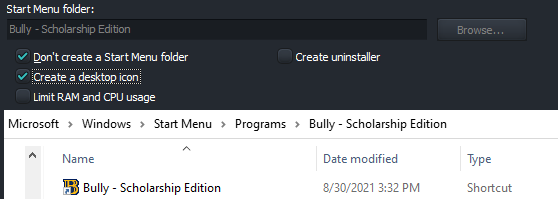 This is just an example. Even when the option to not make one is checked, it still makes them when the installer is finished. Is there any way I can fix this, or at the very least remove the checkbox?
__________________
Stretched to breaking an obscene canvas on a stretcher of parasitism.
|
| The Following User Says Thank You to mr_gnar For This Useful Post: | ||
KaktoR (30-08-2021) | ||
|
#6
30-08-2021, 13:14
|
||||
|
||||
|
Thanks for reporting.
Here is a fix for this The problem was that all the icons were linked to desktop shortcut checkbox and the startmenu checkbox had literally no effect.
__________________
Haters gonna hate
|
| The Following 4 Users Say Thank You to KaktoR For This Useful Post: | ||
|
#7
01-09-2021, 10:21
|
||||
|
||||

Quote:
__________________
Stretched to breaking an obscene canvas on a stretcher of parasitism.
|
|
#9
03-09-2021, 05:09
|
||||
|
||||
|
I uploaded a hotfix for the "expression error" if you run the installer in compact mode and it finished.
Problem was that the installer tried to create startmenu shortcuts and failed, eventough this shouldn't be the case in compactmode (however the installation is done succesfull and desktop icons were created). My previous fix for the shortcuts was just tested in normalmode, sorry for that 
__________________
Haters gonna hate
Last edited by KaktoR; 03-09-2021 at 05:12.
|
| The Following 4 Users Say Thank You to KaktoR For This Useful Post: | ||
|
#10
20-09-2021, 03:22
|
||||
|
||||

UPDATE: Realised I might be able to do a bit of a botched fix using batch scripts, its a bit fucky but thankfully I don't repack collections structured like this often!
Hi all, Got a small question regarding whether my proposed solution could work at all (I'm terribly new to pascal/delphi). I've got a fair few packs that feature selective, multiple-title offerings to the end-user, each with their own, separate executable to launch from (since some are emulated and require a small script to launch the ROM), as well as their own entry under the shortcut section of the "Settings.ini" file used in ASIS (baked into a executable thats just a batch script wrapped in an exe). My issue is that regardless of the component selection, upon extraction of all selected archives, all desktop shortcuts defined within the "settings.ini" are generated (should the option be selected). My current thought process is using the "RemoveShortcut" function, in the Post-install section of the script to delete the shortcut, if a given .txt file is missing (which would be packed with a given selective offering), like so: Code:
#if ("{app}\_CommonRedist\APPS\APP_1.txt" == "0") && ("{userdesktop}\APP_1.lnk" == "1")
 #for {i = 1; Trim(ReadIni(SourcePath + "\Settings.ini", "Executable" + Str(i), "ShortcutName", "")) != ""} RemoveShortcut
#endif
#if ("{app}\_CommonRedist\APPS\APP_2.txt" == "0") && ("{userdesktop}\APP_2.lnk" == "1")
 #for {i = 2; Trim(ReadIni(SourcePath + "\Settings.ini", "Executable" + Str(i), "ShortcutName", "")) != ""} RemoveShortcut
#endif
Last edited by L33THAK0R; 21-09-2021 at 10:00.
|
| The Following User Says Thank You to L33THAK0R For This Useful Post: | ||
Gehrman (31-05-2022) | ||
|
#11
22-09-2021, 08:53
|
|||
|
|||
|
Hi,
Any idea why shortcut is a white blank icon? I have this in Settings.ini [Executable1] ShortcutName=Kena Bridge of Spirits ExePath=Kena.exe ExeParam= IconFileName=Kena.exe I even had: IconFileName=Setup.ico Since Setup.ico use icon straight from game .exe file. Still it was white blank image.
|
|
#12
22-09-2021, 09:14
|
||||
|
||||
|
Quote:
IconFileName={app}\Kena.exe
|
| The Following 2 Users Say Thank You to Cesar82 For This Useful Post: | ||
abror (28-05-2022), MartinezPL (23-09-2021) | ||
|
#13
23-09-2021, 03:36
|
|||
|
|||
|
"IconFileName={app}\Kena.exe"
This made the trick. Thank you very much Cesar82
|
|
#14
11-10-2021, 01:01
|
||||
|
||||
|
Is it there any easy solution to have multiple data files for single selected component? I'm currently making a collection, with one of the selective titles having to have certain files packed separately. I know I could just instruct the user to select 2 items, but for the sake of it looking better I was wondering if a neater solution would be possible.
I tried modifying Code:
if Trim(GetIniString('ComponentsSettings', 'Component' + IntToStr(I) + '.File', '', IniFile)) = '' then
Code:
ComponentFile := ExpandConstant('{src}\' + GetIniString('ComponentsSettings', 'Component' + IntToStr(CompIndexList[I]) + '.File', '', ExpandConstant('{tmp}\Settings.ini')));
Code:
if Trim(GetIniString('ComponentsSettings', 'Component' + IntToStr(I) + '.FileA' or '.FileB', '', IniFile)) = '' then
Code:
ComponentFile := ExpandConstant('{src}\' + GetIniString('ComponentsSettings', 'Component' + IntToStr(CompIndexList[I]) + '.FileA', '', ExpandConstant('{tmp}\Settings.ini')));
ComponentFile := ExpandConstant('{src}\' + GetIniString('ComponentsSettings', 'Component' + IntToStr(CompIndexList[I]) + '.FileB', '', ExpandConstant('{tmp}\Settings.ini')));
|
|
#15
11-10-2021, 02:18
|
||||
|
||||
|
Yes, however, you have to enable Tasks
Just make a Task Code:
Task1.Name=Game Files Task1.ItemType=CHECKBOX Task1.Size=<Game size> gb/mb/kb/b Task1.Level=0 Task1.Checked=1 Task1.Enabled=0 Code:
[Record1]
Type=Freearc_Original
Source={src}\Data1a.bin
Output={app}\
Disk=1
Size=<archive size> gb/mb/kb/b
Task=1

[Record2]
Type=Freearc_Original
Source={src}\Data1b.bin
Output={app}\
Disk=1
Size=<archive size> gb/mb/kb/b
Task=1

...
But may I ask, why you don't make a masked data archive? You can store different files with different compressions inside a single freearc archive. Edit: Ohh, I just forgot you are working with an older script (right?). In this case I can't help you much, but I guess it is possible neverthless (I guess in this case you have to work with Component=# instead of Task=# in records.ini).
__________________
Haters gonna hate
Last edited by KaktoR; 11-10-2021 at 02:22.
|
 |
|
|
 Similar Threads
|
||||
| Thread | Thread Starter | Forum | Replies | Last Post |
| [Help] need Advanced Installer script with Razor1911's UltraArc module | rez3vil | Conversion Tutorials | 3 | 15-04-2024 02:24 |
| Portable Installer Inno Setup Script | y_thelastknight | Conversion Tutorials | 59 | 23-10-2020 00:02 |
| INDEX - Conversion Tutorial Index | Razor12911 | Conversion Tutorials | 5 | 11-06-2020 02:05 |
| Simple Arc Installer | 78372 | Conversion Tutorials | 1 | 15-06-2017 15:37 |
| MSC+Srep+lzma Simple Script Example | gozarck | Conversion Tutorials | 10 | 07-09-2015 16:31 |


 Hybrid Mode
