|
#1321
 25-07-2023, 22:46
|
||||
|
||||
|
Quote:
And after that, you need to edit the "settings. ini" file to apply your settings, then just run the "Compile_Script.bat" file to compile the script and move the (Setup.exe, Setup.ico) to the folder containing your archive and "records.ini" and "Setup.dll". 
__________________
¤ Life good be a Dream ¤ 
|
| The Following User Says Thank You to Lord.Freddy For This Useful Post: | ||
ravikant (25-07-2023) | ||
| Sponsored Links |
|
#1322
25-07-2023, 22:54
|
||||
|
||||
|
I read in the previous posts that we need to extract setup.dll in decompressor folder
also if i rename my archives[i am using unlimited in diskspan] how do i configure the same for my installer
|
|
#1323
25-07-2023, 23:12
|
||||
|
||||
|
Quote:
Quote:
__________________
¤ Life good be a Dream ¤
|
| The Following User Says Thank You to Lord.Freddy For This Useful Post: | ||
ravikant (26-07-2023) | ||
|
#1324
25-07-2023, 23:17
|
||||
|
||||
|
Thanks, i was able to test my installer and it is working perfectly
I have one more question Can i run a crc check for bin file before installation and crc check for output files after installation Can you also suggest me other diskspan compatible installers which have support from the creator till date
|
|
#1325
25-07-2023, 23:34
|
||||
|
||||
|
Quote:
Quote:
__________________
¤ Life good be a Dream ¤ Last edited by Lord.Freddy; 25-07-2023 at 23:44.
|
| The Following User Says Thank You to Lord.Freddy For This Useful Post: | ||
ravikant (26-07-2023) | ||
|
#1327
26-07-2023, 10:01
|
||||
|
||||
|
This is for the [Batch] section, if you want to do tasks after installing, like patching files, repacking files and such.
__________________
Haters gonna hate
|
| The Following User Says Thank You to KaktoR For This Useful Post: | ||
ravikant (26-07-2023) | ||
|
#1328
26-07-2023, 23:26
|
||||
|
||||
|
Quote:
Also how do i configure records.ini for optional files
|
|
#1329
26-07-2023, 23:52
|
||||
|
||||
|
Post install hash check is already built-in. Either you can use the hash file created by DSG, or using your own and use quicksfv.
Code:
[CRCCheck]
Enable=                                                 | Enable (1) or disable (0) the use of a hash check after installation is finished
                                                          Note that internal hash check is only usable if you used DiskSpan_GUI and created hash files with it.
                                                          If you want to use QuickSFV instead you have to set Enable=1 nevertheless
StartCheck=                                             | If enabled (1) CRC checkbox is enabled by default and Hash checking starts automatically after installation process
QuickSFV=                                               | Enable (1) if you want to use QuickSFV for file checking instead of internal Setup hash check
QuickSFVFile=                                           | Set the hash file to use for the hash check
                                                          It is possible to use sfv, md5, crc, csv and ckz files
Edit: Here is a example what a Patch.bat could look like. In this example I used "DELZORec_x64" as it will give the best output size on the game "Far Cry 5" last time I checked. First you have to unpack the game files with said tool, after installation you have to repack the files back to original. Note that the batch file will always run from {app} directory as working directory (I have to fix the help file). Code:
@echo off
setlocal EnableDelayedExpansion EnableExtensions
TITLE Rebuilding game files, please wait...

DELZORec_x64.exe r "data_final\pc\common.unp" "data_final\pc\common.dat" "data_final\pc\common.fat"
del /F "data_final\pc\common.unp"
DELZORec_x64.exe r "data_final\pc\ige.unp" "data_final\pc\ige.dat" "data_final\pc\ige.fat"
del /F "data_final\pc\ige.unp"
DELZORec_x64.exe r "data_final\pc\igepatch.unp" "data_final\pc\igepatch.dat" "data_final\pc\igepatch.fat"
del /F "data_final\pc\igepatch.unp"
DELZORec_x64.exe r "data_final\pc\patch.unp" "data_final\pc\patch.dat" "data_final\pc\patch.fat"
del /F "data_final\pc\patch.unp"
DELZORec_x64.exe r "data_final\pc\patchshadersobj.unp" "data_final\pc\patchshadersobj.dat" "data_final\pc\patchshadersobj.fat"
del /F "data_final\pc\patchshadersobj.unp"
DELZORec_x64.exe r "data_final\pc\shadersobj.unp" "data_final\pc\shadersobj.dat" "data_final\pc\shadersobj.fat"
del /F "data_final\pc\shadersobj.unp"
if exist "data_final\pc\patch_english.unp" DELZORec_x64.exe r "data_final\pc\patch_english.unp" "data_final\pc\patch_english.dat" "data_final\pc\patch_english.fat"
if exist "data_final\pc\patch_english.unp" del /F "data_final\pc\patch_english.unp"
if exist "data_final\pc\patch_german.unp" DELZORec_x64.exe r "data_final\pc\patch_german.unp" "data_final\pc\patch_german.dat" "data_final\pc\patch_german.fat"
if exist "data_final\pc\patch_german.unp" del /F "data_final\pc\patch_german.unp"
if exist "data_final\pc\patch_italian.unp" DELZORec_x64.exe r "data_final\pc\patch_italian.unp" "data_final\pc\patch_italian.dat" "data_final\pc\patch_italian.fat"
if exist "data_final\pc\patch_italian.unp" del /F "data_final\pc\patch_italian.unp"
if exist "data_final\pc\patch_french.unp" DELZORec_x64.exe r "data_final\pc\patch_french.unp" "data_final\pc\patch_french.dat" "data_final\pc\patch_french.fat"
if exist "data_final\pc\patch_french.unp" del /F "data_final\pc\patch_french.unp"
if exist "data_final\pc\patch_spanish.unp" DELZORec_x64.exe r "data_final\pc\patch_spanish.unp" "data_final\pc\patch_spanish.dat" "data_final\pc\patch_spanish.fat"
if exist "data_final\pc\patch_spanish.unp" del /F "data_final\pc\patch_spanish.unp"
if exist "data_final\pc\patch_russian.unp" DELZORec_x64.exe r "data_final\pc\patch_russian.unp" "data_final\pc\patch_russian.dat" "data_final\pc\patch_russian.fat"
if exist "data_final\pc\patch_russian.unp" del /F "data_final\pc\patch_russian.unp"
if exist "data_final\pc\patch_japanese.unp" DELZORec_x64.exe r "data_final\pc\patch_japanese.unp" "data_final\pc\patch_japanese.dat" "data_final\pc\patch_japanese.fat"
if exist "data_final\pc\patch_japanese.unp" del /F "data_final\pc\patch_japanese.unp"
if exist "data_final\pc\patch_brazilian.unp" DELZORec_x64.exe r "data_final\pc\patch_brazilian.unp" "data_final\pc\patch_brazilian.dat" "data_final\pc\patch_brazilian.fat"
if exist "data_final\pc\patch_brazilian.unp" del /F "data_final\pc\patch_brazilian.unp"

DELZORec_x64.exe r "data_final\pc\downloadcontent\dlc_mars\dlc_mars.unp" "data_final\pc\downloadcontent\dlc_mars\dlc_mars.dat" "data_final\pc\downloadcontent\dlc_mars\dlc_mars.fat"
del /F "data_final\pc\downloadcontent\dlc_mars\dlc_mars.unp"
if exist "data_final\pc\downloadcontent\dlc_mars\dlc_mars_english.unp" DELZORec_x64.exe r "data_final\pc\downloadcontent\dlc_mars\dlc_mars_english.unp" "data_final\pc\downloadcontent\dlc_mars\dlc_mars_english.dat" "data_final\pc\downloadcontent\dlc_mars\dlc_mars_english.fat"
if exist "data_final\pc\downloadcontent\dlc_mars\dlc_mars_english.unp" del /F "data_final\pc\downloadcontent\dlc_mars\dlc_mars_english.unp"
if exist "data_final\pc\downloadcontent\dlc_mars\dlc_mars_german.unp" DELZORec_x64.exe r "data_final\pc\downloadcontent\dlc_mars\dlc_mars_german.unp" "data_final\pc\downloadcontent\dlc_mars\dlc_mars_german.dat" "data_final\pc\downloadcontent\dlc_mars\dlc_mars_german.fat"
if exist "data_final\pc\downloadcontent\dlc_mars\dlc_mars_german.unp" del /F "data_final\pc\downloadcontent\dlc_mars\dlc_mars_german.unp"
if exist "data_final\pc\downloadcontent\dlc_mars\dlc_mars_italian.unp" DELZORec_x64.exe r "data_final\pc\downloadcontent\dlc_mars\dlc_mars_italian.unp" "data_final\pc\downloadcontent\dlc_mars\dlc_mars_italian.dat" "data_final\pc\downloadcontent\dlc_mars\dlc_mars_italian.fat"
if exist "data_final\pc\downloadcontent\dlc_mars\dlc_mars_italian.unp" del /F "data_final\pc\downloadcontent\dlc_mars\dlc_mars_italian.unp"
if exist "data_final\pc\downloadcontent\dlc_mars\dlc_mars_french.unp" DELZORec_x64.exe r "data_final\pc\downloadcontent\dlc_mars\dlc_mars_french.unp" "data_final\pc\downloadcontent\dlc_mars\dlc_mars_french.dat" "data_final\pc\downloadcontent\dlc_mars\dlc_mars_french.fat"
if exist "data_final\pc\downloadcontent\dlc_mars\dlc_mars_french.unp" del /F "data_final\pc\downloadcontent\dlc_mars\dlc_mars_french.unp"
if exist "data_final\pc\downloadcontent\dlc_mars\dlc_mars_spanish.unp" DELZORec_x64.exe r "data_final\pc\downloadcontent\dlc_mars\dlc_mars_spanish.unp" "data_final\pc\downloadcontent\dlc_mars\dlc_mars_spanish.dat" "data_final\pc\downloadcontent\dlc_mars\dlc_mars_spanish.fat"
if exist "data_final\pc\downloadcontent\dlc_mars\dlc_mars_spanish.unp" del /F "data_final\pc\downloadcontent\dlc_mars\dlc_mars_spanish.unp"
if exist "data_final\pc\downloadcontent\dlc_mars\dlc_mars_russian.unp" DELZORec_x64.exe r "data_final\pc\downloadcontent\dlc_mars\dlc_mars_russian.unp" "data_final\pc\downloadcontent\dlc_mars\dlc_mars_russian.dat" "data_final\pc\downloadcontent\dlc_mars\dlc_mars_russian.fat"
if exist "data_final\pc\downloadcontent\dlc_mars\dlc_mars_russian.unp" del /F "data_final\pc\downloadcontent\dlc_mars\dlc_mars_russian.unp"
if exist "data_final\pc\downloadcontent\dlc_mars\dlc_mars_japanese.unp" DELZORec_x64.exe r "data_final\pc\downloadcontent\dlc_mars\dlc_mars_japanese.unp" "data_final\pc\downloadcontent\dlc_mars\dlc_mars_japanese.dat" "data_final\pc\downloadcontent\dlc_mars\dlc_mars_japanese.fat"
if exist "data_final\pc\downloadcontent\dlc_mars\dlc_mars_japanese.unp" del /F "data_final\pc\downloadcontent\dlc_mars\dlc_mars_japanese.unp"
if exist "data_final\pc\downloadcontent\dlc_mars\dlc_mars_brazilian.unp" DELZORec_x64.exe r "data_final\pc\downloadcontent\dlc_mars\dlc_mars_brazilian.unp" "data_final\pc\downloadcontent\dlc_mars\dlc_mars_brazilian.dat" "data_final\pc\downloadcontent\dlc_mars\dlc_mars_brazilian.fat"
if exist "data_final\pc\downloadcontent\dlc_mars\dlc_mars_brazilian.unp" del /F "data_final\pc\downloadcontent\dlc_mars\dlc_mars_brazilian.unp"

DELZORec_x64.exe r "data_final\pc\downloadcontent\dlc_vietnam\dlc_vietnam.unp" "data_final\pc\downloadcontent\dlc_vietnam\dlc_vietnam.dat" "data_final\pc\downloadcontent\dlc_vietnam\dlc_vietnam.fat"
del /F "data_final\pc\downloadcontent\dlc_vietnam\dlc_vietnam.unp"
if exist "data_final\pc\downloadcontent\dlc_vietnam\dlc_vietnam_english.unp" DELZORec_x64.exe r "data_final\pc\downloadcontent\dlc_vietnam\dlc_vietnam_english.unp" "data_final\pc\downloadcontent\dlc_vietnam\dlc_vietnam_english.dat" "data_final\pc\downloadcontent\dlc_vietnam\dlc_vietnam_english.fat"
if exist "data_final\pc\downloadcontent\dlc_vietnam\dlc_vietnam_english.unp" del /F "data_final\pc\downloadcontent\dlc_vietnam\dlc_vietnam_english.unp"
if exist "data_final\pc\downloadcontent\dlc_vietnam\dlc_vietnam_german.unp" DELZORec_x64.exe r "data_final\pc\downloadcontent\dlc_vietnam\dlc_vietnam_german.unp" "data_final\pc\downloadcontent\dlc_vietnam\dlc_vietnam_german.dat" "data_final\pc\downloadcontent\dlc_vietnam\dlc_vietnam_german.fat"
if exist "data_final\pc\downloadcontent\dlc_vietnam\dlc_vietnam_german.unp" del /F "data_final\pc\downloadcontent\dlc_vietnam\dlc_vietnam_german.unp"
if exist "data_final\pc\downloadcontent\dlc_vietnam\dlc_vietnam_italian.unp" DELZORec_x64.exe r "data_final\pc\downloadcontent\dlc_vietnam\dlc_vietnam_italian.unp" "data_final\pc\downloadcontent\dlc_vietnam\dlc_vietnam_italian.dat" "data_final\pc\downloadcontent\dlc_vietnam\dlc_vietnam_italian.fat"
if exist "data_final\pc\downloadcontent\dlc_vietnam\dlc_vietnam_italian.unp" del /F "data_final\pc\downloadcontent\dlc_vietnam\dlc_vietnam_italian.unp"
if exist "data_final\pc\downloadcontent\dlc_vietnam\dlc_vietnam_french.unp" DELZORec_x64.exe r "data_final\pc\downloadcontent\dlc_vietnam\dlc_vietnam_french.unp" "data_final\pc\downloadcontent\dlc_vietnam\dlc_vietnam_french.dat" "data_final\pc\downloadcontent\dlc_vietnam\dlc_vietnam_french.fat"
if exist "data_final\pc\downloadcontent\dlc_vietnam\dlc_vietnam_french.unp" del /F "data_final\pc\downloadcontent\dlc_vietnam\dlc_vietnam_french.unp"
if exist "data_final\pc\downloadcontent\dlc_vietnam\dlc_vietnam_spanish.unp" DELZORec_x64.exe r "data_final\pc\downloadcontent\dlc_vietnam\dlc_vietnam_spanish.unp" "data_final\pc\downloadcontent\dlc_vietnam\dlc_vietnam_spanish.dat" "data_final\pc\downloadcontent\dlc_vietnam\dlc_vietnam_spanish.fat"
if exist "data_final\pc\downloadcontent\dlc_vietnam\dlc_vietnam_spanish.unp" del /F "data_final\pc\downloadcontent\dlc_vietnam\dlc_vietnam_spanish.unp"
if exist "data_final\pc\downloadcontent\dlc_vietnam\dlc_vietnam_russian.unp" DELZORec_x64.exe r "data_final\pc\downloadcontent\dlc_vietnam\dlc_vietnam_russian.unp" "data_final\pc\downloadcontent\dlc_vietnam\dlc_vietnam_russian.dat" "data_final\pc\downloadcontent\dlc_vietnam\dlc_vietnam_russian.fat"
if exist "data_final\pc\downloadcontent\dlc_vietnam\dlc_vietnam_russian.unp" del /F "data_final\pc\downloadcontent\dlc_vietnam\dlc_vietnam_russian.unp"
if exist "data_final\pc\downloadcontent\dlc_vietnam\dlc_vietnam_japanese.unp" DELZORec_x64.exe r "data_final\pc\downloadcontent\dlc_vietnam\dlc_vietnam_japanese.unp" "data_final\pc\downloadcontent\dlc_vietnam\dlc_vietnam_japanese.dat" "data_final\pc\downloadcontent\dlc_vietnam\dlc_vietnam_japanese.fat"
if exist "data_final\pc\downloadcontent\dlc_vietnam\dlc_vietnam_japanese.unp" del /F "data_final\pc\downloadcontent\dlc_vietnam\dlc_vietnam_japanese.unp"
if exist "data_final\pc\downloadcontent\dlc_vietnam\dlc_vietnam_brazilian.unp" DELZORec_x64.exe r "data_final\pc\downloadcontent\dlc_vietnam\dlc_vietnam_brazilian.unp" "data_final\pc\downloadcontent\dlc_vietnam\dlc_vietnam_brazilian.dat" "data_final\pc\downloadcontent\dlc_vietnam\dlc_vietnam_brazilian.fat"
if exist "data_final\pc\downloadcontent\dlc_vietnam\dlc_vietnam_brazilian.unp" del /F "data_final\pc\downloadcontent\dlc_vietnam\dlc_vietnam_brazilian.unp"

DELZORec_x64.exe r "data_final\pc\downloadcontent\dlc_zombies\dlc_zombies.unp" "data_final\pc\downloadcontent\dlc_zombies\dlc_zombies.dat" "data_final\pc\downloadcontent\dlc_zombies\dlc_zombies.fat"
del /F "data_final\pc\downloadcontent\dlc_zombies\dlc_zombies.unp"

DELZORec_x64.exe r "data_final\pc\ingameeditor\dlcpack0.unp" "data_final\pc\ingameeditor\dlcpack0.dat" "data_final\pc\ingameeditor\dlcpack0.fat"
del /F "data_final\pc\ingameeditor\dlcpack0.unp"
DELZORec_x64.exe r "data_final\pc\ingameeditor\igepack.unp" "data_final\pc\ingameeditor\igepack.dat" "data_final\pc\ingameeditor\igepack.fat"
del /F "data_final\pc\ingameeditor\igepack.unp"

DELZORec_x64.exe r "data_final\pc\worlds\farcry5.unp" "data_final\pc\worlds\farcry5.dat" "data_final\pc\worlds\farcry5.fat"
del /F "data_final\pc\worlds\farcry5.unp"
DELZORec_x64.exe r "data_final\pc\worlds\installpkg.unp" "data_final\pc\worlds\installpkg.dat" "data_final\pc\worlds\installpkg.fat"
del /F "data_final\pc\worlds\installpkg.unp"

if exist "data_final\pc\worlds\farcry5_english.unp" DELZORec_x64.exe r "data_final\pc\worlds\farcry5_english.unp" "data_final\pc\worlds\farcry5_english.dat" "data_final\pc\worlds\farcry5_english.fat"
if exist "data_final\pc\worlds\farcry5_english.unp" del /F "data_final\pc\worlds\farcry5_english.unp"
if exist "data_final\pc\worlds\farcry5_german.unp" DELZORec_x64.exe r "data_final\pc\worlds\farcry5_german.unp" "data_final\pc\worlds\farcry5_german.dat" "data_final\pc\worlds\farcry5_german.fat"
if exist "data_final\pc\worlds\farcry5_german.unp" del /F "data_final\pc\worlds\farcry5_german.unp"
if exist "data_final\pc\worlds\farcry5_italian.unp" DELZORec_x64.exe r "data_final\pc\worlds\farcry5_italian.unp" "data_final\pc\worlds\farcry5_italian.dat" "data_final\pc\worlds\farcry5_italian.fat"
if exist "data_final\pc\worlds\farcry5_italian.unp" del /F "data_final\pc\worlds\farcry5_italian.unp"
if exist "data_final\pc\worlds\farcry5_french.unp" DELZORec_x64.exe r "data_final\pc\worlds\farcry5_french.unp" "data_final\pc\worlds\farcry5_french.dat" "data_final\pc\worlds\farcry5_french.fat"
if exist "data_final\pc\worlds\farcry5_french.unp" del /F "data_final\pc\worlds\farcry5_french.unp"
if exist "data_final\pc\worlds\farcry5_spanish.unp" DELZORec_x64.exe r "data_final\pc\worlds\farcry5_spanish.unp" "data_final\pc\worlds\farcry5_spanish.dat" "data_final\pc\worlds\farcry5_spanish.fat"
if exist "data_final\pc\worlds\farcry5_spanish.unp" del /F "data_final\pc\worlds\farcry5_spanish.unp"
if exist "data_final\pc\worlds\farcry5_russian.unp" DELZORec_x64.exe r "data_final\pc\worlds\farcry5_russian.unp" "data_final\pc\worlds\farcry5_russian.dat" "data_final\pc\worlds\farcry5_russian.fat"
if exist "data_final\pc\worlds\farcry5_russian.unp" del /F "data_final\pc\worlds\farcry5_russian.unp"
if exist "data_final\pc\worlds\farcry5_japanese.unp" DELZORec_x64.exe r "data_final\pc\worlds\farcry5_japanese.unp" "data_final\pc\worlds\farcry5_japanese.dat" "data_final\pc\worlds\farcry5_japanese.fat"
if exist "data_final\pc\worlds\farcry5_japanese.unp" del /F "data_final\pc\worlds\farcry5_japanese.unp"
if exist "data_final\pc\worlds\farcry5_brazilian.unp" DELZORec_x64.exe r "data_final\pc\worlds\farcry5_brazilian.unp" "data_final\pc\worlds\farcry5_brazilian.dat" "data_final\pc\worlds\farcry5_brazilian.fat"
if exist "data_final\pc\worlds\farcry5_brazilian.unp" del /F "data_final\pc\worlds\farcry5_brazilian.unp"

if exist "data_final\pc\worlds\installpkg_english.unp" DELZORec_x64.exe r "data_final\pc\worlds\installpkg_english.unp" "data_final\pc\worlds\installpkg_english.dat" "data_final\pc\worlds\installpkg_english.fat"
if exist "data_final\pc\worlds\installpkg_english.unp" del /F "data_final\pc\worlds\installpkg_english.unp"
if exist "data_final\pc\worlds\installpkg_german.unp" DELZORec_x64.exe r "data_final\pc\worlds\installpkg_german.unp" "data_final\pc\worlds\installpkg_german.dat" "data_final\pc\worlds\installpkg_german.fat"
if exist "data_final\pc\worlds\installpkg_german.unp" del /F "data_final\pc\worlds\installpkg_german.unp"
if exist "data_final\pc\worlds\installpkg_italian.unp" DELZORec_x64.exe r "data_final\pc\worlds\installpkg_italian.unp" "data_final\pc\worlds\installpkg_italian.dat" "data_final\pc\worlds\installpkg_italian.fat"
if exist "data_final\pc\worlds\installpkg_italian.unp" del /F "data_final\pc\worlds\installpkg_italian.unp"
if exist "data_final\pc\worlds\installpkg_french.unp" DELZORec_x64.exe r "data_final\pc\worlds\installpkg_french.unp" "data_final\pc\worlds\installpkg_french.dat" "data_final\pc\worlds\installpkg_french.fat"
if exist "data_final\pc\worlds\installpkg_french.unp" del /F "data_final\pc\worlds\installpkg_french.unp"
if exist "data_final\pc\worlds\installpkg_spanish.unp" DELZORec_x64.exe r "data_final\pc\worlds\installpkg_spanish.unp" "data_final\pc\worlds\installpkg_spanish.dat" "data_final\pc\worlds\installpkg_spanish.fat"
if exist "data_final\pc\worlds\installpkg_spanish.unp" del /F "data_final\pc\worlds\installpkg_spanish.unp"
if exist "data_final\pc\worlds\installpkg_russian.unp" DELZORec_x64.exe r "data_final\pc\worlds\installpkg_russian.unp" "data_final\pc\worlds\installpkg_russian.dat" "data_final\pc\worlds\installpkg_russian.fat"
if exist "data_final\pc\worlds\installpkg_russian.unp" del /F "data_final\pc\worlds\installpkg_russian.unp"
if exist "data_final\pc\worlds\installpkg_japanese.unp" DELZORec_x64.exe r "data_final\pc\worlds\installpkg_japanese.unp" "data_final\pc\worlds\installpkg_japanese.dat" "data_final\pc\worlds\installpkg_japanese.fat"
if exist "data_final\pc\worlds\installpkg_japanese.unp" del /F "data_final\pc\worlds\installpkg_japanese.unp"
if exist "data_final\pc\worlds\installpkg_brazilian.unp" DELZORec_x64.exe r "data_final\pc\worlds\installpkg_brazilian.unp" "data_final\pc\worlds\installpkg_brazilian.dat" "data_final\pc\worlds\installpkg_brazilian.fat"
if exist "data_final\pc\worlds\installpkg_brazilian.unp" del /F "data_final\pc\worlds\installpkg_brazilian.unp"

del /F DELZORec_x64.exe
del /F /S /Q "data_final\pc\*.unp"

DEL "%~f0"
exit /B
__________________
Haters gonna hate
Last edited by KaktoR; 27-07-2023 at 00:22.
|
|
#1334
07-08-2023, 05:51
|
|||
|
|||
|
Hello, I only need to check the Create uninstaller option during the installation process (but it is checked by default), and the entire folder will be uninstalled immediately after the installation is complete, including the original packaged release and non-packaged files. And the pop-up window did not complete the installation.
|
|
#1335
09-08-2023, 03:00
|
|||
|
|||
|
It prompts me that the setup.dll file is missing and asks me to put the file next to it, but after I do so, the progress bar of each installation does not scroll, and opening the task manager shows that the installer is not responding.
The error message is as follows: The required Setup.dll file was not found. Add the Setup.dll file next to this executable and try again.It prompts me that the setup.dll file is missing and asks me to put the file next to it, but after I do so, the progress bar of each installation does not scroll, and opening the task manager shows that the installer is not responding. The error message is as follows: The required Setup.dll file was not found. Add the Setup.dll file next to this executable and try again. 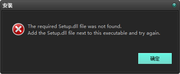  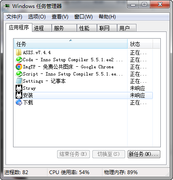
Last edited by Ning; 09-08-2023 at 03:03.
|
 |
|
|
 Similar Threads
|
||||
| Thread | Thread Starter | Forum | Replies | Last Post |
| [Help] need Advanced Installer script with Razor1911's UltraArc module | rez3vil | Conversion Tutorials | 3 | 15-04-2024 02:24 |
| Portable Installer Inno Setup Script | y_thelastknight | Conversion Tutorials | 59 | 23-10-2020 00:02 |
| INDEX - Conversion Tutorial Index | Razor12911 | Conversion Tutorials | 5 | 11-06-2020 02:05 |
| Simple Arc Installer | 78372 | Conversion Tutorials | 1 | 15-06-2017 15:37 |
| MSC+Srep+lzma Simple Script Example | gozarck | Conversion Tutorials | 10 | 07-09-2015 16:31 |


 Linear Mode

