Go Back   FileForums > Game Backup > PC Games > PC Games - CD/DVD Conversions > Conversion Tutorials
Register FAQ Community Calendar Today's Posts Search

Reply
 
Thread Tools Search this Thread Display Modes
  #1  
Old 11-09-2022, 01:14
pcblizzard pcblizzard is offline
Registered User
 
Join Date: Aug 2009
Location: Germany
Posts: 32
Thanks: 65
Thanked 3 Times in 3 Posts
pcblizzard is on a distinguished road
Funny, that's exactly the problem I'm having right now, and wanted to ask what the problem is. Both “DirectX” and “Microsoft Visual C++ 2015-2022” are simply ignored.

Code:
[Redists]
Enable=1

Redist1.Enable=1
Redist1.Name=Microsoft DirectX
Redist1.Level=0
Redist1.ItemType=CHECK
Redist1.Checked=1
Redist1.Enabled=1
Redist1.Exe32={app}\_redist\directx\DXSETUP.exe
Redist1.Exe64={app}\_redist\directx\DXSETUP.exe
;Redist1.Param=/silent

Redist2.Enable=1
Redist2.Name=Microsoft Visual C++ 2015-2022
Redist2.Level=0
Redist2.ItemType=CHECK
Redist2.Checked=1
Redist2.Enabled=1
Redist2.Exe32={app}\_redist\vc_redist_2015_2022\VC_redist.x86.exe
Redist2.Exe64={app}\_redist\vc_redist_2015_2022\VC_redist.x64.exe
;Redist2.Param=/q /norestart
And is it possible to say in the “settings.ini” that e.g., “Microsoft Visual C++ 2015-2022” is mandatory and the entry is preselected and not deselectable? In the normal Inno setup script [under “Components”] the “Fixed” command works, but not here.

Last edited by pcblizzard; 11-09-2022 at 01:21.
Reply With Quote
Sponsored Links
  #2  
Old 11-09-2022, 10:08
Cesar82's Avatar
Cesar82 Cesar82 is offline
Registered User
 
Join Date: May 2011
Location: Brazil
Posts: 1,074
Thanks: 1,814
Thanked 2,304 Times in 787 Posts
Cesar82 is on a distinguished road
Smile

Quote:
Originally Posted by pcblizzard View Post
Funny, that's exactly the problem I'm having right now, and wanted to ask what the problem is. Both “DirectX” and “Microsoft Visual C++ 2015-2022” are simply ignored.

Code:
[Redists]
Enable=1

Redist1.Enable=1
Redist1.Name=Microsoft DirectX
Redist1.Level=0
Redist1.ItemType=CHECK
Redist1.Checked=1
Redist1.Enabled=1
Redist1.Exe32={app}\_redist\directx\DXSETUP.exe
Redist1.Exe64={app}\_redist\directx\DXSETUP.exe
;Redist1.Param=/silent

Redist2.Enable=1
Redist2.Name=Microsoft Visual C++ 2015-2022
Redist2.Level=0
Redist2.ItemType=CHECK
Redist2.Checked=1
Redist2.Enabled=1
Redist2.Exe32={app}\_redist\vc_redist_2015_2022\VC_redist.x86.exe
Redist2.Exe64={app}\_redist\vc_redist_2015_2022\VC_redist.x64.exe
;Redist2.Param=/q /norestart
And is it possible to say in the “settings.ini” that e.g., “Microsoft Visual C++ 2015-2022” is mandatory and the entry is preselected and not deselectable? In the normal Inno setup script [under “Components”] the “Fixed” command works, but not here.
Try with this hotfix (I didn't have time to test).
Attached Files
File Type: rar ASIS 7.36 (Fix Redist).rar (39.7 KB, 12 views)
Reply With Quote
The Following User Says Thank You to Cesar82 For This Useful Post:
Titeuf (19-09-2022)
  #3  
Old 11-09-2022, 12:45
pcblizzard pcblizzard is offline
Registered User
 
Join Date: Aug 2009
Location: Germany
Posts: 32
Thanks: 65
Thanked 3 Times in 3 Posts
pcblizzard is on a distinguished road
Quote:
Originally Posted by Cesar82 View Post
Try with this hotfix (I didn't have time to test).
The script works! Thank you very much!
Reply With Quote
  #4  
Old 11-09-2022, 02:10
KaktoR's Avatar
KaktoR KaktoR is offline
Lame User
 
Join Date: Jan 2012
Location: From outer space
Posts: 4,689
Thanks: 1,106
Thanked 7,336 Times in 2,838 Posts
KaktoR is on a distinguished road
I checked quick, don't have really any time today, but the problem is somewhere in ssPostInstall step, at least debug mode tells me (the whole redist part is not processed).

I will look at it further tomorrow
__________________
Haters gonna hate
Reply With Quote
The Following 2 Users Say Thank You to KaktoR For This Useful Post:
pcblizzard (11-09-2022), Titeuf (19-09-2022)
  #5  
Old 11-09-2022, 10:40
L33THAK0R's Avatar
L33THAK0R L33THAK0R is offline
Registered User
 
Join Date: Feb 2021
Location: Saudi Arabia
Posts: 406
Thanks: 137
Thanked 117 Times in 70 Posts
L33THAK0R is on a distinguished road
Bizarre update for anyone else in the future who encounters my issue, it seems "WizardForm.DirEdit" & "WizardForm.DirBrowseButton" were the culprits of my bizarre element issue and simply hiding them resolves this. I've done some digging but alas I've no idea what the scripts reasoning is for creating this rogue overlapping element.
Reply With Quote
  #6  
Old 11-09-2022, 11:45
KaktoR's Avatar
KaktoR KaktoR is offline
Lame User
 
Join Date: Jan 2012
Location: From outer space
Posts: 4,689
Thanks: 1,106
Thanked 7,336 Times in 2,838 Posts
KaktoR is on a distinguished road
There are some other elements which glitch around

All of these problems with misplaced and glitched elements started when I was trying to resize the original wizardform way back, which was - to my naive surprise - problematic in the past because there seems to be a internal limitation in Inno Setup source for some reason (if you want to make the installer surface bigger then default). Not sure but I think it was the Wizardform.Innerpage which was the real problem, that's why there exists a funny procedure GrowWizard to get rid of this problem.
__________________
Haters gonna hate
Reply With Quote
The Following User Says Thank You to KaktoR For This Useful Post:
L33THAK0R (11-09-2022)
  #7  
Old 11-09-2022, 13:15
KaktoR's Avatar
KaktoR KaktoR is offline
Lame User
 
Join Date: Jan 2012
Location: From outer space
Posts: 4,689
Thanks: 1,106
Thanked 7,336 Times in 2,838 Posts
KaktoR is on a distinguished road
Made some changes and added quicksfv alternative crc checking a week ago. Wanted to wait for next DSG but it let us wait and I don't know if anything have to be changed in script yet. So here is a new update.

Code:
v7.3.7
_____________________________________________________
- Added QuickSFV option again as alternative crc check option after installation
  > Note: You can't use both options
- Fixed redist installation (thanks to Cesar)
- Fixed some other things
https://fileforums.com/showpost.php?...postcount=1191
__________________
Haters gonna hate
Reply With Quote
The Following 5 Users Say Thank You to KaktoR For This Useful Post:
Cesar82 (12-09-2022), Gehrman (15-09-2022), mausschieber (11-09-2022), pcblizzard (14-09-2022), Titeuf (19-09-2022)
  #8  
Old 15-09-2022, 11:26
ROKA1969's Avatar
ROKA1969 ROKA1969 is offline
Registered User
 
Join Date: May 2017
Location: Poland
Posts: 27
Thanks: 6
Thanked 1 Time in 1 Post
ROKA1969 is on a distinguished road
In my case, the progress bar doesn't work in version 7.3.5, I didn't have this problem.


How can anyone check this under the link is my script
Attached Files
File Type: zip Script 7.3.6.zip (44.1 KB, 8 views)
Reply With Quote
  #9  
Old 15-09-2022, 19:58
fabrieunko fabrieunko is offline
Registered User
 
Join Date: Sep 2021
Location: france
Posts: 217
Thanks: 514
Thanked 78 Times in 71 Posts
fabrieunko is on a distinguished road
hello is an update planned for DiskSpan support 2.0.1.2?
Reply With Quote
  #10  
Old 15-09-2022, 21:47
Cesar82's Avatar
Cesar82 Cesar82 is offline
Registered User
 
Join Date: May 2011
Location: Brazil
Posts: 1,074
Thanks: 1,814
Thanked 2,304 Times in 787 Posts
Cesar82 is on a distinguished road
Quote:
Originally Posted by fabrieunko View Post
hello is an update planned for DiskSpan support 2.0.1.2?
One thing at a time... Wait!
Soon the Light Installer Script will be supported.
Then the CIU and then the ASIS and then the other installers.
Just don't use the new features with outdated scripts and errors will not occur even using DiskSpan GUI 2.0.1.2.
Reply With Quote
The Following 3 Users Say Thank You to Cesar82 For This Useful Post:
fabrieunko (15-09-2022), Gehrman (16-09-2022), mausschieber (16-09-2022)
  #11  
Old 16-09-2022, 00:49
KaktoR's Avatar
KaktoR KaktoR is offline
Lame User
 
Join Date: Jan 2012
Location: From outer space
Posts: 4,689
Thanks: 1,106
Thanked 7,336 Times in 2,838 Posts
KaktoR is on a distinguished road
Quote:
Originally Posted by fabrieunko View Post
hello is an update planned for DiskSpan support 2.0.1.2?
It is compatible. Only the new hash function in DSG does not work with ASIS at the moment.

Quote:
Originally Posted by ROKA1969 View Post
In my case, the progress bar doesn't work in version 7.3.5, I didn't have this problem.


How can anyone check this under the link is my script
I will check
__________________
Haters gonna hate
Reply With Quote
  #12  
Old 16-09-2022, 11:01
ROKA1969's Avatar
ROKA1969 ROKA1969 is offline
Registered User
 
Join Date: May 2017
Location: Poland
Posts: 27
Thanks: 6
Thanked 1 Time in 1 Post
ROKA1969 is on a distinguished road
It has already been clarified that the problem was the upgrade to version 7.3.7. Version 7.3.6 + fix redist itself works fine.
Reply With Quote
  #13  
Old 16-09-2022, 11:19
KaktoR's Avatar
KaktoR KaktoR is offline
Lame User
 
Join Date: Jan 2012
Location: From outer space
Posts: 4,689
Thanks: 1,106
Thanked 7,336 Times in 2,838 Posts
KaktoR is on a distinguished road
Works here (v7.3.7)
Attached Images
File Type: png Unbenannt.png (10.9 KB, 111 views)
__________________
Haters gonna hate
Reply With Quote
  #14  
Old 16-09-2022, 12:01
fabrieunko fabrieunko is offline
Registered User
 
Join Date: Sep 2021
Location: france
Posts: 217
Thanks: 514
Thanked 78 Times in 71 Posts
fabrieunko is on a distinguished road
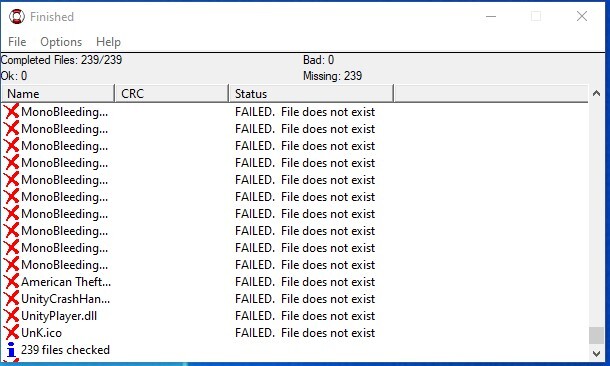
Hello, I just tested version 7.3.7 it works very well. but I have a problem when I test with QuickSFV.
I generated an sfv file but it gives me an error see image. maybe the checksum file is not copied to the right place? if I copy it into the tu game directory and launch QuickSFV manually it works

Reply With Quote
The Following User Says Thank You to fabrieunko For This Useful Post:
KaktoR (16-09-2022)
  #15  
Old 16-09-2022, 16:21
KaktoR's Avatar
KaktoR KaktoR is offline
Lame User
 
Join Date: Jan 2012
Location: From outer space
Posts: 4,689
Thanks: 1,106
Thanked 7,336 Times in 2,838 Posts
KaktoR is on a distinguished road
Quote:
Originally Posted by fabrieunko View Post
Hello, I just tested version 7.3.7 it works very well. but I have a problem when I test with QuickSFV.
I generated an sfv file but it gives me an error see image. maybe the checksum file is not copied to the right place? if I copy it into the tu game directory and launch QuickSFV manually it works


The problem seems that you can't set the WorkingDir constant in Exec function correctly for QuickSFV.exe

If you set RunFromAppFolder=1 it works fine. I have removed the RunFromAppFolder option temporarily if you use QuickSFV until I find another solution.


Here is v7.3.8
https://fileforums.com/showthread.ph...028#post498028

Code:
v7.3.8
_____________________________________________________
- Fixed INI options if the file was not present in {app} dir the installer has created the file instead
- Removed RunFromAppFolder setting temporarily if you use QuickSFV
__________________
Haters gonna hate

Last edited by KaktoR; 16-09-2022 at 16:24.
Reply With Quote
The Following 2 Users Say Thank You to KaktoR For This Useful Post:
Gehrman (16-09-2022), Titeuf (19-09-2022)
Reply


Posting Rules
You may not post new threads
You may not post replies
You may not post attachments
You may not edit your posts

BB code is On
Smilies are On
[IMG] code is On
HTML code is Off

Forum Jump

Similar Threads
Thread Thread Starter Forum Replies Last Post
[Help] need Advanced Installer script with Razor1911's UltraArc module rez3vil Conversion Tutorials 3 15-04-2024 02:24
Portable Installer Inno Setup Script y_thelastknight Conversion Tutorials 59 23-10-2020 00:02
INDEX - Conversion Tutorial Index Razor12911 Conversion Tutorials 5 11-06-2020 02:05
Simple Arc Installer 78372 Conversion Tutorials 1 15-06-2017 15:37
MSC+Srep+lzma Simple Script Example gozarck Conversion Tutorials 10 07-09-2015 16:31


All times are GMT -7. The time now is 10:14.


Powered by vBulletin® Version 3.8.11
Copyright ©2000 - 2026, vBulletin Solutions Inc.
FileForums @ https://fileforums.com