|
|
|
#2
 10-11-2017, 04:24
|
|||
|
|||
|
Code:
///////////////////////////////////////////////////////////////
// Advanced Simple Installer Script                          //
//-----------------------------------------------------------//
// UltraARC by Razor12911, modified by Simorq                //
// zTool, pZLib3, pZStd, pLZO, pLZ4, PrecompMT by Razor12911 //
// Precomp by Christian Schneider                            //
// AFR (Anvil Forge Recompressor) by Edison007               //
// 7-zip by Igor Pavlov                                      //
// RAR by win.rar GmbH                                       //
// FreeArc by Bulat Ziganshin                                //
// SREP by Bulat Ziganshin                                   //
// MSC by ProFrager                                          //
// RAZOR Archiver by Christian Martelock                     //
// MPZ Slimmer by Shelwien                                   //
///////////////////////////////////////////////////////////////
#define ScriptVersion "6.9.1 for UltraARC R3"


//////// SETTINGS ////////
#define Name "Call of Duty®: WWII"
#define Exe "CoD_SP.exe"
#define Version "v1.0"
#define Size "69577060352"
#define Compression "lzma"


//Define if you want to use UltraARC or DiskSpan. Do not enable both!
#define UltraARC
;#define DiskSpan


#define DefaultDir "{sd}\Call Of Duty WWII"
//{sd} = system disk (in most cases C:\)
//For a full list, see http://www.jrsoftware.org/ishelp/index.php?topic=consts


//Define if Setup create uninstall files (unins000.dat, unins000.exe) (no = no uninstall files will be created, yes = uninstall files will be created)
#define Uninstallable "yes"


//Icons/Start menu icons. Set the standard settings to True (checked) or False (not checked)
#define DesktopIcon "True"
#define StartMenuIcon "False"


//Background = WelcomePage, Background2 = FinishedPage
#define Background "CallOfDutyWWIIWelcome.bmp"
#define Background2 "CallOfDutyWWIIFinish.bmp"
#define Smallimage "CallOfDutyWWIISmallBitmap.bmp"
#define Icon "CallOfDutyWWIIIcon.ico"


//Define .sfv/.md5 file for integrity check after installation. If not needed, just disable CheckCRC
;#define CheckCRC
#define CRCFileName "Debris.sfv"


//Registry file. If not needed, just disable Registry
;#define Registry
#define RegistryFile "CallOfDutyWWIIRegistry.iss"


//Name and target of Website button. If not needed, just disable WebsiteButton
#define WebsiteButton
#define WebBtnName "Call of Duty®: WWII"
#define URL "http://store.steampowered.com/app/476600/Call_of_Duty_WWII/"


//Define Splash image and duration of FadeIn/Show/FadeOut in ms. If not needed, just disable Splash
#define Splash
#define SplashFile "CallOfDutyWWIISplash.png"
#define SplashFadeIn "500"
#define SplashShow "500"
#define SplashFadeOut "500"


//Set Music file name and volume (1 - 10, standard is 5). If not needed, just disable Music
#define Music
#define MusicFile "CallOfDutyWWIIMusic.mp3"
#define MusicVolume "5"


//Name for License files. File names in folder must be GAMENAMEeulaEnglish, GAMENAMEeulaFrench, GAMENAMEeulaGerman, etc., where GAMENAME is = LicenseName "xyz".
//If not needed, just disable License
;#define License
#define LicenseName "CallOfDutyWWII"  ;EULAEnglish.rtf


//Define background images size and duration (5000 = 5sec, 10000 = 10sec, ...). If not needed, just disable InstallBackground
#define InstallBackground
#define BgTime "10000"
#define ImageWidth "1280"
#define ImageHeight "720"
#define Fullscreen "Yes"


//Place your name here. Will be shown in Info window.
#define Creator "Knabberfee"


//Font and Font Color for Welcome/Finish messages. Important: Only accept fonts that are installed on users system.
#define Font "Arial"
#define FontColor "White"
#define ProgressBarLabelColor "White"
//  Black   = $000000;
//  Maroon  = $000080;
//  Green   = $008000;
//  Olive   = $008080;
//  Navy    = $800000;
//  Purple  = $800080;
//  Teal    = $808000;
//  Gray    = $808080;
//  Silver  = $C0C0C0;
//  Red     = $0000FF;
//  Lime    = $00FF00;
//  Yellow  = $00FFFF;
//  Blue    = $FF0000;
//  Fuchsia = $FF00FF;
//  Aqua    = $FFFF00;
//  LtGray  = $C0C0C0;
//  DkGray  = $808080;
//  White   = $FFFFFF;
//  None    = $1FFFFFFF;
//  Default = $20000000;


//Define name of Skin file. Only enable Cjstyles or VCL, NOT both. If you don't want to use any skin, disable both.
;#define Cjstyles
;#define CjstylesName "concave_dark.cjstyles"
#define VCL
#define VCLName "steampunks.vsf"
//////// SETTINGS ////////

[Setup]
DisableDirPage=no
DisableFinishedPage=no
DisableProgramGroupPage=yes
DisableReadyPage=yes
WizardImageFile=Setup\{#Background}
WizardSmallImageFile=Setup\{#Smallimage}
SetupIconFile=Setup\{#Icon}
AppName={#Name}
AppVersion={#Version}
VersionInfoDescription={#Name}
DefaultDirName={#DefaultDir}
DefaultGroupName={#Name}
ExtraDiskSpaceRequired={#Size}
VersionInfoCompany=Advanced Simple Installer Script
OutputBaseFilename=Setup
OutputDir=.
Compression={#Compression}
SolidCompression=yes
UninstallFilesDir={app}\_Uninstall
UnInstallable={#Uninstallable}
#ifdef InstallBackground
BackColor=clBlack
BackColor2=clBlack
#endif
Help : correction & sample Last edited by pakrat2k2; 29-11-2017 at 09:27. Reason: no need for wall of text 
|
|
#3
10-11-2017, 04:25
|
||||
|
||||
|
Change
#define Name "Call of Duty®: WWII" to #define Name "Call of Duty® WWII" PS: Next update all settings will be stored in external Settings.ini
__________________
Haters gonna hate
Last edited by KaktoR; 10-11-2017 at 04:31.
|
| The Following 3 Users Say Thank You to KaktoR For This Useful Post: | ||
|
#4
11-11-2017, 11:24
|
||||
|
||||
|
Update will be released soon. Had to fix some serious bugs
Code:
Update v6.9.3
- All settings are now in Settings.ini
- Added Internal Inno compression. Now you have to choose between UltraARC, DiskSpan and Internal Inno
- Fixed some bugs
- Added System requirements page
- Added ISSysInfo.dll by peterf1999
- Removed the Slideshow Fullscreen option by now because of some bugs with it. Slideshow is now always in fullscreen
- Minor improvements
__________________
Haters gonna hate
|
|
#5
12-11-2017, 09:48
|
||||
|
||||
|
Quote:
thank your link please ? Thank youy
|
| The Following User Says Thank You to Titeuf For This Useful Post: | ||
ramazan19833 (12-11-2017) | ||
|
#6
12-11-2017, 10:37
|
||||
|
||||
|
Quote:
Update will be released soon 
|
| The Following User Says Thank You to omdj For This Useful Post: | ||
ramazan19833 (12-11-2017) | ||
|
#7
12-11-2017, 03:07
|
|||
|
|||
|
Hi KaktoR
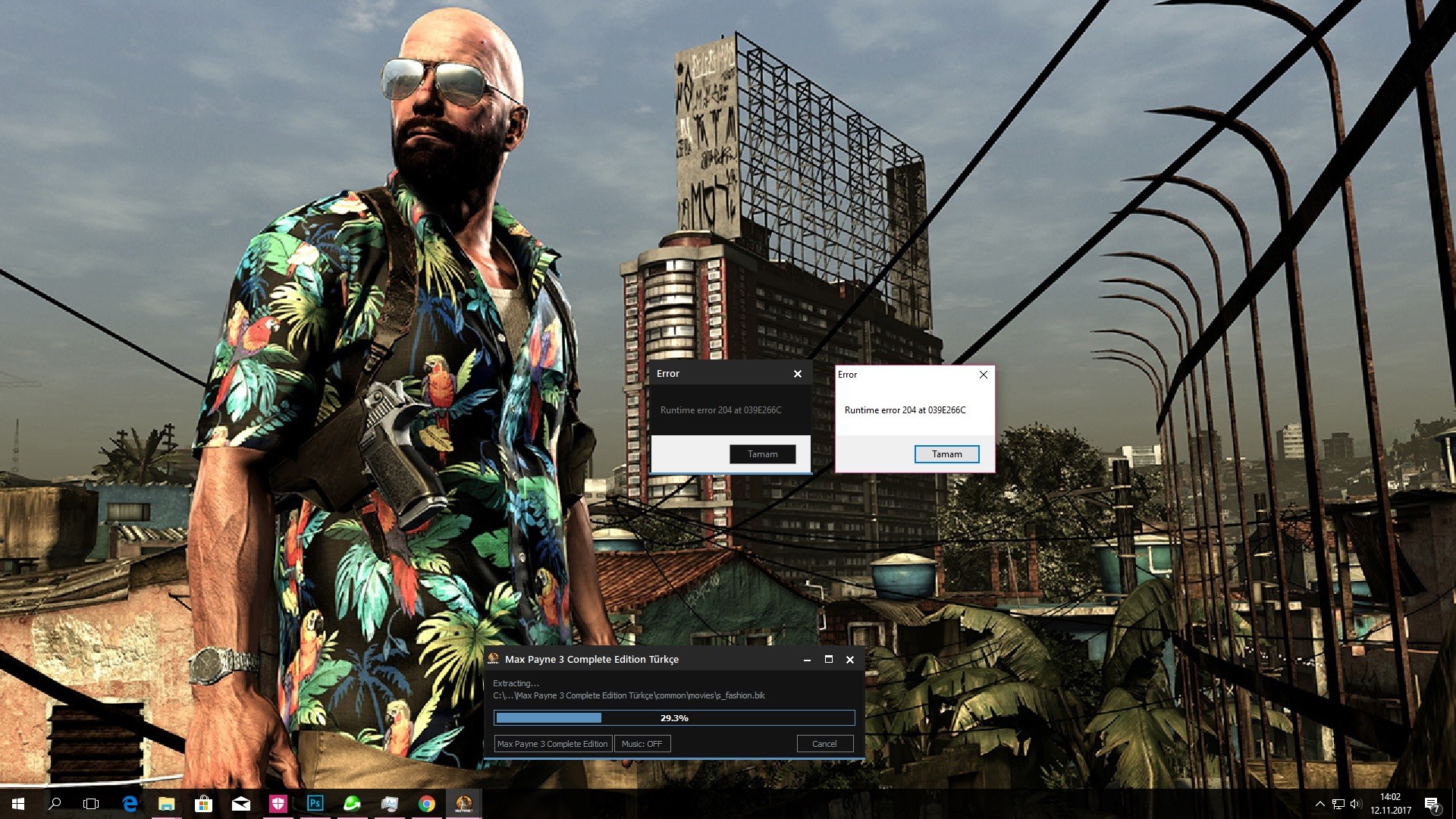 Help... Last edited by pakrat2k2; 12-11-2017 at 07:48.
|
|
#8
12-11-2017, 10:39
|
||||
|
||||
|
Soon, have to fix some more.
Furthermore waiting for princegupta's reply 
__________________
Haters gonna hate
|
| The Following User Says Thank You to KaktoR For This Useful Post: | ||
ramazan19833 (12-11-2017) | ||
|
#10
14-11-2017, 07:21
|
||||
|
||||
|
Will see
__________________
Haters gonna hate
|
|
#12
26-11-2017, 13:29
|
||||
|
||||
|
New in next version, other game size appereance

__________________
Haters gonna hate
|
| The Following 5 Users Say Thank You to KaktoR For This Useful Post: | ||
kassane (27-11-2017), mausschieber (26-11-2017), pakrat2k2 (26-11-2017), Stor31 (27-11-2017), Titeuf (26-11-2017) | ||
|
#13
27-11-2017, 08:17
|
|||
|
|||
|
Hello KaktoR i know you love me so much but I would like to ask you
I have seen you use the new ASIS Advanced Simple Installer Script version 6.9.3 which you have used in new games and I am very grateful ASIS: Advanced Simple Installer Script v6.9.3 is it readyf ? reply : ready ASIS: Advanced Simple Installer Script v6.9.3 WORLD OF FINAL FANTASY® [2xDVD5] Link : http://fileforums.com/showthread.php?t=99804 ASIS: Advanced Simple Installer Script v6.9.3 when to use ? ( Benim için önemlidir) I you understand you is not easy to prepare
|
|
#14
27-11-2017, 08:21
|
||||
|
||||
|
Actually it is 6.9.5 already.
Soon, on weekend i think.
__________________
Haters gonna hate
|
| The Following User Says Thank You to KaktoR For This Useful Post: | ||
Titeuf (27-11-2017) | ||
|
#15
27-11-2017, 08:39
|
|||
|
|||
|
You make me very happy
KaktoR Thank you Because you answered the question quickly
|
 |
|
|
 Similar Threads
|
||||
| Thread | Thread Starter | Forum | Replies | Last Post |
| [Help] need Advanced Installer script with Razor1911's UltraArc module | rez3vil | Conversion Tutorials | 3 | 15-04-2024 02:24 |
| Portable Installer Inno Setup Script | y_thelastknight | Conversion Tutorials | 59 | 23-10-2020 00:02 |
| INDEX - Conversion Tutorial Index | Razor12911 | Conversion Tutorials | 5 | 11-06-2020 02:05 |
| Simple Arc Installer | 78372 | Conversion Tutorials | 1 | 15-06-2017 15:37 |
| MSC+Srep+lzma Simple Script Example | gozarck | Conversion Tutorials | 10 | 07-09-2015 16:31 |


 Hybrid Mode
