Go Back   FileForums > Game Backup > PC Games > PC Games - CD/DVD Conversions > Conversion Tutorials
Register FAQ Community Calendar Today's Posts Search

Reply
 
Thread Tools Search this Thread Display Modes
  #1141  
Old 28-05-2022, 23:01
abror's Avatar
abror abror is offline
Registered User
 
Join Date: May 2022
Location: indonesia
Posts: 33
Thanks: 19
Thanked 0 Times in 0 Posts
abror is on a distinguished road
Quote:
Originally Posted by Cesar82 View Post
Insert something like this in CurStepChanged.

Code:
procedure CurStepChanged(CurStep: TSetupStep);
var
  ResultCode: Integer;
begin
  if CurStep = ssDone then
  begin
    ShellExec('open', 'https://www.fileforums.com', '', '', SW_SHOWNORMAL, ewNoWait, ResultCode);
    ShellExec('open', ExpandConstant('{app}\game.exe'), '', '', SW_SHOWNORMAL, ewNoWait, ResultCode);
  end;
end;
Hi Cesar82, thanks for helping me yesterday...

I want to ask again what compression method is the best

So far I'm using [1] Srep + Lzma I'm compressing a 200 mb file to 60 mb but last night I compressed WWE 2K22 with 10 Hours only cut very little from 49.8 GB to 49.3 GB

I read on the internet every game has a different compression method.. Do you know what the difference is?

~~~~~~~~~~~~~~~~~~~~~~~~~~~~~~~~~~~~~~~~~~~~~~~~~~ ~~~~~

Edit: if you want to know the compression method please open the link https://fileforums.com/showthread.php?t=99554 Thanks @KaktoR for telling

Last edited by abror; 29-05-2022 at 02:58.
Reply With Quote
Sponsored Links
  #1142  
Old 31-05-2022, 10:19
fabrieunko fabrieunko is offline
Registered User
 
Join Date: Sep 2021
Location: france
Posts: 217
Thanks: 514
Thanked 78 Times in 71 Posts
fabrieunko is on a distinguished road
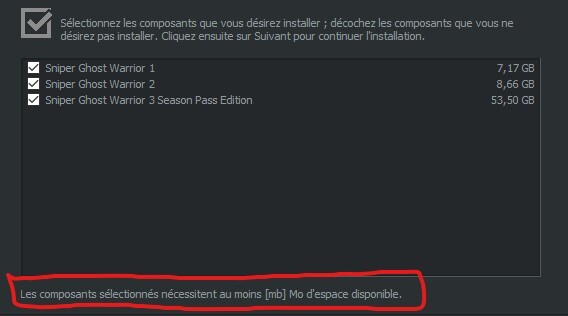
hello, I just realized there is an error in the image below in the red frame, it should indicate a number instead of mb?

but I can't find where it is. can you help me? I am using version 7.3.3
Reply With Quote
  #1143  
Old 31-05-2022, 12:09
Cesar82's Avatar
Cesar82 Cesar82 is offline
Registered User
 
Join Date: May 2011
Location: Brazil
Posts: 1,074
Thanks: 1,814
Thanked 2,304 Times in 787 Posts
Cesar82 is on a distinguished road
Quote:
Originally Posted by fabrieunko View Post
hello, I just realized there is an error in the image below in the red frame, it should indicate a number instead of mb?

but I can't find where it is. can you help me? I am using version 7.3.3

Check if you have correctly configured the keys referring to the size of each component in the [ComponentsSettings] section of the Settings.ini file as:
Code:
Component1.Size=4.15 GB
In the ASIS theme configuration it is displaying correctly, so there must be some configuration missing.
Attached Images
File Type: png snap3320.png (80.5 KB, 157 views)
Reply With Quote
  #1144  
Old 31-05-2022, 13:19
fabrieunko fabrieunko is offline
Registered User
 
Join Date: Sep 2021
Location: france
Posts: 217
Thanks: 514
Thanked 78 Times in 71 Posts
fabrieunko is on a distinguished road
Code:
;; requires at least two components to enable page. 
;; if components is used the global size will be ignored. 
Component1.Name=Sniper Ghost Warrior 1
Component1.ItemType=CHECK
Component1.Size=7.17 GB
Component1.Level=0
Component1.Checked=1
Component1.Enabled=1

Component2.Name=Sniper Ghost Warrior 2
Component2.ItemType=CHECK
Component2.Size=8.66 GB
Component2.Level=0
Component2.Checked=1
Component2.Enabled=1

Component3.Name=Sniper Ghost Warrior 3 Season Pass Edition
Component3.ItemType=CHECK
Component3.Size=53.5 GB
Component3.Level=0
Component3.Checked=1
Component3.Enabled=1
I think so it's good I don't see any error.
Reply With Quote
  #1145  
Old 31-05-2022, 19:04
Cesar82's Avatar
Cesar82 Cesar82 is offline
Registered User
 
Join Date: May 2011
Location: Brazil
Posts: 1,074
Thanks: 1,814
Thanked 2,304 Times in 787 Posts
Cesar82 is on a distinguished road
I really think ASIS needs a little fix in the source code.
The label "MB" in Inno Setup languages is not constant in all languages.
Edit ASIS "Script.iss" and add the lines highlighted in RED (Place the lines in the same order as below).
Code:
function FormatDiskSpaceLabel(Labl: String; Size: Extended): String;
begin
  Result := Labl;
  StringChangeEx(Result, '[mb] MBs', '[size]', True);
  StringChangeEx(Result, '[mb] Мб', '[size]', True);
  StringChangeEx(Result, '[mb] Mo', '[size]', True);
  StringChangeEx(Result, '[mb] MB', '[size]', True);
  StringChangeEx(Result, '[size]', FormatBytes(Size, 2, False), True);
end;
Reply With Quote
The Following 5 Users Say Thank You to Cesar82 For This Useful Post:
fabrieunko (31-05-2022), Gehrman (01-06-2022), KaktoR (01-06-2022), mausschieber (01-06-2022), Titeuf (08-06-2022)
  #1146  
Old 31-05-2022, 20:48
fabrieunko fabrieunko is offline
Registered User
 
Join Date: Sep 2021
Location: france
Posts: 217
Thanks: 514
Thanked 78 Times in 71 Posts
fabrieunko is on a distinguished road
many thanks this worked
Reply With Quote
  #1147  
Old 08-06-2022, 00:51
kuyhaa's Avatar
kuyhaa kuyhaa is offline
Registered User
 
Join Date: Jun 2019
Location: metro
Posts: 54
Thanks: 89
Thanked 8 Times in 4 Posts
kuyhaa is on a distinguished road
hi, firstly thank you so much for this great script. i have little question for batch setting

how to show info in caption label when batch run after install, show the text in label caption, ex : " wait finishing proses" on compact mode

thanks
Reply With Quote
  #1148  
Old 08-06-2022, 07:58
KaktoR's Avatar
KaktoR KaktoR is offline
Lame User
 
Join Date: Jan 2012
Location: From outer space
Posts: 4,689
Thanks: 1,106
Thanked 7,336 Times in 2,838 Posts
KaktoR is on a distinguished road
Code:
procedure CurStepChanged(CurStep: TSetupStep);
...
  if (CurStep = ssPostInstall) then
  begin
    if not IsDoneError then
    begin
      #if UseBatch
        if FileExists(ExpandConstant('{#BatchFileName}')) then
          WizardForm.FilenameLabel.Caption := 'Waiting for batch...';
          Exec2(ExpandConstant('{#BatchFileName}'), '', True);
      #endif
__________________
Haters gonna hate

Last edited by KaktoR; 08-06-2022 at 08:00.
Reply With Quote
The Following 2 Users Say Thank You to KaktoR For This Useful Post:
kuyhaa (08-06-2022), Titeuf (08-06-2022)
  #1149  
Old 08-06-2022, 17:15
Cesar82's Avatar
Cesar82 Cesar82 is offline
Registered User
 
Join Date: May 2011
Location: Brazil
Posts: 1,074
Thanks: 1,814
Thanked 2,304 Times in 787 Posts
Cesar82 is on a distinguished road
@KaktoR, I think you forgot the begin end.
Code:
procedure CurStepChanged(CurStep: TSetupStep);
...
  if (CurStep = ssPostInstall) then
  begin
    if not IsDoneError then
    begin
      #if UseBatch
        if FileExists(ExpandConstant('{#BatchFileName}')) then
        begin
          WizardForm.FilenameLabel.Caption := 'Waiting for batch...';
          Exec2(ExpandConstant('{#BatchFileName}'), '', True);
        end;
      #endif
Reply With Quote
The Following 2 Users Say Thank You to Cesar82 For This Useful Post:
KaktoR (09-06-2022), kuyhaa (08-06-2022)
  #1150  
Old 08-06-2022, 18:34
kuyhaa's Avatar
kuyhaa kuyhaa is offline
Registered User
 
Join Date: Jun 2019
Location: metro
Posts: 54
Thanks: 89
Thanked 8 Times in 4 Posts
kuyhaa is on a distinguished road
worked thanks @kaktor & @Cesar82

and 1 question again

when the batch running, i want the prosses hidden/silent ( only see on task manager and text 'Waiting for batch prosses...' ) without window cmd,

have setting ?
Reply With Quote
  #1151  
Old 08-06-2022, 20:11
Cesar82's Avatar
Cesar82 Cesar82 is offline
Registered User
 
Join Date: May 2011
Location: Brazil
Posts: 1,074
Thanks: 1,814
Thanked 2,304 Times in 787 Posts
Cesar82 is on a distinguished road
Quote:
Originally Posted by kuyhaa View Post
worked thanks @kaktor & @Cesar82

and 1 question again

when the batch running, i want the prosses hidden/silent ( only see on task manager and text 'Waiting for batch prosses...' ) without window cmd,

have setting ?
try
Code:
Exec2(ExpandConstant('{#BatchFileName}'), '', False);
Reply With Quote
The Following 2 Users Say Thank You to Cesar82 For This Useful Post:
kuyhaa (08-06-2022), Titeuf (08-06-2022)
  #1152  
Old 08-06-2022, 22:49
kuyhaa's Avatar
kuyhaa kuyhaa is offline
Registered User
 
Join Date: Jun 2019
Location: metro
Posts: 54
Thanks: 89
Thanked 8 Times in 4 Posts
kuyhaa is on a distinguished road
Quote:
Originally Posted by Cesar82 View Post
try
Code:
Exec2(ExpandConstant('{#BatchFileName}'), '', False);
big thanks ,
Reply With Quote
  #1153  
Old 09-06-2022, 06:04
KaktoR's Avatar
KaktoR KaktoR is offline
Lame User
 
Join Date: Jan 2012
Location: From outer space
Posts: 4,689
Thanks: 1,106
Thanked 7,336 Times in 2,838 Posts
KaktoR is on a distinguished road
Quote:
Originally Posted by Cesar82 View Post
@KaktoR, I think you forgot the begin end.
Code:
procedure CurStepChanged(CurStep: TSetupStep);
...
  if (CurStep = ssPostInstall) then
  begin
    if not IsDoneError then
    begin
      #if UseBatch
        if FileExists(ExpandConstant('{#BatchFileName}')) then
        begin
          WizardForm.FilenameLabel.Caption := 'Waiting for batch...';
          Exec2(ExpandConstant('{#BatchFileName}'), '', True);
        end;
      #endif
Thanks, already fixed it here (I made already extensive changes in the script).

Me be like
__________________
Haters gonna hate
Reply With Quote
  #1154  
Old 10-06-2022, 02:19
abror's Avatar
abror abror is offline
Registered User
 
Join Date: May 2022
Location: indonesia
Posts: 33
Thanks: 19
Thanked 0 Times in 0 Posts
abror is on a distinguished road
can the pause button be removed?
Reply With Quote
  #1155  
Old 13-06-2022, 05:35
KaktoR's Avatar
KaktoR KaktoR is offline
Lame User
 
Join Date: Jan 2012
Location: From outer space
Posts: 4,689
Thanks: 1,106
Thanked 7,336 Times in 2,838 Posts
KaktoR is on a distinguished road
Quote:
Originally Posted by abror View Post
can the pause button be removed?
Yes
__________________
Haters gonna hate
Reply With Quote
Reply


Posting Rules
You may not post new threads
You may not post replies
You may not post attachments
You may not edit your posts

BB code is On
Smilies are On
[IMG] code is On
HTML code is Off

Forum Jump

Similar Threads
Thread Thread Starter Forum Replies Last Post
[Help] need Advanced Installer script with Razor1911's UltraArc module rez3vil Conversion Tutorials 3 15-04-2024 02:24
Portable Installer Inno Setup Script y_thelastknight Conversion Tutorials 59 23-10-2020 00:02
INDEX - Conversion Tutorial Index Razor12911 Conversion Tutorials 5 11-06-2020 02:05
Simple Arc Installer 78372 Conversion Tutorials 1 15-06-2017 15:37
MSC+Srep+lzma Simple Script Example gozarck Conversion Tutorials 10 07-09-2015 16:31


All times are GMT -7. The time now is 22:02.


Powered by vBulletin® Version 3.8.11
Copyright ©2000 - 2026, vBulletin Solutions Inc.
FileForums @ https://fileforums.com