|
|
|
#1
 08-10-2023, 13:32
|
|||
|
|||
|
Quote:

|
| Sponsored Links |
|
#2
08-10-2023, 09:00
|
||||
|
||||
|
Welp

|
| The Following User Says Thank You to Razor12911 For This Useful Post: | ||
Masquerade (08-10-2023) | ||
|
#3
03-03-2024, 04:13
|
|||
|
|||
|
XNB
Code:
[Stream1]
Name=xnb
Codec=xmemcompress
BigEndian=0
Signature=0x77424E58
Structure=Signature(4),XNBFormatVersion(1),Compressed(1),FileSize(4),DSize(4),Stream
CompressedSize=FileSize-14
DecompressedSize=DSize
Condition1=Compressed = 0x80
|
| The Following User Says Thank You to Masquerade For This Useful Post: | ||
Gehrman (18-07-2024) | ||
|
#7
29-04-2024, 05:04
|
||||
|
||||
|
Either not compressed, crypted or something else. There is no unityfs header, so maybe this is the problem.
__________________
Haters gonna hate
|
| The Following User Says Thank You to KaktoR For This Useful Post: | ||
kuyhaa (29-04-2024) | ||
|
#8
07-07-2024, 00:05
|
||||
|
||||
|
hi, anyone have plugin or database creator The Legend of Heroes: Trails through Daybreak
.p3a files sample Code:
https://pixeldrain.com/u/sFp3YTHU Last edited by kuyhaa; 07-07-2024 at 00:16.
|
|
#9
07-07-2024, 00:49
|
||||
|
||||
|
I will quote masquerade, maybe he will tell you how to process this.
Quote:
__________________
Haters gonna hate
|
| The Following User Says Thank You to KaktoR For This Useful Post: | ||
kuyhaa (07-07-2024) | ||
|
#10
07-07-2024, 05:18
|
|||
|
|||
|
^^
These p3a archives are made with dictionary ZSTD just like Zelda Tears of the Kingdom files. You can rebuild the archives using p3a_tool and decide for no compression. If you decide on the zstd compression with p3a_tool, you still need to brute force a stream to figure out what version and settings for ZSTD were used. I think there is more than one dictionary, they can be dumped from memory at runtime but that's about as far as I have got.
|
| The Following User Says Thank You to Masquerade For This Useful Post: | ||
kuyhaa (07-07-2024) | ||
|
#11
07-07-2024, 06:53
|
|||
|
|||
|
I cannot believe I was unbelievably stupid to not check the archives themselves for the dictionary. After looking more closely at the syntax for the p3a_tool, there is the option "info". So:
Code:
CMD> p3a_tool.exe info scene.p3a PH3 archive scene.p3a: 916 files, v1200 Extended header available: 16 bytes, 304 bytes per index entry compression stats: none:0 lz4:0 zStd:0 zStdDict:916 compressed size: 89239105 (15%) uncompressed size: 578417191 Has dictionary, 112640 bytes The ZSTD dictionary compression format tells us that the magic number for a ZSTD dictionary is 0xEC30A437 (little endian). So, by searching for this magic number in HXD, sure enough we have our dictionary beginning at location 0x44000 for scene.p3a. Next, select a block and set the length to the dictionary length from earlier - 112640 bytes. Copy the select bytes and dump them to a new file, I called it scene.zdict. Now, if you unpack scene.p3a with: Code:
CMD> p3a_tool extract scene.p3a Code:
CMD> p3a_tool archive scene.MSQ scene --comp=zstd --dictionary=scene.zdict -- Code:
    File: scene.MSQ
  CRC-32: 04492de2
     MD5: b2c8a40571e8673ed3682df82544281d
   SHA-1: 95d40b6e693641ef8c7692531370fecd0378290c
  BLAKE3: 79c13b93a662d4789949c228e116a52ac10a47d91562bd39023a61cabd09d0ca

    File: scene.p3a
  CRC-32: 04492de2
     MD5: b2c8a40571e8673ed3682df82544281d
   SHA-1: 95d40b6e693641ef8c7692531370fecd0378290c
  BLAKE3: 79c13b93a662d4789949c228e116a52ac10a47d91562bd39023a61cabd09d0ca
|
| The Following User Says Thank You to Masquerade For This Useful Post: | ||
kuyhaa (09-07-2024) | ||
|
#12
08-07-2024, 06:44
|
||||
|
||||
|
i have run HxD application and open the file, but i didn't understand
Quote:
 by the way, thanks Masquerade for the information
|
|
#13
08-07-2024, 10:32
|
|||
|
|||
|
^^
In HXD, CTRL+F to search for "37 A4 30 EC" as shown in the image below: 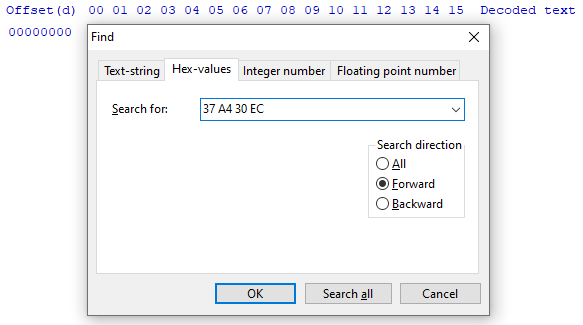 Why are they reversed? Endianness. When you find your result, place your cursor on the "37" byte, change "hex" to "dec" at the top of the screen and press CTRL+E to select a block of data. Select the radio button for length and paste the length of the dictionary in bytes that you found from the p3a_tool info. You will now get a selected section of bytes. CTRL+C to copy and then CTRL+N to open a new file. CTRL+V to paste these bytes (they will appear in red) and CTRL+S to save the file. The bytes will go black when saved.
|
| The Following User Says Thank You to Masquerade For This Useful Post: | ||
kuyhaa (13-07-2024) | ||
|
#14
13-07-2024, 08:52
|
||||
|
||||
|
Quote:
|
|
#15
24-12-2024, 05:30
|
|||
|
|||
|
The Legend of Heroes: Trails of Cold Steel III [v1.07] [LZ4HC]
Code:
xtool precomp -mLoHToCSIII I_MG08_CARD.pkg
XTool is created by Razor12911

Version 0.8.9

Streams: 2 / 2
Time: 00:00:11 (CPU 00:00:11)

Size: 15.2 MB >> 85.3 MB
Code:
xtool precomp -mReverie I_MG08_CARD.pkg XTool is created by Razor12911 Version 0.8.9 Streams: 4 / 4 Time: 00:00:02 (CPU 00:00:05) Size: 16.2 MB >> 48.0 MB 
|
 |
|
|
 Similar Threads
|
||||
| Thread | Thread Starter | Forum | Replies | Last Post |
| XTool 2020 (Main Project) | Razor12911 | Conversion Tutorials | 713 | 01-06-2026 23:52 |
| XTool - Successor of ZTool | Razor12911 | Conversion Tutorials | 584 | 22-04-2023 18:16 |
| [Dev]XTool | Razor12911 | Conversion Tutorials | 180 | 23-10-2020 06:26 |
| XTool 2019 (Plugins) | Razor12911 | Conversion Tutorials | 50 | 16-05-2020 06:14 |


 Hybrid Mode
