Quote:
Originally Posted by Gummy Bear

Hi, I don't understand what's wrong, I compress any file using xtool+srep+lolz, and it gives this error, I can't figure out how to fix it.
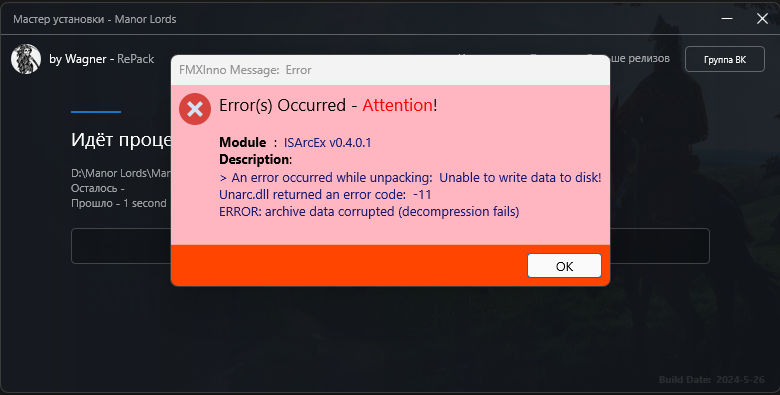 |
This error occurs because your installer is using the "IsArcEx.dll" library that is integrated inside FMXInno.dll or externally. DiskSpan GUI has been prepared to work with IsDone.dll.
You can include IsDonel.dll in your project and use the IsDone functions to do the unpacking.
Along with DiskSpan GUI you find an example with "DSG_Module.iss". You can integrate this module into your script by replacing the IsArcEx functions.
Quote:
Originally Posted by audiofeel
In my opinion, DiskSpanGui lacks a checkbox - "do everything for another unpacker and do not hide everything in setup.dll ". Then any user can compress the archive in this program and transfer all the necessary dll and ini files to his installer without incident. "FMXInno" is gaining popularity and there will be even more questions and problems with this program "DiskSpanGui".
|
DiskSpan GUI is designed to work only with "IsDone.dll" (not "IsArcEx.dll").
The reason is that some functions used in "DiskSpan GUI", such as Z-Zip and RAR compression and Patch mode cannot be unpacked by "IsArcEx.dll".
BLACKFIRE69 chose not to include in its "IsArcEx.dll" library (whether the version integrated with FMXInno.dll or an external library) functions equivalent to IS7ZipExtract, ISRarExtract and ISxDeltaExtract contained in "IsDone.dll".
I personally find this additional feature very useful, because with IS7ZipExtract we can just create an additional file manually in 7-Zip or RAR using one of the WinRAR or 7-zip programs at any time after compression, and just add a section to "Records.ini ", as long as you have not merged "Records.ini" into "Setup.dll" or integrated into "Setup.exe", and include the information from the new 7-Zip/RAR file. Example: You want to include an extra addon to your installation, with optional installation, you would just compress it with WinRar and play it on the last disk by making the config in Records.ini and you could also define a task for it in Records.ini, so you could check this task in your installer.
In any case, the DiskSpan GUI module is there for you to integrate into your installers without much effort.
The idea of putting a checkbox to not generate Setup.dll and keeping the files in a folder on Disk 1 could be an option for the next DSG. The problem would be the division of disks which should subtract the size of all compressors in the folder so that when including them in Setup.exe it can be subtracted (If the reserved size is not defined on disk 1, if it reserves space, already include the total size) .
NOTES:
Somewhere in the FMXInno thread there were 2 example scripts using InnoFmx.dll and containing DiskSpan GUI support (previous version of DSG), but I think BLACKFIRE69 may have removed the post.
Quote:
Originally Posted by homerliew
Hello! Version 2.0.2.0 of Diskspan GUI has too much vertical window size and won't fit on my screen, I have to enable Keep on top to see everything pass my taskbar but the problem still exists in the Tools tab because it doesn't stay on top of the taskbar inside Tools tab.
I use a 15.6" laptop with 2560x1440 resolution. The screen is just too small for its resolution, allow adjusting the window size will help. v2.0.1.9 had no issues btw.
|
You must be using some Windows desktop enlargement scale above 125%.
The maximum supported for creating the DSG interface is 125% scaling at 1440p or 100% at 1080p.
For lower resolutions, unfortunately the DSG cannot be drawn correctly.
The DSG 2.0.1.9 version had a slightly smaller interface than the current one, that is, 636x734 pixels, so it was displayed correctly for you.
The current version of DSG 2.0.2.0 has dimensions of 693x814 pixels because it was necessary to include new EDITs in the DEVELOPER mode area to meet the new supported configurations, so now in this new version your monitor area stands out when using resolutions below 1080p or for those using scales above 125% at 1440p resolutions.
I'll see if I can find a way to reduce the size of the DSG interface in the next version, but I can't promise anything because the DSG is developed in Inno Setup, and Inno Setup doesn't offer many customization options for design objects.