I have a problem now.
My last MASK is: xZLib+srep:m5f:l256+lzma2/$binkpack=BPK/$MscSolid=msc/$void=0
In my config0.ini(edited)
xZLib="PE\XT" e

recomp:t75p:zlib - - <stdin> <stdout>
BPK="FAZip32" -i0 compress:bpk_c <stdin> <stdout>
msc="MSC" c -f -v -wav=1 InFile OutFile
lzma2="7-Zip" a -txz -an -mcrc=0 -m1=lzma2:d1536m:mf=bt4 -mmt=off -mx9 -si -so <stdin> <stdout>
My Arc.groups:
[IMG]
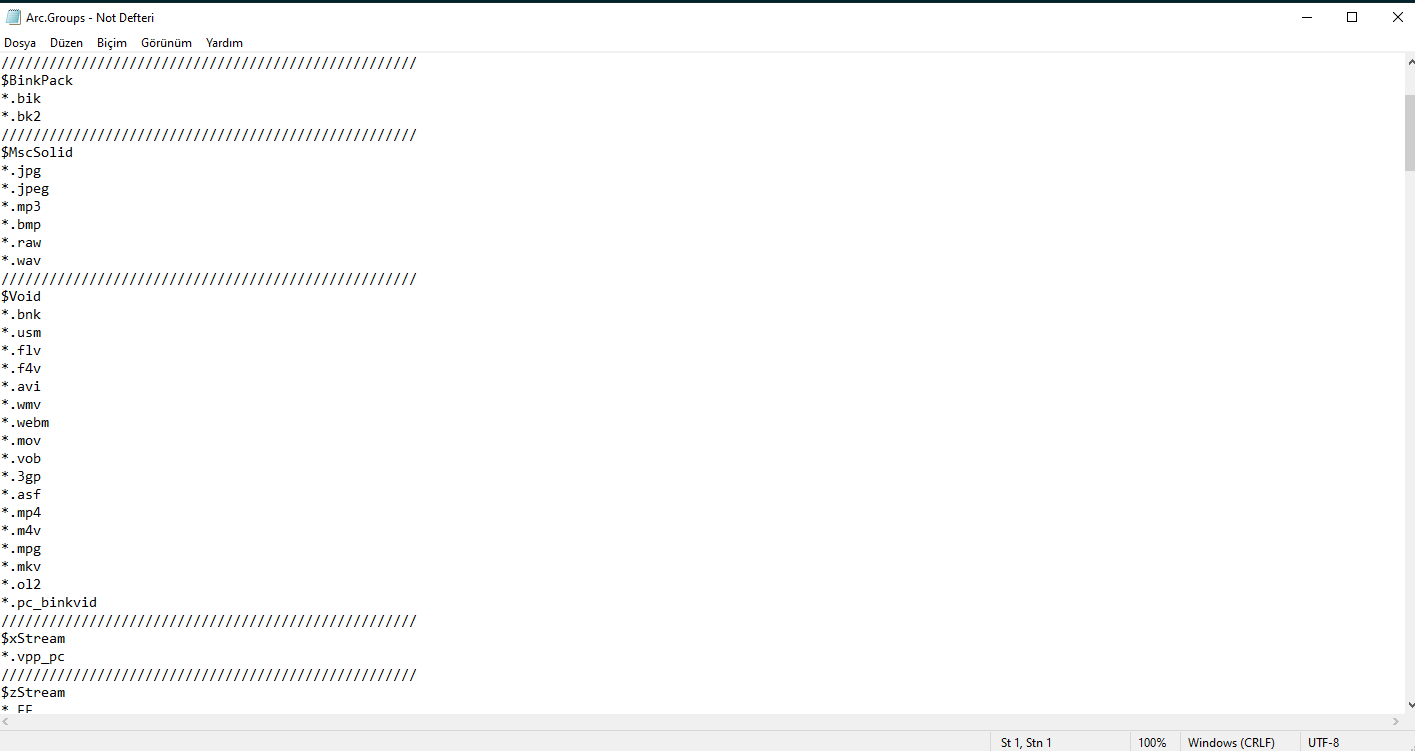
My folder has 8963 files. 151 .bik, 8071.wav files, 741 other game files. Game File Scanner found over 1.000.000 zlib data. So according to my MASK, 151 files must process with binkpack, 8071 wav files (or supported by MSC ones) must process with MSC, files with extensions in $Void must process with store, then remaining files first process with Xtool then srep then lzma2, am I right? Or horribly wrong?
I'm watching from Task Manager and cmd simultenously
When I hit Start button, in cmd windows:
Memory for compression 256kb, decompression 256kb, cache 0b
(and waits a few seconds) then
Compressing 8,963 files, 5,726,317,223 bytes
than
compressing a.bik
compressing b.bik
compressing c.bik etc... all bik files(task manager says FAZip32.exe works)
without stopping, continues compressing all other files but task manager says XT.exe works(no msc or something, all files except .bik processing with XT.exe)[some files has .bnk extension and $void has .bnk so these files must not process with XT???]
When compression ends, it says;
Compressing 4,954,668,369 bytes with "SREP" -m5f -l256 InFile OutFile (How it reach 4,954,668,369 bytes? Does 8,963 files processed with FAZip32 and XT and result is 4,954,668,369?)
Result:
SREP 3.92 beta (July 23, 2013): input size 4725 mb, memory used 855 mb, -m5f -l256 -c128 -a4/4 -hash=vmac -b8mb
100%: 4,954,668,369 -> 3,118,866,147: 62.95%. Cpu 234 mb/s (20.203 sec), real 22 mb/s (216.414 sec) = 9%
Sorting matches... Second pass:100.0%
Than it continues with lzma2 compression(Task Manager says 7-Zip Standalone Console works)
Result:
Uncompressed: 5.726.317.223
Compressed: 3.220.382.950 (data1.arc, records.ini)
Time: ~15 min
GAIN: %43,7
If I don't choose MASK and tick others (LZMA2, MSC, PRECOMP(P.XT),SREP):
First compress everything with XT.exe (according to task manager), then try to compress result with MSC(analyzes it and finds wav files, I don't know how they compressed with XT), COMPRESS supported .wav files with PackTAK(thats what I want too), then compress result file with SREP(default settings), then compress result file with 7-zip(default settings)
Uncompressed: 5.726.317.223
Compressed: 2.667.545.125 (data1.arc, records.ini, unpack.exe)
Time: ~19 min
GAIN: %53,4 (WTH)
Note: I want one single file so I choose threshold %100 and both size 65536(it's not necessary normally, but in comments, many says it has better compress result)
Normally, it looks like second way easier and result is better. But, it's for 5,33 GB. Think about 50-60 GB or more. It must not compress everything with XT or any preprocessor. It's gonna be huugeee waste of time. So I want to choose what compressed with what or store.
What I want is:
1-Compress compressible media and music files with suitable compressor(As far as I know, wav or bik not compressible with lzma or any other usual compressing programs)
2-Store uncompressible files(trying to compress them is huge waste of time and ssd-hdd exhaustive)
3-Compress remain files with all the force I have. (I have Windows 10 Pro x64, 32 GB DDR 4 RAM, i7-6700K processor.)
So;
1-Where did I make mistake? What the heck is wrong with my mask code?
2-Did anyone know lzma2 maximum compress options?(I have 32 GB RAM)(As far as I know, multithreading in LZMA2 is not good for result files size sometimes)
3-Did anyone know sREP maximum compress options?
4-How can I prevent precomp's self compress in XTool or any precompresser includes precomp?(Precomp compresses precompressed data by default)[For detailed explanation look my previous comment]