Nero – This will write our DVD files to our Blank DVD.
Insert a Blank DVD into your DVD Drive!!
 Step 1:
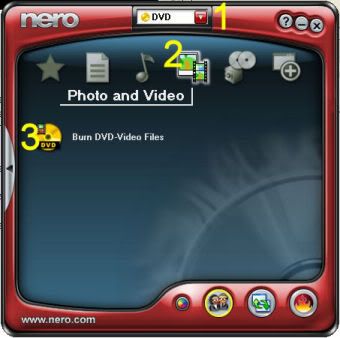
 Refer to above Picture.
1. Open Nero and use the drop down arrow to choose DVD.
2. Choose ‘Photo and Video’.
3. Click on ‘Burn DVD-Video Files’.
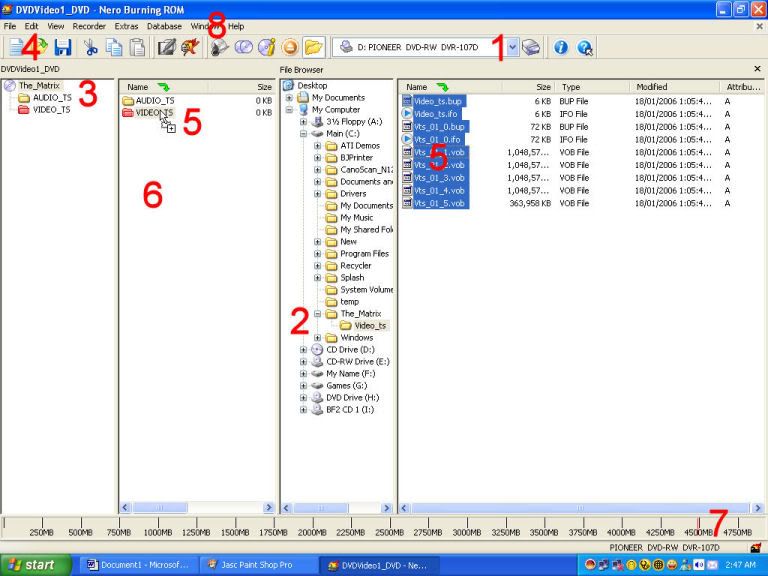
Step 2: Refer to Picture below.
1. Change to the DVD Recorder.
2. Browse to where you saved your DVD files.
3. Label the disc the same as the original.
NOTE: Remember we named our folder the same as the original DVD! So just click on the folder (number 2) and copy the text, then paste it in for the label. (number 3).
4. Open the ‘Edit’ menu and choose ‘Select All’. This will highlite all our files.
5. Left Click, AND HOLD THE LEFT CLICK, on the highlited files and drag them over and drop them onto the red VIDEO_TS folder icon. (Drag 5 to 5)
6. The files will now show up in the column where you just dropped the files.
7. The blue bar will now show up to let you know how much of the Blank DVD will be used.
8. Click the ‘Burns the current compilation’ button. (its just below the 8)
 Step 3:
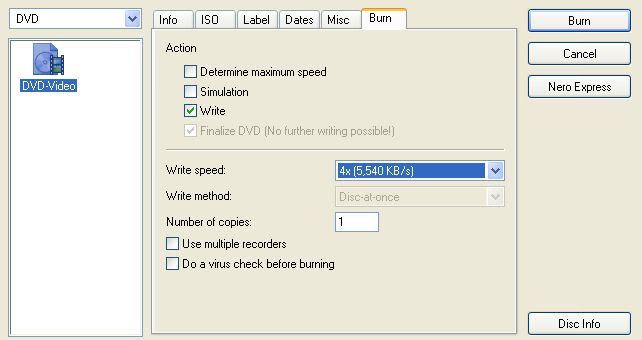
 Refer to above Picture.
All there is to do now is to check the write speed, (I always use 4x) and click the ‘Burn’ button.
The writing should take approximately 12-15 minutes at 4x.
Have fun and enjoy.
